
Garvee GVUS-VNN_33GVVHG8-YBY-WvML1j
Contents
Garvee Bar Stools (Set of 4) Instruction Manual
Model: GVUS-VNN_33GVVHG8-YBY-WvML1j
Introduction
Thank you for choosing Garvee Bar Stools. This manual provides essential information for the safe assembly, operation, and maintenance of your new counter height bar stools. Please read these instructions carefully before assembly and retain them for future reference.
This set includes four (4) counter height bar stools designed for use in kitchens, dining rooms, and home bar areas. They feature a comfortable cushioned seat, ergonomic backrest, and a sturdy metal frame.
Important Safety Information
- Maximum Weight Capacity: Each bar stool is designed to support a maximum weight of 250 lbs (113 kg). Do not exceed this weight limit to prevent damage or injury.
- Assembly: Ensure all parts are correctly assembled and tightened according to the instructions. Periodically check and re-tighten all fasteners.
- Stability: Do not stand on the stools. Avoid leaning excessively to one side, which could cause tipping.
- Placement: Place stools on a flat, stable surface.
- Children: Supervise children when they are using the stools.
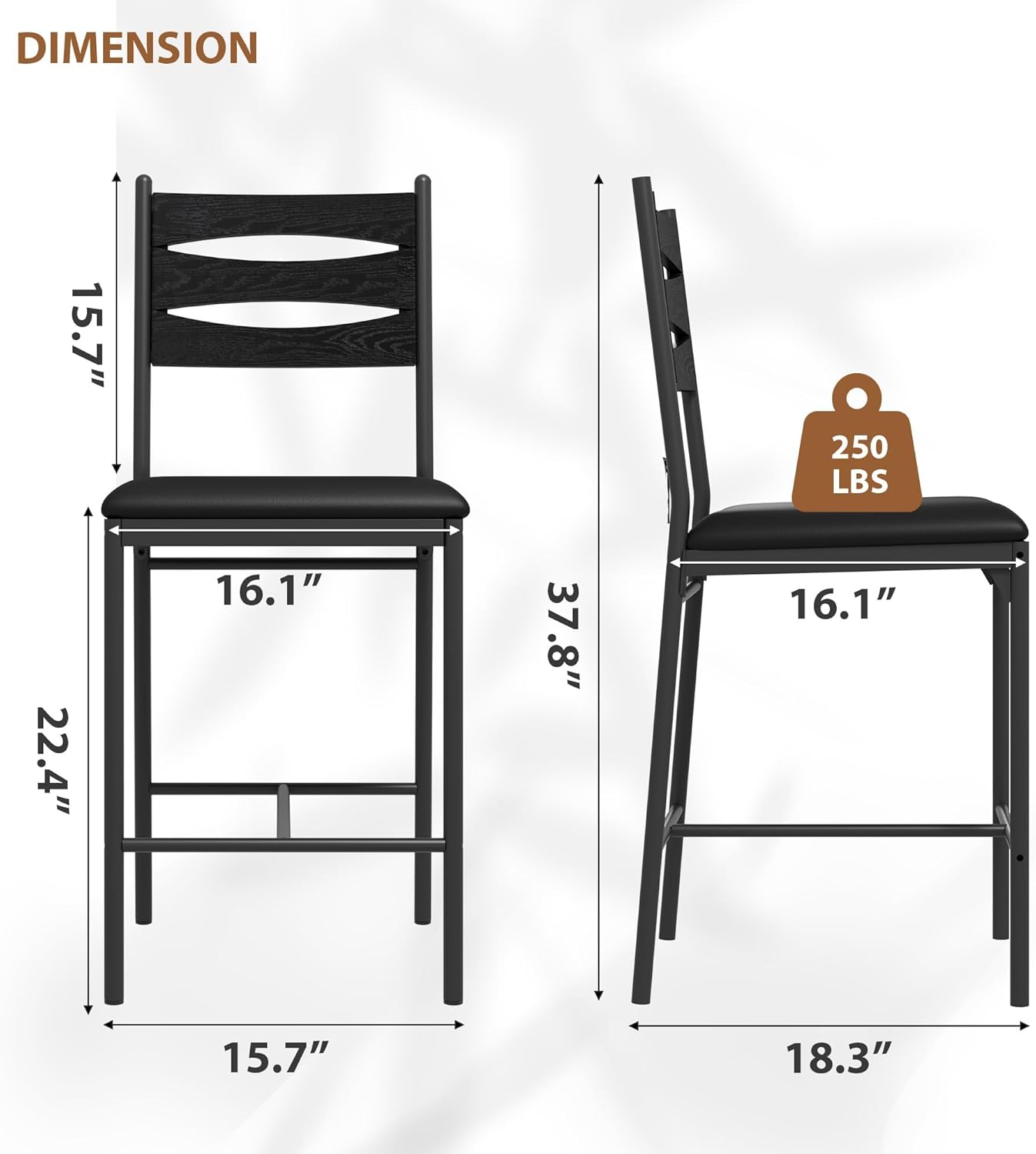
Image: Detailed dimensions of the bar stool, showing a height of 37.8 inches, seat height of 22.4 inches, and a maximum weight capacity of 250 lbs.
Package Contents
Before beginning assembly, verify that all components are present and undamaged. If any parts are missing or damaged, please contact customer service.
- Bar Stool Frames (4 sets)
- Cushioned Seats (4)
- Backrests (4)
- Assembly Hardware (screws, washers, nuts)
- Assembly Tools (Allen wrench, etc.)
- Instruction Manual (this document)
Setup and Assembly
Assembly is required for these bar stools. Please follow the step-by-step instructions below. It is recommended to assemble the stools on a soft, clean surface to prevent scratching.
- Step 1: Assemble the Frame. Attach the side frames to the front and back crossbars using the provided hardware. Ensure all connections are secure but do not fully tighten screws yet.
- Step 2: Attach the Backrest. Secure the backrest to the assembled frame using the designated screws.
- Step 3: Install the Seat Cushion. Place the cushioned seat onto the frame and secure it with the remaining screws from underneath.
- Final Tightening: Once all parts are in place, carefully place the stool on a flat surface and gradually tighten all screws until they are firm. Do not overtighten.

Image: Visual guide demonstrating the three main steps for assembling the Garvee bar stools, from frame construction to seat and backrest attachment.
Operating and Usage
Your Garvee Bar Stools are designed for comfortable and versatile use in various settings.
- Comfortable Seating: The thick cushioned seat with high-density foam provides comfort for extended periods.
- Ergonomic Support: The contoured backrest and built-in footrest offer natural and supportive seating.
- Versatile Placement: Suitable for kitchen islands, home bars, dining rooms, and light commercial use in cafes.
- Stability: The reinforced metal frame ensures stability and strength during use.

Image: Examples of Garvee bar stools in various settings, including pubs, home bars, coffee areas, and kitchens, demonstrating their versatility.

Image: Illustration highlighting the comfortable seating of the bar stools, suitable for 34-40 inch high tables, with a weight capacity of 250 lbs.
Care and Maintenance
- Cleaning the Seat: The waterproof PU leather seat can be easily cleaned. Wipe away spills, stains, or dust with a damp cloth. Avoid abrasive cleaners.
- Cleaning the Frame: The scratch-resistant metal base can be wiped clean with a soft, dry or slightly damp cloth.
- Regular Checks: Periodically inspect all screws and fasteners to ensure they remain tight. Re-tighten as necessary to maintain stability.
- Avoid Harsh Chemicals: Do not use harsh chemicals or solvents on any part of the stool, as this may damage the finish or material.

Image: Details on the premium PU leather, highlighting its soft, skin-friendly, plump, elastic, and excellent wear-resistant properties.

Image: Close-up views of the I-Beam construction, easy-to-clean surface, anti-friction footpads, and ergonomic backrest, illustrating key product details.
Troubleshooting
If you encounter any issues with your Garvee Bar Stools, please refer to the following common solutions:
- Wobbling Stool:
- Ensure all screws and fasteners are fully tightened.
- Verify that the stool is placed on a flat, even surface.
- Check if any footpads are uneven or missing.
- Difficulty Assembling:
- Review the assembly steps carefully.
- Ensure you are using the correct hardware for each step.
- Do not fully tighten all screws until the entire frame is loosely assembled, then tighten gradually.
- Damaged or Missing Parts:
- Immediately contact Garvee customer service for assistance.
Specifications
| Model Number | GVUS-VNN_33GVVHG8-YBY-WvML1j |
| Product Dimensions (D x W x H) | 16.14"D x 18.7"W x 37.8"H |
| Seat Height | 22.4 inches |
| Color | Black |
| Frame Material | Metal |
| Seat Material | Polyurethane (PU Leather) |
| Maximum Weight Capacity | 250 lbs (113 kg) |
| Number of Items | 4 |
| Required Assembly | Yes |
| GTIN (UPC) | 820567950422 |
Warranty and Customer Support
Warranty Information: Specific warranty details are not provided in this manual. Please refer to your purchase documentation or contact Garvee customer service for warranty terms and conditions.
Customer Service: If you have any questions, require assistance with assembly, or need to report missing/damaged parts, our customer service team is available to help. We aim to respond to inquiries within 38 hours.
For support, please visit the Garvee Store on Amazon: Garvee Store
Documents and downloads
Ask a question about this manual
Ask about setup, troubleshooting, compatibility, parts, safety, or missing instructions. Manuals+ will review the question and use this page’s manual context to help answer it.