
Introduction
Thank you for choosing the GOBOULT Partybox X200 Bluetooth Speaker. This powerful portable speaker is designed to deliver high-quality audio with dynamic RGB LED lighting, making it ideal for parties, gatherings, and personal entertainment. This manual will guide you through the setup, operation, and maintenance of your device to ensure optimal performance and longevity.
Package Contents
Please check the box for the following items:
- GOBOULT Partybox X200 Bluetooth Speaker
- Power Cable
- Quick Start Guide
- Remote Control
- Warranty Card
Product Overview
The GOBOULT Partybox X200 features a robust design with dual dynamic drivers for powerful 160W audio output and BoomX bass technology. It includes a professional control panel, multiple input options, and integrated wheels for portability.

Figure 1: GOBOULT Partybox X200 Key Features Overview
Control Panel
The top-mounted control panel provides access to all speaker functions. Familiarize yourself with the buttons and knobs for optimal control.
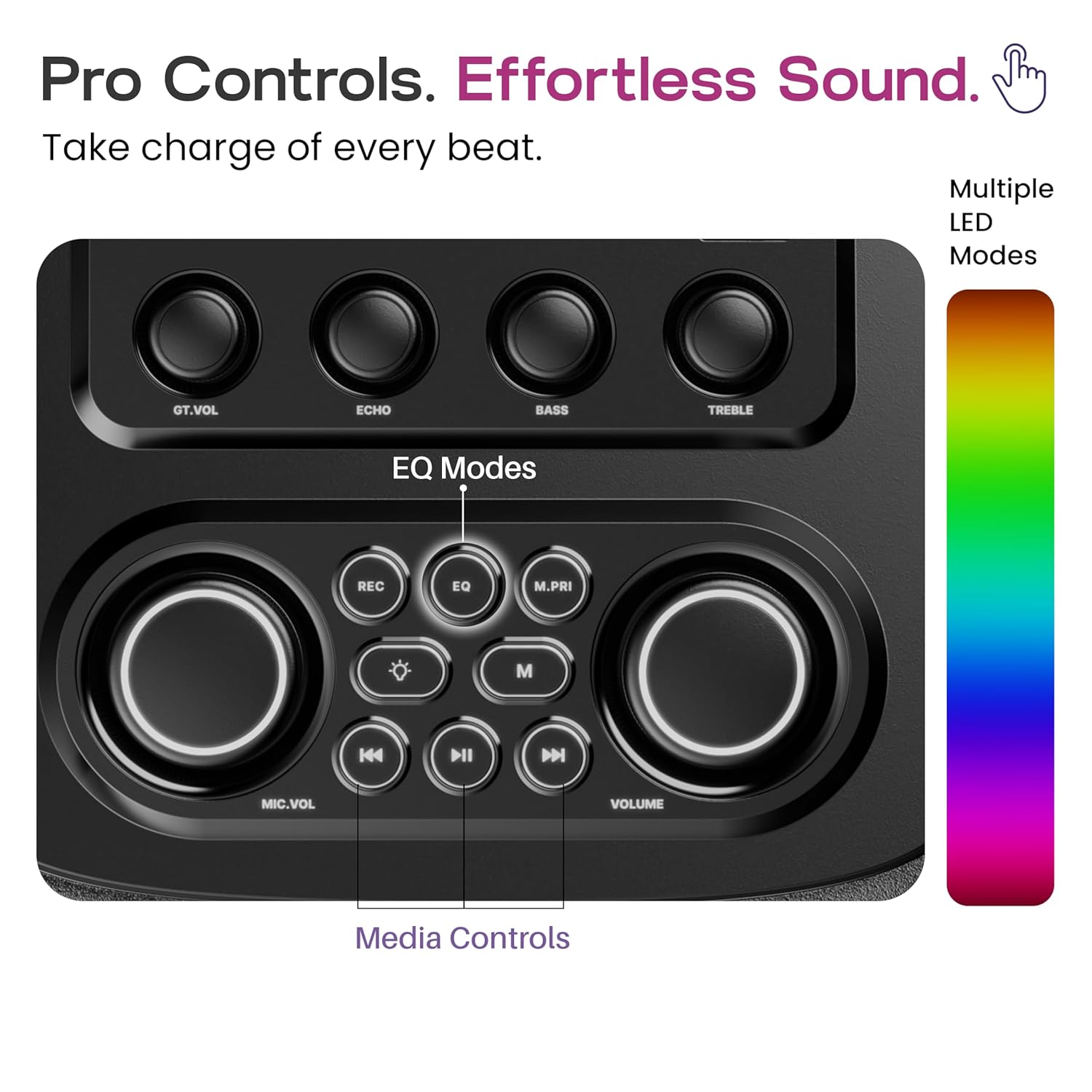
Figure 2: Pro Audio Control Panel Layout
- GT.VOL: Guitar Volume Control
- ECHO: Microphone Echo Effect Control
- BASS: Bass Level Adjustment
- TREBLE: Treble Level Adjustment
- REC: Record Function (if supported by connected device)
- EQ: Equalizer Mode Selection (Pop, Rock, Classic, Country, Standard)
- M.PRI: Microphone Priority Function
- MIC.VOL: Microphone Volume Control
- VOLUME: Master Volume Control
- Media Controls: Play/Pause, Skip Forward/Backward
Setup
- Unpacking: Carefully remove the speaker and all accessories from the packaging.
- Placement: Place the speaker on a stable, flat surface. Ensure adequate ventilation around the unit.
- Charging: Before first use, fully charge the speaker using the provided power cable. Connect the power cable to the DC power input port on the speaker and plug it into a standard wall outlet. The charging indicator will show the charging status.
- Power On: Press and hold the power button on the control panel to turn on the speaker.
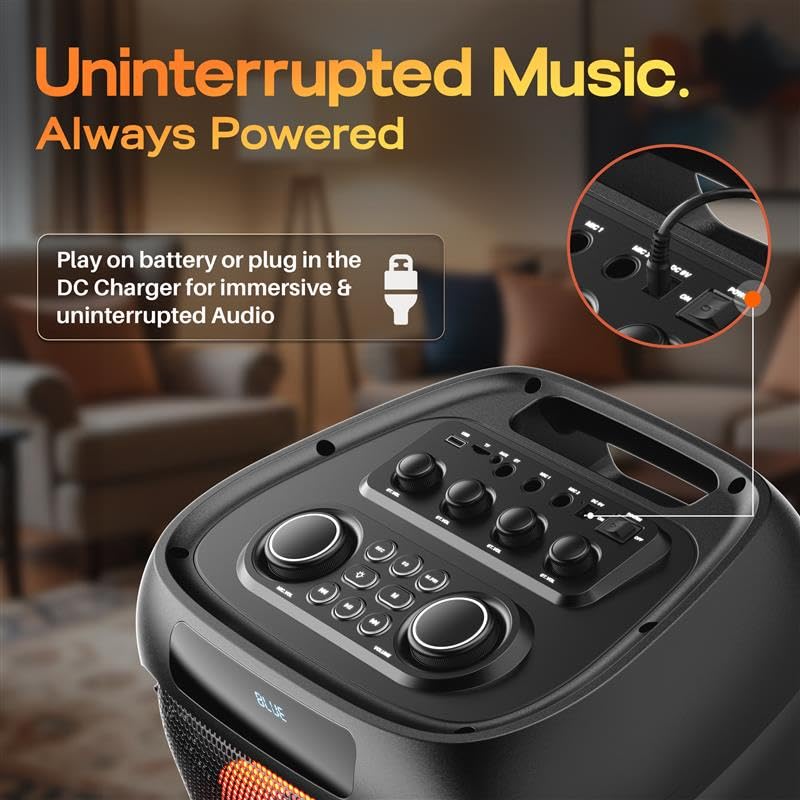
Figure 3: DC Power Input for Charging and Uninterrupted Playback
Operating Instructions
Bluetooth Pairing
- Turn on the GOBOULT Partybox X200. It will automatically enter Bluetooth pairing mode, indicated by a flashing LED.
- On your mobile device (smartphone, tablet, laptop), enable Bluetooth and search for available devices.
- Select "GOBOULT Partybox X200" from the list of devices.
- Once paired, the speaker will emit a confirmation sound, and the LED indicator will stop flashing.
- You can now play audio from your device through the speaker.
USB/TF Card Playback
- Insert a USB drive or TF (MicroSD) card into the respective port on the control panel.
- The speaker will automatically detect the storage device and begin playing audio files.
- Use the media control buttons (Play/Pause, Skip Forward/Backward) on the control panel or remote to manage playback.
AUX Input
- Connect one end of a 3.5mm audio cable (not included) to the AUX input port on the speaker.
- Connect the other end of the cable to the audio output jack of your external device (e.g., MP3 player, computer).
- The speaker will switch to AUX mode. Adjust volume from both the speaker and your connected device.

Figure 4: Multiple Input Modes
Karaoke and Guitar Input
- Connect a microphone to the Mic Input port and/or a guitar to the Guitar Input port.
- Adjust the microphone volume using the MIC.VOL knob and guitar volume using the GT.VOL knob.
- Use the ECHO knob to add an echo effect to the microphone.
- Press the M.PRI button to activate Microphone Priority, which lowers music volume when the microphone is in use.

Figure 5: Karaoke and Guitar Ready Inputs
EQ Modes
The Partybox X200 offers five equalizer modes to optimize sound for different music genres:
- Pop
- Rock
- Classic
- Country
- Standard
Press the EQ button on the control panel or remote to cycle through these modes.

Figure 6: EQ Mode Selection
Dynamic RGB LED Lights
The speaker features dynamic RGB LED lights that sync with the music. Use the dedicated light button on the control panel or remote to cycle through different light modes or turn them off.

Figure 7: Dynamic RGB LED Lights in Action
Charging and Battery
The GOBOULT Partybox X200 is equipped with a 9000 mAh battery for portable use. For extended listening sessions, you can plug the speaker directly into a DC power source. The speaker supports up to 7 hours of direct DC playback.

Figure 8: Battery Life and Direct DC Playback
To charge the speaker, connect the provided power cable to the DC input port and a power outlet. The battery indicator will show the charging status. Ensure the speaker is fully charged before its first portable use to maximize battery life.
Maintenance
- Cleaning: Use a soft, dry cloth to clean the speaker's exterior. Do not use abrasive cleaners or solvents.
- Storage: Store the speaker in a cool, dry place away from direct sunlight and extreme temperatures.
- Water Resistance: This speaker is not waterproof. Avoid exposing it to water or excessive moisture.
- Battery Care: For optimal battery health, avoid fully discharging the battery frequently. Charge it regularly, even if not in use for extended periods.
Troubleshooting
| Problem | Possible Cause | Solution |
|---|---|---|
| No power | Battery is depleted; Power cable not connected properly. | Charge the speaker; Ensure power cable is securely connected. |
| No sound | Volume is too low; Incorrect input mode selected; Device not paired (Bluetooth). | Increase volume on speaker and source device; Select correct input mode (Bluetooth, AUX, USB/TF); Re-pair Bluetooth device. |
| Bluetooth connection unstable | Device is too far from speaker; Interference from other devices. | Move device closer to speaker (within 10 meters); Avoid obstacles between devices; Turn off other Bluetooth devices. |
| Microphone/Guitar not working | Cable not connected properly; Volume too low. | Ensure cables are fully inserted; Adjust MIC.VOL/GT.VOL knobs. |
Specifications
- Model Name: Partybox X200
- Speaker Type: Portable Speaker
- Output Power: 160 Watts
- Bluetooth Version: 5.3
- Connectivity: Bluetooth, USB, TF Card, AUX, Guitar Input, Mic Input
- Audio Driver Type: Dynamic Driver
- Battery: 1 Nonstandard Battery (included), Lithium Ion, 9000 mAh (from description)
- Product Dimensions: 38D x 36W x 84H Centimeters
- Item Weight: 9.25 Kilograms
- Control Method: Touch (on panel), Remote
- Special Features: Bass Boost, Dynamic RGB LED Light, Portable (with wheels), Karaoke & Guitar Support, 5 EQ Sound Modes
- Included Components: Power Cable, Quick Start Guide, Remote, Warranty Card
Warranty Information
The GOBOULT Partybox X200 comes with a 1-year manufacturer warranty from the date of purchase. This warranty covers manufacturing defects and workmanship under normal use. Please retain your purchase receipt for warranty claims. The warranty does not cover damage caused by misuse, accidents, unauthorized modifications, or exposure to water.
For warranty service, please contact GOBOULT customer support with your product details and proof of purchase.
Support
For further assistance, technical support, or inquiries regarding your GOBOULT Partybox X200, please visit the official GOBOULT website or contact our customer service team. Contact details can typically be found on the warranty card or the GOBOULT brand store page.
Online Support: Visit the GOBOULT Store on Amazon


