
1. Introduction
The Luminous Zelio M 1300 is a high-performance sine wave inverter designed to provide reliable power backup for homes, offices, and shops. This manual provides essential information for the safe installation, operation, maintenance, and troubleshooting of your inverter. Please read this manual thoroughly before using the product.
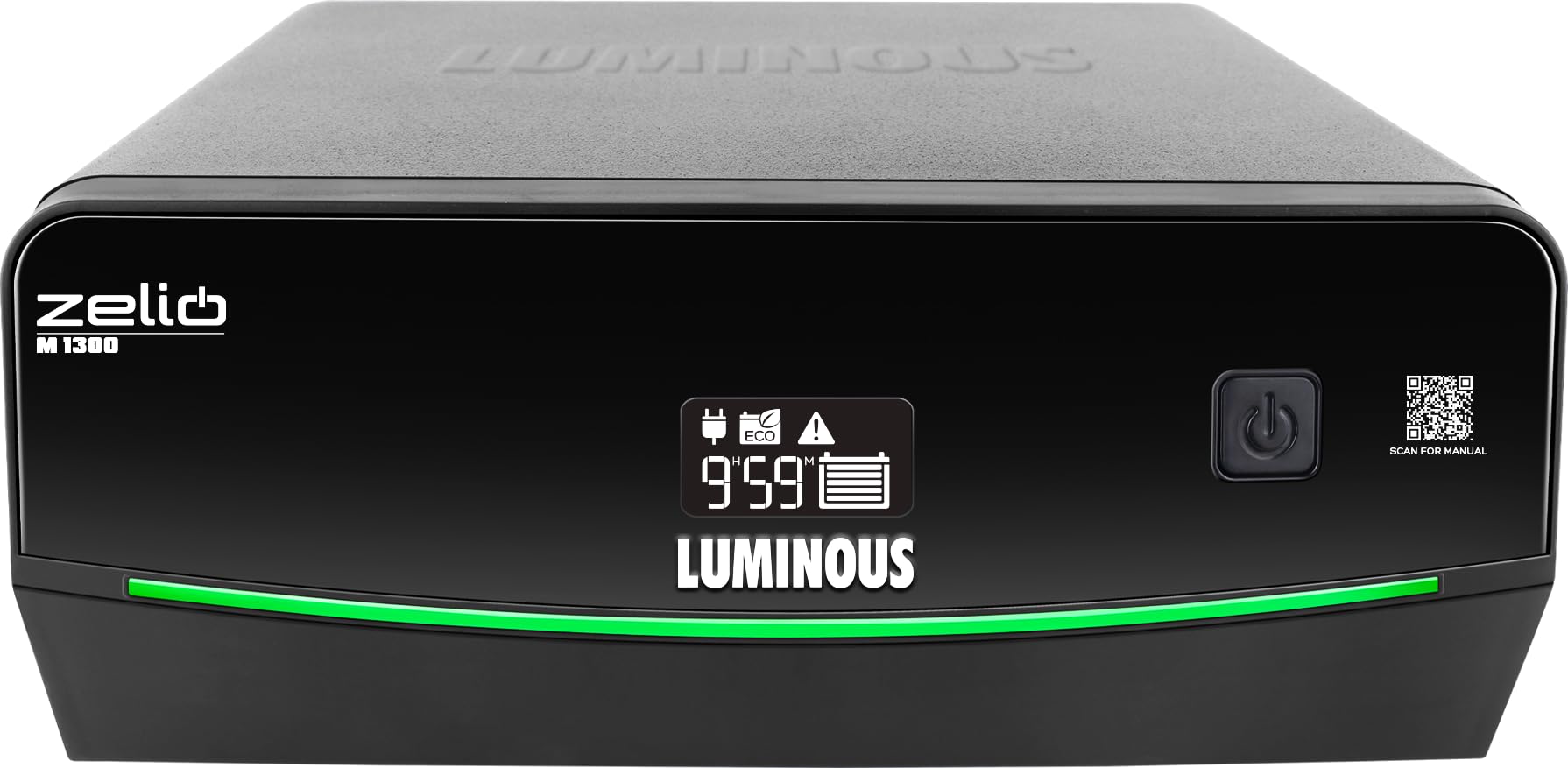
Figure 1.1: Front view of the Luminous Zelio M 1300 Sine Wave Inverter.
2. Safety Information
Always adhere to the following safety guidelines to prevent injury or damage to the inverter:
- Electrical Safety: Ensure proper grounding and use only specified battery types and capacities. All electrical connections should be performed by a qualified technician.
- Ventilation: Install the inverter in a well-ventilated area to prevent overheating. Do not block ventilation openings.
- Environment: Keep the inverter away from direct sunlight, moisture, flammable materials, and corrosive substances.
- Children and Pets: Keep the inverter out of reach of children and pets.
- Emergency: In case of smoke, unusual odors, or abnormal operation, immediately disconnect the power supply and contact customer support.

Figure 2.1: The Zelio M 1300 Inverter includes multiple protection features such as MCB protection, over temperature, short circuit, overload, and low battery/overcharge protection.
3. Product Features
The Luminous Zelio M 1300 Inverter offers advanced features for efficient and reliable power management:
- 1100VA / 924W Power Output: Capable of powering essential appliances like lights, fans, TVs, routers, and office electronics during outages.
- UPS/REG & ECO Mode Support: UPS mode provides regulated voltage for sensitive devices, while ECO mode supports a wide input voltage range for unstable power conditions.
- Fast Transfer Time (<20 ms): Ensures a seamless transition to battery power with minimal interruption.
- 12V Single Battery System: Compatible with tubular, SMF, or flat plate batteries ranging from 80Ah to 250Ah.
- LCD Display & Safety Alerts: Displays battery status, backup time, and fault indicators. Audible alerts for low battery, overload, short circuit, and overheating.
- Tri-Color Battery Indicator: Provides instant visual feedback on battery status.
- Silent Performance: Operates quietly due to Sine Wave Technology.
- Low Voltage Fast Charging: Charges batteries efficiently even at low input voltages (starts at 95V).

Figure 3.1: Key features include a tri-color battery indicator, LED backlit 7-segment display, and a QR code for manual access.

Figure 3.2: The inverter offers silent performance, advanced efficiency, charges at low voltage, and ensures longer battery life.
4. Setup
Follow these steps for the initial setup of your Luminous Zelio M 1300 Inverter:
- Unpacking: Carefully remove the inverter from its packaging and inspect for any damage. Retain packaging for future transport.
- Placement: Choose a cool, dry, and well-ventilated location. Ensure sufficient clearance around the inverter for airflow. Avoid placing it near heat sources or in direct sunlight.
- Battery Connection: Connect the inverter to a compatible 12V battery (80Ah to 250Ah). Ensure correct polarity: connect the red cable to the positive (+) terminal and the black cable to the negative (-) terminal of the battery. Secure connections tightly.
- AC Input Connection: Plug the inverter's AC input cord into a properly grounded wall outlet.
- Load Connection: Connect your appliances to the output sockets of the inverter. Do not overload the inverter beyond its rated capacity (924W).
- Initial Power On: Once all connections are secure, switch on the inverter using the power button. The LCD display will illuminate, indicating operational status.
5. Operating Instructions
Understanding the operation of your Zelio M 1300 Inverter:
- Power On/Off: Press the power button on the front panel to turn the inverter ON or OFF.
- LCD Display: The LCD provides real-time information including battery charge level, estimated backup time, and various operational modes or fault codes.
- Mode Selection (UPS/ECO): The inverter typically has a mode selection switch or button.
- UPS Mode (Regulated Output): Provides a stable output voltage, ideal for sensitive electronic devices like computers and TVs.
- ECO Mode (Wide Voltage Range): Allows the inverter to operate over a wider input voltage range, reducing battery usage in areas with frequent voltage fluctuations.
- Battery Status Indicator: Observe the tri-color indicator for a quick visual check of the battery's charge status.

Figure 5.1: The Zelio M 1300 can power essential items such as LED bulbs (9W), fans (80W), LED tubelights (18W), and LED TVs (75W).
6. Maintenance
Regular maintenance ensures optimal performance and longevity of your inverter:
- Cleaning: Keep the inverter's exterior clean and free from dust. Use a dry, soft cloth. Do not use liquid cleaners.
- Ventilation: Periodically check that the ventilation openings are clear and not obstructed.
- Battery Care: If using a lead-acid battery, ensure electrolyte levels are maintained (if applicable to your battery type). Keep battery terminals clean and free from corrosion.
- Connections: Periodically check all electrical connections for tightness and signs of wear.
- Storage: If storing the inverter for an extended period, ensure the battery is fully charged and disconnect it. Recharge the battery every 3-6 months to prevent deep discharge.
7. Troubleshooting
Refer to the following table for common issues and their solutions:
| Problem | Possible Cause | Solution |
|---|---|---|
| Inverter not turning ON | No battery connection, low battery, faulty power button. | Check battery connections, charge battery, contact service if button is faulty. |
| No output power | Overload, short circuit, inverter in fault mode. | Reduce load, check for short circuits, restart inverter. |
| Low backup time | Battery not fully charged, aged battery, high load. | Allow battery to fully charge, consider battery replacement, reduce load. |
| Overload alarm | Connected load exceeds inverter capacity. | Immediately disconnect some appliances to reduce the load. |
| Overheating alarm | Poor ventilation, blocked vents, high ambient temperature. | Ensure proper ventilation, clear vents, move to a cooler location. |
If the problem persists after attempting these solutions, please contact Luminous customer support.
8. Specifications
| Specification | Detail |
|---|---|
| Brand | Luminous |
| Model Name | Zelio M 1300 |
| Power Output (VA) | 1100 VA |
| Power Output (Watts) | 924 Watts |
| Voltage | 12 Volts |
| Battery Capacity Compatibility | 80Ah to 250Ah (12V Single Battery System) |
| Recommended Uses | Home, Office, Shops |
| Power Source | Battery Powered |
| Item Dimensions (L x W x H) | 27.5L x 28.1W x 14H Centimeters |
| Item Weight | 11.5 Kilograms |
| Colour | Black |
| Country of Origin | India |
9. Warranty
The Luminous Zelio M 1300 Sine Wave Inverter comes with a 36 Months Warranty from the date of purchase. This warranty covers manufacturing defects and ensures reliable performance under normal operating conditions.
For warranty claims or service, please retain your purchase receipt and contact Luminous customer support. The warranty does not cover damage caused by improper installation, misuse, unauthorized repairs, or natural disasters.

Figure 9.1: The Zelio M 1300 Inverter is backed by a 36-month warranty.
10. Support
For any queries, technical assistance, or service requests, please contact Luminous customer support:
- Manufacturer Contact Information: Luminous Power Technologies Pvt. Ltd. Village-Malpur, Baddi, District-Solan, Himachal Pradesh-173205
- Packer Contact Information: Luminous Power Technologies Private Limited Plot No 150, Sector- 44, Gurugram, Haryana -122003
- Email: Care@luminousindia.com
- Luminous offers a nationwide service network with trained service engineers for comprehensive installation and support.

Figure 10.1: Luminous provides reliable power with expert care, including comprehensive installation service, trained engineers, a nationwide network, warranty assurance, and 24/7 customer support.


