
Introduction
This manual provides detailed instructions for the safe and efficient use of your Samvix iBusiness Mehadrin 128 Kosher MP3 Player. Please read this manual thoroughly before operating the device and retain it for future reference.
Key Features
- Massive 128GB Storage: Store thousands of songs, lectures, and audio files without needing an SD card.
- Full MP3 Playback: Features repeat, shuffle, bookmark, Add to Playlist, and adjustable playback speed for a customized listening experience.
- High-Quality Voice Recording: Built-in recorder with noise reduction and voice activity detection (VAD) for clear recordings.
- Secure and Family-Friendly: Three parental password options, plus USB and Bluetooth password protection for safe use.
- Multilingual and Convenient: Supports English, Hebrew, and Yiddish, with auto power-saving shutdown, date/time display, and Type C USB charging.
- No SD Card Slot: The device features ample internal storage and does not include an SD card slot.
- No Radio Functionality: This device is designed for dedicated audio playback and does not include a radio tuner.
What's in the Box
- Samvix iBusiness Mehadrin 128GB Kosher MP3 Player
- USB Type-C Charging Cable (not explicitly listed but implied for Type C USB charging)
- User Manual (this document)
Device Overview
Familiarize yourself with the physical components of your Samvix iBusiness Mehadrin MP3 Player.
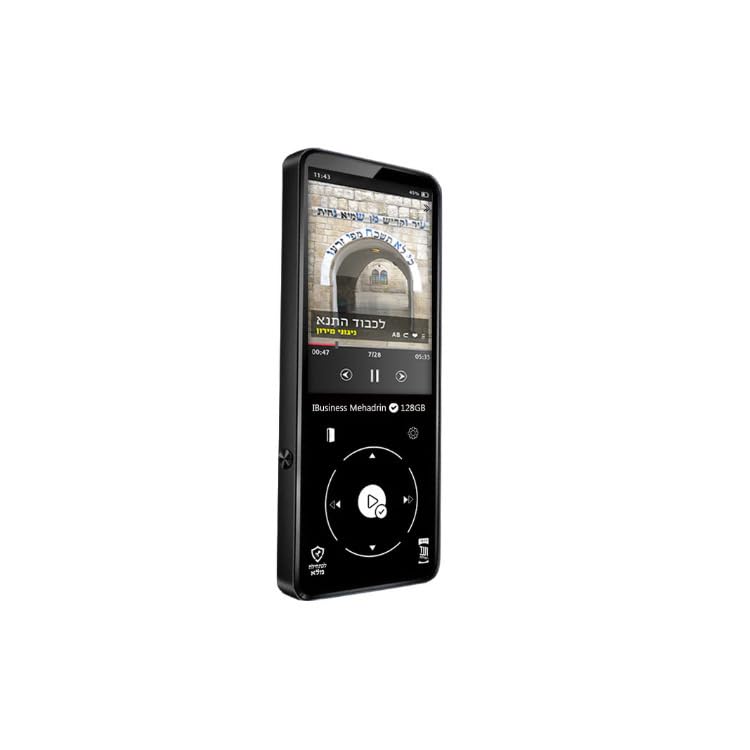
Figure 1: Samvix iBusiness Mehadrin 128 Kosher MP3 Player in its retail packaging.
Front Panel
- 2.4-inch LCD Screen: Displays menus, music information, and settings.
- Scroll Wheel: Used for navigating through menus and lists.
- Play/Pause Button: Initiates or pauses music playback.
- Menu Button: Accesses the main menu or returns to the previous screen.
- Previous/Rewind Button: Skips to the previous track or rewinds the current track.
- Next/Fast-forward Button: Skips to the next track or fast-forwards the current track.
- Back Button: Returns to the previous menu or screen.
Side Panel
- Volume Up/Down Buttons: Adjusts the audio output volume.
- Micro SD Card Slot: Note: This model does not include an SD card slot.
Top/Bottom Panel
- Power Button: Turns the device on/off or locks/unlocks the screen.
- Earphone Port: Connects to wired headphones.
- USB Type-C Port: Used for charging the device and transferring files to/from a computer.
- Line Out Port: Provides an audio output for connecting to external amplifiers or speakers.
- Built-in Speaker: For direct audio playback without headphones.
Setup
1. Charging the Device
- Connect the USB Type-C charging cable to the device's USB Type-C port.
- Connect the other end of the cable to a USB power adapter (not included) or a computer's USB port.
- The device will indicate charging status on the screen. Allow sufficient time for a full charge before first use.
2. Transferring Music Files
To transfer music from your computer to the Samvix iBusiness Mehadrin MP3 Player:
- Connect the MP3 player to your computer using the provided USB Type-C cable.
- On the MP3 player, navigate to System Settings > USB Mode and select USB (do not select DAC).
- Your computer should recognize the MP3 player as a removable disk or portable device.
- Open the device's drive on your computer. You can create new folders (e.g., "Music 1", "Music 2") to organize your files.
- Drag and drop your desired audio files (MP3, FLAC, etc.) from your computer into the folders on the MP3 player.
- Once all files are transferred, safely eject the device from your computer before disconnecting the USB cable.
- The device will automatically update its music library after disconnection.
Operating Instructions
1. Power On/Off
- To Power On: Press and hold the Power button until the screen lights up.
- To Power Off: Press and hold the Power button until the power-off prompt appears, then confirm.
- Screen Lock/Unlock: Briefly press the Power button to lock or unlock the screen during operation.
2. Navigating the Menu
- Use the Scroll Wheel to move through menu options.
- Press the Play/Pause button (center of the scroll wheel) to select an option.
- Press the Back button to return to the previous menu.
- Press the Menu button to go to the main menu.
3. Music Playback
- From the main menu, select "Music" or "Category" to browse your audio files.
- Use the Scroll Wheel to highlight a song, then press the Play/Pause button to start playback.
- During playback, use the Previous/Rewind and Next/Fast-forward buttons to change tracks. Press and hold these buttons to fast-forward or rewind within a track.
- Press the Play/Pause button to pause or resume playback.
- Adjust volume using the Volume Up/Down buttons on the side.
4. Bluetooth Pairing
To connect your Samvix iBusiness Mehadrin MP3 Player to Bluetooth headphones or speakers:
- Ensure your Bluetooth device is in pairing mode.
- On the MP3 player, navigate to System Settings > Bluetooth Settings.
- Turn Bluetooth On.
- Select Bluetooth Scan to search for available devices.
- Once your device appears in the list, select it to initiate pairing.
- Confirm any pairing requests on both devices. Once connected, the Bluetooth icon will appear on the MP3 player's screen.
5. Voice Recording
The device features a built-in voice recorder:
- From the main menu, select the "Voice Recorder" option.
- Follow the on-screen prompts to start, pause, save, or delete recordings.
- Recordings benefit from noise reduction and Voice Activity Detection (VAD) for clear audio.
Parental Control
The Samvix iBusiness Mehadrin MP3 Player offers robust parental control features to ensure a safe listening environment:
- Three Parental Password Options: Configure different password levels to restrict access to certain features or content.
- USB Password Protection: Secure the device with a password to prevent unauthorized file transfers via USB.
- Bluetooth Password Protection: Implement a password for Bluetooth connections to control which devices can pair with the MP3 player.
Refer to the device's settings menu for detailed configuration of these parental control features.
Maintenance
Cleaning
- Use a soft, dry, lint-free cloth to clean the device.
- Do not use liquid cleaners, aerosols, or harsh chemicals.
Battery Care
- Avoid exposing the device to extreme temperatures.
- Charge the device regularly, even if not in use, to maintain battery health.
Storage
- Store the device in a cool, dry place away from direct sunlight.
- Keep the device away from magnetic fields.
Troubleshooting
- Device not turning on: Ensure the battery is charged. Connect to a power source and try again.
- Cannot transfer files: Check the USB cable connection. Ensure the device's USB Mode is set to "USB" in System Settings. Try a different USB port or computer.
- Bluetooth not connecting: Ensure Bluetooth is enabled on both the MP3 player and the target device. Make sure both devices are in pairing mode and within range.
- Poor audio quality: Check headphone connections. Ensure the audio files are of good quality. Adjust equalizer settings if available.
- Device unresponsive: Press and hold the Power button for about 10-15 seconds to perform a forced restart.
Specifications
| Brand | SAMVIX |
| Model Name | MP3 |
| Model Number | iBusinessMehadrin128 |
| Special Feature | Voice Recorder |
| Connectivity Technology | Bluetooth |
| Memory Storage Capacity | 128 GB |
| Screen Size | 2.4 Inches |
| Compatible Devices | Headphone |
| Display Technology | LCD |
| Item Weight | 9.1 Pounds |
| Item Dimensions D x W x H | 0.39"D x 9.1"W x 9.1"H |
| UPC | 766162175757 |
Warranty and Support
For warranty information, technical support, or service inquiries, please refer to the official SAMVIX website or contact their customer service directly. Keep your purchase receipt as proof of purchase for warranty claims.