
1. Introduction
Thank you for choosing the NEEWER Z3R-N 100Ws 2.4G TTL Round Head Flash Speedlight. This advanced camera flash is designed to provide versatile and reliable lighting for your photography needs. Featuring a user-friendly 2.8-inch full-color touch screen, powerful output, and a durable design, the Z3R-N ensures excellent performance and natural color reproduction. Please read this manual carefully to understand the product's features and ensure proper operation.
2. Safety Information
- Do not disassemble or modify the flash unit. Unauthorized modifications can lead to electric shock or malfunction.
- Keep the flash unit dry. Do not expose it to rain, moisture, or high humidity.
- Avoid direct eye exposure to the flash. The intense light can cause temporary vision impairment.
- Keep out of reach of children.
- Use only the specified battery and charging accessories. Improper use can lead to fire or explosion.
- Ensure proper ventilation during operation to prevent overheating.
3. Package Contents
Verify that all items are present in your package:
- 1 x NEEWER Z3R-N Flash Body
- 1 x Lithium Battery (3000mAh)
- 1 x USB Type-C Cable
- 1 x Protective Case
- 1 x Magnetic Dome Diffuser
- 1 x Mini Stand
- 1 x User Manual

Image: Contents of the NEEWER Z3R-N Flash package, showing the flash unit, battery, USB cable, protective case, magnetic dome diffuser, mini stand, and user manual.
4. Product Overview
The NEEWER Z3R-N features a round flash head for soft, even light distribution and a 2.8-inch full-color touch screen for intuitive control. Its robust design includes an advanced cooling system for extended use.

Image: Two NEEWER Z3R-N flash units, showcasing their 100Ws power output, 3000mAh battery capacity, 500 full power flashes, and two LED modeling lights.

Image: A detailed view of the NEEWER Z3R-N flash's 2.8-inch full-color touch screen, demonstrating its responsive interface and easy mode switching between TTL and M modes.
5. Setup
5.1 Battery Installation
- Open the battery compartment cover located on the side of the flash unit.
- Insert the provided 3000mAh lithium battery, ensuring correct polarity.
- Close the battery compartment cover securely.
5.2 Mounting on Camera
- Slide the flash's hot shoe mount into your camera's hot shoe slot.
- Tighten the locking ring or lever on the flash to secure it to the camera.
6. Operating Modes
6.1 TTL Mode (Through-The-Lens)
In TTL mode, the flash automatically adjusts its output based on the camera's metering system, providing accurate exposure in various lighting conditions. This mode is ideal for quick shooting and changing environments.
6.2 M Mode (Manual)
Manual mode allows precise control over the flash output, adjustable from 1/256 to 1/1 in 0.1 EV increments. This mode is suitable for experienced users who require consistent lighting and creative control. The flash maintains a stable 6000K color temperature in this mode.
6.3 RPT Mode (Stroboscopic)
The RPT mode, also known as stroboscopic flash, fires a series of rapid flashes during a single exposure. This allows you to capture multiple movements of a subject within one frame, creating dynamic and artistic effects.
Image: Visual representation of TTL, M, and RPT flash control modes. TTL mode shows automatic flash adjustment, M mode displays manual output settings, and RPT mode illustrates capturing multiple movements in one shot.
6.4 High-Speed Sync (HSS)
The Z3R-N supports High-Speed Sync (HSS) up to 1/8000s. This feature allows you to use flash at shutter speeds faster than your camera's native sync speed, enabling you to freeze fast-moving subjects or use wider apertures in bright conditions to achieve shallow depth of field.

Image: A comparison showing the effect of 1/8000s High-Speed Sync. The image on the right, with HSS enabled, demonstrates effective exposure control in bright outdoor conditions, preventing overexposure while providing fill light to the subject.
6.5 Front and Rear Curtain Sync
The flash supports both front and rear curtain sync. Front curtain sync fires the flash at the beginning of the exposure, while rear curtain sync fires it just before the shutter closes. Rear curtain sync is often used to create motion blur effects where the blur trails behind the moving subject.
6.6 Modeling Lights
The Z3R-N is equipped with two LED modeling lights, adjustable across 10 brightness levels. These lights help you preview the lighting effect before taking a shot, aiding in precise light placement and shadow control.

Image: The NEEWER Z3R-N flash showcasing its 100W continuous flash capability and the 10-level brightness adjustment for its two LED modeling lights (3300K±200K).
7. Battery and Charging
The Z3R-N is powered by a 3000mAh lithium battery, providing approximately 500 full power flashes. The recycle time is a fast 1.7 seconds, ensuring you don't miss a shot. Flash duration ranges from 1/556 to 1/20000 seconds.
7.1 Charging
The battery can be charged via the USB-C port on the flash unit using the provided USB cable and a 5V/2A USB power adapter (not included). For faster charging and recycling, the flash is compatible with external power packs (sold separately), reducing the recycle time to 0.8 seconds.
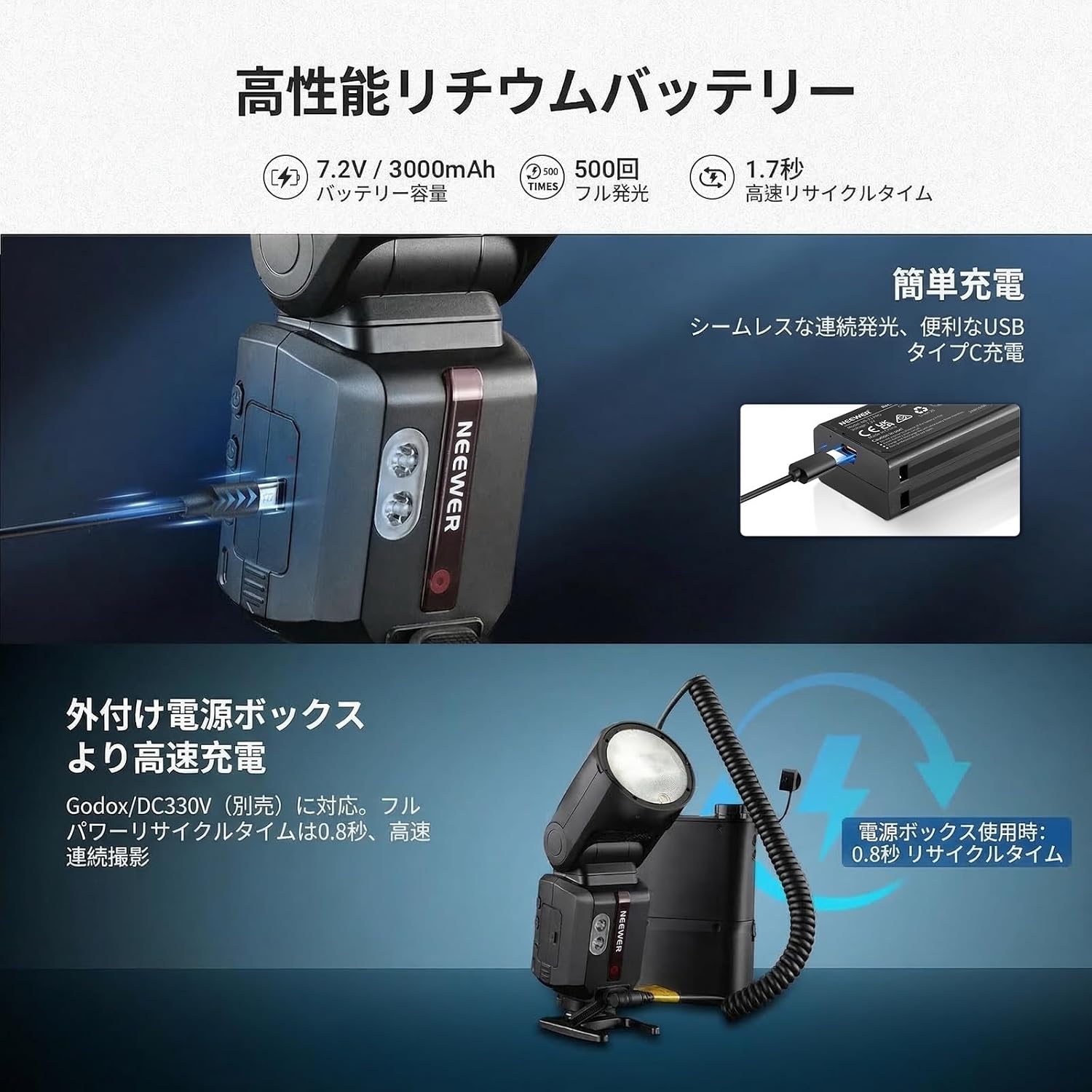
Image: The NEEWER Z3R-N flash demonstrating its 7.2V/3000mAh lithium battery, 500 full power flashes, 1.7-second recycle time, and charging options including USB-C and an external power box for a 0.8-second recycle time.
8. Wireless System (2.4G Q System)
The Z3R-N integrates a 2.4G wireless Q system, offering comprehensive control as both a master and slave unit. It supports 5 control groups (A, B, C, D, E), 32 channels (CH1-CH32), and 99 IDs (1-99, OFF) with a transmission distance of up to 100 meters (328 feet).
8.1 Compatibility
The flash can sync with the QZ-N transmitter (sold separately) and other Q system flashes. It is also compatible with Godox 2.4G X system Xpro, X3, X2 transmitters (RX COMPAT) and can function as a slave unit with the Sekonic L-858D light meter (RT-GX module). Please note that the Q system and X system cannot be used simultaneously. Firmware updates may be required to ensure full compatibility.

Image: Diagram illustrating the NEEWER 2.4G wireless Q system (TX/RX mode) and its compatibility with Godox 2.4G X system and Sekonic L-858D light meter (RT-GX module) in RX mode. It shows various compatible NEEWER flashes and transmitters.
9. Maintenance
- Clean the flash unit regularly with a soft, dry cloth. Do not use solvents or abrasive cleaners.
- Keep the hot shoe contacts clean to ensure reliable communication with the camera.
- Store the flash in a cool, dry place away from direct sunlight and extreme temperatures.
- Remove the battery if the flash will not be used for an extended period.
10. Troubleshooting
10.1 Flash Not Firing
- Check if the flash is securely mounted on the camera's hot shoe.
- Ensure the battery is fully charged and correctly installed.
- Verify that the flash is powered on.
- Check camera settings to ensure external flash is enabled.
- If using wireless mode, ensure the transmitter and receiver are on the same channel and group.
10.2 Incorrect Exposure
- In TTL mode, check camera's exposure compensation settings.
- In M mode, adjust flash output manually.
- Ensure the flash head zoom matches the lens focal length or is set to auto.
- Check for obstructions between the flash and subject.
10.3 Overheating Warning
If the flash displays an overheating warning, stop using it immediately and allow it to cool down. The Z3R-N has an advanced cooling system, but continuous rapid firing can still lead to high temperatures.
11. Specifications
| Model | Z3R-N |
| Item Type | Speedlight Flash |
| Compatibility | Digital SLR Cameras (Hot Shoe Mount) |
| Application | Photography, Portrait |
| Main Features | 3000mAh Lithium Battery, 2.8-inch Touch Screen |
| Mounting Point | Hot Shoe |
| Main Material | Plastic |
| Dimensions (L x W x H) | 21.5 x 7.5 x 7.5 cm |
| Weight (with battery) | 643g |
| Power Output | 100Ws |
| Flash Output Range | 1/256 - 1/1 |
| Battery Capacity | 3000mAh |
| Charging Time | Approx. 2.5 hours |
| Full Power Flashes | Approx. 500 |
| Continuous Full Power Flashes | 70-100 (at 28-105mm zoom) |
| Flash Duration | 1/556 - 1/20000s |
| Color Temperature | 6000K (±200K) |
| Recycle Time | 1.7 seconds (0.8 seconds with external power pack) |
| Sync Mode | High-Speed Sync (1/8000s), Front Curtain Sync, Rear Curtain Sync |
| Wireless Type | 2.4G |
| Wireless Function | Master/Slave unit, up to 100m transmission distance |
| Control Method | Buttons, 2.8-inch Touch Screen |
| Modeling Lamp Quantity | 2 |
| Modeling Lamp Brightness Levels | 10 |
12. Warranty and Support
The NEEWER Z3R-N Flash Speedlight comes with a 1-year manufacturer's warranty from the date of purchase. This warranty covers defects in materials and workmanship under normal use. It does not cover damage caused by misuse, accident, unauthorized modification, or improper storage.
For technical support, troubleshooting assistance, or warranty claims, please contact NEEWER customer service through the official website or your point of purchase. Please have your product model and purchase information ready when contacting support.