
hykolity ACB-2614
Hykolity WiFi Enabled Portable Air Conditioner 10,000 BTU User Manual
Model: ACB-2614
1. Introduction
Thank you for choosing the Hykolity WiFi Enabled Portable Air Conditioner. This manual provides important information for the safe operation, installation, maintenance, and troubleshooting of your unit. Please read it thoroughly before use and retain it for future reference.
Safety Information
- Always place the unit on a flat, stable surface.
- Ensure the power supply matches the rating label on the unit.
- Do not operate the unit with a damaged cord or plug.
- Keep the air intake and exhaust vents clear of obstructions.
- Do not insert objects into the air vents.
- Unplug the unit before cleaning or servicing.
- This appliance is not intended for use by persons (including children) with reduced physical, sensory or mental capabilities, or lack of experience and knowledge, unless they have been given supervision or instruction concerning use of the appliance by a person responsible for their safety.
2. Product Overview
Key Features
- 5-in-1 Functionality: Offers Cool, Fan, Dehumidify, Sleep Mode, and 24H Timer for versatile climate control.
- Remote & WiFi Control: Manage settings via the Smart Life App or the included remote control.
- Quiet Operation: Advanced dual motor technology ensures a low noise level of 45 dB.
- Self-Evaporating Technology: Reduces the need for frequent drainage by automatically removing excess moisture.
- Easy Installation: Comes with all necessary accessories for quick setup in vertical or horizontal sliding windows.
- Mobile Design: Built-in wheels and handle allow for easy movement between rooms.
Components
Familiarize yourself with the main components of your portable air conditioner.
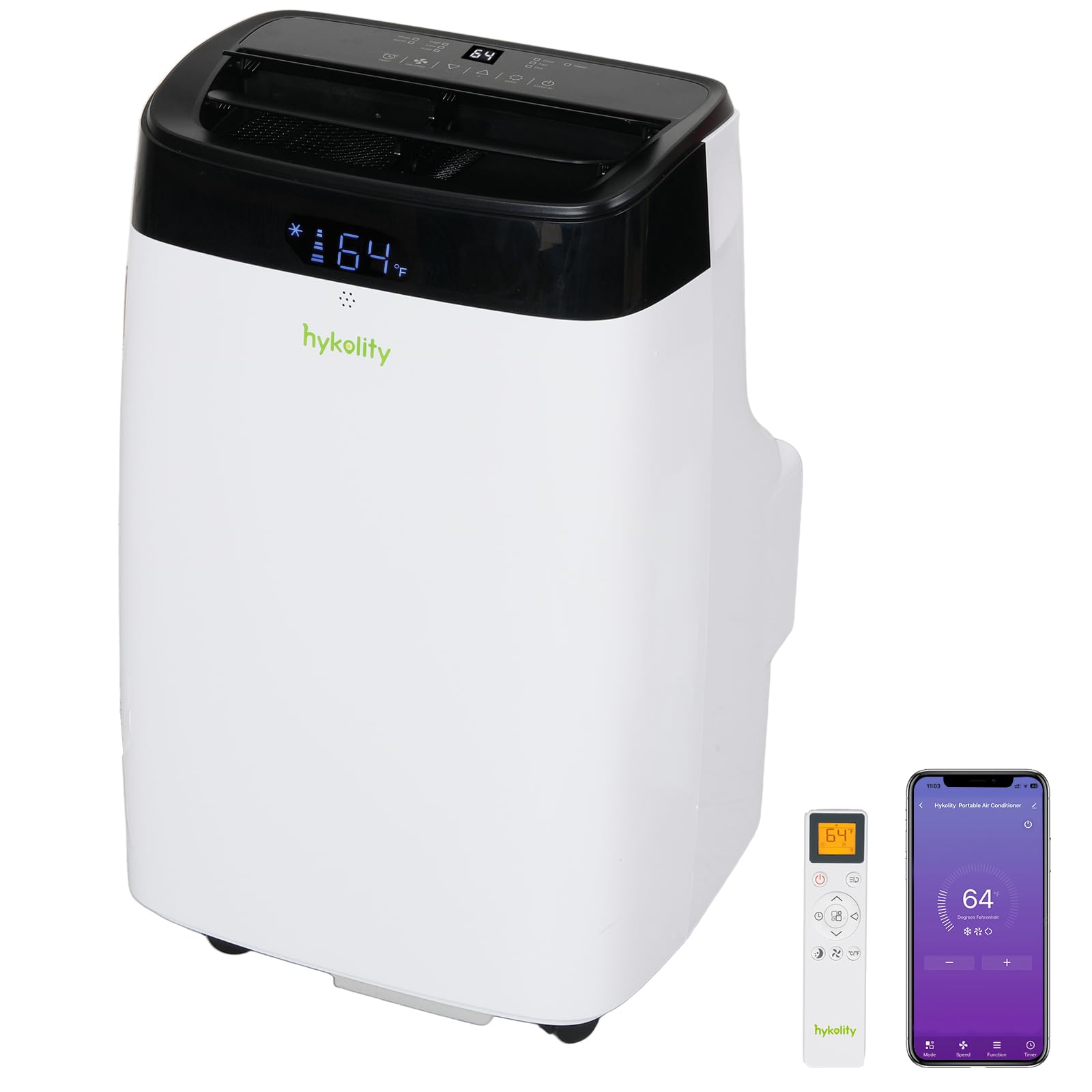
Figure 2.1: Front view of the Hykolity Portable Air Conditioner unit.

Figure 2.2: Top control panel with dual LED displays and function icons (Cool, Fan, Dry, Sleep, Timer, Wi-Fi, 2 Speed Fan, Swing, Auto, Turbo).

Figure 2.3: Illustration of the dual-motor design, showing independent control of upper and lower ducts for optimal performance.

Figure 2.4: Diagram illustrating the self-evaporating technology, where a water pump transfers excess water to the condenser for enhanced cooling and reduced drainage needs.
3. Setup and Installation
This portable air conditioner is designed for easy installation. All necessary accessories are included for quick setup in most vertical and horizontal sliding windows.
Unpacking
- Carefully remove the unit and all accessories from the packaging.
- Check for any damage during transit. If damaged, do not operate and contact customer support.
- Allow the unit to stand upright for at least 24 hours before plugging it in, especially if it was not transported upright. This allows the refrigerant to settle.
Included Accessories

Figure 3.1: Included accessories for installation, including window boards, sealing tape, sealing foam, hose coupler, hose coupler to machine, exhaust hose, and remote control. Also shown are examples of installation in double-hung and sliding windows.
- Portable AC Unit
- Exhaust Hose
- Hose Coupler (for unit)
- Window Adapter (for window kit)
- Window Sealing Kit (Window Boards, Sealing Tape, Sealing Foam)
- Remote Control
- User Manual
Window Installation Steps
- Prepare the Window: Open the window and place the window sealing kit (window boards) into the window opening. Adjust the length to fit snugly.
- Attach Exhaust Hose: Connect one end of the exhaust hose to the hose coupler, then attach the coupler to the exhaust port on the back of the AC unit.
- Connect to Window Kit: Attach the other end of the exhaust hose to the window adapter, and then insert the window adapter into the opening in the window sealing kit.
- Seal Gaps: Use the provided sealing tape and foam to seal any gaps around the window kit to prevent air leakage and maximize efficiency.
- Position the Unit: Place the portable AC unit on a flat surface near the window, ensuring the exhaust hose is not kinked or bent sharply.
4. Operation
Your Hykolity portable air conditioner offers multiple ways to control your comfort.
Control Panel
The unit features a top-front dual LED display and touch controls for direct operation.
Figure 4.1: Detailed view of the control panel, showing icons for Cool, Fan, Dry, Sleep, Timer, Wi-Fi, 2 Speed Fan, Swing, Auto, and Turbo modes.
- Power Button: Turns the unit ON or OFF.
- Mode Button: Cycles through Cool, Fan, and Dehumidify modes.
- Temperature Up/Down: Adjusts the desired temperature in Cool mode.
- Fan Speed: Selects fan speed (Low/High).
- Timer: Sets the auto-on or auto-off timer.
- Sleep Mode: Activates quiet operation and gradual temperature adjustment for sleeping.
- Wi-Fi: Activates or deactivates Wi-Fi connectivity.
Remote Control
The included remote control provides convenient access to all functions from a distance.
Video 4.1: Demonstration of using the remote control to adjust settings and view the LED display on the Hykolity Portable Air Conditioner.
Refer to the remote control section in the full manual for a detailed button layout and function description.
Smart Life App Control (Wi-Fi)
Control your air conditioner from anywhere using the Smart Life App on your smartphone.

Figure 4.2: A hand holding a smartphone showing the Smart Life App interface, used to control the portable air conditioner remotely.
- Download App: Download the "Smart Life" app from the App Store (iOS) or Google Play Store (Android).
- Register/Login: Create an account or log in to your existing Smart Life account.
- Add Device: Follow the in-app instructions to add your Hykolity Portable Air Conditioner. Ensure your unit's Wi-Fi function is enabled.
- Control: Once connected, you can control modes, temperature, fan speed, and set schedules from your smartphone.
Operating Modes

Figure 4.3: Visual representation of the three primary operating modes: Fan, Dry (Dehumidify), and Cool.
- Cool Mode: Provides powerful cooling. Set your desired temperature and fan speed.
- Fan Mode: Circulates air without cooling. Choose between low and high fan speeds.
- Dehumidify Mode (Dry): Reduces humidity in the room. The fan operates at a low speed, and the temperature cannot be adjusted.
- Sleep Mode: Optimizes comfort during sleep by gradually increasing the set temperature and operating quietly.
- Timer Mode: Program the unit to turn ON or OFF automatically after a set period (up to 24 hours).
- Turbo Mode: Activates maximum cooling power for rapid temperature reduction.
5. Maintenance
Regular maintenance ensures optimal performance and extends the lifespan of your air conditioner.
Cleaning the Air Filter
The unit features a slide-out washable filter. Clean it every two weeks or more frequently depending on usage and air quality.
- Power Off: Unplug the air conditioner from the power outlet.
- Remove Filter: Locate the air filter on the back or side of the unit and slide it out.
- Clean Filter: Wash the filter under running water (warm, not hot) with a mild detergent. Gently brush away any accumulated dust or debris.
- Dry Filter: Allow the filter to air dry completely before reinserting it. Do not expose to direct sunlight or use a dryer.
- Reinstall: Slide the dry filter back into its position.
Draining Water (if necessary)
The unit features self-evaporating technology, which minimizes the need for manual drainage. However, in high humidity conditions, the internal water tank may fill up. The unit will display a "Full Water Alarm" when this occurs.
- Power Off: Unplug the air conditioner.
- Position for Drainage: Move the unit to a location where water can be drained, such as a floor drain or outdoors.
- Remove Drain Plug: Locate the drain plug at the bottom rear of the unit and carefully remove it.
- Drain Water: Allow all accumulated water to drain out. You may need to tilt the unit slightly.
- Replace Plug: Once drained, securely replace the drain plug.
Storage
When storing the unit for an extended period:
- Drain all water from the unit.
- Clean the air filter.
- Run the unit in Fan mode for a few hours to dry the interior.
- Unplug the power cord and wrap it neatly.
- Store the unit in a cool, dry place, away from direct sunlight and extreme temperatures.
6. Troubleshooting
Before contacting customer service, please refer to the following table for common issues and solutions.
| Problem | Possible Cause | Solution |
|---|---|---|
| Unit does not turn on. | No power supply; Power cord not plugged in; Circuit breaker tripped; Full water tank. | Check power outlet; Plug in power cord securely; Reset circuit breaker; Drain water tank. |
| Unit does not cool effectively. | Air filter clogged; Room too large; Doors/windows open; Exhaust hose blocked/leaking; Temperature setting too high. | Clean air filter; Ensure room size is within 450 sq. ft; Close all doors/windows; Check exhaust hose for kinks or leaks; Lower temperature setting. |
| Unit is noisy. | Unit not on a flat surface; Air filter clogged; Internal components vibrating. | Place unit on a flat, stable surface; Clean air filter; If noise persists, contact customer support. |
| Water leaks from the unit. | Drain plug not securely closed; Unit tilted; Excessive humidity. | Ensure drain plug is secure; Place unit on a level surface; Drain water tank if full. |
| Wi-Fi connection issues. | Incorrect Wi-Fi password; Router too far; App not configured correctly. | Verify Wi-Fi password; Move unit closer to router; Re-pair device in Smart Life App. |
7. Specifications
| Feature | Detail |
|---|---|
| Brand | Hykolity |
| Model Number | ACB-2614 |
| Cooling Power | 10,000 BTU (ASHRAE) / 6,000 BTU (DOE) |
| Coverage Area | Up to 450 sq. ft. |
| Noise Level | 45 Decibels |
| Product Dimensions (D x W x H) | 14"D x 15.3"W x 24.8"H |
| Voltage | 115 Volts |
| Wattage | 1058 watts |
| Control Method | App, Remote, Touch |
| Operating Modes | Cooling, Air Circulation (Fan), Dehumidifying |
| Installation Type | Window (Vertical/Horizontal Sliding) |
| Window Opening Minimum Width | 20.47 Inches |
| Window Opening Maximum Width | 39.92 Inches |
| Window Opening Minimum Height | 6.69 Inches |
8. Warranty and Support
Warranty Information
This Hykolity Portable Air Conditioner (Model ACB-2614) comes with a 1 Year Warranty from the date of purchase. This warranty covers defects in materials and workmanship under normal use.
The warranty does not cover:
- Damage caused by improper installation or operation.
- Damage caused by accidents, abuse, misuse, flood, fire, earthquake, or other external causes.
- Damage caused by operating the product outside the permitted or intended uses described by Hykolity.
- Damage caused by service performed by anyone who is not a representative of Hykolity or an authorized Hykolity Service Provider.
Please retain your proof of purchase for warranty claims.
Customer Support
For technical assistance, warranty claims, or any questions regarding your Hykolity Portable Air Conditioner, please contact our customer support team.
Contact information can typically be found on the Hykolity official website or on the product packaging. Please have your model number (ACB-2614) and purchase date ready when contacting support.
Ask a question about this manual
Ask about setup, troubleshooting, compatibility, parts, safety, or missing instructions. Manuals+ will review the question and use this page’s manual context to help answer it.