
1. Introduction
Thank you for choosing the eSynic HK200 Kids Video Walkie-Talkie. This device is designed to provide a fun and interactive communication experience for children, featuring real-time video calls, photo capture, and clear voice messages. Please read this manual carefully before use to ensure proper operation and safety.
2. Safety Information
- Age Recommendation: Suitable for children aged 3 years and above.
- Battery Safety: The device contains a built-in rechargeable lithium battery. Do not attempt to replace it. Use only the provided Type-C charging cable. Do not expose to extreme temperatures or dispose of in fire.
- Water Resistance: This device is NOT waterproof. Avoid exposure to water or moisture to prevent damage.
- Choking Hazard: Keep small parts, such as lanyards, away from very young children to prevent choking or strangulation.
- Cleaning: Use a soft, dry cloth for cleaning. Do not use liquid cleaners.
- Supervision: Adult supervision is recommended during use, especially for younger children.
3. Package Contents
Please check the package to ensure all items are present:
- 2 x eSynic HK200 Video Walkie-Talkies (one pink, one blue)
- 2 x Type-C USB Charging Cables
- 2 x Lanyards
- 1 x User Manual
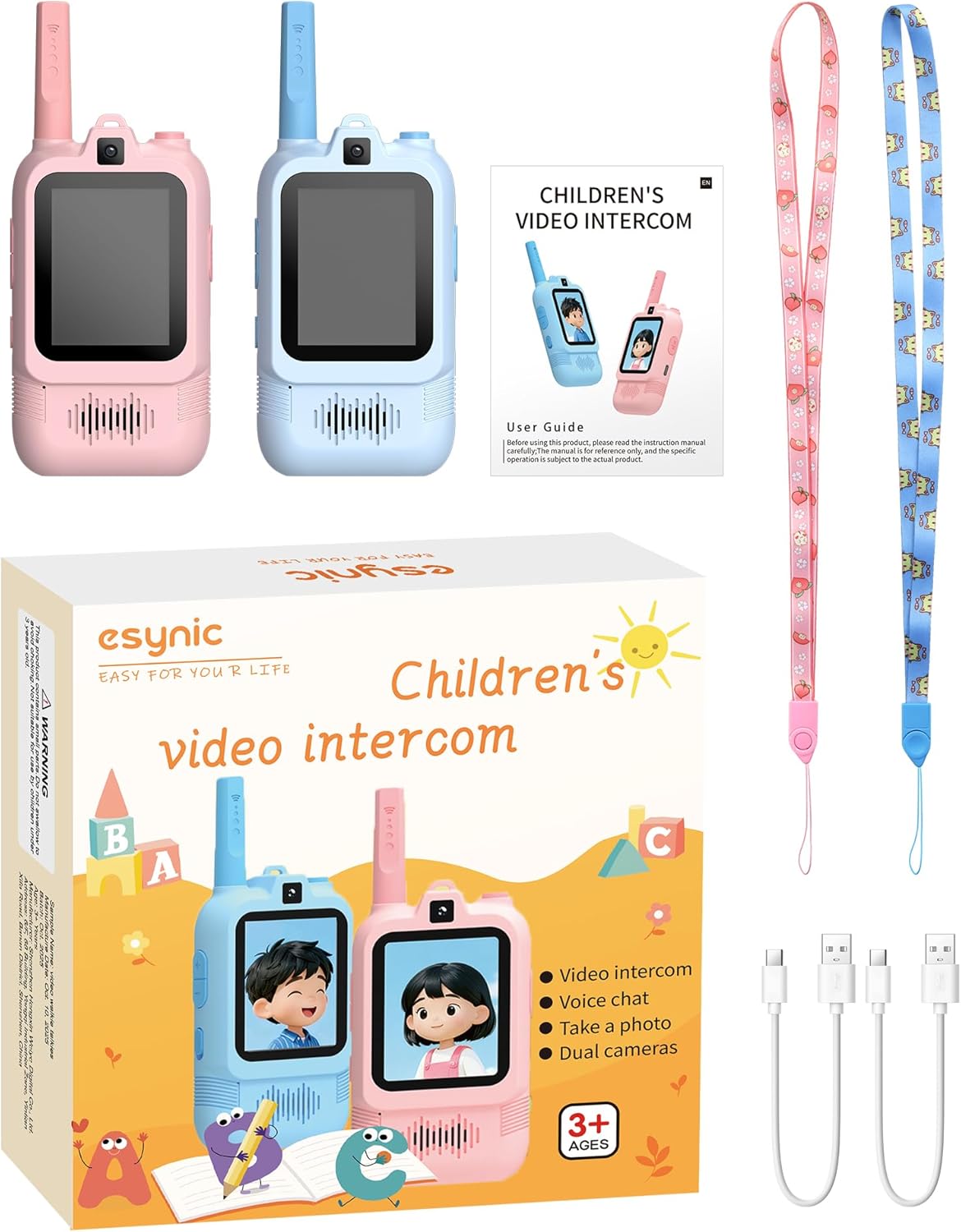
Image: Package contents including two walkie-talkies, charging cables, lanyards, and manual.
4. Product Overview
Familiarize yourself with the components and controls of your eSynic HK200 Video Walkie-Talkie:
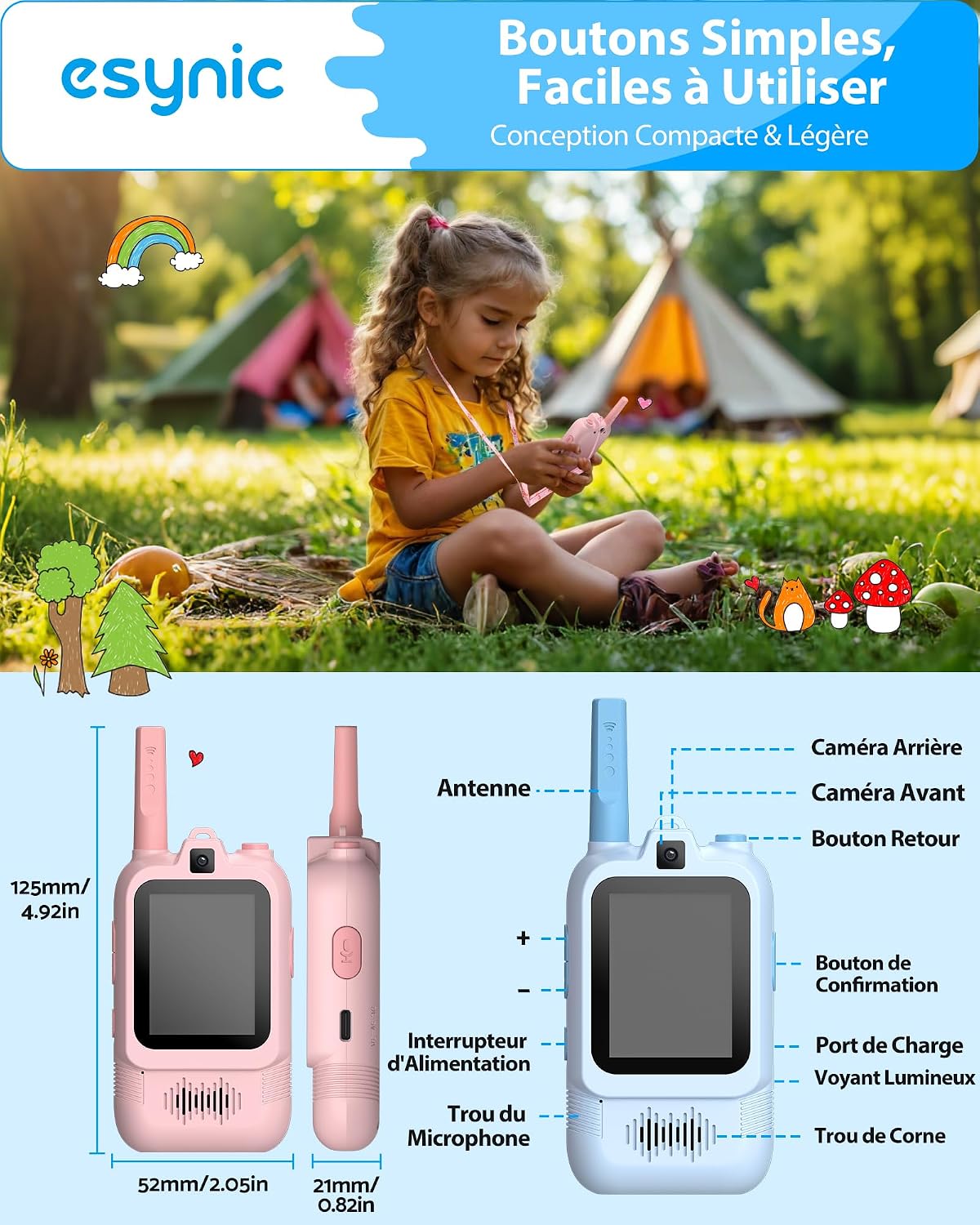
Image: Detailed diagram of the walkie-talkie's buttons and features.
- Antenna: For signal transmission and reception.
- Front Camera: For video calls and selfies.
- Rear Camera: For capturing photos of surroundings.
- Power Switch: To turn the device On/Off.
- Volume Buttons (+/-): To adjust speaker volume.
- Confirmation Button: Used for selection and confirming actions.
- Return Button: To go back to the previous screen or menu.
- Microphone Hole: For voice input during calls and messages.
- Charging Port (Type-C): For connecting the charging cable.
- Speaker Hole: For audio output.
5. Setup
5.1 Charging the Device
Before first use, fully charge both walkie-talkies.
- Connect the provided Type-C USB cable to the charging port on the walkie-talkie.
- Plug the other end of the USB cable into a compatible USB power adapter (not included) or a computer's USB port.
- The charging indicator light will illuminate. Once fully charged (approximately 4 hours for a full charge), the light may change color or turn off.

Image: Charging the walkie-talkie via its Type-C port.
5.2 Powering On/Off
- To Power On: Press and hold the Power Switch button until the screen lights up.
- To Power Off: Press and hold the Power Switch button until the screen turns off.
6. Operating Instructions
6.1 Making a Video Call
The eSynic HK200 allows for real-time, one-to-one video communication.
- Ensure both walkie-talkies are powered on and within range (up to 500m outdoors, 30-50m indoors).
- Press the dedicated Call Button (often labeled with a phone or video icon) to initiate a video call.
- The screen will display the live video feed from the other walkie-talkie.
- To end the call, press the Call Button again or the Return Button.

Image: Children engaging in a real-time video chat.
6.2 Taking Photos
Capture moments using the built-in cameras.
- Navigate to the camera mode using the menu or a dedicated button.
- To switch between the front and rear cameras, long-press the 'M' button (if available, refer to product diagram).
- Frame your shot on the screen.
- Press the Confirmation Button to take a photo. Photos are stored internally (up to 50 photos).

Image: Using the dual cameras to capture photos and apply effects.
6.3 Sending Voice Messages
For quick audio communication without video.
- While in communication mode, press and hold the Voice Message button (or a designated button for voice chat).
- Speak clearly into the microphone.
- Release the button to send the voice message.
6.4 Channel Lock
To maintain an uninterrupted connection, you can lock the communication channel.
- Refer to the on-screen menu for the 'Channel Lock' option.
- Select and activate this feature to prevent accidental channel changes.
6.5 Camera Effects
Add fun filters and frames to your photos.
- In camera mode, navigate through the available effects using the directional buttons.
- Select an effect using the Confirmation Button before taking a photo.
7. Maintenance
7.1 Cleaning
- Wipe the device with a soft, dry, lint-free cloth.
- Do not use abrasive cleaners, solvents, or chemical sprays.
7.2 Storage
- Store the walkie-talkies in a cool, dry place away from direct sunlight and extreme temperatures.
- If storing for an extended period, ensure the battery is partially charged (around 50%) and recharge it every few months to maintain battery health.
8. Troubleshooting
If you encounter any issues, please refer to the following common problems and solutions:
| Problem | Possible Cause | Solution |
|---|---|---|
| Device does not power on. | Battery is depleted. | Charge the device fully using the provided Type-C cable. |
| Poor video or audio quality. | Out of range, obstacles, or low battery. | Move closer to the other device. Ensure no major obstructions. Charge the battery. |
| Cannot connect to the other walkie-talkie. | Out of range, different channels, or interference. | Ensure both devices are on the same channel. Move closer. Restart both devices. |
| Screen is frozen or unresponsive. | Software glitch. | Press and hold the Power Switch for 10 seconds to force a restart. |
9. Specifications
- Model Number: HK200
- Brand: eSynic
- Special Feature: Video calls and dual camera
- Maximum Range: Up to 1500 feet (approx. 457 meters) outdoors; 30-50 meters indoors
- Battery: 600mAh rechargeable lithium battery (1 D-type battery equivalent, included)
- Charging: Type-C USB (5 Volts)
- Water Resistance Level: Not waterproof
- Number of Units: 2
- Compatible Devices: Other eSynic HK200 walkie-talkies

Image: Illustrating the communication range and clear video display.
10. Warranty and Support
eSynic products are manufactured to high-quality standards. For any questions, technical support, or warranty claims, please contact eSynic customer service through the retailer where the product was purchased. Please retain your proof of purchase for warranty purposes.