
1. Introduction
This manual provides essential information for the safe and effective operation of your Aspiron Steam Cleaner AS-CA019. Please read all instructions carefully before use and retain this manual for future reference.
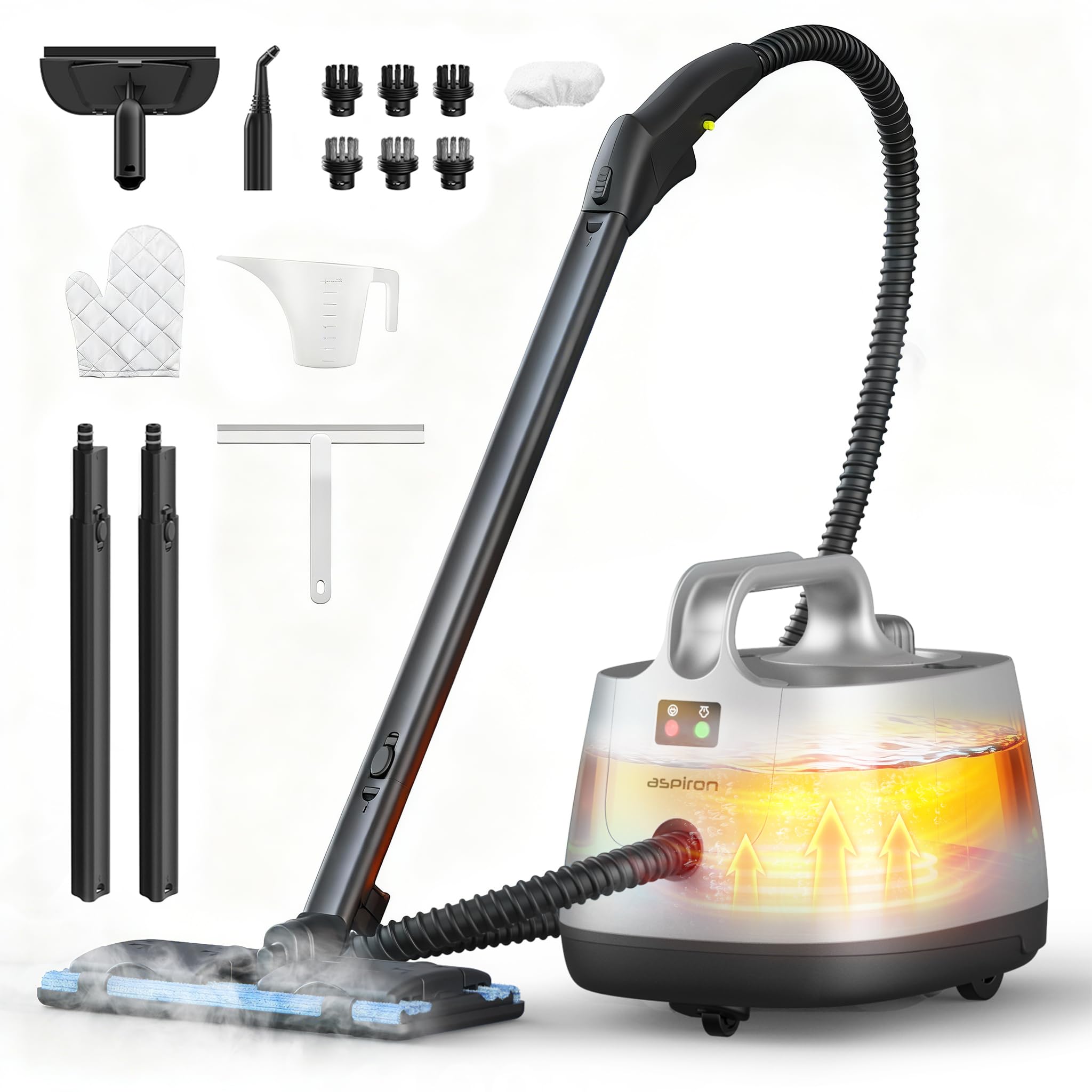
The Aspiron Steam Cleaner AS-CA019, a versatile cleaning device designed for various household tasks.
2. Safety Information
Always observe basic safety precautions when using electrical appliances to reduce the risk of fire, electric shock, or injury. This appliance generates high-temperature steam. Exercise extreme caution.
- Child Lock: The unit features a built-in child lock to prevent accidental steam release. Always engage the child lock when the appliance is not in use or when children are present.
- Pressure Release System: A highly sensitive temperature control system is integrated to release steam directly if boiler pressure becomes too high, ensuring safe operation.
- Do not direct steam at people, animals, or electrical appliances.
- Ensure the water tank cap is securely fastened before operation.
- Always unplug the appliance before filling, cleaning, or performing maintenance.

The steam cleaner features a 4 Bar Steam Pressure Indicator (green) and a Water Shortage Indicator (red) for operational safety. A child lock is also integrated.
3. Package Contents
Verify that all items listed below are included in your package:
- Steam Cleaner Main Unit
- Floor Brush
- Ironing Brush
- Glass Brush
- Nylon Round Brushes (3x)
- Stainless Steel Brushes (3x)
- Extension Tubes (2x)
- Big Nozzle
- Towel Floor Brush
- Ironing Towel
- Carpet Glider
- Gloves (Pair)
- Squeegee
- Measuring Cup
- Funnel
- Cleaning Wipe
- Storage Bag

A visual representation of the 21 versatile accessories included with your steam cleaner.
4. Setup
- Fill Water Tank: Ensure the unit is unplugged. Unscrew the water tank cap. Use the provided measuring cup and funnel to fill the 50.7oz (1.5L) water tank with clean tap water. Do not overfill. Securely replace the cap.
- Attach Accessories: Select the appropriate cleaning attachment for your task. Connect it firmly to the steam gun or extension tubes as needed.
- Power On: Plug the power cord into a grounded electrical outlet. The unit will begin heating. The power cord is 16ft (5M) long, providing an extensive reach.
- Heating Time: Allow 4-6 minutes for the unit to preheat. The steam ready indicator light will illuminate when the desired temperature of 293°F (145°C) and 4 bar (58 PSI) steam pressure is reached.

Carefully fill the water tank using the provided funnel.

The 16ft power cord allows for extensive cleaning coverage.
5. Operating Instructions
Once the unit is ready, you can begin cleaning. The large 50.7oz capacity provides up to 50 minutes of continuous steaming time.
- Release Steam: Press and hold the steam trigger on the handle to release steam. For continuous steam, some models may have a lock button; otherwise, maintain pressure on the trigger.
- Engage Child Lock: To prevent accidental steam release, slide the child lock switch to the locked position when not actively steaming or when pausing operation.
- Cleaning Surfaces:
- Floors & Carpets: Use the floor brush with extension tubes and the carpet glider for large areas.
- Kitchen Surfaces (e.g., Stoves): Attach the big nozzle or a round brush (nylon for general, stainless steel for tough grime) to target grease and grime.
- Grout & Cracks: Use a small round brush (nylon or stainless steel) with the big nozzle for concentrated steam.
- Windows & Glass: Attach the glass brush or squeegee for streak-free cleaning.
- Upholstery & Car Interiors: Use the ironing brush with an ironing towel or a round brush for refreshing fabrics and removing odors.
- Wallpaper Removal: The steam can assist in softening wallpaper adhesive for easier removal without chemicals.
- Towel Replacement: The floor brush is designed for easy towel replacement, allowing use of microfiber pads or regular cloths.

The red button indicates the child lock mechanism on the handle.

High-efficiency cleaning on hard floors using the floor brush attachment.

Steam effectively removes oil stains and baked-on grease from stove tops.

Targeted steam cleaning for grout lines and narrow crevices.

Using the squeegee attachment for cleaning glass surfaces.

Deep cleaning car upholstery with steam to remove dirt and odors.

The floor brush features an upgraded structure for easy towel replacement.
Product Demonstration Video
This video demonstrates the powerful cleaning capabilities of the Aspiron Steam Cleaner for various applications.
6. Maintenance
Regular maintenance ensures optimal performance and extends the lifespan of your steam cleaner.
- Empty Water Tank: After each use, unplug the unit and allow it to cool completely. Carefully unscrew the water tank cap and empty any remaining water.
- Clean Attachments: Wash brushes and cloths with warm, soapy water. Rinse thoroughly and allow them to air dry before storing.
- Descaling (Periodically): Depending on water hardness, mineral deposits may accumulate. Consult the full user manual for detailed descaling instructions.
- Storage: Store the steam cleaner and its accessories in a cool, dry place, away from direct sunlight and out of reach of children. The included storage bag can be used for organizing accessories.

The main unit provides convenient storage for some accessories.
7. Troubleshooting
If you encounter issues with your steam cleaner, refer to the following common problems and solutions:
| Problem | Possible Cause | Solution |
|---|---|---|
| No steam or low steam output | Water tank empty or low. Unit not heated sufficiently. Nozzle/attachment clogged. | Refill water tank. Allow 4-6 minutes for heating. Clean nozzle/attachment. |
| Water leaking from attachments | Attachment not securely connected. Condensation. | Ensure attachment is firmly in place. This is normal during initial steam release. |
| Unit not turning on | Not plugged in. Power outlet issue. | Check power cord connection. Test outlet with another appliance. |
| Water Shortage Indicator is red | Water level is too low. | Unplug the unit, allow to cool, then refill the water tank. |
If the problem persists after attempting these solutions, please contact customer support.
8. Specifications
| Feature | Specification |
|---|---|
| Brand | Aspiron |
| Model Number | AS-CA019 |
| Form Factor | Handheld |
| Color | Platinum |
| Maximum Temperature | 293 °F (145 °C) |
| Steam Pressure | 4 bar (58 PSI) |
| Water Tank Capacity | 50.7 oz (1.5 L) |
| Heating Time | 4-6 minutes |
| Continuous Steaming Time | Up to 50 minutes |
| Power Cord Length | 16 ft (5 M) |
| Accessories Included | 21 |
9. Warranty and Support
Aspiron offers comprehensive support for your steam cleaner.
- Service Agreement: Enjoy a 12-month standard service agreement, extendable by an additional 18 months.
- Customer Support: 24-hour support is available for any inquiries or assistance you may need.
- Returns: A 30-day free return policy is provided.
- VIP Service: Benefit from VIP service, including free replacement for eligible issues.
For support or to activate your privilege service, please contact us at: support@aspiron.co

Contact information and details about Aspiron's customer support and service benefits.


