
Introduction
Thank you for choosing the Istar Bluetooth Speaker. This portable wireless audio device combines Bluetooth streaming, FM radio, USB playback, and a built-in microphone for hands-free calls. It also features RGB lighting for an enhanced audio-visual experience. Please read this manual carefully to ensure proper use and optimal performance of your speaker.
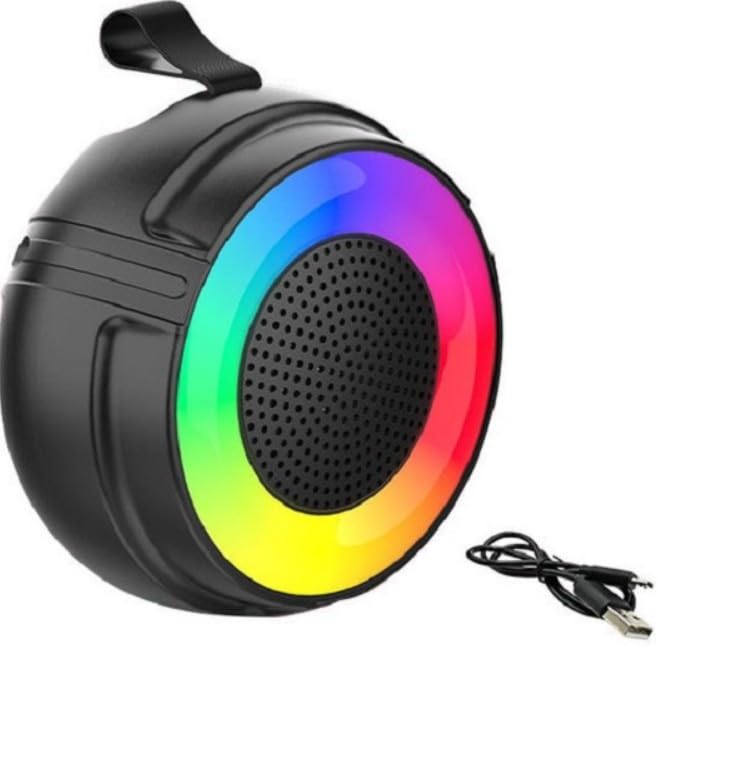
Image: Front view of the Istar Bluetooth Speaker, showcasing its compact design and RGB lighting elements.
Key Features:
- Versatile Connectivity: Bluetooth wireless streaming, FM radio, and USB input.
- Built-in Microphone: For hands-free calls and voice interactions.
- RGB Lighting: Dynamic lighting effects to complement your music.
- Portable Design: Rechargeable battery for on-the-go use.
- Multi-Function Controls: Easy switching between modes and playback options.
Setup Guide
1. Charging the Speaker
Before first use, fully charge the speaker. Connect the provided USB cable to the speaker's charging port and the other end to a USB power adapter (not included) or a computer's USB port. The charging indicator light will illuminate during charging and turn off when fully charged.
2. Powering On/Off
- To power on, press and hold the Power button until you hear an audible prompt.
- To power off, press and hold the Power button again until the speaker shuts down.
Operating Instructions
1. Bluetooth Mode
- Power on the speaker. It will automatically enter Bluetooth pairing mode, indicated by a flashing LED light.
- On your smartphone, tablet, or other Bluetooth-enabled device, enable Bluetooth and search for available devices.
- Select "Istar Speaker" (or similar name) from the list of devices.
- Once paired, the speaker will emit an audible confirmation, and the LED light will stop flashing.
- You can now play audio from your device through the speaker.
2. FM Radio Mode
- Press the Mode button to switch to FM Radio mode.
- Press and hold the Play/Pause button to automatically scan and save available FM stations.
- Use the Previous/Next buttons to navigate between saved stations.
3. USB Input Mode
- Insert a USB flash drive containing MP3 audio files into the USB port.
- The speaker will automatically switch to USB mode and begin playing music. If not, press the Mode button to select USB mode.
- Use the Play/Pause and Previous/Next buttons to control playback.
4. Hands-Free Calling
- When connected via Bluetooth, incoming calls will be announced through the speaker.
- Press the Play/Pause button to answer an incoming call.
- Press the Play/Pause button again to end the call.
- Press and hold the Play/Pause button to reject an incoming call.
5. RGB Lights Control
The speaker features integrated RGB lighting. Specific controls for the RGB lights may vary. Typically, a dedicated light button or a long press on a mode button can cycle through different light modes or turn them off/on. Refer to the physical buttons on your speaker for specific light control functions.
6. Volume Control
Adjust the volume using the Volume Up (+) and Volume Down (-) buttons on the speaker, or directly from your connected device.
Maintenance
- Cleaning: Use a soft, dry cloth to clean the speaker's exterior. Do not use abrasive cleaners or solvents.
- Storage: Store the speaker in a cool, dry place away from direct sunlight and extreme temperatures.
- Battery Care: To prolong battery life, avoid fully discharging the battery frequently. Charge the speaker regularly, even if not in use for extended periods.
- Water Exposure: This speaker is not waterproof. Avoid exposure to water or high humidity.
Troubleshooting
| Problem | Solution |
|---|---|
| Speaker does not power on. | Ensure the battery is charged. Connect the speaker to a power source using the USB cable. |
| No sound from the speaker. | Check the volume level on both the speaker and the connected device. Ensure the speaker is correctly paired via Bluetooth or the USB drive is properly inserted. |
| Bluetooth pairing fails. | Ensure the speaker is in Bluetooth pairing mode (flashing LED). Turn off and on Bluetooth on your device. Move the speaker closer to your device. Clear previous Bluetooth connections on your device. |
| FM radio reception is poor. | Ensure the speaker is in an open area, away from obstructions or interference. Re-scan for stations. |
| Microphone not working during calls. | Ensure the speaker is connected via Bluetooth and the call is routed through the speaker. Check your phone's audio output settings. |
Specifications
- Brand: Istar
- Model: Istar-bt-001
- Connectivity Technology: Bluetooth, FM Radio, USB
- Special Features: RGB Lights, Built-in Microphone, Rechargeable Battery, Hands-free Calls
- Color: Black
- Product Dimensions (L x W x H): 30L x 20W x 30H centimetres
- Item Weight: 500 Grams
- Power Source: Battery Powered
- Compatible Devices: Laptops, PC, Smartphones, Tablets
- Audio Output Mode: Stereo
Warranty Information
This Istar Bluetooth Speaker comes with a Limited (18 months) warranty from the date of purchase. This warranty covers manufacturing defects. It does not cover damage caused by misuse, accidents, unauthorized modifications, or normal wear and tear. Please retain your proof of purchase for warranty claims.
Customer Support
If you encounter any issues not covered in this manual or require further assistance, please contact your retailer or the manufacturer's customer support. Refer to your purchase documentation for specific contact details.
For more information, you may visit the manufacturer's website (if available, check product packaging or purchase details).