
Introduction
This manual provides detailed instructions for the installation, operation, maintenance, and troubleshooting of your Eonon UX7SK2J-PRO-MAX 11.8-inch Android Display Audio System and the Eonon A100 720P HD Drive Recorder. Please read this manual thoroughly before use to ensure proper functionality and safety.
Product Overview: UX7SK2J-PRO-MAX Display Audio System
The UX7SK2J-PRO-MAX is an advanced 11.8-inch Android Display Audio system designed for in-car entertainment and navigation. It features a powerful processor, high-resolution QLED display, and extensive connectivity options.
Key Features:
- High-Performance Processor: Equipped with a Qualcomm Snapdragon 6225-AD processor (6nm), offering improved CPU performance by 15% and GPU performance by 13% compared to the previous model.
- Android 13 Operating System: Provides a modern and intuitive user experience.
- Memory and Storage: Features 8GB LPDDR4 RAM for smooth multitasking and 256GB ROM for ample storage of media files.
- Stunning 2K QLED Display: An 11.8-inch 2K QLED screen with 1200x2000 resolution, 2.5D full-touch capability, and a 178° viewing angle for vibrant visuals and 2K video playback.
- Advanced Connectivity: Supports wireless and wired CarPlay, Android Auto, and screen mirroring. Integrated Wi-Fi (WiFi6 ready) and a 4G module for internet access.
- Bluetooth 5.1: For high-quality audio streaming and hands-free calling.
- Enhanced UI: New user interface with split-screen functionality (3:7 or 7:3 ratio) for simultaneous use of navigation and other applications, a new dropdown menu, and vertical volume bar.
- Expandability: Compatible with AHD backup cameras (up to 1920x1080), external TV tuners (EONON V0051), OBD2 diagnostic tools (EONON V0056), and the EONON A100 drive recorder. Features 3 USB ports for various connections.

Figure 1: Eonon UX7SK2J-PRO-MAX Display Audio System. This image shows the main unit installed in a vehicle, displaying a map and music player on its large 11.8-inch QLED screen.
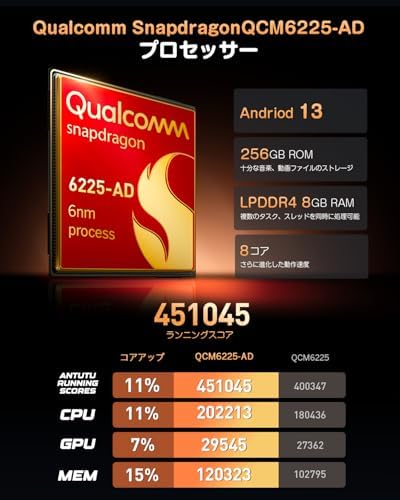
Figure 2: Processor Specifications. This image details the Qualcomm Snapdragon 6225-AD processor, highlighting its Android 13 OS, memory, storage, and core components.

Figure 3: Display and UI Features. This image illustrates the 11.8-inch 2K QLED display specifications and the new user interface with split-screen functionality.
Product Overview: A100 Drive Recorder
The Eonon A100 is a dedicated 720P HD drive recorder designed to integrate seamlessly with Eonon Android navigation systems, providing reliable video recording for your journeys.
Key Features:
- Wide-Angle Camera: 120° wide-angle lens captures a broad view of the road, covering vehicles and pedestrians.
- 720P HD Recording: Records clear video at 1280x720 resolution, ensuring important details like license plates and road signs are visible.
- Loop Recording: Automatically overwrites older files when the memory card is full, ensuring continuous recording.
- File Lock Protection: Important video files can be locked to prevent accidental overwriting.
- Automatic Recording: Starts recording automatically when the connected Eonon navigation unit powers on.
- Adjustable Lens: Features a 360° adjustable lens angle for optimal positioning, independent of the windshield angle.
- Still Image Capture: Allows capturing still images with a tap of the recording button.

Figure 4: Eonon A100 Drive Recorder. This image highlights the key features of the A100, including its wide-angle lens, HD recording, and compatibility with Android navigation systems.
Setup and Installation
1. UX7SK2J-PRO-MAX Main Unit Installation
- Power Connection: Connect the main unit to your vehicle's power supply according to the wiring diagram provided in the separate installation guide. Ensure all connections are secure to prevent power interruptions.
- Antenna Connection: Connect the GPS antenna and Wi-Fi/4G antennas to their respective ports on the main unit. Position the antennas in a location with clear signal reception.
- USB Connections: Utilize the three USB ports for connecting external memory devices, or for wired CarPlay/Android Auto/Mirroring functionality.
- Optional Accessories:
- AHD Backup Camera: Connect a compatible AHD backup camera (up to 1920x1080 resolution). The system will automatically switch to the camera view when reverse gear is engaged. (EONON A0119JA0127 sold separately).
- Original Backup Camera: If using an original vehicle backup camera, a separate conversion cable may be required.
- TV Tuner: Connect an external TV tuner (e.g., EONON V0051, sold separately) for in-car television viewing.
- OBD2 Adapter: Connect an OBD2 adapter (e.g., EONON V0056, sold separately) for vehicle diagnostics.
- Steering Wheel Control (SWC):
- The unit supports analog SWC signals.
- For digital SWC signals, a separate conversion cable is required.
- Configure SWC functions in the system settings after installation.
- SIM Card Insertion: For 4G connectivity, insert a compatible SIM card into the designated slot. Ensure the SIM card supports the listed frequency bands (GSM 850/900/1800, WCDMA B1/B5/B6/B8/B19, TDD-LTE B38/B39/B40/B41, FDD-LTE B1/B3/B5/B7/B8/B9/B18/B19/B20/B26/B28). Note that compatibility may vary by region and carrier.
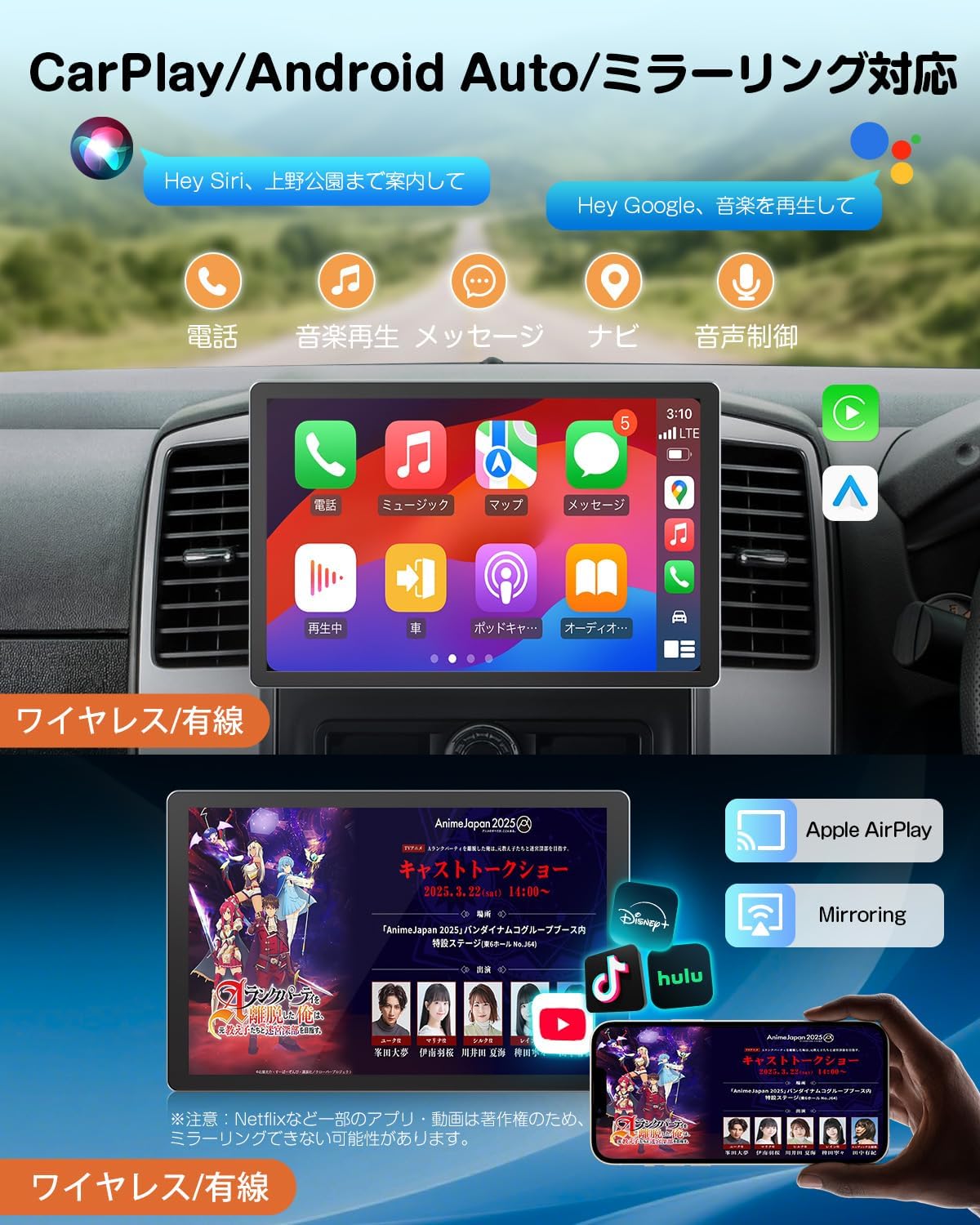
Figure 5: Connectivity Options. This image displays the CarPlay, Android Auto, and Mirroring interfaces, showing how smartphones can integrate with the system.

Figure 6: Wireless Connectivity. This image illustrates the Wi-Fi and 4G capabilities, including supported apps and SIM card specifications.

Figure 7: Expansion and Accessory Connections. This image details the various ports and compatible accessories for expanding the system's functionality.

Figure 8: Display Angle Adjustment and Dimensions. This image illustrates how to adjust the display angle and provides key dimensions for installation.
2. A100 Drive Recorder Installation
- Mounting: Securely mount the A100 drive recorder to your windshield using the provided adhesive or suction cup mount. Ensure it has a clear view of the road and does not obstruct your driving vision.
- Angle Adjustment: Adjust the lens angle up to 360° to capture the desired field of view.
- Connection to Main Unit: Connect the A100 to a compatible Eonon Android navigation unit (e.g., UX7SK2J-PRO-MAX, GA2190N, GA2197, GA2198J) via USB.
- Micro SD Card: Insert a Class 10 or higher micro SD card (8GB-32GB, sold separately) into the A100. This card is essential for recording video footage.
Operating Instructions
1. UX7SK2J-PRO-MAX Basic Operation
- Power On/Off: The unit typically powers on and off with the vehicle's ignition. A long press on the power button (if available) may manually turn it off.
- Touch Screen: Navigate the interface by tapping, swiping, and pinching on the 11.8-inch touch screen.
- Home Screen: The redesigned UI allows for split-screen display (3:7 or 7:3 ratio) on the home screen, enabling simultaneous use of navigation and other apps.
- Media Playback: Access music, videos, and radio through dedicated apps. A mini-widget for the media player is available on the home screen. The system supports lyrics and music list display with one-touch switching.
- Bluetooth:
- Pair your smartphone via Bluetooth 5.1 for music playback and hands-free calling.
- Ensure the included "camera cable" is connected for optimal microphone performance during calls.
- Note: Bluetooth functionality is limited to smartphones and OBD adapters (EONON V0056). It does not support Bluetooth headphones, speakers, remotes, or tethering.
- CarPlay / Android Auto / Mirroring:
- Connect your iPhone (iPhone 5 or later) for CarPlay or Android smartphone (Android 6.0 or later for wired, Android 11.0 or specific Google/Samsung models for wireless) for Android Auto.
- Use voice assistants (Siri, Google Assistant) for navigation, calls, and music.
- Screen mirroring allows displaying your phone's screen on the unit.
- Internet Connectivity:
- Connect to Wi-Fi hotspots (e.g., from your smartphone) or use a directly inserted 4G SIM card for internet access.
- Download and use various applications like TikTok, YouTube, Google Maps, etc.
- Split-Window Function: Display two applications simultaneously on a 5:5 split screen, such as navigation and a media player, to reduce distractions while driving. Note: This function may not be supported by all services like CarPlay or Bluetooth.
2. A100 Drive Recorder Operation
- Automatic Recording: Once connected to a compatible Eonon Android navigation unit and the unit is powered on, the A100 will automatically begin loop recording.
- Loop Recording: The system continuously records video. When the micro SD card is full, the oldest files will be overwritten.
- File Lock: Tap the recording button on the screen to lock the current recording, preventing it from being overwritten. This is useful for saving important event footage.
- Still Image Capture: Tap the recording button to capture a still image from the live view.
- Viewing Footage: Access recorded footage directly through the Eonon navigation unit's display.
Maintenance
- Software Updates (OTA): The UX7SK2J-PRO-MAX supports Over-The-Air (OTA) updates. Regularly check for and install updates to receive bug fixes, security enhancements, and new features based on customer feedback (e.g., lock screen password, widget placement, multiple sleep time options).
- Screen Cleaning: Use a soft, lint-free cloth to gently wipe the display screen. For stubborn smudges, slightly dampen the cloth with water or a screen-safe cleaner. Avoid harsh chemicals.
- Micro SD Card (A100): Periodically format the micro SD card in the A100 drive recorder to maintain optimal performance and prevent data corruption. Back up any important files before formatting.
- General Cleaning: Keep the unit and its accessories free from dust and debris. Use a soft brush or compressed air for hard-to-reach areas.
Troubleshooting
UX7SK2J-PRO-MAX Issues:
- No Power:
- Check all power connections to ensure they are securely attached.
- Verify the vehicle's fuse for the audio system is intact.
- No Sound / Distorted Sound:
- Check speaker connections.
- Ensure volume is not muted or set too low.
- If using Bluetooth for calls, ensure the "camera cable" is connected for the microphone.
- Bluetooth Connection Issues:
- Ensure Bluetooth is enabled on both the unit and your smartphone.
- Delete previous pairings and try re-pairing.
- Restart both devices.
- CarPlay / Android Auto Not Connecting:
- Ensure your smartphone is compatible and has the latest version of the respective app installed.
- For wireless Android Auto, ensure your phone supports 5GHz Wi-Fi.
- Try a different USB cable for wired connections.
- Poor GPS Signal:
- Ensure the GPS antenna is installed in a location with a clear view of the sky.
- Check the antenna connection to the main unit.
- Slow Performance / Freezing:
- Close unnecessary background applications.
- Perform a system restart.
- Check for and install any available OTA software updates.
A100 Drive Recorder Issues:
- Not Recording:
- Ensure a compatible micro SD card (Class 10, 8GB-32GB) is inserted correctly.
- Check if the micro SD card is full; format it if necessary (back up important files first).
- Verify the A100 is properly connected to the Eonon navigation unit.
- Poor Video Quality:
- Clean the camera lens.
- Ensure the lens angle is adjusted correctly and not obstructed.
- Check if the micro SD card is faulty; try a different card.
Specifications
UX7SK2J-PRO-MAX Display Audio System:
| Feature | Specification |
|---|---|
| Brand | Eonon |
| Model | UX7SK2J-PRO-MAX |
| Processor | Qualcomm Snapdragon 6225-AD (6nm, 8-core) |
| Operating System | Android 13 |
| RAM | 8GB LPDDR4 |
| ROM | 256GB |
| GPU | Adreno 610 |
| DSP | Hexagon 686 |
| Display Size | 11.8 inches |
| Display Type | 2K QLED, 2.5D Full-Touch |
| Resolution | 1200 x 2000 pixels |
| Viewing Angle | 178° |
| Video Playback | Up to 2K resolution |
| CarPlay / Android Auto | Wireless & Wired Support |
| Wi-Fi | WiFi6 Ready, 2.4GHz/5GHz |
| 4G Module | Built-in (SIM card required) |
| 4G Frequency Bands | GSM 850/900/1800, WCDMA B1/B5/B6/B8/B19, TDD-LTE B38/B39/B40/B41, FDD-LTE B1/B3/B5/B7/B8/B9/B18/B19/B20/B26/B28 |
| Bluetooth | Bluetooth 5.1 (Qualcomm WCN3988 module) |
| Radio Tuner | ST TDA7708 (FM/AM/Wide FM) |
| USB Ports | 3 x USB ports |
| Backup Camera Input | AHD (up to 1920x1080) |
| Steering Wheel Control | Analog SWC supported (Digital SWC requires adapter) |
| Control Method | Touch, Voice |
| Compatible Vehicle Type | Passenger Car |
A100 Drive Recorder:
| Feature | Specification |
|---|---|
| Brand | Eonon |
| Model | A100 |
| Video Resolution | 1280 x 720 (720P HD) |
| Lens Angle | 120° Wide-Angle |
| Lens Adjustment | 360° Adjustable |
| Recording Mode | Loop Recording |
| Memory Card Support | Micro SD Card (8GB-32GB, Class 10 or higher, sold separately) |
| Compatibility | Eonon Android Navigation Units (e.g., UX7SK2J-PRO-MAX, GA2190N, GA2197, GA2198J) |
Warranty and Support
For warranty information, technical support, or service inquiries, please refer to the warranty card included with your product or visit the official Eonon website. You can also contact Eonon customer service directly for assistance.
Eonon Official Store: Eonon Store on Amazon.co.jp


