
Product Overview
The GRIFEMA GB1056 is a versatile 2-in-1 device functioning as both a smartphone tripod and a selfie stick. Constructed from durable aluminum alloy, it features an innovative auto-deploying base, 7 adjustable height levels extending up to 176 cm (69 inches), a 360-degree rotating and 225-degree tilting phone holder, and a detachable Bluetooth remote control. This product is designed for capturing stable photos and videos with various devices, including smartphones, digital cameras, GoPros, and webcams.

Image: The GRIFEMA GB1056 in both extended tripod and compact selfie stick configurations, highlighting its dual functionality.
What's in the Box
- GRIFEMA GB1056 Tripod & Selfie Stick
- Detachable Bluetooth Remote Control
Setup Instructions
1. Deploying the Tripod Base
To use the device as a tripod, simply place the base on a flat surface. The reinforced legs will automatically deploy and spread out, providing a stable foundation. No manual unfolding of the legs is required.

Image: Close-up of the GRIFEMA GB1056 tripod base, illustrating the automatic deployment mechanism and non-slip silicone tips.
2. Extending the Pole
Gently pull the top section of the pole upwards to extend it. The pole features 7 expandable sections, allowing you to adjust the height from its compact form to a maximum of 176 cm (69 inches). Ensure each section is securely locked in place for stability.

Image: The GRIFEMA GB1056 fully extended, demonstrating its maximum height and multiple sections.
3. Attaching Your Device
- For Smartphones: Open the flexible phone clip and securely place your smartphone (compatible with widths from 6 cm to 9.5 cm). The holder can be rotated 360 degrees for horizontal or vertical orientation and tilted 225 degrees for optimal angles.
- For Cameras/Other Devices: The phone holder is detachable. Remove it to reveal a universal 1/4" screw mount. This allows direct attachment of digital cameras, GoPros, webcams, or ring lights.

Image: The universal phone holder, showing its adjustable width and compatibility with various smartphone sizes.

Image: Close-up of the 1/4" standard screw mount, indicating compatibility with cameras and other accessories.
4. Pairing the Bluetooth Remote Control
- Locate the detachable Bluetooth remote control, usually integrated into the main body of the stick.
- Turn on the remote control (refer to the remote's specific power button if applicable).
- On your smartphone, go to Bluetooth settings and search for available devices.
- Select "GRIFEMA" or a similar device name to pair. Once paired, the remote is ready for use.
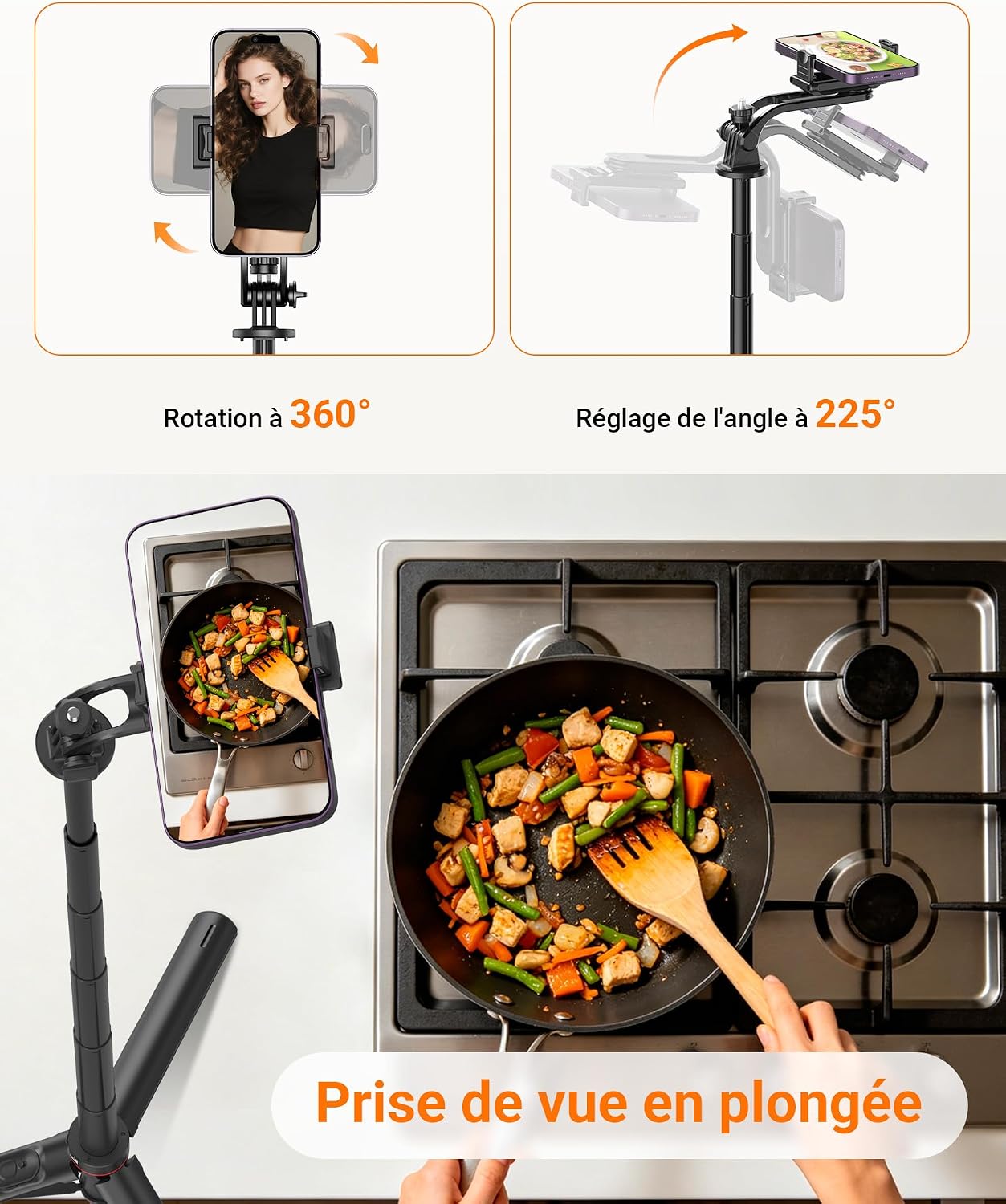
Image: The detachable Bluetooth remote control, shown in hand and integrated into the tripod body.
Operating Instructions
Using as a Tripod
With the base deployed and the pole extended to your desired height, position the tripod on a stable surface. Adjust the phone holder's angle and rotation to frame your shot. Use the Bluetooth remote for hands-free photo or video capture.
Using as a Selfie Stick
Collapse the tripod legs into the stick for handheld use. Extend the pole to your preferred length. Hold the stick and use the Bluetooth remote to capture selfies or group photos from a distance.
Adjusting Angles
The smartphone holder offers 360-degree rotation and 225-degree tilt. Loosen the adjustment knob slightly, set your desired angle (portrait, landscape, aerial, or low-angle shots), and then tighten the knob to secure the position.

Image: Illustration of the 360-degree rotation and 225-degree tilt capabilities of the phone holder, allowing for diverse shooting angles.
Using the Bluetooth Remote
Once paired, press the button on the remote control to trigger your smartphone's camera shutter. The remote works up to 10 meters (33 feet) away, enabling convenient hands-free operation for photos, videos, and time-lapses.
Maintenance
Cleaning
Wipe the device with a soft, dry cloth. For stubborn dirt, a slightly damp cloth can be used, followed by immediate drying. Avoid using harsh chemicals or abrasive cleaners.
Storage
When not in use, collapse the pole and fold the tripod legs. Store the device in a cool, dry place away from direct sunlight and extreme temperatures. Ensure the Bluetooth remote is securely placed in its designated slot.
Troubleshooting
Remote Control Not Connecting
- Ensure the remote control is powered on.
- Check that Bluetooth is enabled on your smartphone.
- Make sure the remote is within the 10-meter operating range.
- If previously paired, try unpairing and re-pairing the remote in your phone's Bluetooth settings.
- Check the remote's battery.
Tripod Instability
- Ensure the tripod is placed on a flat, level surface.
- Verify that all pole sections are fully extended and securely locked.
- Do not overload the device beyond its recommended weight capacity (refer to specifications).
- Check that the smartphone or camera is securely fastened in its holder.
Specifications
| Feature | Detail |
|---|---|
| Brand | GRIFEMA |
| Model Name | GB1056 |
| Color | Black |
| Material | Aluminum, Plastic |
| Compatible Devices | Camera, Smartphone (iOS/Android), GoPro, Webcam, Ring Light |
| Special Features | Foldable, Lightweight, Remote Control, Auto-Deploying Base |
| Maximum Height | 176 Centimeters (69 inches) |
| Minimum Height | Approximately 34.5 Centimeters (13.5 inches) when folded |
| Tripod Head Type | Rotary Head (360° rotation, 225° tilt) |
| Phone Clip Width | 6 - 9.5 cm (2.36 - 3.74 inches) |
| Remote Control Range | Up to 10 meters (33 feet) |
| Weight | Approximately 429g - 505g (depending on configuration) |
| Country of Origin | Spain |
Warranty Information
The GRIFEMA GB1056 Tripod & Selfie Stick comes with a 1-year manufacturer's warranty. This warranty covers defects in materials and workmanship under normal use. Please retain your proof of purchase for warranty claims. For specific terms and conditions, refer to the warranty documentation included with your product or contact GRIFEMA customer support.
Customer Support
For any questions, technical assistance, or warranty inquiries regarding your GRIFEMA GB1056, please visit the official GRIFEMA website or contact their customer service department. Contact details can typically be found on the product packaging or the brand's official online presence.
