
1. Important Safety Information
Please read this entire manual carefully before assembling and operating your CHAOKE Walking Pad Treadmill. Keep this manual for future reference. Failure to follow these instructions could result in injury or damage to the product.
- Ensure the treadmill is placed on a flat, stable surface.
- Keep children and pets away from the treadmill during operation.
- Do not operate the treadmill if it is damaged or malfunctioning.
- Wear appropriate athletic footwear during use.
- Maximum user weight capacity is 150 kg.
- Always consult a physician before starting any new exercise program.
2. Product Overview
The CHAOKE Walking Pad is a versatile 4-in-1 treadmill designed for various fitness levels and environments. It features a manual 9% incline, a powerful 2.75 HP silent motor, and a compact design for easy storage.

Image: The CHAOKE Walking Pad Treadmill, showcasing its sleek design and compact form factor suitable for home use.
3. Setup and Assembly
Your CHAOKE Walking Pad Treadmill comes largely pre-assembled. Follow these steps for initial setup:
- Unpacking: Carefully remove the treadmill from its packaging. Retain packaging for potential future transport or returns.
- Placement: Place the treadmill on a firm, level surface, ensuring adequate space around it for safe operation.
- Power Connection: Connect the power cord to the treadmill and then to a grounded electrical outlet.
- Initial Check: Before first use, ensure all components are securely in place and there are no visible damages.

Image: Demonstrates the compact design and integrated wheels, allowing the treadmill to be easily moved and stored vertically or under furniture like a bed or sofa.
4. Operating Instructions
4.1 Powering On/Off
Press the power button located on the front panel to turn the treadmill on or off. The LED display will illuminate upon power-on.
4.2 Using the Remote Control
The magnetic remote control allows for convenient adjustment of speed and settings during your workout.

Image: The magnetic remote control and the LED display, which shows real-time data such as calories, speed, distance, and time.
4.3 LED Display
The integrated LED screen displays essential workout data:
- Time: Duration of your workout.
- Speed: Current speed in km/h.
- Distance: Total distance covered.
- Calories: Estimated calories burned.
- Heart Rate: (If applicable, may require external sensor or specific model feature not detailed in provided data).
4.4 Manual Incline Adjustment
The treadmill features a manual 9% incline. To adjust, lift the rear of the treadmill and engage the incline support mechanism. Ensure it is securely locked in place before use. This incline can increase workout efficiency by up to 50%.
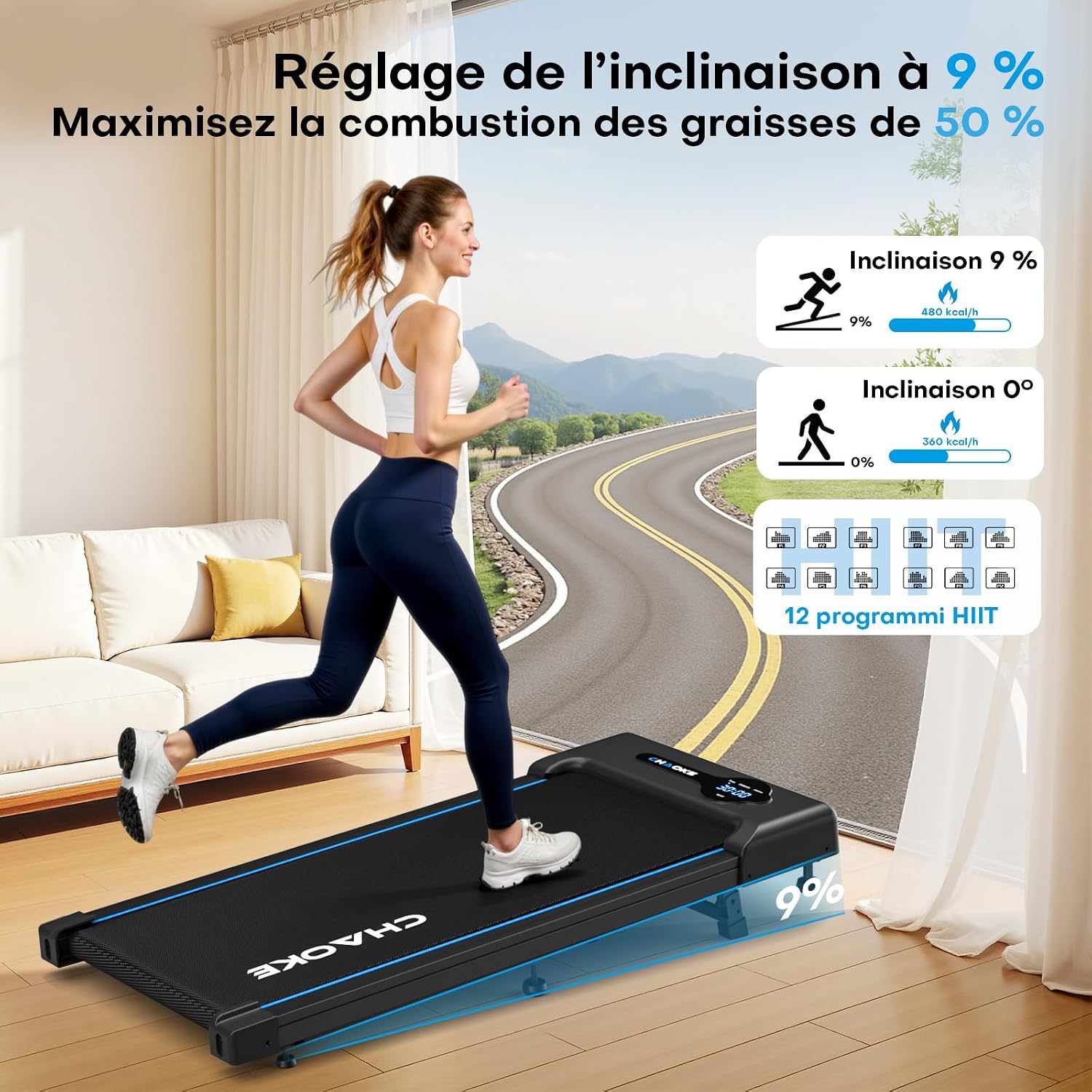
Image: Illustrates the manual 9% incline feature and its benefit in increasing calorie expenditure compared to a flat surface, alongside the 12 integrated HIIT programs.
4.5 4-in-1 Operating Modes
The CHAOKE Walking Pad offers four distinct modes to suit your exercise needs:
- Under Desk Mode: Speed range 2.0–3.5 km/h. Ideal for light activity while working.
- Walking Mode: Speed range 4.0–5.5 km/h. For brisk walking or incline training.
- Jogging Mode: Speed range 5.5–7.5 km/h. For moderate intensity jogging.
- Running Mode: Speed range 8.0–10.0 km/h. For higher intensity running workouts.

Image: Displays the four operating modes (Under Desk, Walking, Jogging, Running) with their respective speed ranges and a visual representation of the treadmill's dimensions (95cm x 38cm running surface).
4.6 Preset HIIT Programs
Utilize the 12 integrated HIIT programs to diversify your workouts and optimize fat burning, cardiovascular health, and endurance. Refer to the remote control or display for program selection.
4.7 Manual and Countdown Modes
- Manual Mode: Allows you to freely control speed and incline.
- Countdown Mode: Set a target for time (8 to 99 minutes), distance, or calories. The system will count down and stop automatically when the target is reached.
5. Maintenance
Regular maintenance ensures the longevity and optimal performance of your treadmill.
5.1 Cleaning
Wipe down the treadmill after each use with a damp cloth to remove sweat and dust. Do not use abrasive cleaners or solvents.
5.2 Belt Lubrication
Lubricate the running belt regularly to reduce friction and extend its lifespan. The frequency depends on usage:
| Usage Frequency | Maintenance Frequency |
|---|---|
| 3 hours/week | Every 2 months |
| 4-7 hours/week | Every 1 month |
| > 8 hours/week | Every 2 weeks |

Image: Detailed visual guide on how to lubricate the running belt and the new design feature that prevents belt deviation.
5.3 Belt Adjustment
If the running belt becomes misaligned or too loose/tight, refer to the detailed instructions in the full user manual for adjustment procedures. Proper belt tension and alignment are crucial for safe and efficient operation.
6. Troubleshooting
If you encounter any issues with your CHAOKE Walking Pad, refer to the following common problems and solutions:
- Treadmill not powering on: Check if the power cord is securely plugged into both the treadmill and the wall outlet. Ensure the power switch is in the 'ON' position.
- Belt not moving: Ensure the safety key (if applicable) is correctly inserted. Check if the motor is running but the belt is stationary, which might indicate a belt tension issue.
- Unusual noise during operation: This could be due to a loose component, lack of lubrication, or belt misalignment. Refer to the maintenance section.
- Inaccurate display readings: Ensure all connections are secure. If the issue persists, contact customer support.
For more complex issues, please contact CHAOKE customer support.
7. Specifications
Key technical specifications for the CHAOKE Walking Pad Treadmill:
| Feature | Specification |
|---|---|
| Brand | CHAOKE |
| Model | B0FP519DMT |
| Color | Black-Blue |
| Product Dimensions (L x W x H) | 112 x 50 x 11.5 cm |
| Product Weight | 15 kg |
| Material | Acrylonitrile Butadiene Styrene (ABS) |
| Motor Power | 2.75 Horsepower (HP) |
| Maximum Speed | 10 km/h |
| Maximum Incline | 9% (Manual) |
| Maximum User Weight | 150 kg |
| Number of Programs | 12 HIIT Programs |
| Display Metrics | Time, Speed, Distance, Calories, Heart Rate (if applicable) |
| Power Source | Electric Cable |
| Assembly Required | No |
| Special Features | Compact Design, Manual Incline, Remote Control, LED Screen, 5-layer Anti-slip Running Belt, 6 Anti-slip Cushions, 10 Integrated Shock Absorbers |

Image: Detailed view of the 2.75 HP brushless motor and a comparison table highlighting CHAOKE's superior specifications in power, noise level, capacity, incline, speed, and cushioning system.

Image: Illustrates the advanced 5-layer anti-shock cushioning system, including 6 anti-slip cushions and 10 integrated shock absorbers, designed to protect joints and support up to 150 kg.
8. Warranty and Support
CHAOKE is committed to product quality and excellent after-sales service.
- Warranty: Your CHAOKE Walking Pad Treadmill comes with a 5-year warranty.
- Customer Support: We offer multilingual support (English, French, German, Italian, and Spanish). Our customer service team is available via email or online and will respond to your inquiries within 24 hours to resolve your request quickly.

Image: Highlights CHAOKE's commitment to customer support, offering 24/7 online assistance and a 5-year maintenance service.

