
1. Introduction
Thank you for choosing the GRIFEMA GB1057-1 Selfie Stick Tripod with Fill Lights. This versatile device combines a selfie stick, a stable tripod, and integrated fill lights to enhance your photography and videography experience. It is designed for use with smartphones, offering adjustable height, multi-angle shooting capabilities, and a detachable Bluetooth remote control for convenient operation.
Please read this manual thoroughly before using the product to ensure proper setup, operation, and maintenance. Keep this manual for future reference.
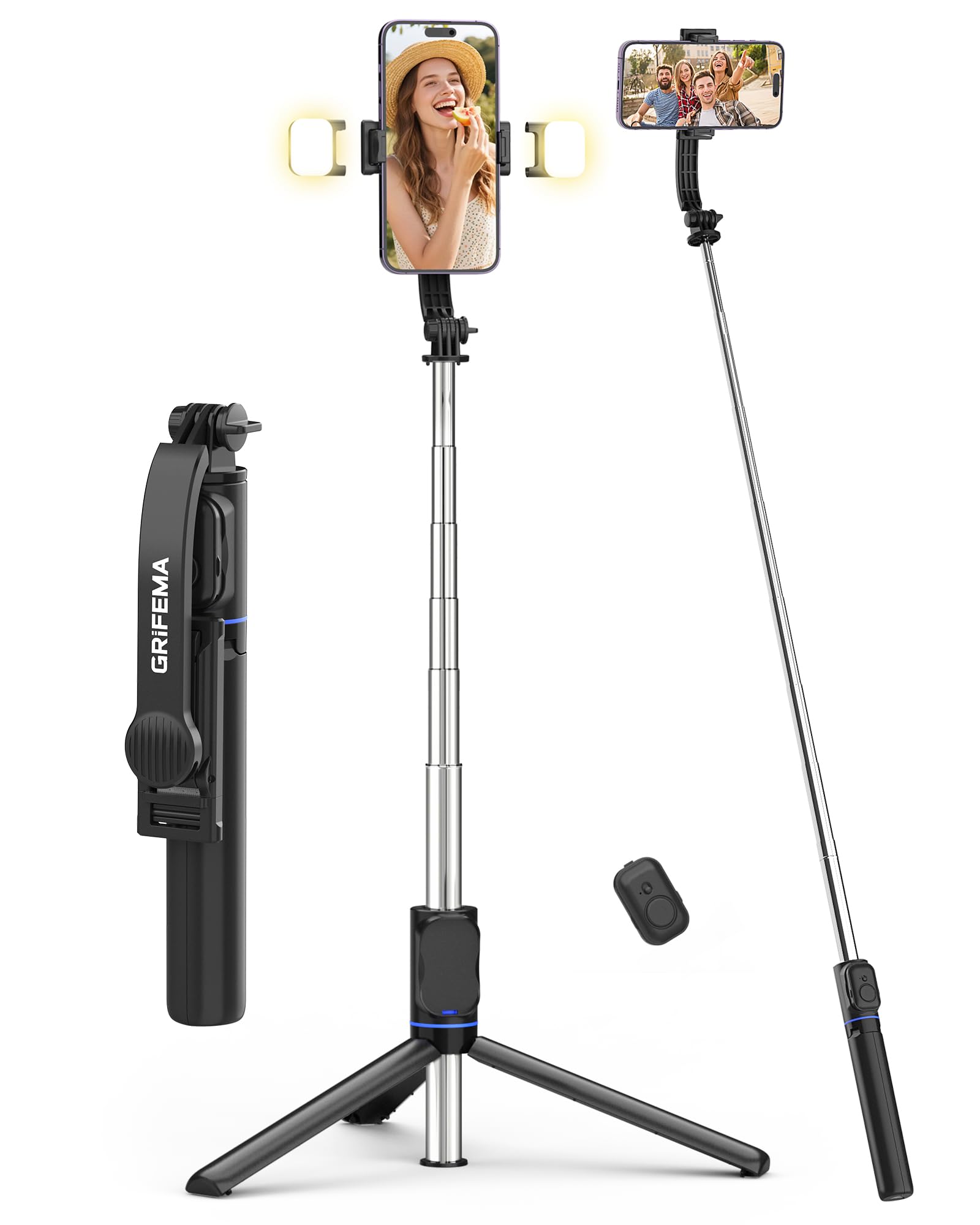
Image 1: GRIFEMA GB1057-1 Selfie Stick Tripod with Fill Lights. This image shows the product in its extended form, highlighting the phone clamp, fill lights, and extendable pole.
2. Product Components
The GRIFEMA GB1057-1 package includes the following components:
- Selfie Stick Tripod Body: The main unit, featuring an extendable pole and integrated tripod legs.
- Phone Clamp: Adjustable clamp to securely hold your smartphone.
- Detachable Bluetooth Remote Control: For wireless photo and video capture.
- Dual Fill Lights (x2): Two detachable LED lights for adjustable illumination.
- USB-C Charging Cable: For recharging the fill lights.
3. Setup
Follow these steps to set up your GRIFEMA GB1057-1 Selfie Stick Tripod:
- Unpack the Device: Carefully remove all components from the packaging.
- Charge Fill Lights: Before first use, ensure the fill lights are fully charged using the provided USB-C cable. Connect the cable to the charging port on each light and a standard USB power source. The indicator light will change when charging is complete.
- Attach Phone: Extend the phone clamp and carefully insert your smartphone. Ensure the phone is centered and securely held by the non-slip silicone pads. The clamp supports phones between 65mm and 95mm in width.
- Pair Bluetooth Remote:
- Remove the detachable remote control from the handle.
- Press and hold the button on the remote until the indicator light flashes, indicating it is in pairing mode.
- On your smartphone, go to Bluetooth settings and search for available devices.
- Select "GRIFEMA Remote" (or similar name) to pair. The indicator light on the remote will stop flashing once successfully paired.
4. Operating Instructions
4.1. Extending and Retracting the Selfie Stick
- To extend: Hold the base and pull the phone clamp upwards. The stick extends in 7 stages up to 107cm.
- To retract: Push the phone clamp downwards until the stick is fully collapsed to 19.6cm.
4.2. Converting to Tripod Mode
- From the collapsed position, gently pull the bottom handle downwards to unfold the three tripod legs.
- Place the tripod on a flat, stable surface.
- Extend the pole to your desired height for stable hands-free shooting.
4.3. Adjusting Phone Angle
- The phone clamp features a dual-axis 360° rotation, allowing you to switch between portrait and landscape modes.
- The head of the tripod is 225° adjustable, enabling various shooting angles, including overhead and low-angle shots. Loosen the adjustment knob, set the desired angle, and tighten the knob to secure.
4.4. Using the Fill Lights
- Attach the two fill lights to the designated slots on the phone clamp.
- Press the power button on each light to turn it on.
- Press the button repeatedly to cycle through the 3 color temperatures (Cold, Warm, Natural) and 2 brightness levels for each color, offering a total of 6 lighting options.
- Press and hold the button to turn the light off.
4.5. Using the Remote Control
- Once paired with your smartphone, open your phone's camera application.
- Press the button on the remote control to trigger the camera shutter or start/stop video recording.
- The remote operates wirelessly up to 10 meters (33 feet) away.
5. Maintenance
- Cleaning: Wipe the device with a soft, dry cloth. Do not use abrasive cleaners or solvents.
- Storage: Store the selfie stick tripod in a cool, dry place, away from direct sunlight and extreme temperatures. Ensure it is fully retracted and the tripod legs are folded.
- Battery Care: Recharge the fill lights regularly, even if not in frequent use, to maintain battery health.
6. Troubleshooting
- Remote Control Not Connecting:
- Ensure the remote control has power (check battery if replaceable, or charge if rechargeable).
- Make sure Bluetooth is enabled on your smartphone.
- Unpair and re-pair the remote control in your phone's Bluetooth settings.
- Ensure the remote is within the 10-meter operating range.
- Fill Lights Not Turning On:
- Check if the fill lights are charged. Connect them to the USB-C charging cable.
- Ensure the power button is pressed firmly.
- Tripod Stability Issues:
- Ensure the tripod legs are fully extended and locked into position on a flat, stable surface.
- Avoid extending the pole to its maximum height in windy conditions or on uneven terrain.
- Ensure your phone is securely clamped and balanced.
7. Specifications
| Feature | Specification |
|---|---|
| Model Number | GB1057-1 |
| Brand | GRIFEMA |
| Material | Stainless Steel, Plastic |
| Maximum Height | 107 cm (42.1 inches) |
| Minimum Height | 34 cm (13.4 inches) |
| Folded Length | 19.6 cm (7.7 inches) |
| Weight (excluding lights) | 182 g (6.4 oz) |
| Phone Clamp Width | 65 mm - 95 mm (2.5 - 3.7 inches) |
| Fill Light Modes | 3 Colors (Cold, Warm, Natural), 2 Brightness Levels each (6 total) |
| Remote Control Range | Up to 10 meters (33 feet) |
| Special Features | Foldable, Lightweight, Detachable Remote Control, Telescopic, 360° Rotating Head |
| Compatible Devices | Smartphones (iPhone, Android) |
8. Warranty and Support
For warranty information, technical support, or service inquiries, please refer to the warranty card included with your purchase or visit the official GRIFEMA website. Please retain your proof of purchase for warranty claims.
9. Safety Information
- Do not expose the device to water or excessive moisture.
- Avoid dropping or subjecting the device to strong impacts.
- Keep out of reach of children.
- Do not attempt to disassemble or modify the device. This will void the warranty.
- Dispose of the device and its components responsibly according to local regulations.

