
Introduction
The NORTH EDGE Apache-D is a versatile digital outdoor watch designed for various activities including freediving, hiking, mountaineering, camping, skiing, surfing, and daily outdoor training. It features a robust carbon fiber composite case, stainless steel bezel, and a clear FSTN display. This manual provides essential information for setting up, operating, maintaining, and troubleshooting your Apache-D watch.

Image: The NORTH EDGE Apache-D watch highlighting its core outdoor adventure features: Freediving, Altimeter, Barometer, and Compass.
Setup
Initial Charging
Before first use, fully charge your Apache-D watch using the provided magnetic charging cable. Connect the magnetic end to the charging points on the back of the watch and the USB end to a power source. A full charge ensures optimal performance.
Time and Date Setting
To set the time and date, navigate to the 'SET' menu. Use the 'MODE' and 'START/DIVE' buttons to select and adjust values. Confirm your settings to save them.
Pedometer Setup Guide
Follow these steps to set up the pedometer for accurate step tracking:
- From the Home screen (Time display), press S1 (Menu/Back) to enter the menu.
- Use S2/S4 (Select/Adjust) to find 'SET', then press S3 (Enter/Next).
- In the 'SET' menu, use S2/S4 to select 'PEDOMETER', then press S3.
- Set your Weight (KG) using S2/S4 and confirm with S3.
- Set your Height (CM) using S2/S4 and confirm with S3.
- Set your Stride Length (CM) using S2/S4 and confirm with S3.
- Press S1 to save and exit the setup.
- Setup is complete. The watch is now ready to count steps.
- To view step data, press S2 from the Home screen.

Image: Visual guide for setting up the pedometer function on the Apache-D watch, detailing button presses and display changes.
Display Settings
The watch allows adjustment of display size for main data, making it easier to read. You can also switch between dark and light display modes. The light/white display mode can significantly reduce glare in strong sunlight.
Operating Modes
The Apache-D watch features five primary buttons: S1 (LIGHT), S2 (MODE), S3 (START), S4 (DIVE), and S5 (DOWN). These buttons are used to navigate menus, select functions, and adjust settings.
Video: An official product video demonstrating the Apache-D watch's freediving capabilities and key features.
Freediving Mode
Activate Freediving Mode for underwater training. This mode tracks dive time, monitors depth (up to 50M), displays surface intervals, senses water temperature, and provides depth reminders. The watch is water-resistant up to 100M.

Image: A diver wearing the Apache-D watch underwater, illustrating its use in freediving with depth and water resistance indicators.
ABC Outdoor Sensor Functions (Altimeter, Barometer, Compass)
- Altimeter: Provides current altitude readings, useful for hiking and mountaineering.
- Barometer: Displays atmospheric pressure and a 24-hour barometric trend graph to help predict weather changes.
- Compass: Offers digital compass functionality with calibration options to ensure accurate direction.
- Thermometer: Measures ambient temperature. For accurate ambient readings, remove the watch from your wrist and let it sit for 10-15 minutes to avoid body heat interference.

Image: The Apache-D watch showing barometer and altimeter data, demonstrating its use in outdoor conditions.

Image: The Apache-D watch displaying its compass function, indicating direction for navigation during outdoor activities.
Everyday Sports & Time Functions
Beyond outdoor sensors, the Apache-D includes practical tools for daily use and training:
- Pedometer: Tracks steps and estimates calories burned.
- Stopwatch: For timing activities.
- Countdown Timer: Useful for various timed tasks.
- World Time: Displays time in different global zones.
- Alarm: Set multiple alarms.
- Date Display: Shows current date.
- Vibration Reminder: Provides discreet alerts.
Maintenance
Cleaning
Clean your watch regularly with a soft, damp cloth. For the nylon strap, mild soap and water can be used, ensuring it is thoroughly dried afterward. Avoid harsh chemicals or abrasive materials that could damage the watch or strap.
Charging
Recharge the watch using the magnetic charging cable when the battery indicator is low. Ensure the charging contacts on the watch and cable are clean and dry before connecting. Avoid overcharging.
Water Resistance
The Apache-D is 100M water resistant and features a 50M dive mode. Ensure all buttons are not pressed while underwater to maintain water resistance. Rinse the watch with fresh water after exposure to saltwater to prevent corrosion.
Troubleshooting
- Information appears small: The watch allows you to adjust the display size of main data. Access the display settings in the menu to customize for better readability.
- Inaccurate temperature readings: This is common for wrist-worn devices due to body heat. For a true ambient temperature reading, remove the watch and place it on a stable surface for 10-15 minutes.
- Screen glare in sunlight: The watch offers two display options: dark and light mode. If experiencing glare, switch to the light/white display mode, which is designed to be easier to read in bright conditions.
- Multiple button presses required for features: Due to the watch's compact design and numerous functions, some features require a sequence of button presses. Familiarity with the button layout and functions will make operation intuitive after a short learning period.
- Watch not responding or buttons non-functional: Ensure the watch is adequately charged. If issues persist, try performing a soft reset (refer to the 'Reset' option in the settings menu, if available). If the problem continues, contact customer support.
Specifications
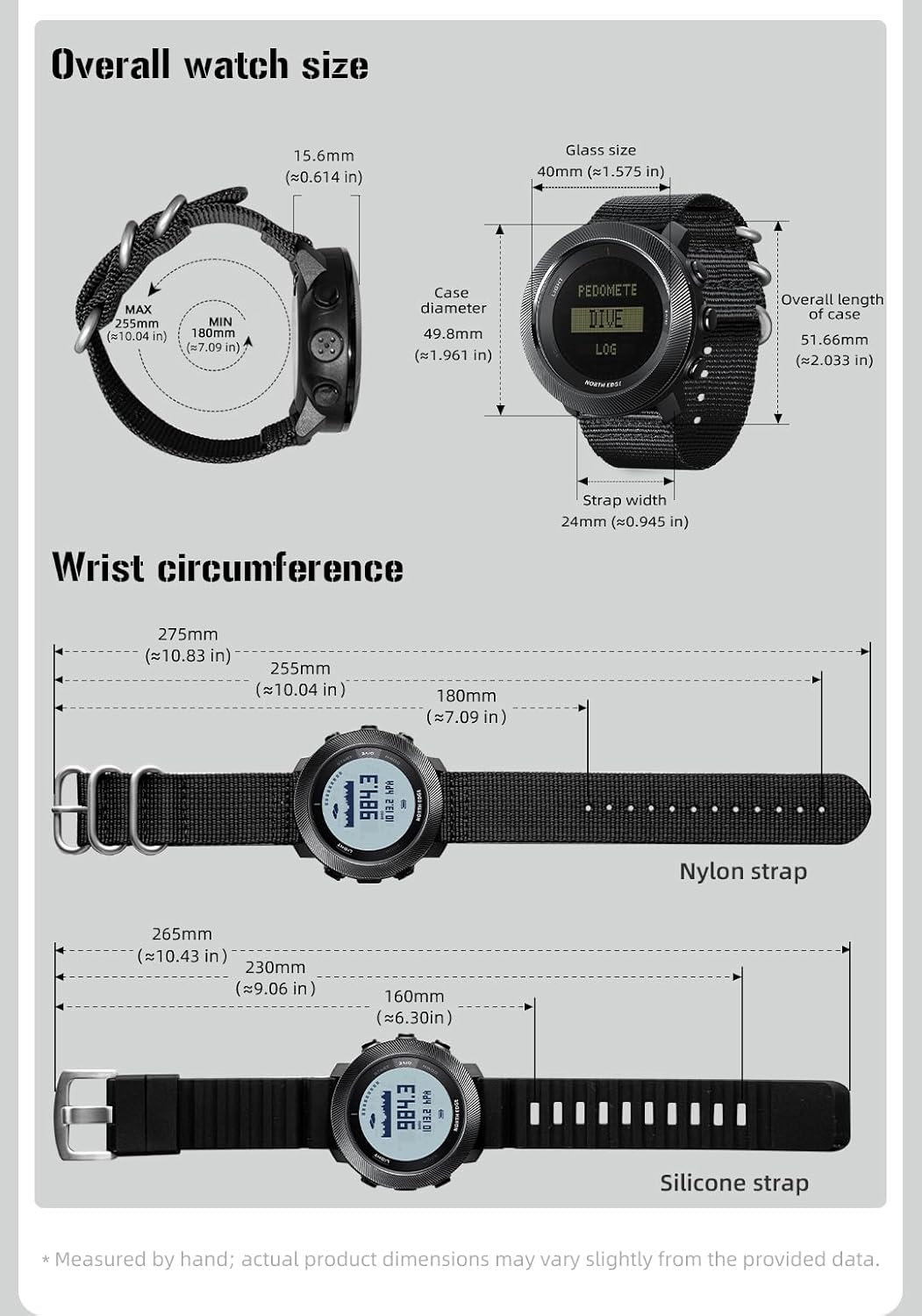
Image: Detailed dimensions of the Apache-D watch, including case diameter, glass size, and strap lengths for both nylon and silicone options.
| Feature | Detail |
|---|---|
| Model Name | Apache-D |
| Brand | NORTH EDGE |
| Display Type | Digital (FSTN) |
| Case Material | PPS + Carbon Fiber |
| Crystal Material | Mineral Glass |
| Case Diameter | 50 Millimeters |
| Case Thickness | 17 Millimeters |
| Band Material Type | Nylon (Adjustable) |
| Band Width | 24 Millimeters |
| Band Length | 260 Millimeters |
| Water Resistance Depth | 100 Meters (328 Feet) |
| Dive Mode Depth | 50 Meters |
| Movement Type | Quartz |
| Power Source | Battery Powered (Rechargeable) |
| Included Components | Magnetic charging cable, Instruction manual |
| Additional Features | Altimeter, Barometer, Compass, Dive Logs, Thermometer, Pedometer, Stopwatch, Countdown Timer, World Time, Alarm, Vibration Reminder |
Warranty
The NORTH EDGE Apache-D watch comes with a limited warranty. Please refer to the warranty card included in your product packaging for specific terms and conditions, or visit the official NORTH EDGE website for more details.
Support
For further assistance, technical support, or inquiries regarding your NORTH EDGE Apache-D watch, please visit the official NORTH EDGE website or contact their customer service department. Contact information can typically be found on the product packaging or the official website.

