
Introduction
Thank you for choosing the COLAMY OCS20 High Back Executive Office Chair. This chair is designed to provide a comfortable and supportive seating experience for extended periods, featuring a high-density foam padded seat, durable PU leather upholstery, and quiet rubber casters. This manual will guide you through the assembly, operation, and maintenance of your new office chair to ensure optimal performance and longevity.
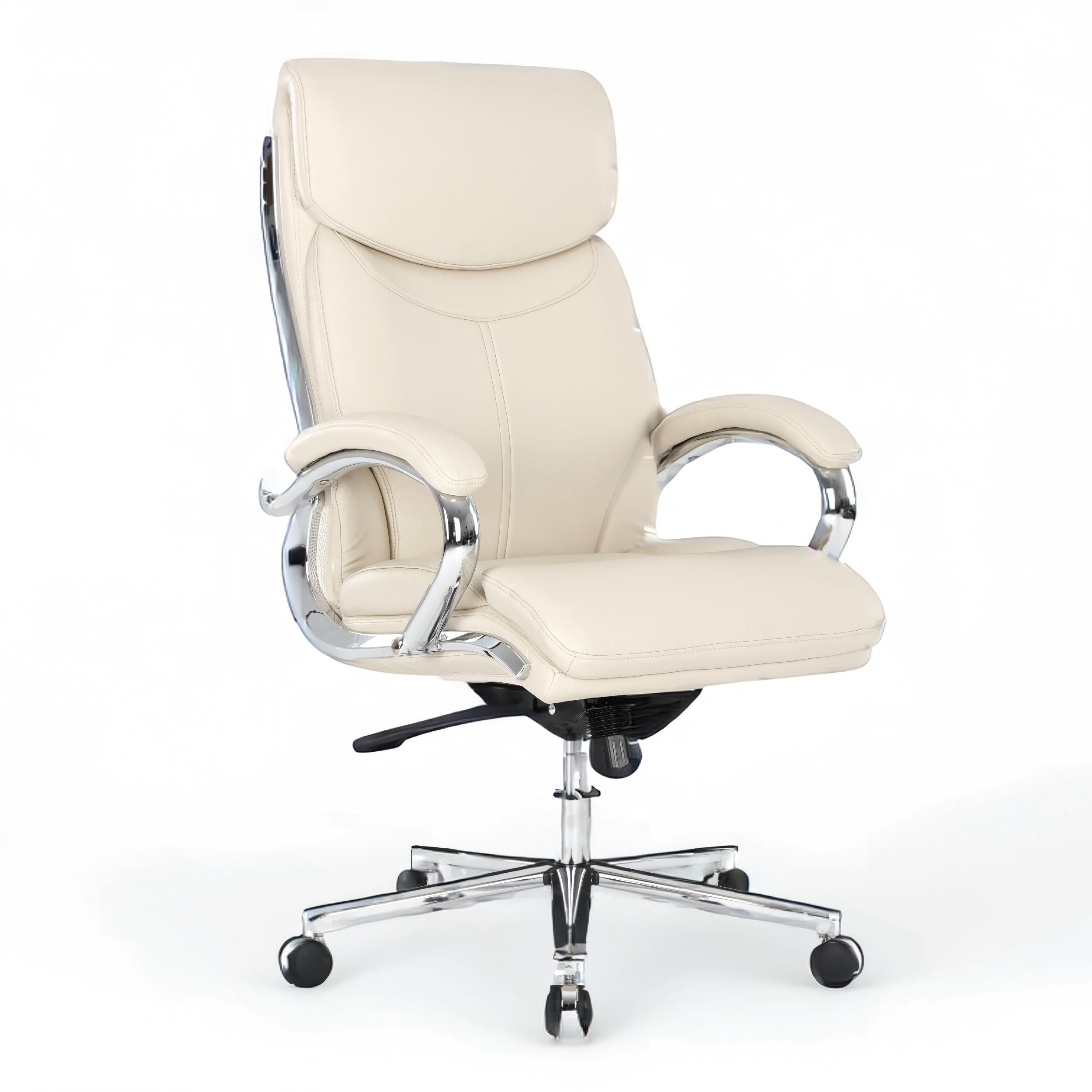
Image: The COLAMY OCS20 High Back Executive Office Chair, showcasing its design and beige color.
Safety Information
Please read and follow these safety instructions carefully before assembly and use:
- Follow the assembly instructions precisely to ensure safe and proper installation.
- Keep all tools and hardware components out of the reach of children.
- Always test the chair's stability and functionality after assembly and before initial use.
- Do not stand on the chair.
- Do not use the chair if any parts are missing or damaged. Contact customer support for replacement parts.
- Ensure all screws and bolts are tightened securely before use. Periodically check and re-tighten as needed.
- The maximum weight recommendation for this chair is 275 pounds. Do not exceed this limit.
Package Contents
Before beginning assembly, ensure all components are present and undamaged. The package should contain:
- 1 x COLAMY OCS20 Office Chair (disassembled)
- 1 x Assembly Hardware Kit (screws, bolts, wrench)
- 1 x User Manual (this document)
Note: If any parts are missing or damaged, please contact COLAMY customer support immediately.
Assembly Instructions
For a visual guide, please refer to the official assembly video below. Detailed steps are also provided.
Video: Official COLAMY Office Chair Assembly Guide. This video demonstrates the step-by-step process for assembling your chair, including attaching the base, gas lift, and seat components.
Step-by-Step Assembly:
- Assemble the Chair Base: Connect the five base legs to the star base using the provided bolts and wrench. Insert the casters into the holes at the end of each base leg. Ensure they are firmly seated.
- Install the Gas Lift: Vertically insert the gas lift cylinder into the center hole of the assembled star base.
- Prepare the Seat and Backrest: Unfold the backrest of the folded seat back (if applicable).
- Attach the Mechanism to the Seat: Secure the seat mechanism to the underside of the seat cushion using the appropriate screws. Ensure the front of the mechanism aligns with the front of the seat.
- Connect Seat to Gas Lift: Carefully place the assembled seat onto the gas lift cylinder, ensuring the tapered end of the gas lift fits securely into the mechanism's central hole.
- Attach Armrests: Secure the armrests to both the seat and the backrest using the designated screws. Ensure they are tightened evenly to prevent wobbling.
- Final Checks: Verify that all screws are tightened, and the chair is stable before use.
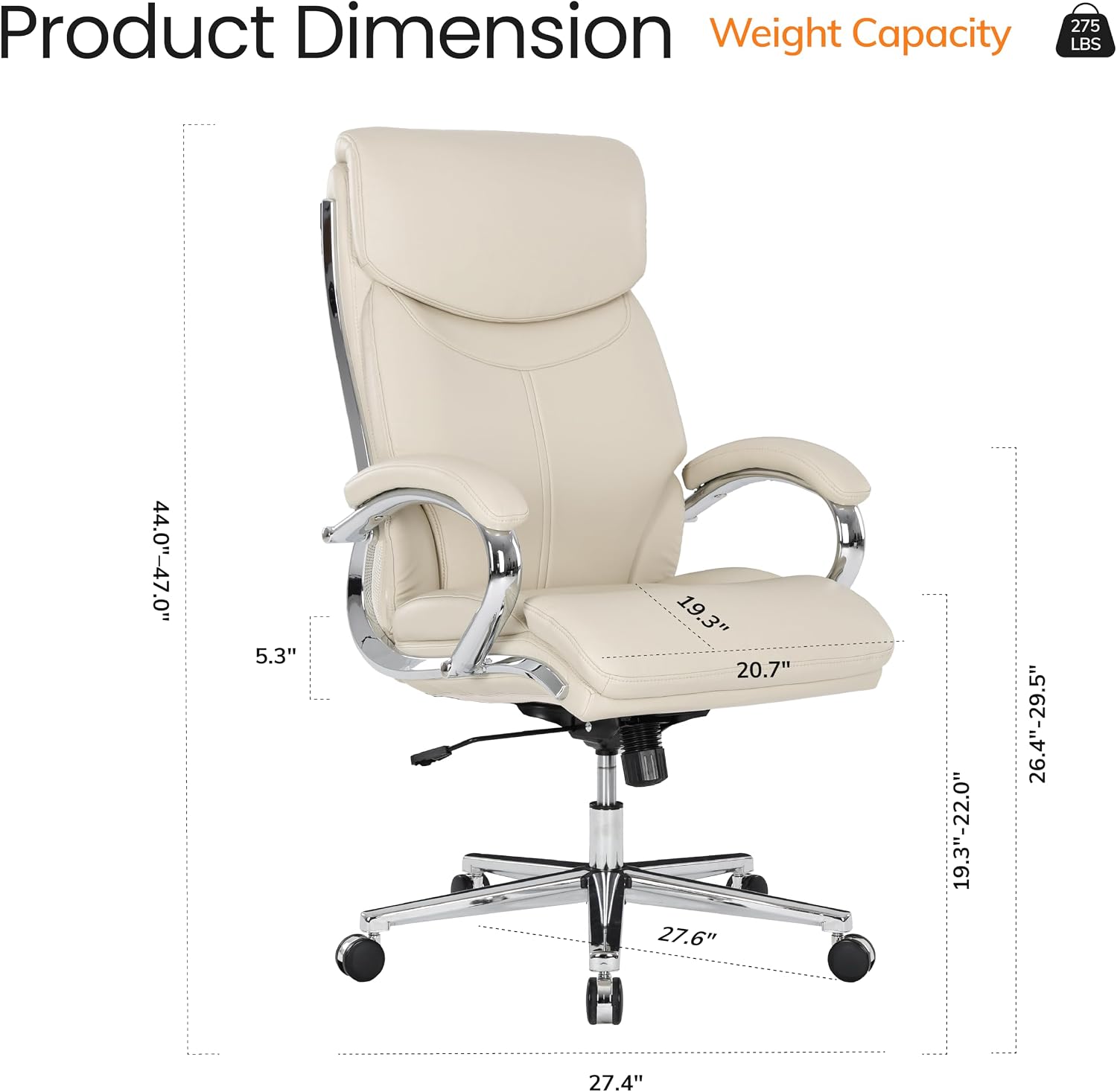
Image: Diagram illustrating the product dimensions and weight capacity (275 lbs) of the COLAMY OCS20 chair.
Operating Instructions
Your COLAMY OCS20 chair features several adjustable functions to customize your seating experience:
1. Pneumatic Seat Height Adjustment
To adjust the seat height:
- To raise the seat: While seated, pull the lever upwards. The seat will rise. Release the lever at the desired height.
- To lower the seat: While seated, pull the lever upwards. The seat will lower. Release the lever at the desired height.
- To raise the seat without sitting: Pull the lever upwards, and the seat will automatically rise. Release the lever at the desired height.

Image: Close-up of the lever for pneumatic seat height adjustment, showing the "Free Lock" and "Down Up" indicators.
2. Rock & Lock Backrest (Tilt Function)
The chair features a tilt mechanism that allows the backrest to recline and rock. You can also adjust the tension of this rocking motion.
- To enable rocking: Pull the lever on the right side (when seated) outwards. The chair will now allow rocking motion.
- To lock the backrest: Push the lever inwards to lock the backrest in an upright position.
- To adjust tilt tension: Rotate the round knob located underneath the seat, at the front of the mechanism. Turn clockwise to increase tension (making it harder to recline) or counter-clockwise to decrease tension (making it easier to recline).

Image: Illustration of the Rock & Lock backrest mechanism, showing the lever for locking/unlocking tilt and the knob for adjusting tilt tension (tight/loose).
3. 360-Degree Swivel
The chair is equipped with a 360-degree swivel function, allowing you to rotate freely without moving the base. This facilitates easy access to different areas of your workspace.
Maintenance
Proper maintenance will extend the life and appearance of your COLAMY OCS20 office chair:
- Cleaning the PU Leather: Wipe the PU leather upholstery with a soft, damp cloth. For tougher stains, use a mild soap solution and then wipe clean with a dry cloth. Avoid harsh chemicals or abrasive cleaners, as these can damage the material.
- Caster Care: Periodically check the rubber casters for any accumulated dust, hair, or debris. Clean them as needed to ensure smooth and quiet rolling.
- Hardware Check: Every few months, inspect all screws and bolts to ensure they are tight. Re-tighten any loose fasteners to maintain stability and safety.
- Avoid Direct Sunlight: Prolonged exposure to direct sunlight can cause the PU leather to fade or crack. Position your chair away from direct sunlight when possible.

Image: Close-up showing the premium soft-touch PU design, breathable mesh side padding, and TÜV certified Class-3 gas lift, highlighting the quality materials.
Troubleshooting
Here are solutions to common issues you might encounter:
- Q: The seat cushion feels like it might flatten over time.
- A: The COLAMY OCS20 chair utilizes a specialized, thick high-density foam fill designed for maximum structural resilience. It is engineered to maintain its supportive, overstuffed profile even after long hours of continuous daily use. If you experience significant flattening, please contact customer support.
- Q: The rolling wheels are noisy or scratch my floors.
- A: This chair is equipped with premium quiet rubber wheels designed for ultra-smooth, silent gliding while minimizing friction and protecting flooring. Ensure the casters are clean and free of debris. If the issue persists, verify the casters are fully inserted into the base legs. If problems continue, contact customer support for assistance.
- Q: The chair feels wobbly after assembly, or installation was difficult.
- A: The assembly process has been optimized with a precise hardware kit and clear instructions to ensure a secure, wobble-free build. Double-check that all screws and bolts are fully tightened according to the assembly instructions. If the wobbling continues after ensuring all fasteners are secure, disassemble and reassemble carefully, or contact customer support for guidance.
Specifications
| Model Name | OCS20 |
| Brand | COLAMY |
| Color | Beige |
| Upholstery Material | Polyurethane (PU Leather) |
| Fill Material | High-Density Foam |
| Frame Material | Wood, Electroplated Heavy-Duty Base |
| Mobility | Quiet Rubber Casters, 360-Degree Swivel |
| Product Dimensions (D x W x H) | 27.4"D x 27.6"W x 47"H |
| Seat Back Interior Height | 25 inches |
| Seat Height | Adjustable, up to 22 inches |
| Seat Depth | 13.9 inches |
| Item Weight | 34 pounds |
| Maximum Weight Recommendation | 275 pounds |
| Additional Features | Adjustable Height, Tilt Tension Control, Rocking Function |
Warranty and Support
COLAMY stands behind the quality of its products. For specific warranty details, please refer to the warranty card included with your purchase or visit the official COLAMY website.
If you have any questions, require assistance with assembly, or need replacement parts, please contact COLAMY customer support:
- Online Support: Visit the COLAMY Store on Amazon.
- Email/Phone: Refer to your product packaging or the COLAMY website for the most current contact information.