
1. Product Overview
The YOOPAI 3D Printer Filament Storage Box is designed to organize and protect your 3D printer filament spools. This 2-tier rack, featuring a durable fabric cover, can accommodate up to 24 standard 1KG filament rolls. Its reinforced iron frame ensures stability, while the enclosed design helps to keep spools sorted and accessible. The cover offers protection against dust and splashes, and included desiccant packs assist in reducing short-term moisture exposure for your filament.
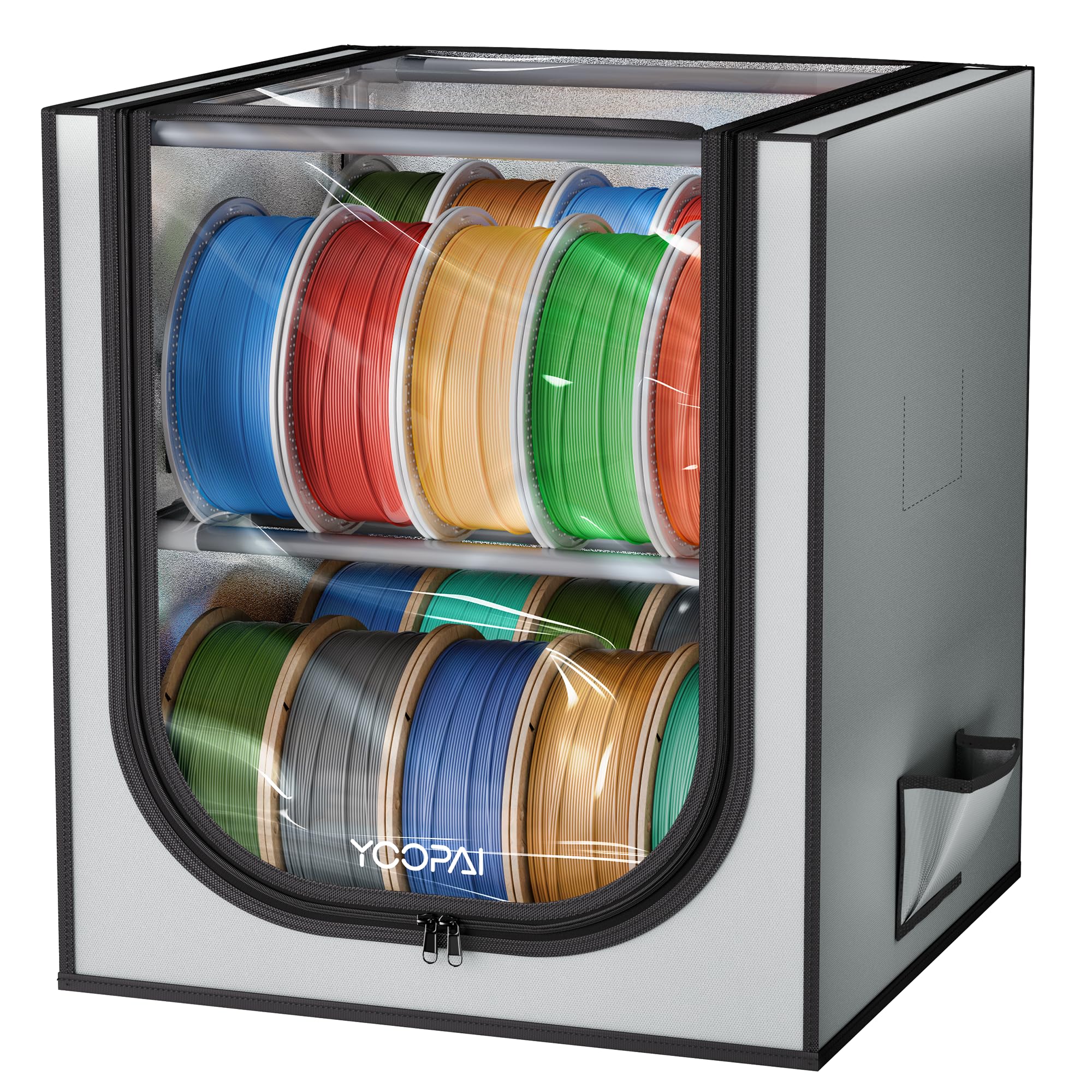
Image 1.1: The YOOPAI 3D Printer Filament Storage Box, designed for efficient filament organization.
2. Package Contents
Please verify that all components are present before beginning assembly:
- Fabric Cover with transparent front panel
- Reinforced Iron Frame Bars (various lengths)
- Plastic Connectors (for frame assembly)
- Desiccant Packs (4 count)
3. Setup and Assembly
Assembly of the filament storage box is designed to be straightforward. Follow these steps carefully:
- Unpack Components: Carefully remove all frame bars, connectors, the fabric cover, and desiccant packs from the packaging.
- Assemble the Frame: Connect the iron frame bars using the provided plastic connectors. Ensure each connection is secure. The upgraded connectors are designed for a smoother fit, but firm pressure may be required.
- Build Tiers: Construct the two tiers of the rack as shown in the diagrams. Pay attention to the orientation of the connectors to ensure the shelves are level and stable.
- Attach the Cover: Once the frame is fully assembled and stable, carefully slide the fabric cover over the frame. Ensure the cover fits snugly. If the cover is difficult to install, double-check that all frame bars and connectors are securely and correctly joined.

Image 3.1: Illustration of securely connecting frame bars and plastic connectors during assembly.

Image 3.2: The completed 2-tier frame structure before the cover is fully zipped.
4. Operating Instructions
Using your YOOPAI Filament Storage Box is simple and designed for convenience:
- Load Filament: Unzip the front panel of the cover. Place your 3D printer filament spools onto the shelves. The rack is designed to hold various sizes, including standard 1KG rolls.
- Utilize Desiccants: Insert the provided desiccant packs into the designated mesh pockets inside the cover. These help absorb ambient moisture to protect your filament.
- Accessing Filament: The high-quality double zipper and transparent PVC window allow for quick selection and easy access to your filament rolls without fully opening the entire cover.
- Secure Storage: After loading or retrieving filament, ensure the zipper is fully closed to maintain a dust-proof and splash-proof environment.
Important Note: This storage box is intended for organization and short-term moisture reduction with desiccants. It is NOT an active filament drying box or dehydrator.

Image 4.1: Easy access to filament spools through the zippered front panel.

Image 4.2: The storage box features a splash-proof and dust-proof design, along with pockets for desiccant packs.
5. Maintenance and Care
To ensure the longevity and effectiveness of your filament storage box:
- Cleaning the Cover: Wipe the fabric cover with a damp cloth as needed to remove dust or spills. Avoid harsh chemicals.
- Desiccant Replacement: Monitor the condition of your desiccant packs. Replace them when they show signs of saturation (e.g., color change if applicable, or reduced effectiveness).
- Frame Inspection: Periodically check the frame connections to ensure they remain secure and stable.
6. Troubleshooting
- Difficulty Installing Cover: If the protective cover is difficult to install, ensure that all frame connectors and tubes are securely connected and fully seated. Loose connections can alter the frame dimensions, making the cover fit improperly.
- Filament Still Absorbing Moisture: This storage box is designed to reduce moisture exposure with passive desiccant absorption, not to actively dry wet filament. For heavily saturated filament, a dedicated filament dryer is recommended before storage.
7. Specifications
| Feature | Detail |
|---|---|
| Model Number | FilamentRack-Cloth-20-New |
| Capacity | Up to 24 standard 1KG filament spools |
| Dimensions (Package) | 17.04 x 7.13 x 4.76 inches |
| Item Weight | 5.1 pounds |
| Material | Reinforced Iron Frame, Fabric Cover, PVC Window |
| Features | 2-Tier Design, Dust-proof, Splash-proof, Desiccant Pockets |
8. Warranty and Support
For warranty information or product support, please refer to the retailer's return policy or contact YOOPAI customer service directly. Contact details are typically available on the product packaging or the official brand website.
9. Product Videos
No official product videos from the seller are available for embedding at this time. For visual demonstrations, please refer to the product page on the retailer's website.
