
1. Important Safety Information
Please read all safety warnings and instructions carefully before using the Gosvor LiteVac G1. Failure to follow these instructions may result in electric shock, fire, or serious injury.
- Always ensure the power adapter is disconnected from the power outlet before performing any maintenance or cleaning on the robot.
- Do not operate the robot if the power cable or plug is damaged.
- Keep the robot away from children and pets when in operation.
- Only use the original power adapter provided with the device for charging.
- Do not use the robot in water temperatures outside the recommended range (typically 10°C to 35°C).
- Ensure the pool is free of large objects that could obstruct the robot's movement or damage its components.
2. Product Overview
The Gosvor LiteVac G1 is an advanced robotic pool cleaner designed for efficient and comprehensive cleaning of various pool types. It features powerful suction, dual filtration, smart navigation, and convenient app control.
Key Features
- Superior Suction Power: Equipped with a powerful motor providing 15,000 LPH suction to effectively remove leaves, sand, and fine debris.
- 4-in-1 Cleaning: Cleans the pool floor, walls, waterline, and shallow areas (depths greater than 30 cm).
- Dual Filtration System: Captures debris down to 3 microns, ensuring crystal clear water. Includes a 180 µm filter basket and a 3 µm fine filter.
- Smart Navigation: Utilizes WavePath technology for S-shaped cleaning on floors and N-shaped cleaning on walls, ensuring up to 99% coverage. Adaptive navigation helps avoid blockages in complex pool shapes.
- App Control & Multiple Modes: Control your cleaner via a secure Bluetooth app with 5 cleaning modes: Walls, Floor, Smart, ECO, and Periodic.
- Lightweight Design: Weighing only 6.9 kg with a quick drain system for easy handling and retrieval.
- Long Battery Life: Up to 200 minutes of runtime in ECO mode, covering pools up to 200 m².

Image: The Gosvor LiteVac G1 robotic pool cleaner in action, showcasing its powerful suction as it removes leaves, sand, and other debris from the pool floor. The image highlights its superior cleaning capability.
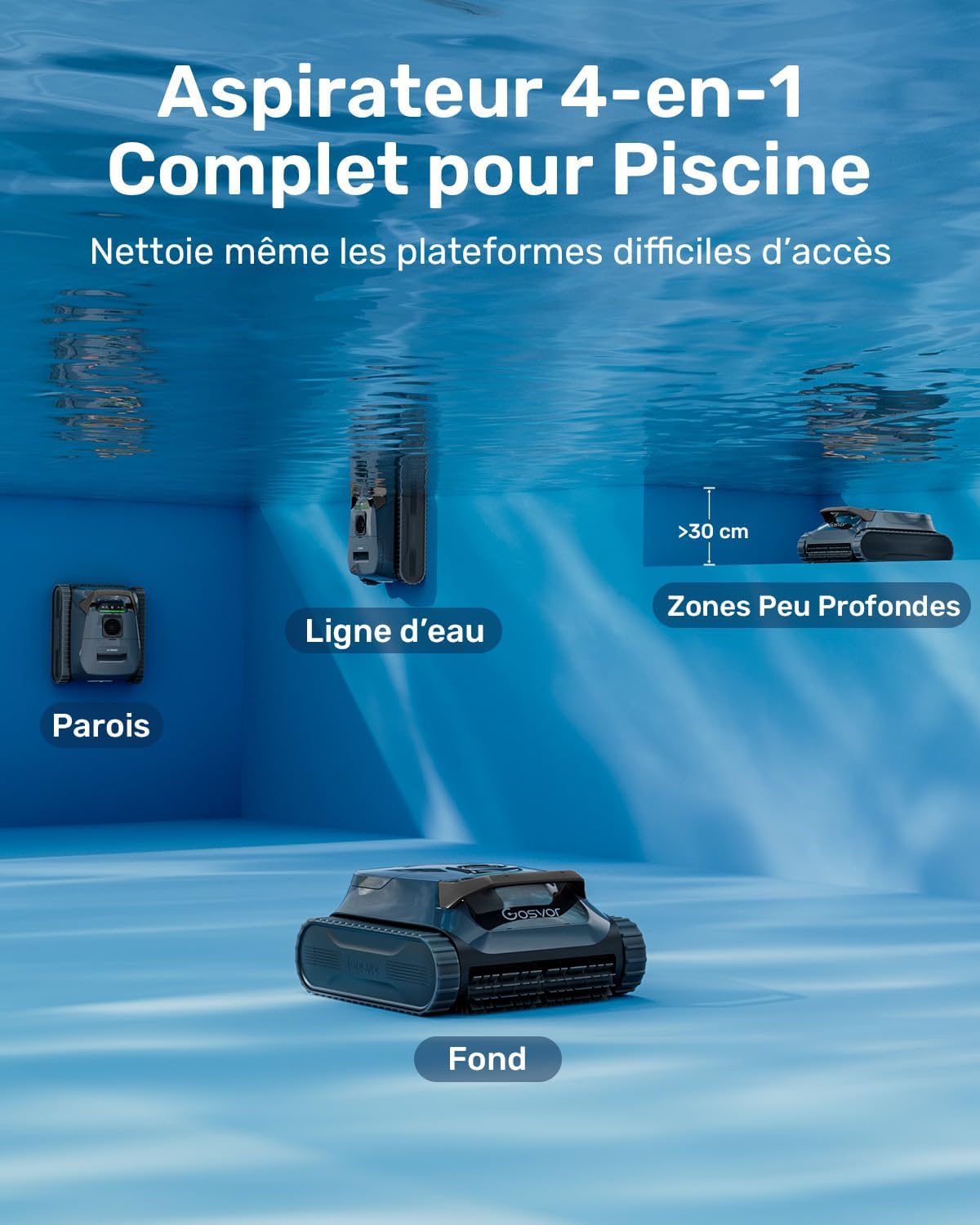
Image: A visual representation of the Gosvor LiteVac G1's comprehensive 4-in-1 cleaning, showing the robot cleaning the pool bottom, walls, waterline, and shallow areas (greater than 30 cm deep).
3. Setup
3.1 Unpacking
Carefully remove all components from the packaging. Ensure all parts are present and undamaged. Retain the packaging for future storage or transport.
3.2 Initial Charging
Before first use, fully charge the LiteVac G1. Connect the charging adapter to the robot and then to a power outlet. The LED indicators will show the charging status. A full charge typically takes approximately 3 hours.
3.3 Filter Basket Installation
The LiteVac G1 comes with a dual filtration system. The 180 µm filter basket is for general debris, and the 3 µm fine filter can be inserted inside for ultra-fine particle collection. Ensure the filter basket is securely in place before operation.

Image: A detailed diagram illustrating the Gosvor LiteVac G1's dual filtration system, showing the larger 180 µm filter basket and the smaller 3 µm fine filter designed to capture micro-debris. For bulky debris, use only the 180 µm filter basket.
4. Operating Instructions
4.1 Placing the Cleaner in the Pool
Gently lower the LiteVac G1 into the pool. Ensure it is fully submerged and air bubbles have escaped before starting operation.
4.2 Control Methods
The LiteVac G1 can be controlled directly via its onboard button or through the dedicated mobile application.
- Onboard Button: Press the power button on the robot to cycle through available cleaning modes.
- Mobile App: Download the Gosvor app from your device's app store. Connect to the LiteVac G1 via Bluetooth. The app allows for mode selection, path customization, and OTA updates. Note: The app functions only out of water, and connection range is limited to 10 meters. No user data is collected, stored, or transmitted.

Image: The Gosvor LiteVac G1 positioned at the poolside, with a smartphone screen showing the intelligent and secure app interface. The app allows for changing modes, selecting cleaning paths, and receiving OTA updates via Bluetooth connection.
4.3 Cleaning Modes
Select the appropriate cleaning mode based on your pool's needs:
- Walls Mode: Focuses cleaning on the pool walls and waterline.
- Floor Mode: Concentrates cleaning on the pool floor.
- Smart Mode: Provides comprehensive cleaning of both floor and walls.
- ECO Mode: Optimized for energy efficiency, offering extended runtime (up to 200 minutes). Adjustable via app.
- Periodic Mode: Automatically cleans every 48 hours for consistent maintenance.

Image: The Gosvor LiteVac G1 displaying its control panel with an overlay indicating the five available cleaning modes: ECO (adjustable via app), Intelligent (Wall/Floor/Waterline), Wall Only, Floor Only, and Periodic (automatic cleaning every 48 hours).
4.4 Smart Navigation
The LiteVac G1 employs intelligent navigation for optimal coverage:
- WavePath Technology: Cleans flat surfaces with an S-shaped path and walls with an N-shaped path for thorough coverage.
- Adaptive Path Planning: Helps the robot navigate complex pool shapes (e.g., bowl-shaped, diamond-shaped) and avoid blockages. This feature can be adjusted via the app.

Image: A visual representation of the LiteVac G1's WavePath navigation, showing S-shaped paths for floor cleaning and N-shaped paths for wall cleaning, ensuring comprehensive coverage. It also illustrates adaptive path planning for complex pool bottoms.
4.5 Retrieving the Cleaner
When the cleaning cycle is complete or the battery is low, the robot will automatically return to the edge of the pool. Use the provided hook or handle to safely retrieve the cleaner from the water. The quick drain system allows for rapid water release, making it easy to lift.

Image: Two images demonstrating the ease of retrieval and quick drainage of the LiteVac G1. The left image shows a person lifting the lightweight 6.9 kg cleaner from the pool using a hook. The right image shows the cleaner quickly draining water in approximately 15 seconds.
5. Maintenance
5.1 Cleaning the Filter Basket
Regular cleaning of the filter basket is crucial for maintaining optimal cleaning performance. It is recommended to clean the filter after each use, especially if the pool is heavily soiled.
- Remove the LiteVac G1 from the pool and allow it to drain.
- Open the top cover of the robot to access the filter basket.
- Carefully remove the filter basket. If the fine filter is installed, remove it from the main basket.
- Rinse the filter basket(s) thoroughly with a garden hose or high-pressure jet until all debris is removed.
- Ensure the filters are completely clean before reinserting them into the robot.
- Close the top cover securely.

Image: Two images demonstrating the easy maintenance of the LiteVac G1. The left image shows the large 3.6L top-loading filter basket being removed from the cleaner. The right image shows the filter basket being cleaned with a high-pressure water jet.
5.2 Battery Care
To prolong battery life:
- Always fully charge the battery before storing the robot for an extended period.
- Store the robot in a cool, dry place away from direct sunlight.
- Avoid completely draining the battery frequently.
6. Troubleshooting
If you encounter issues with your Gosvor LiteVac G1, refer to the table below for common problems and solutions.
| Problem | Possible Cause | Solution |
|---|---|---|
| Robot does not start | Low battery; Power button not pressed; Obstruction. | Charge the robot; Press the power button firmly; Check for and remove any obstructions. |
| Poor cleaning performance | Clogged filter basket; Low battery; Incorrect cleaning mode. | Clean the filter basket; Recharge the robot; Select an appropriate cleaning mode (e.g., Smart mode). |
| Robot gets stuck or cannot climb walls | Low battery; Excessive algae on walls; Obstruction; Pool surface material. | Recharge the robot; Brush pool walls manually; Remove obstructions; Ensure pool surface is compatible (vinyl, fiberglass, tile, concrete, pebble are compatible). |
| App connection issues | Robot out of Bluetooth range; Bluetooth disabled on device; App not updated. | Move closer to the robot (within 10m); Enable Bluetooth on your smartphone; Update the Gosvor app to the latest version. |
7. Specifications
Technical specifications for the Gosvor LiteVac G1 robotic pool cleaner:
| Feature | Specification |
|---|---|
| Brand | Gosvor |
| Model Name | LiteVac G1-GS-FR |
| Model Number | PRE1-G |
| Color | Grey |
| Product Dimensions (L x W x H) | 36L x 21W x 44.3H cm |
| Power Source | Battery powered |
| Special Feature | Dual filtration system |
| Assembly Required | No |
| Control Method | Application (Bluetooth) |
| Battery Weight | 769 Grams |
| Lithium Battery Energy Content | 112.32 Watt-hours |
| Suction Capacity | 15000 LPH |
| Number of Batteries | 1 (non-standard, included) |
| Number of Lithium-Ion Cells | 12 |
| Installation Type | Robotic |
| Country of Origin | China |
8. Warranty and Support
The Gosvor LiteVac G1 comes with a standard manufacturer's warranty. Please refer to the warranty card included in your product packaging for specific terms and conditions.
For technical support, troubleshooting assistance, or to inquire about replacement parts, please contact Gosvor customer service through the contact information provided on our official website or your purchase platform.


