
Introduction
Thank you for choosing the Duracell Tri-Power Rechargeable Lantern. This versatile lantern provides up to 3000 lumens of bright light and offers multiple charging options, including solar, USB, and Qi wireless charging. It is designed for both indoor and outdoor use, featuring a durable, weather-resistant construction and an emergency red flasher for added safety. Please read this manual thoroughly before using your lantern to ensure proper operation and longevity.
Setup
Initial Charging
Before first use, fully charge the lantern's internal rechargeable battery. The lantern supports three charging methods:
- USB-C Charging: Connect the included USB-C cable to the lantern's USB-C input port and to a compatible USB power adapter (not included). The charging indicator light will illuminate.
- Solar Charging: Place the lantern with its solar panel facing direct sunlight. The solar charging indicator light will illuminate. Solar charging is slower and best for maintaining charge or emergency situations.
- Qi Wireless Charging: Place the lantern on a compatible Qi wireless charging pad. Ensure proper alignment for efficient charging.
A full charge typically takes several hours via USB-C. The charging indicator will change or turn off once charging is complete.
Optional D-Cell Battery Installation
For extended runtime, the lantern can also operate using D-cell alkaline batteries (not included) in conjunction with its internal rechargeable battery. This provides a dual power source.
- Locate the battery compartment cover on the bottom of the lantern.
- Twist or unlatch the cover to open it.
- Insert the required number of D-cell alkaline batteries, ensuring correct polarity (+/-).
- Securely close the battery compartment cover.

Image: The side of the lantern revealing the USB-C input/output port and a standard USB-A output port, protected by a rubber cover.
Operating Instructions
Power On/Off and Light Modes
The lantern features a single power button to control its functions.
- To Turn On: Press the power button once. The lantern will typically turn on in High mode.
- To Cycle Modes: Press the power button repeatedly to cycle through the available light modes: High > Medium > Low > Power Save > Emergency Red Flasher.
- To Turn Off: After cycling through all modes, pressing the button again will turn the lantern off. Alternatively, press and hold the power button for 2-3 seconds to turn it off from any mode.
Qi Wireless Charging Output
The top surface of the lantern is equipped with a Qi wireless charging pad, allowing you to charge compatible devices.
- Open the protective flap on the top of the lantern to reveal the Qi charging area.
- Place your Qi-compatible device (e.g., smartphone) on the charging pad.
- Ensure the device is centered on the pad for optimal charging. The lantern's indicator light may show charging status.
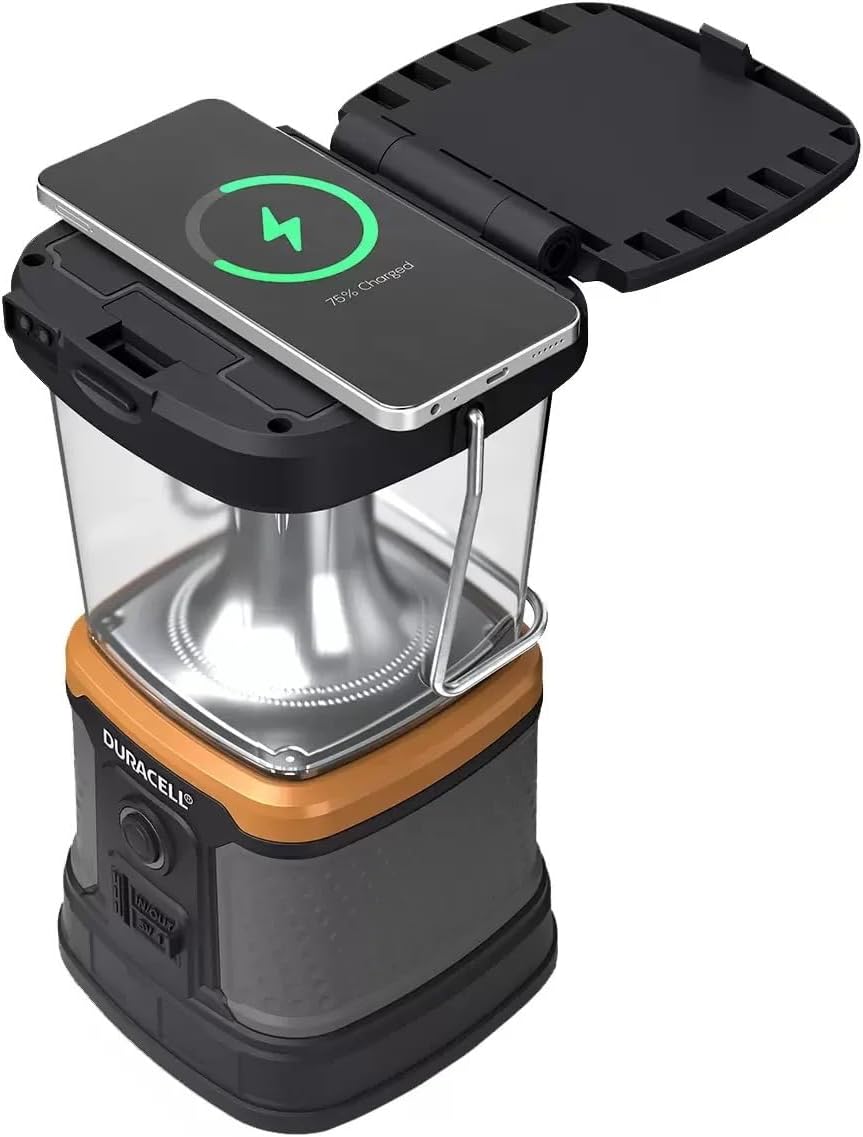
Image: A smartphone resting on the open top flap of the lantern, indicating active wireless charging.
USB-C and USB-A Output
The lantern can also serve as a power bank to charge other devices via its USB-C and USB-A ports.
- Open the protective rubber cover on the side of the lantern to access the USB ports.
- Connect your device's charging cable to either the USB-C or USB-A output port.
- Charging will typically begin automatically. Monitor your device's charging status.

Image: The top of the lantern with the Qi wireless charging symbol clearly marked on its open flap, indicating the wireless charging area.
Maintenance
Cleaning
To clean the lantern, wipe it with a soft, damp cloth. Do not use abrasive cleaners or solvents, as these can damage the surface or internal components. Ensure all port covers are securely closed before cleaning to maintain water resistance.
Storage
Store the lantern in a cool, dry place away from direct sunlight when not in use. For long-term storage, it is recommended to fully charge the internal rechargeable battery every 3-6 months to preserve battery health.
Battery Care
The internal Lithium-Ion Polymer battery is designed for durability. Avoid fully discharging the battery frequently. If using D-cell alkaline batteries, remove them during long periods of non-use to prevent leakage.
Troubleshooting
- Lantern does not turn on: Ensure the internal rechargeable battery is charged. If using D-cell batteries, check their installation and charge level.
- Lantern not charging: Verify that the USB-C cable is properly connected to a power source and the lantern. For solar charging, ensure the panel is in direct sunlight. For Qi charging, confirm proper alignment on the charging pad.
- Device not charging via Qi or USB output: Ensure the lantern has sufficient charge. Check that your device is Qi-compatible (for wireless charging) and properly aligned. Verify USB cable connections.
- Dim light output: The battery may be low. Recharge the lantern.
Specifications
| Model Number | 1819561 |
| Light Source Type | Light Emitting Diode (LED) |
| Light Output Maximum | 3000 lumens |
| Power Source | Rechargeable Battery (Solar & USB Charging), D-cell Alkaline (optional) |
| Battery Type | Lithium-Ion Polymer (internal) |
| Battery Life | Up to 40 days (on Power Save mode with D-cell batteries) |
| Special Features | Qi Wireless Charging, Solar Charging, USB-C In/Out |
| Water Resistance Level | Water Resistant |
| Material | Plastic |
| Dimensions (L x W x H) | 5.35"L x 5"W x 10.1"H |
Warranty Information
This Duracell Tri-Power Rechargeable Lantern (Model 1819561) is covered by a 1-year manufacturer's warranty from the date of purchase. This warranty covers defects in materials and workmanship under normal use. It does not cover damage resulting from misuse, accidents, unauthorized modifications, or normal wear and tear. Please retain your proof of purchase for warranty claims.
Support
For further assistance, technical support, or warranty inquiries, please refer to the contact information provided on the product packaging or visit the official Duracell website. When contacting support, please have your product model number (1819561) and proof of purchase readily available.


