
1. Introduction
This manual provides essential information for the safe and effective operation, assembly, maintenance, and troubleshooting of your EVKRUN EUA5 Auto Incline Treadmill. Please read this manual thoroughly before initial use and retain it for future reference.
The EVKRUN EUA5 treadmill is designed for home use, offering a versatile workout experience with features such as a 15% auto incline, adjustable handle height, and a powerful 3.5HP motor. It supports speeds up to 8.7 MPH and has a weight capacity of 350 lbs.
2. Important Safety Information
Before starting any exercise program, consult with your physician. Improper or excessive training can result in serious injury.
- Always place the treadmill on a flat, stable surface.
- Keep children and pets away from the treadmill during operation.
- Wear appropriate athletic footwear and clothing.
- Ensure the safety key is properly attached to your clothing before starting the treadmill. In case of emergency, the safety key will stop the machine.
- Do not operate the treadmill if it has a damaged cord or plug, or if it is not working properly.
- Do not attempt to service the treadmill yourself. Contact qualified service personnel.
- Maintain a clear space of at least 6 feet behind the treadmill and 2 feet on each side.
3. Package Contents
Verify that all components are present and undamaged before assembly.
- Treadmill Body
- Tool Kit
- User Manual
- Safety Key
4. Setup and Assembly
Follow these steps to assemble your EVKRUN EUA5 Treadmill. It is recommended to have two people for assembly.
- Install Foot Pads: Carefully place the treadmill body on a flat surface. Locate the 4 foot pads and attach them to the designated points on the base of the treadmill. Ensure they are securely tightened.
- Fix Risers: Identify the left and right risers. Use the provided medium and large screws with washers to fix the risers to the treadmill base. The medium screws are for the upper holes, and the large screws are for the lower holes. Tighten them with the Allen wrench.
- Remove Folding Stand: Carefully cut and remove any zip ties securing the folding stand during shipping.
- Attach Folding Rack to Console Handle: Connect the folding rack to the console handle. Ensure the end with a hole is facing outwards. Secure it with the provided screws.
- Attach Console Left Armrest: Attach the console's left armrest to the left riser.
- Connect Power Cord: Connect the right handle power cord of the controller to the right riser. Ensure a secure connection.
- Adjust Height: Align the holes on both sides of the console with the desired height on the risers. Use the rotation knobs to secure the console at your preferred height.
Video: EVKRUN A5 Installation Video 01. This video demonstrates the step-by-step assembly process for the treadmill, including attaching the foot pads, risers, console, and connecting cables.
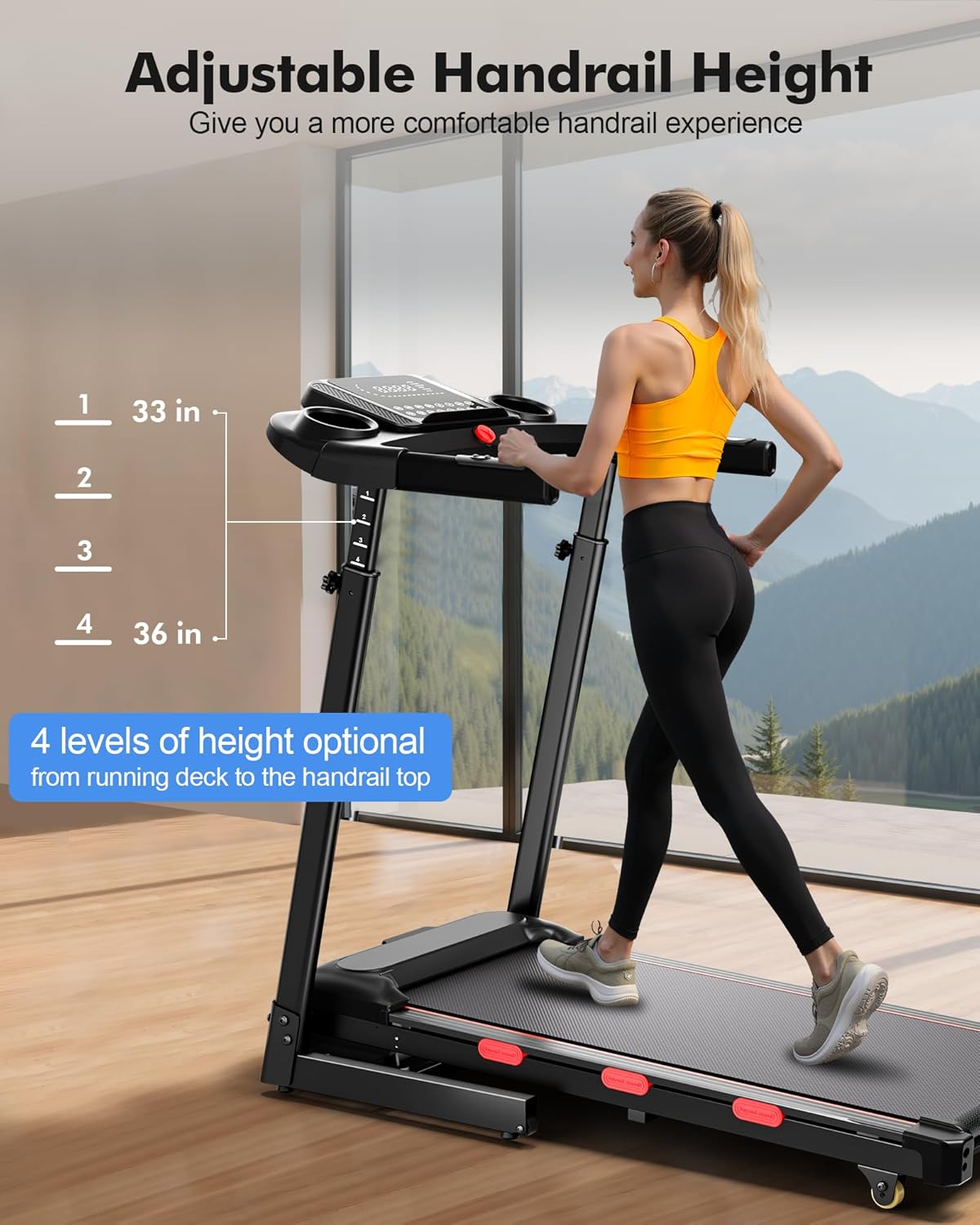
Image: Initial components for assembly, including screws, washers, and tools.

Image: The treadmill with its auto-incline mechanism visible, showing the range of incline settings.
5. Operating Instructions
Your EVKRUN EUA5 treadmill offers multiple ways to control your workout.
5.1 Console Control
The console provides direct access to various functions:
- Start/Stop: Press to begin or end your workout.
- Speed +/-: Adjust the running belt speed.
- Incline +/-: Adjust the automatic incline level (0-15%).
- Speed Shortcut Keys: Quickly set speed to 2, 4, 5.5, or 7.5 MPH.
- Incline Shortcut Keys: Quickly set incline to 3%, 6%, 9%, or 12%.
- MODE: Cycle through different display modes (Time, Speed, Distance, Pulse, Calories).
- PRO: Access pre-set programs.
- Safety Key: Attach the red safety key to the console and your clothing. The treadmill will not operate without it, and pulling it off will immediately stop the machine.
5.2 App Control
Connect your treadmill to a compatible fitness app via Bluetooth to manage training goals, track real-time workout data, and participate in fitness games or online running competitions.
5.3 Adjustable Handlebar
The handrails can be manually adjusted to 4 different levels (33-36 inches from the running deck) to accommodate users of varying heights, promoting a comfortable and healthy posture during exercise.
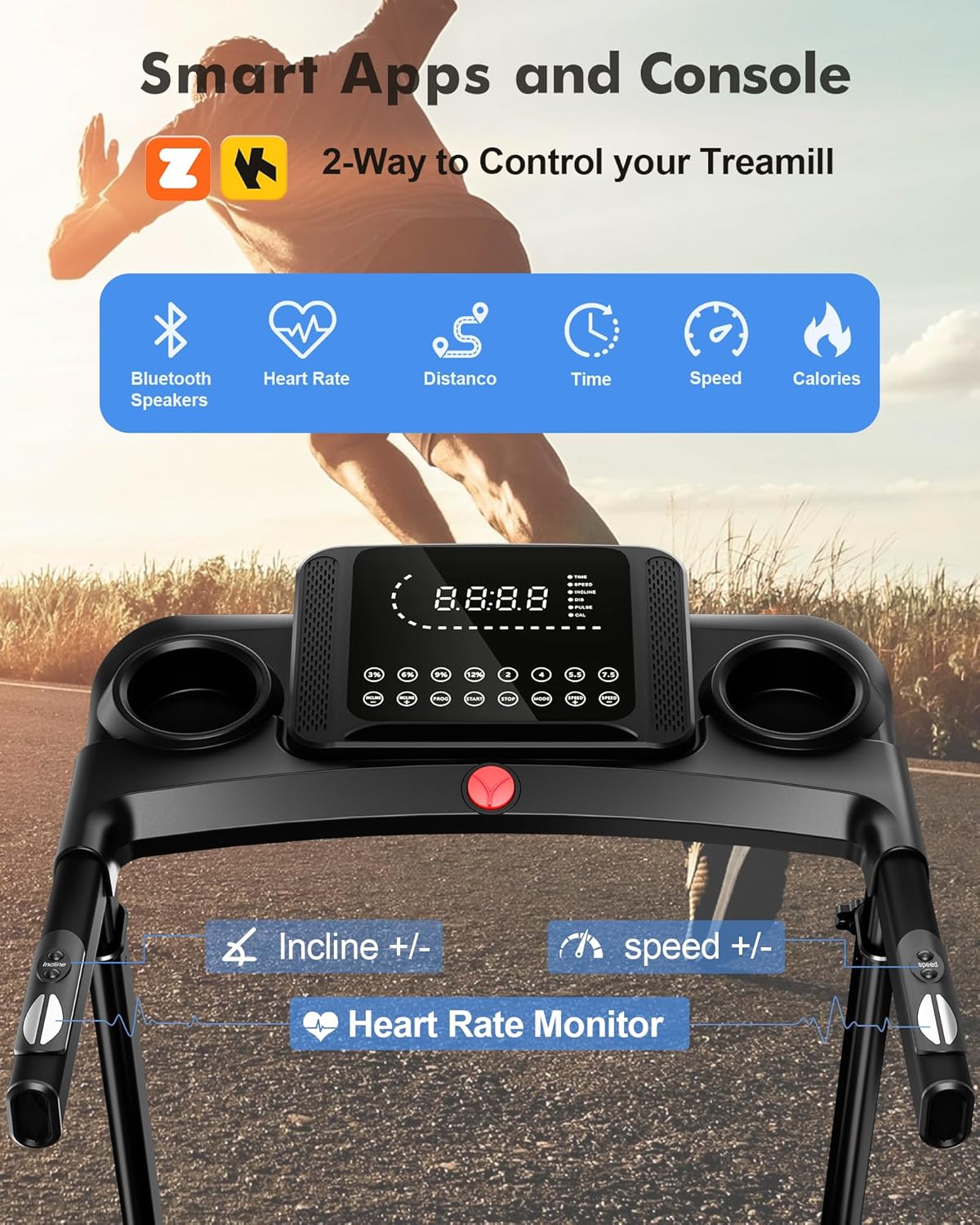
Image: Close-up of the treadmill console, showing speed and incline controls, display, and safety key placement.

Image: A user demonstrating the adjustable handle height feature, highlighting the four available levels.
6. Key Features
- Powerful Brushless Motor: Equipped with a 3.5HP rated/4.0HP peak brushless motor, providing quiet operation (under 45 dB) and a longer lifespan (up to 3500 hours) with 80% reduced power consumption compared to brushed motors.
- Variable Speed & Incline: Speed range from 0.6 to 8.7 MPH and 15 levels of automatic incline (0-15%) for diverse workout intensities, from walking to professional running and climbing simulations.
- Adjustable Handlebar: 4-level adjustable handrails (33-36 inches from deck) for ergonomic comfort and support for users of different heights.
- Console & App Connectivity: Intuitive console with shortcut keys for speed and incline, plus Bluetooth connectivity for fitness apps to track data and engage in interactive workouts.
- Double Deck & Shock Absorption: Features an upgraded double running deck with 6 shock absorption points, increasing shock absorption by 50% for enhanced comfort and knee protection.
- Compact & Foldable Design: Auto hydraulic folding system allows the treadmill to fold up easily, saving 50% space. Front wheels enable convenient relocation and storage under a sofa/bed or in a corner.
- High Weight Capacity: Robust design supports users up to 350 lbs.
- Running Belt Size: The running belt measures 14.8 x 38.58 inches, suitable for users under 5.6 feet (1.7 meters) tall for comfortable stride.

Image: Illustration of the double deck and 6-point shock absorption system, designed to protect joints during exercise.

Image: The treadmill in its folded position, demonstrating its compact design for easy storage.
7. Maintenance
Regular maintenance ensures the longevity and optimal performance of your treadmill.
- Cleaning: Wipe down the treadmill after each use with a damp cloth to remove sweat and dust. Do not use abrasive cleaners.
- Belt Lubrication: Lubricate the running belt every 3-6 months or after 100-150 hours of use, using silicone lubricant specifically designed for treadmills. Refer to the detailed instructions in the full user manual for proper application.
- Belt Tension & Alignment: Periodically check the running belt for proper tension and alignment. If the belt feels loose or is drifting to one side, adjust it according to the instructions in the full user manual.
- Motor Cover: Keep the motor cover area clean and free of dust to ensure proper ventilation.
8. Troubleshooting
If you encounter issues with your treadmill, refer to the following common problems and solutions:
| Problem | Possible Cause | Solution |
|---|---|---|
| Treadmill does not start | Power cord not plugged in; Safety key not in place; Power switch off | Ensure power cord is securely plugged in; Insert safety key; Turn power switch ON |
| Running belt slips | Belt too loose; Belt needs lubrication | Adjust belt tension (refer to full manual); Lubricate belt |
| Unusual noise from motor | Loose components; Foreign object in motor area | Check and tighten all visible screws; Inspect motor area for obstructions (unplug first) |
| Console display not working | Loose cable connection; Power issue | Check all cable connections to the console; Verify power supply |
For more detailed troubleshooting or issues not listed here, please refer to the comprehensive user manual or contact customer support.
9. Specifications
| Feature | Detail |
|---|---|
| Brand | EVKRUN |
| Model Number | EUA5 |
| Color | Black |
| Product Dimensions | 45.3"D x 23"W x 45.3"H |
| Item Weight | 63 Pounds |
| Material | Alloy Steel |
| Maximum Speed | 8.7 Miles per Hour |
| Maximum Horsepower | 3.5 Horsepower |
| Maximum Incline Percentage | 15.0% |
| Minimum Speed | 0.6 Miles per Hour |
| Maximum Weight Recommendation | 350 Pounds |
| Deck Length | 38.6 Inches |
| Deck Width | 15.4 Inches |
| Folded Size | 27.1" x 23" x 43.5" |
| Display | LED |
| Connectivity Technology | Bluetooth |
| Metrics Measured | Speed, Time, Distance, Calories Burned, Heart Rate, Incline |
| Special Features | Adjustable Handle-Height, Built-in Heart Rate Monitor, Water Bottle Holder |
| Assembly Required | Yes |
10. Warranty and Support
Your EVKRUN EUA5 Treadmill comes with a 60-day warranty. For warranty claims, technical support, or any questions regarding your product, please contact EVKRUN customer service through the retailer where you purchased the product. Please have your model number (EUA5) and purchase information ready when contacting support.