
Introduction
The MACAP MI40 Pro is a high-performance commercial espresso grinder designed for demanding environments such as cafés and coffee bars. It features 65 mm flat tempered steel burrs and a powerful 600 W high-torque motor, ensuring fast and consistent grinding for superior espresso extraction. The intuitive 3.5" touchscreen display simplifies dose programming and real-time adjustments. This manual provides essential information for the safe and efficient operation, setup, and maintenance of your grinder.
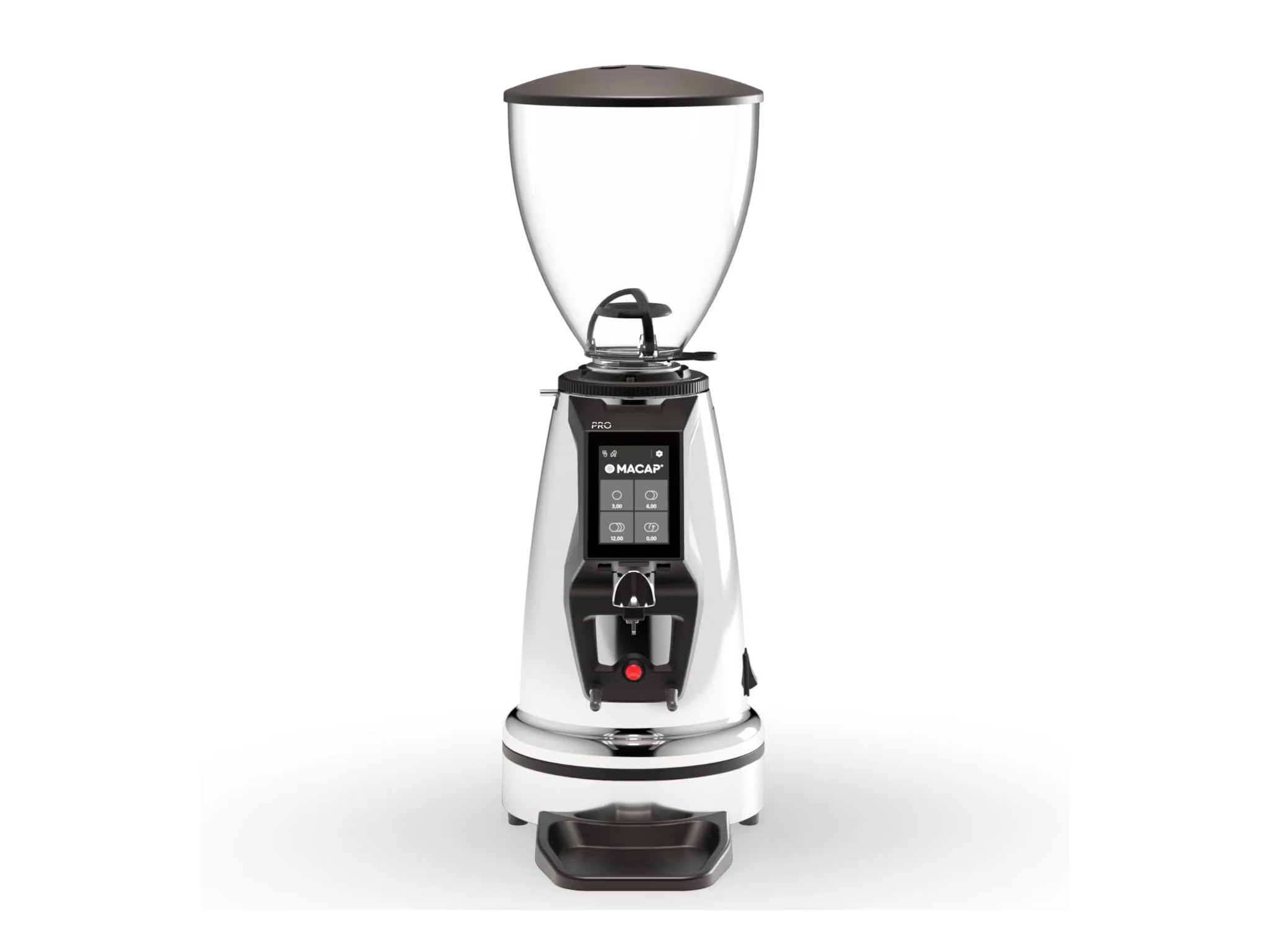
Image: MACAP MI40 Pro Commercial Espresso Grinder, showcasing its chrome exterior and overall design.
Key Features:
- High-Performance Commercial Grinder: Built for cafés and coffee bars, the MI40 Pro delivers fast, consistent grinding with a powerful 600W motor.
- 65mm Flat Burrs: Large flat steel burrs provide uniform grind particle size for exceptional espresso extraction.
- Intuitive Touchscreen Interface: A 3.5" color touchscreen with Macap HMI streamlines dose programming and real-time control.
- Grind Adjustment: Features a standard grind ring with zero-grind setting; optional stepless micrometric adjustment is available for ultra-fine control.
- Professional Workflow Features: Includes height-adjustable hands-free filter support, IP68 start button, anti-vibration metal fork, and a pull-out plate for improved workflow and cleanliness.
Setup Instructions
- Unpacking: Carefully remove the grinder from its packaging. Retain all packaging materials for future transport or service.
- Placement: Position the grinder on a stable, level, and dry surface. Ensure adequate ventilation around the unit. Avoid placing it near heat sources or in direct sunlight.
- Hopper Assembly: Place the bean hopper onto the grinder body, ensuring it is securely seated. The hopper should lock into place to prevent accidental removal during operation.
- Initial Cleaning: Before first use, wipe down the exterior of the grinder with a damp cloth. Ensure the burr chamber and coffee chute are free of any packing debris.
- Power Connection: Connect the power cord to a grounded 110 Volt AC outlet. Ensure the power switch is in the "OFF" position before plugging in.
Operating Instructions
1. Powering On/Off
- To power on, flip the main power switch located on the grinder. The touchscreen display will illuminate.
- To power off, flip the main power switch to the "OFF" position.
2. Grind Adjustment
The MI40 Pro features a grind adjustment ring. Rotate the ring to achieve the desired grind fineness. Finer grinds are typically required for espresso. The standard grind ring includes a zero-grind setting for calibration. If equipped with optional stepless micrometric adjustment, use the fine adjustment knob for precise control.
3. Dosing and Grinding
- Fill Hopper: Pour fresh, roasted coffee beans into the hopper.
- Program Dose: Use the 3.5" touchscreen display to program your desired single or double shot dose. The intuitive Macap HMI allows for easy adjustment of grinding time.
- Position Portafilter: Place your portafilter onto the height-adjustable hands-free filter support.
- Start Grinding: Press the IP68-rated activation button with the portafilter. The grinder will dispense the programmed dose.
- Monitor: Observe the grind consistency and adjust as necessary for optimal espresso extraction.
Maintenance
Regular cleaning and maintenance ensure the longevity and optimal performance of your MACAP MI40 Pro grinder.
1. Daily Cleaning
- Hopper: Empty any remaining beans from the hopper. Wipe the inside of the hopper with a dry cloth.
- Exterior: Wipe down the exterior surfaces of the grinder with a soft, damp cloth. Avoid abrasive cleaners or solvents.
- Pull-out Plate: Remove and clean the pull-out plate located beneath the grinding area to collect any stray grounds.
2. Weekly / Bi-Weekly Cleaning (Burrs)
- Power Off: Ensure the grinder is unplugged from the power source.
- Remove Hopper: Remove the bean hopper.
- Access Burrs: Follow the manufacturer's instructions to safely access the grinding burrs. This typically involves removing the top burr carrier.
- Clean Burrs: Use a stiff brush or a vacuum cleaner to remove all coffee grounds and oils from the burrs and the burr chamber. Do not use water.
- Reassemble: Carefully reassemble the burr carrier and hopper, ensuring all components are securely in place.
Troubleshooting
| Problem | Possible Cause | Solution |
|---|---|---|
| Grinder does not start. | No power; power switch off; safety interlock not engaged. | Check power cord connection. Ensure main power switch is ON. Verify hopper is correctly seated. |
| Inconsistent grind or no coffee dispensing. | Hopper empty; burrs clogged; grind setting too fine. | Refill hopper. Clean burrs and chute (refer to Maintenance). Adjust grind setting coarser. |
| Grinder is unusually loud or vibrating. | Foreign object in burrs; loose components. | Immediately power off and unplug. Inspect burr chamber for foreign objects. If problem persists, contact support. |
If you encounter issues not listed here or if solutions do not resolve the problem, please contact Macap customer support.
Specifications
| Model | MI40 Pro |
| Brand | Macap |
| Color | Chrome |
| Material | Stainless Steel |
| Burr Type | 65mm Flat Tempered Steel Burrs |
| Motor Power | 600 Watts |
| Voltage | 110 Volts |
| Item Weight | 19.6 Pounds |
| Dimensions (L x W x H) | 12.1" x 7.7" x 22" |
| Hopper Capacity | 2.65 Pounds (approx. 1.2 kg) |
| Display | 3.5" Color Touchscreen with Macap HMI |
| Activation Button | IP68-rated |
Warranty and Support
For warranty information and customer support, please refer to the documentation provided with your purchase or visit the official Macap website. Keep your proof of purchase for warranty claims.
If you require technical assistance or have questions regarding the operation or maintenance of your MI40 Pro grinder, please contact Macap customer service through their official channels.


