
1. Introduction
This manual provides essential information for the safe and efficient operation of your DATOUBOSS 24V 3300W Hybrid Solar Inverter. This pure sine wave inverter integrates a 100A MPPT solar charge controller and a Battery Management System (BMS) for lithium batteries, offering a reliable power solution for various applications.
The inverter is designed to convert DC power from solar panels and batteries into stable AC power, suitable for powering a wide range of household and office appliances. Please read this manual thoroughly before installation and operation to ensure proper use and to prevent damage to the unit or connected equipment.
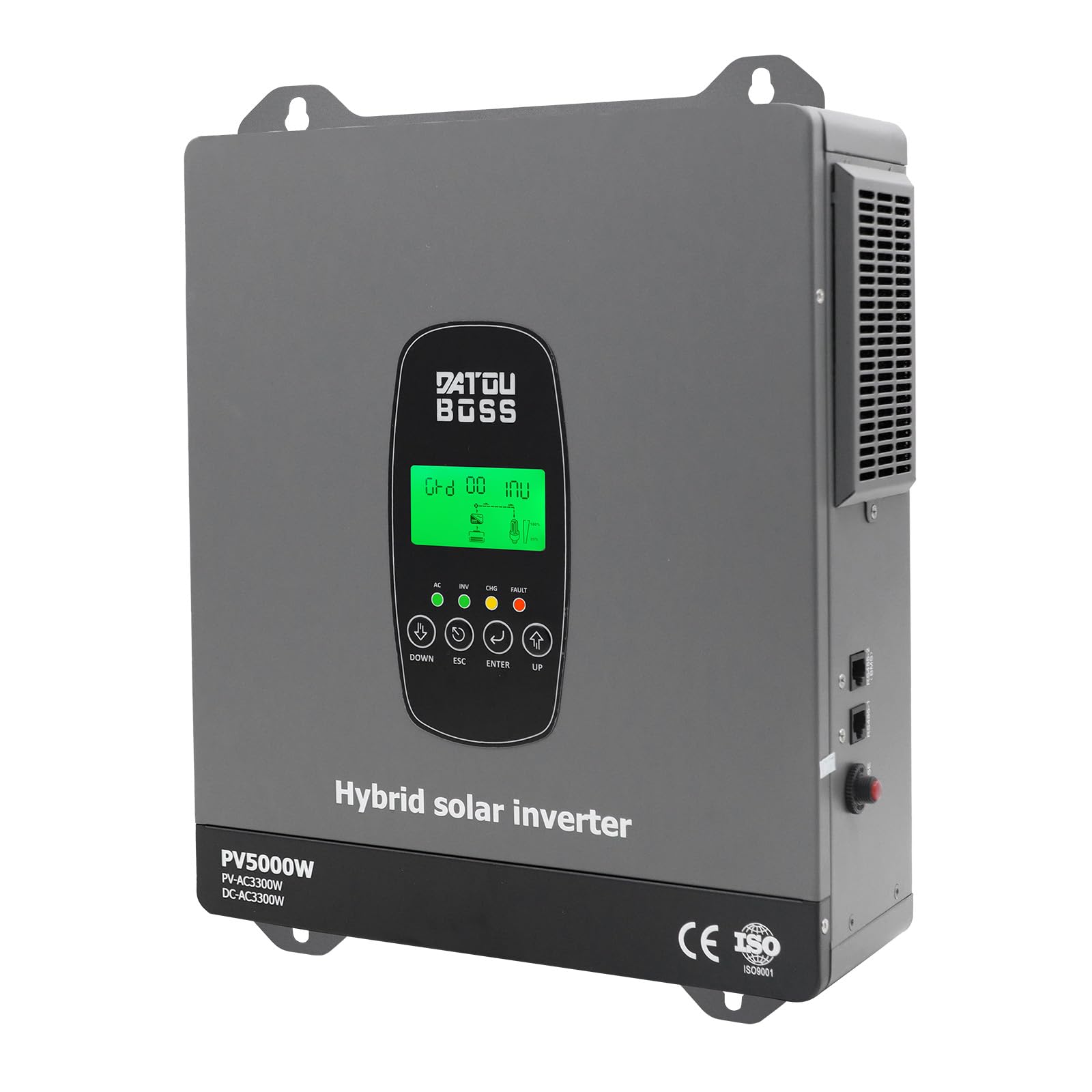
Image 1.1: Front view of the DATOUBOSS 24V 3300W Hybrid Solar Inverter.
2. Safety Information
Always observe the following safety precautions to reduce the risk of electric shock, fire, or injury:
- Installation: Only qualified personnel should install this device. Ensure all wiring complies with local electrical codes.
- Ventilation: Install the inverter in a well-ventilated area to prevent overheating. Do not block ventilation openings.
- Environment: Avoid exposure to rain, snow, spray, or any liquids. Do not operate in environments with flammable gases or materials.
- Battery Safety: Work with batteries carefully. Wear eye protection and remove metal objects like rings or watches. Batteries can produce explosive gases.
- Disconnection: Before performing any maintenance or cleaning, disconnect all power sources, including solar panels, utility grid, and batteries.
- Grounding: Ensure the inverter is properly grounded.
- Children: Keep the device out of reach of children.

Image 2.1: Overview of the inverter highlighting key features and safety symbols.
3. Product Overview and Components
The DATOUBOSS Hybrid Solar Inverter combines multiple functions to provide a comprehensive power solution. It features a robust design with clear indicators and connection points.
3.1 Detailed Features
- Rated Power: 3300W
- Max. PV Input Power: 5000W
- MPPT Tracking Range: 40-450V DC
- Max. PV Open Circuit Voltage: 500V DC
- Max. PV Input Current: 18A
- Nominal Input Voltage: 220V/230V/240V AC
- Output Waveform: Pure Sine Wave
- Max. Hybrid Charge Current: 120A (AC + PV)

Image 3.1: Detailed product parameters for the DT-2433M model.
3.2 Inverter Components and Ports
Familiarize yourself with the various ports and components of the inverter for correct installation and operation.

Image 3.2: Front, top, bottom, left, and right views showing all connection ports and user interface elements.
- Battery Connection Port: For connecting to the battery bank.
- PV Input Port: For connecting solar panel arrays.
- AC Input Port: For connecting to the utility grid.
- AC Output: For connecting to AC loads.
- Ground Terminal: For safety grounding.
- LCD Screen: Displays real-time system status and parameters.
- LED Indicator: Provides visual status cues.
- Function Buttons: For navigating menus and setting parameters.
- On/Off Switch: Main power switch for the inverter.
- AC Input Selector: Switch to select AC input source.
- Communication Interfaces (RS485-2, RS485): For external communication and monitoring.
- AC Input Fuse: Protection for the AC input circuit.
4. Setup and Installation
Proper installation is crucial for the performance and safety of the hybrid solar inverter. Follow these guidelines carefully.
4.1 Site Selection
- Mount the inverter vertically on a non-flammable surface.
- Ensure adequate clearance around the inverter for proper airflow (at least 20 cm on all sides).
- Avoid direct sunlight, high temperatures, and high humidity.
- The installation site should be easily accessible for maintenance.
4.2 Wiring Connections
Refer to the detailed system diagram for connection guidance. Ensure all connections are secure and correctly polarized.

Image 4.1: Detailed wiring diagram illustrating the solar, grid, battery, and AC output connections.
- Battery Connection: Connect the 24V battery bank (e.g., LiFePO4 24V) to the battery connection port. Ensure correct polarity (+ to + and - to -).
- Solar Panel Connection: Connect your solar panel array to the PV input port. Verify that the PV open circuit voltage and current are within the inverter's specifications (Max. PV Input Power: 5000W, MPPT Tracking Range: 40-450V DC, Max. PV Open Circuit Voltage: 500V DC, Max. PV Input Current: 18A).
- AC Input (Grid) Connection: Connect the utility grid power to the AC input port.
- AC Output (Load) Connection: Connect your AC loads (appliances) to the AC output port.
- Grounding: Connect the inverter's ground terminal to a reliable earth ground.
The inverter supports various battery types including 24V lead-acid (sealed, AGM, Gel, flooded) and lithium batteries. The integrated BMS provides protection against overcharge and deep discharge for lithium batteries.

Image 4.2: Simplified system diagram showing solar charge, battery connection, and AC loads.
5. Operating Instructions
Once installed, the inverter can be configured and operated using the LCD display and function buttons.
5.1 Powering On/Off
- Ensure all wiring is correct and secure.
- Turn on the battery breaker/switch.
- Turn on the main On/Off switch on the inverter.
- The LCD screen will light up, and the inverter will begin its startup sequence.
- To power off, reverse the sequence: turn off the inverter switch, then the battery breaker.
5.2 LCD Display and Real-time Monitoring
The clear LCD screen displays real-time information including voltage, power, battery status, and system operation. Fault codes are also displayed for quick troubleshooting.
5.3 Selectable Operating Modes
The inverter offers versatile operating modes to suit different application requirements:
- Charge Modes:
- Solar Priority
- Utility Priority
- Solar Priority (ECO mode)
- Hybrid Charge (Utility + PV)
- Output Modes:
- PV Priority
- Utility Priority
- Inverter Priority
These modes can be configured via the LCD display and function buttons according to your energy input and output priorities.
5.4 Wi-Fi Monitoring
The inverter is Wi-Fi ready, allowing real-time performance visualization without needing to check the LCD screen directly. Use the dedicated website or application for monitoring and viewing data as needed.

Image 5.1: Wi-Fi monitoring feature for remote access to inverter performance data.
6. Maintenance
Regular maintenance ensures the longevity and optimal performance of your DATOUBOSS Hybrid Solar Inverter.
- Cleaning: Periodically clean the exterior of the inverter and ensure ventilation openings are free from dust and debris. Use a dry, soft cloth. Do not use liquid cleaners.
- Connections: Annually check all electrical connections (battery, PV, AC input/output) for tightness and signs of corrosion. Tighten any loose connections.
- Environment: Ensure the operating environment remains within specified temperature and humidity ranges.
- Battery Inspection: Regularly inspect batteries for any signs of damage, leakage, or swelling. Follow battery manufacturer's maintenance guidelines.
7. Troubleshooting
The inverter is equipped with a comprehensive safety system. If an error occurs, the LCD display will show a fault code. Refer to the manual's troubleshooting section (not provided in detail here, but typically found in a full manual) for specific fault code interpretations and solutions.
7.1 Common Issues and Solutions
- No Power Output: Check battery connections, AC input, and inverter's On/Off switch. Verify if any circuit breakers or fuses have tripped.
- Low Battery Voltage Alarm: Ensure batteries are adequately charged. Check solar panel output and grid connection for charging.
- Overload Warning: Reduce the connected load. The inverter has overload protection.
- Over-temperature Warning: Ensure proper ventilation. Clean any dust from the inverter's vents.
If the issue persists after basic troubleshooting, contact customer support.

Image 7.1: Integrated protection features of the inverter, ensuring comprehensive safety.
8. Specifications
Below are the detailed technical specifications for the DATOUBOSS Hybrid Solar Inverter 3300W 24V (Model DT-2433M).
| Parameter | Value |
|---|---|
| Manufacturer | DATOUBOSS |
| Model Name | DATOUBOSS Hybrid Solinverter 3300W 24V (DT-2433M) |
| Rated Power | 3300 Watts |
| Input Voltage (DC) | 24 Volts |
| Output Voltage (AC) | 220 Volts (AC) |
| Output Waveform | Pure Sine Wave |
| Max. PV Open Circuit Voltage | 500V DC |
| MPPT PV Array Voltage Range | 40-450V DC |
| Max. PV Input Power | 5000W |
| Max. PV Input Current | 18A |
| Max. Hybrid Charge Current | 120A (Utility + PV) |
| Recommended Uses | RVs, camping vehicles, boats, off-grid home electrical systems |
| Power Source | Solar Energy |
| Country of Origin | China |
| GTIN / UPC | 740684063716 |

Image 8.1: Comprehensive technical specifications for the inverter's various operational aspects.
9. Warranty and Support
9.1 Warranty Information
This DATOUBOSS Hybrid Solar Inverter comes with a 2-year manufacturer's warranty. Please retain your proof of purchase for warranty claims. The warranty covers defects in materials and workmanship under normal use.
9.2 Customer Support
For technical assistance, troubleshooting, or warranty inquiries, please contact DATOUBOSS customer support through your retailer or the official DATOUBOSS website. Have your model number (DT-2433M) and purchase date ready when contacting support.


