
1. Introduction and Overview
This manual provides essential information for the safe assembly, operation, and maintenance of your Garvee 12V Electric Kids Forklift Ride-On Car. Designed for children aged 3-7, this ride-on toy offers a realistic forklift experience with a liftable fork and removable pallet, controlled by an easy-to-use joystick. It features dual control modes, allowing your child to drive via the foot pedal or for parental guidance using the included remote control.
Enjoy lasting fun with 2 speed settings, built-in music, a horn, and a USB/MP3 port for personalized entertainment. The vehicle is built with safety in mind, featuring an adjustable safety belt and supporting up to 66 lbs, suitable for both indoor and outdoor play. Encourage active playtime and provide an engaging gift for young operators with this durable electric ride-on car.
2. Safety Information
- Adult Supervision Required: Always supervise children during operation.
- Age and Weight Limits: Suitable for children aged 3-7 years, with a maximum weight capacity of 66 lbs (30 kg).
- Wear Safety Belt: Ensure the adjustable safety belt is securely fastened before each use.
- Safe Operating Environment: Use on flat, dry surfaces. Avoid slopes, uneven terrain, water, and public roads.
- Charging Safety: Only use the provided charger. Do not overcharge the battery. Keep away from flammable materials.
- Avoid Obstacles: Ensure the play area is clear of obstacles, people, and pets.
- No Modifications: Do not modify the electrical system or any components of the vehicle.
3. What's in the Box
The Garvee 12V Electric Kids Forklift Ride-On Car package includes the following components:
- KIDS FORKLIFT CAR (Main Body)
- Remote Control
- Charger (12V 500mA)
- Liftable Fork Attachment
- Removable Pallet
- Assembly Hardware (screws, washers, nuts)
- Instruction Manual
4. Setup and Assembly
Follow these general steps for assembling your ride-on forklift. Refer to the detailed assembly video for visual guidance.
Video Description: This video demonstrates the assembly process for a kids' electric ride-on vehicle, including unpacking, connecting battery terminals, attaching wheels, installing the steering wheel, and securing various body components. While the video features a pickup truck model, the general assembly principles for connecting motors, wheels, and steering components are applicable to the Garvee forklift.
Key Assembly Steps:
- Unpack Components: Carefully remove all parts from the packaging and verify against the 'What's in the Box' list.
- Connect Battery: Locate the battery compartment, typically under the seat or hood. Connect the positive and negative terminals as indicated.
- Install Wheels: Attach the wheels to the axles, securing them with the provided washers and nuts. Ensure they are firmly in place but can rotate freely.
- Attach Steering Wheel: Connect the steering column to the vehicle's chassis and then attach the steering wheel, ensuring all electrical connections for horn/music are made. Secure with screws.
- Install Forklift Mechanism: Assemble the liftable fork and pallet mechanism according to the instructions, securing it to the front of the vehicle.
- Secure Seats and Accessories: Install the seat(s) and any additional accessories like mirrors or decorative elements.
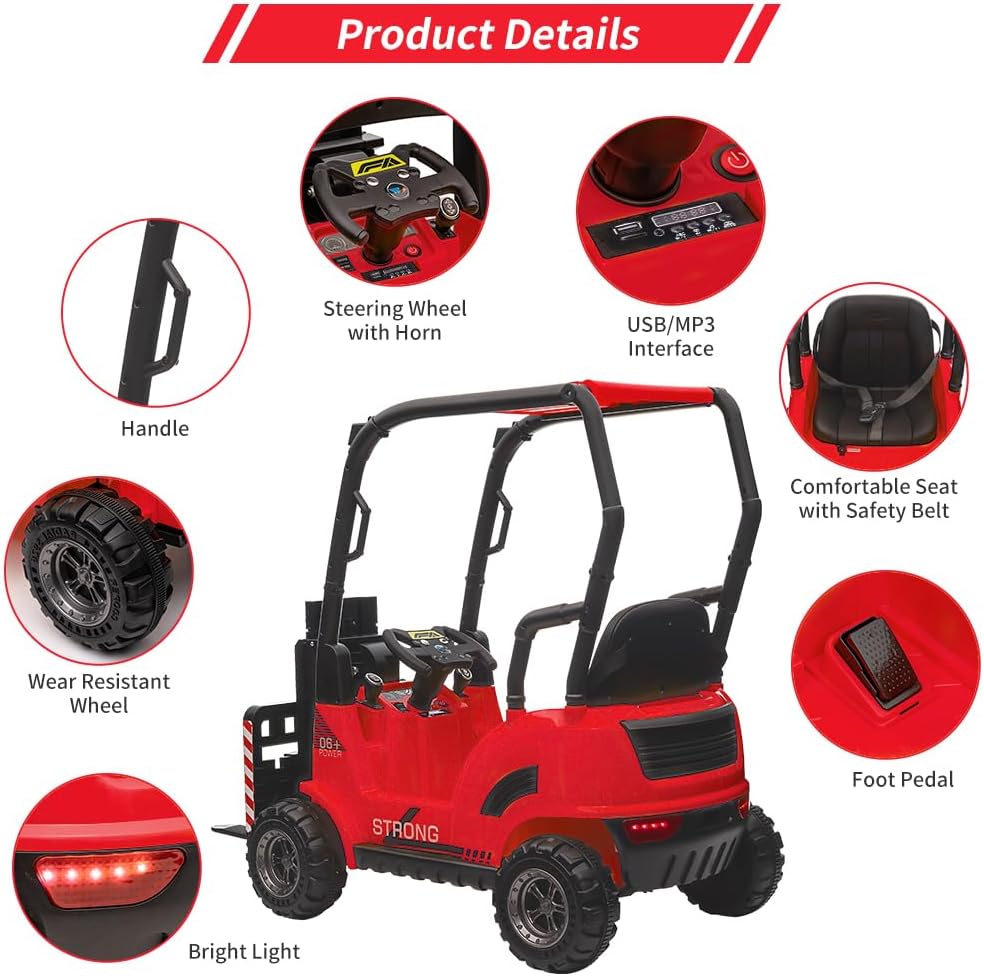
Image Description: An overhead view of the red Garvee forklift highlighting various product details including the steering wheel with horn, USB/MP3 interface, comfortable seat with safety belt, foot pedal, bright lights, wear-resistant wheels, and a handle.
5. Operating Instructions
Driving Modes:
- Child-Controlled: The child can operate the vehicle using the foot pedal for acceleration and the steering wheel for direction.
- Parental Remote Control: For younger children or for safety, parents can override child control using the included remote control to steer, accelerate, and brake the vehicle.

Image Description: A child happily driving the red Garvee forklift in a field, with insets showing the remote control and the manual steering wheel, illustrating the two available driving modes.
Forklift Operation:
Use the dedicated joystick or lever to control the liftable fork. This allows children to raise and lower the fork, simulating real forklift actions. The removable pallet can be used to transport lightweight items.
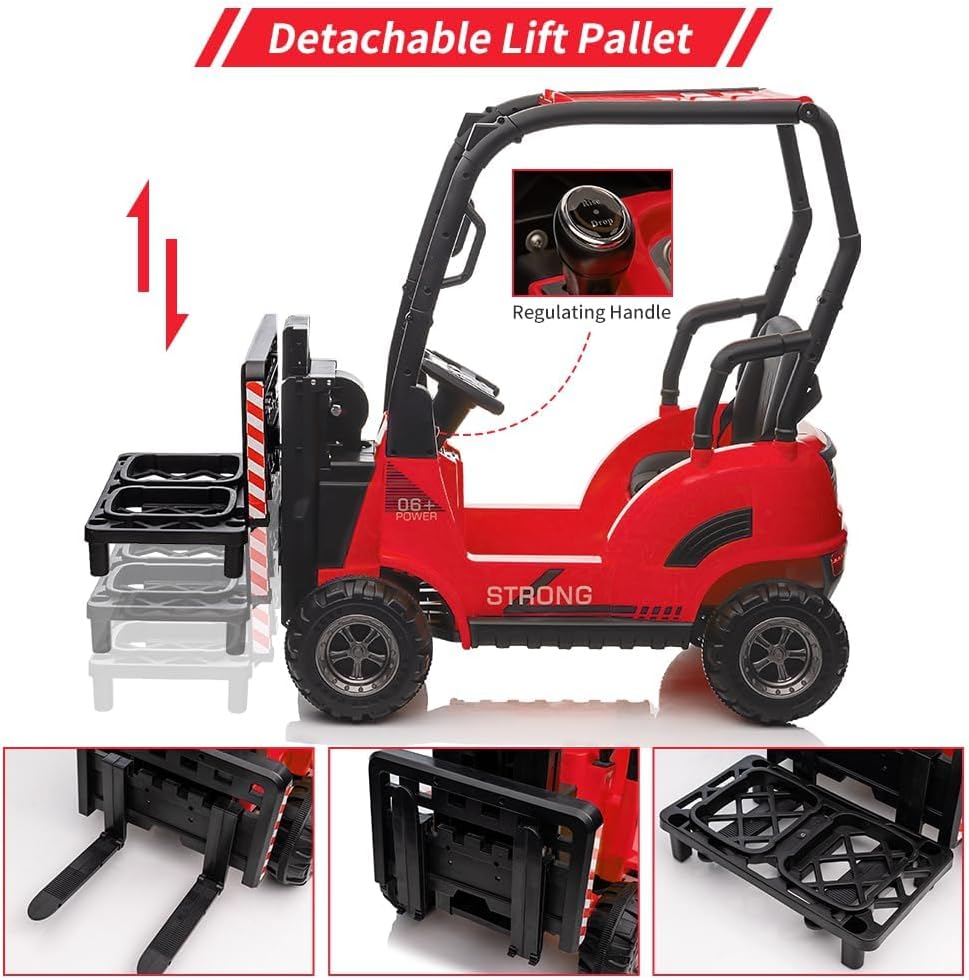
Image Description: A side view of the red Garvee forklift demonstrating the detachable lift pallet feature. Insets show close-ups of the fork mechanism and the removable pallet.
Entertainment Features:
- Music & Horn: Activate built-in music and horn sounds via buttons on the dashboard or steering wheel.
- USB/MP3 Port: Connect a USB device or MP3 player to the designated port to play your child's favorite songs through the vehicle's speakers.
6. Maintenance
- Cleaning: Wipe the vehicle with a soft, damp cloth. Do not use abrasive cleaners or solvents. Avoid spraying water directly onto electrical components.
- Battery Care: Charge the battery fully after each use and at least once a month during storage to prolong its lifespan. Do not allow the battery to fully discharge.
- Storage: Store the vehicle in a dry, cool place away from direct sunlight and moisture. If storing for extended periods, disconnect the battery.
- Regular Checks: Periodically inspect all screws, nuts, and connections to ensure they are tight and secure. Check wheels for wear and tear.
7. Troubleshooting
- Vehicle Not Moving: Check if the battery is connected and fully charged. Ensure all power switches are in the 'ON' position. Verify that the remote control is paired correctly if in parental mode.
- Slow Speed: The battery may be low, requiring a recharge. Ensure the vehicle is not overloaded beyond its weight capacity. Check for any obstructions around the wheels.
- Remote Control Not Working: Check the batteries in the remote control and replace if necessary. Ensure the remote is properly paired with the vehicle.
- Unusual Noises: Stop operation immediately and inspect the vehicle for loose parts, obstructions, or damaged components. Contact customer support if the issue persists.
8. Specifications
| Feature | Detail |
|---|---|
| Brand Name | Garvee |
| Model Number | LWY-12FORKLIFT-redJC4p01 |
| Manufacturer Minimum Age | 37 Months |
| Item Weight | 38.6 Pounds |
| Item Dimensions L x W x H | 46"L x 21.6"W x 38.5"H |
| Material Type | Iron |
| Is Assembly Required | Yes |
| UPC | 820567777739 |
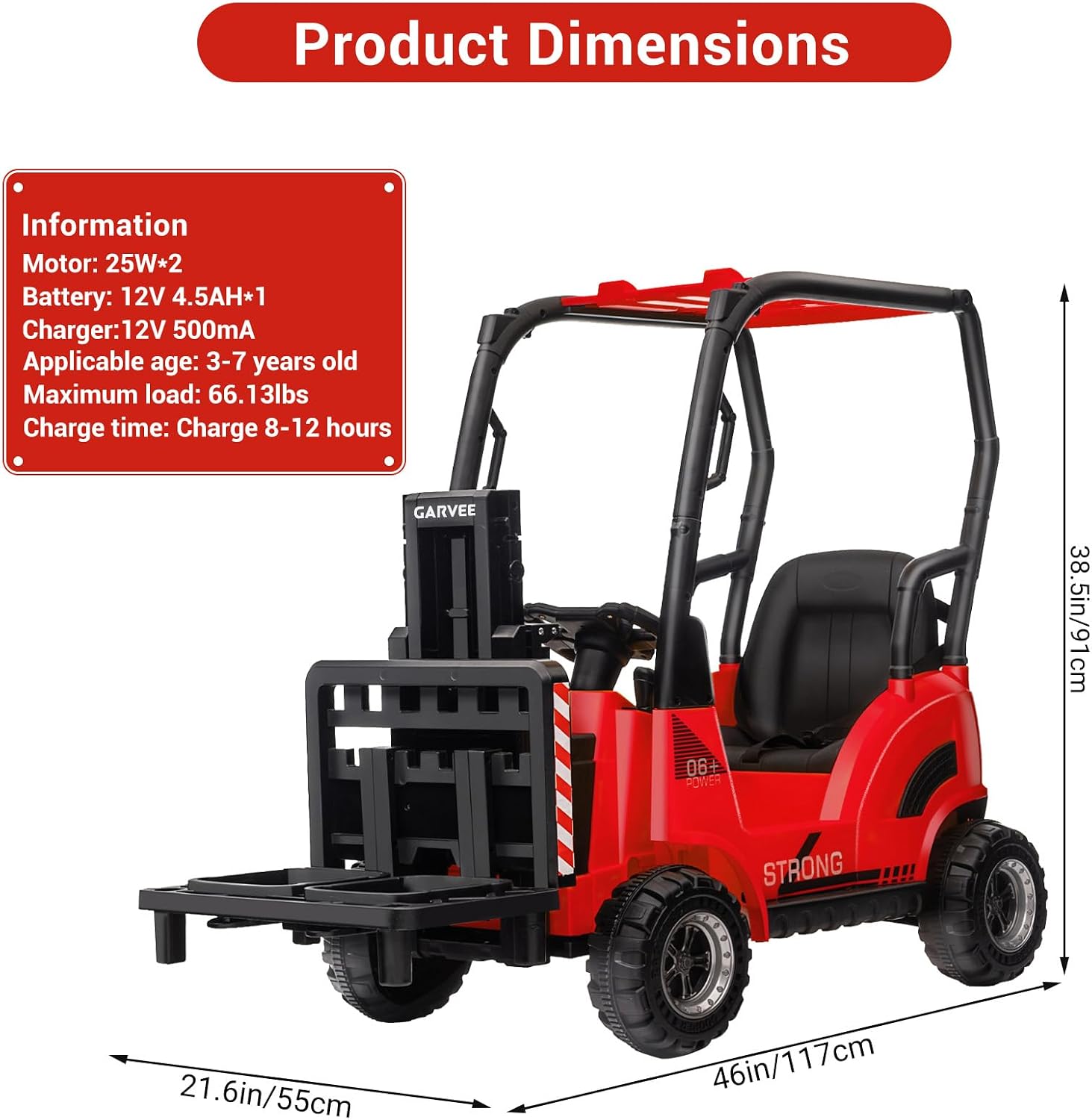
Image Description: A side view of the red Garvee forklift with key dimensions highlighted: 46 inches (117 cm) in length, 21.6 inches (55 cm) in width, and 38.5 inches (91 cm) in height. Additional information includes motor (25W*2), battery (12V 4.5AH*1), charger (12V 500mA), applicable age (3-7 years old), maximum load (66.13 lbs), and charge time (8-12 hours).
9. Warranty and Support
For warranty information, technical support, or replacement parts, please refer to the contact details provided on the product packaging or the official Garvee website. Keep your purchase receipt for warranty claims.