
1. Product Overview
The LVSOMT 63" RGB High-Gloss Sideboard Buffet Cabinet is a modern storage solution designed for various rooms, featuring adjustable shelving, an integrated charging station, and customizable RGB LED lighting with a motion sensor. This cabinet combines functionality with a sleek aesthetic.

Image: The LVSOMT 63-inch RGB High-Gloss Sideboard Buffet Cabinet in black, showcasing its design and RGB lighting.
2. Safety Information
- Always follow assembly instructions carefully to ensure structural integrity.
- Do not overload shelves or the countertop beyond specified weight capacities.
- Keep electrical components (charging station, LED lights) away from water.
- Ensure the cabinet is placed on a level surface to prevent tipping.
- Children should be supervised around the cabinet, especially during assembly or when accessing contents.
3. Setup and Assembly
Assembly of the LVSOMT Sideboard Buffet Cabinet is required. Please ensure all components are present before beginning. Your order ships in two separate packages (A & B), which may arrive at different times.
3.1 Unpacking and Inventory
- Open both packages (A & B) carefully and lay out all parts on a clean, soft surface to prevent scratches.
- Refer to the included hardware and instructions manual for a complete list of parts. Verify all pieces are accounted for.

Image: Visual representation of the product arriving in two separate boxes.
3.2 Assembly Instructions
Follow the detailed assembly instructions provided in the included user manual. Ensure all screws and fasteners are tightened securely. Do not overtighten.
Video: Step-by-step guide on how to install the Sideboard Buffet Cabinet.
3.3 Hinge Adjustment
After assembly, you may need to adjust the door hinges to ensure proper alignment and smooth closing. Use the adjustment screws on each hinge as follows:
- Screw A: Controls the up and down height of the door.
- Screw B: Controls the gap between the door and the cabinet frame.
- Screw C: Controls the gap between the two doors.
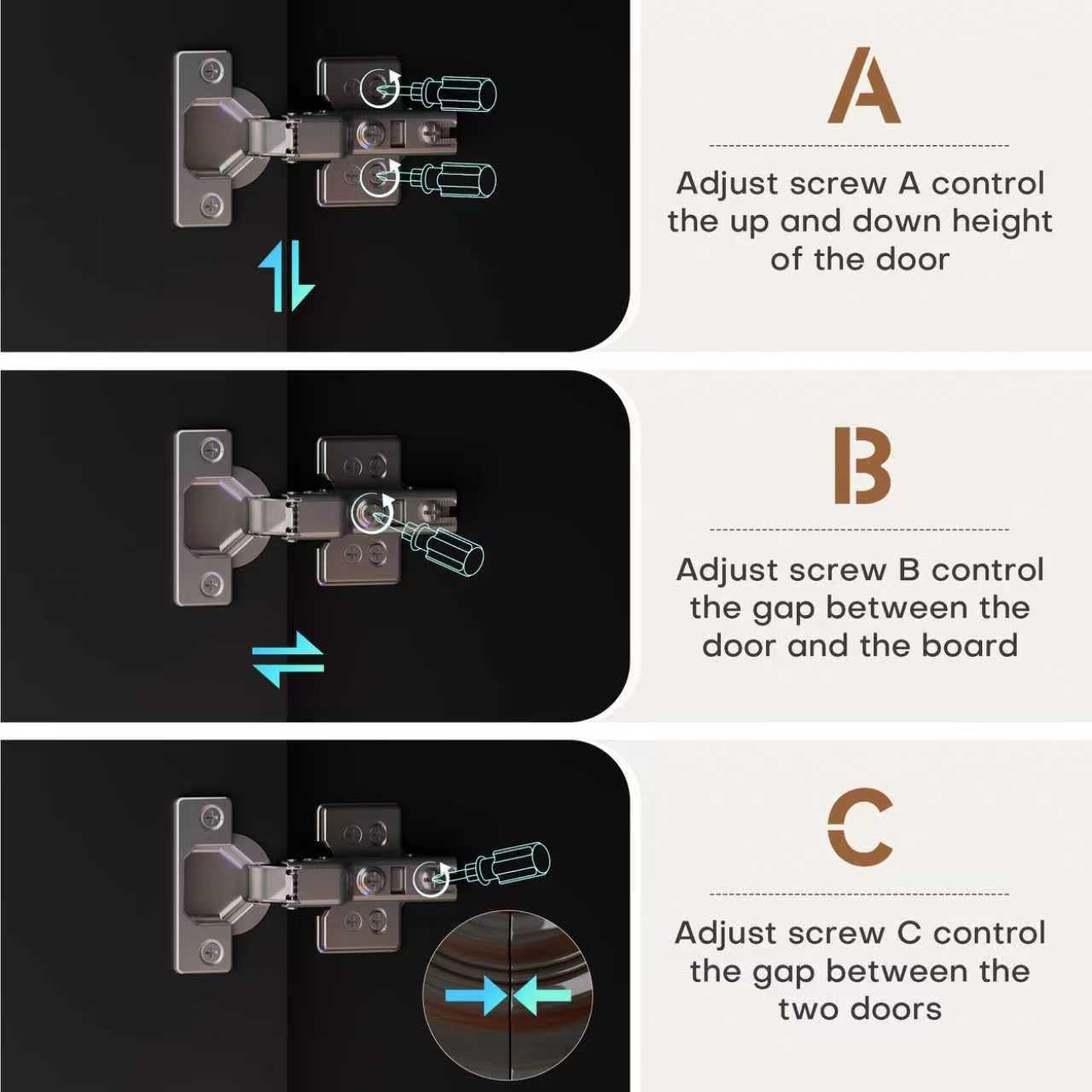
Image: Detailed diagram illustrating how to adjust the cabinet door hinges.
4. Operating Instructions
4.1 Built-In Charging Station
The cabinet features an integrated charging station for convenient power access. It includes:
- 1 x Type-C Port (5V/2A)
- 1 x USB Port (5V/2A)
- 2 x AC Outlets (125V/12A)
Simply plug your devices into the appropriate ports to charge. The station is designed to keep your devices powered and your space tidy by reducing cable clutter.

Image: A detailed view of the integrated charging station on the cabinet's surface.
4.2 RGB LED Ambient Lighting
Enhance your room's ambiance with the customizable RGB LED lighting strip. The lighting can be controlled via a user-friendly mobile application or directly from the smart module.
- App Control: Download the dedicated mobile app to access over 20 lighting colors, dynamic patterns, and loop modes.
- Smart Module Control: Use the physical controls on the smart module for basic adjustments. Short-touch to cycle through 24 color dimming modes. Long-touch to adjust brightness levels (30%, 50%, 100%).

Image: Visual guide for selecting LED colors and adjusting brightness.
Video: Demonstration of the 63-inch High-Gloss Sideboard Buffet Cabinet's RGB lighting features.
4.3 Motion Sensor Light
The cabinet is equipped with an energy-saving human body motion sensor light. When the sensor button is activated, the light will automatically turn on when motion is detected within 1-2 meters and will turn off after 30 seconds of no activity. This feature provides hands-free convenience and enhances safety in low-light conditions.
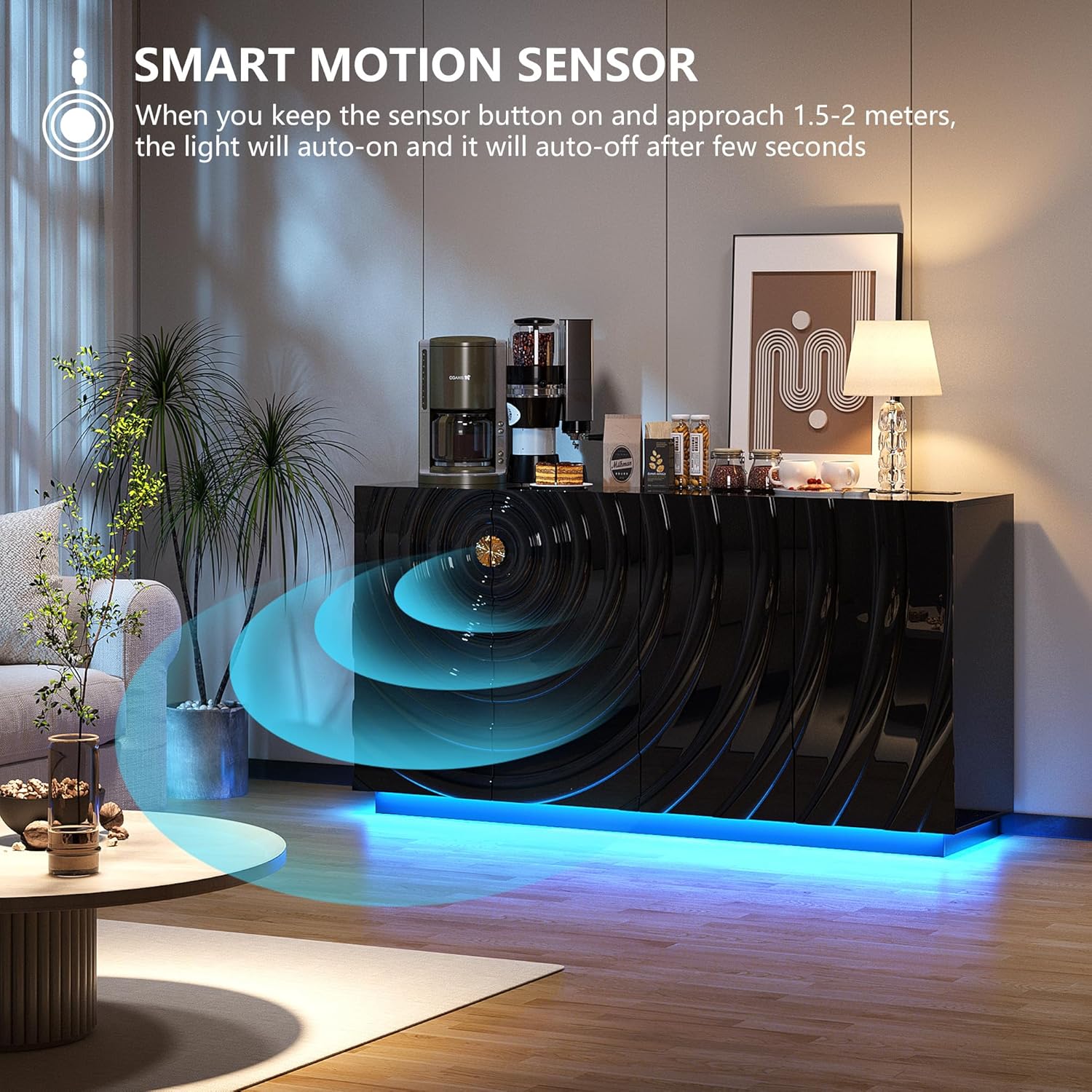
Image: Depiction of the smart motion sensor in action, illuminating the cabinet's base.
4.4 Adjustable Shelves
The cabinet features adjustable shelves within its four compartments, allowing you to customize storage space for items of various sizes. Simply reposition the shelf supports to your desired height.

Image: The interior of the cabinet highlighting the adjustable shelves for flexible storage.
5. Maintenance and Care
To ensure the longevity and appearance of your LVSOMT Sideboard Buffet Cabinet, follow these maintenance guidelines:
- Cleaning: For the high-gloss finish, wipe surfaces with a soft, damp cloth. Avoid abrasive cleaners or harsh chemicals that could damage the finish. Dry immediately with a clean, soft cloth.
- Dusting: Regularly dust with a soft, dry cloth.
- Spills: Clean up spills immediately to prevent staining or damage to the engineered wood.
- Hinges: Periodically check door hinges for tightness and adjust if necessary to maintain proper door alignment.
- Electrical Components: Ensure the charging station and LED lights are kept dry and free from dust. Do not attempt to repair electrical components yourself.

Image: Features like the spacious tabletop, RGB LED strip, and soft-close hinges, which benefit from regular care.
6. Troubleshooting
This section addresses common issues you might encounter with your sideboard cabinet.
- Doors are misaligned or do not close properly: Refer to Section 3.3 Hinge Adjustment to correct the alignment.
- LED lights are not working:
- Check if the power adapter is securely plugged into a working outlet and the cabinet's power input.
- Ensure the LED strip connection is secure.
- Verify that the mobile app or smart module controls are set to an 'on' state and a visible color/brightness.
- Motion sensor light is not activating:
- Confirm the motion sensor button is turned on.
- Ensure there are no obstructions blocking the sensor's field of view.
- Check if the ambient light is too bright, as some sensors are designed to only activate in low-light conditions.
- Charging station is not providing power:
- Ensure the cabinet's main power cord is plugged into a functional wall outlet.
- Test with a different device or cable to rule out device-specific issues.
If you encounter issues not listed here or if troubleshooting steps do not resolve the problem, please contact LVSOMT Customer Support.
7. Specifications
| Brand | LVSOMT |
| Model Number | 97136-27 |
| UPC | 717944948489 |
| Color | Black |
| Material | Engineered Wood |
| Overall Dimensions (W x H x D) | 63" x 33" x 15" |
| Countertop Weight Capacity | 200 lbs |
| Adjustable Shelf Weight Capacity | 50 lbs |
| Number of Doors | 4 |
| Number of Shelves | 2 (adjustable) |
| Charging Station | 1x Type-C, 1x USB, 2x AC Outlets |
| Lighting | RGB LED with Motion Sensor |

Image: Detailed product dimensions and weight capacity information.
8. Warranty and Support
8.1 Warranty Information
Specific warranty details for this product are not provided in the available information. Please refer to your purchase documentation or contact LVSOMT Customer Support for warranty terms and conditions.
8.2 Customer Support
For any questions, assistance with assembly, troubleshooting, or to inquire about warranty information, please contact LVSOMT Customer Support. You can also visit the official LVSOMT store for more product information and support resources.
- LVSOMT Store: Visit the LVSOMT Store on Amazon