1. Introduction
The Flozari GH-302-FM Toggle Clamp is a robust hand tool designed for securely holding workpieces in various applications. Its quick-release push-pull action allows for efficient clamping and unclamping, making it suitable for welding, forming, bench saw/planer fixtures, cabinetry, milling machine worktops, jigs, assemblies, and mobile bases. This manual provides essential information for the safe and effective use of your GH-302-FM toggle clamp.
2. Safety Information
- Always wear appropriate personal protective equipment (PPE), such as safety glasses, when operating or installing the clamp.
- Ensure the clamp is securely mounted to a stable surface before applying pressure.
- Do not exceed the specified holding capacity of 136 kg (300 lbs) to prevent damage to the clamp or injury.
- Keep hands and fingers clear of moving parts during clamping and unclamping operations.
- Inspect the clamp for any signs of wear, damage, or loose components before each use. Do not use a damaged clamp.
- Use the clamp only for its intended purpose as a workholding device.
3. Product Overview
The GH-302-FM toggle clamp features a durable construction of cold-rolled carbon steel with zinc plating for corrosion resistance. It is designed with a low-profile form factor and includes a pressure adaptor for easy depth adjustment, ensuring maximum clearance for various workpieces.
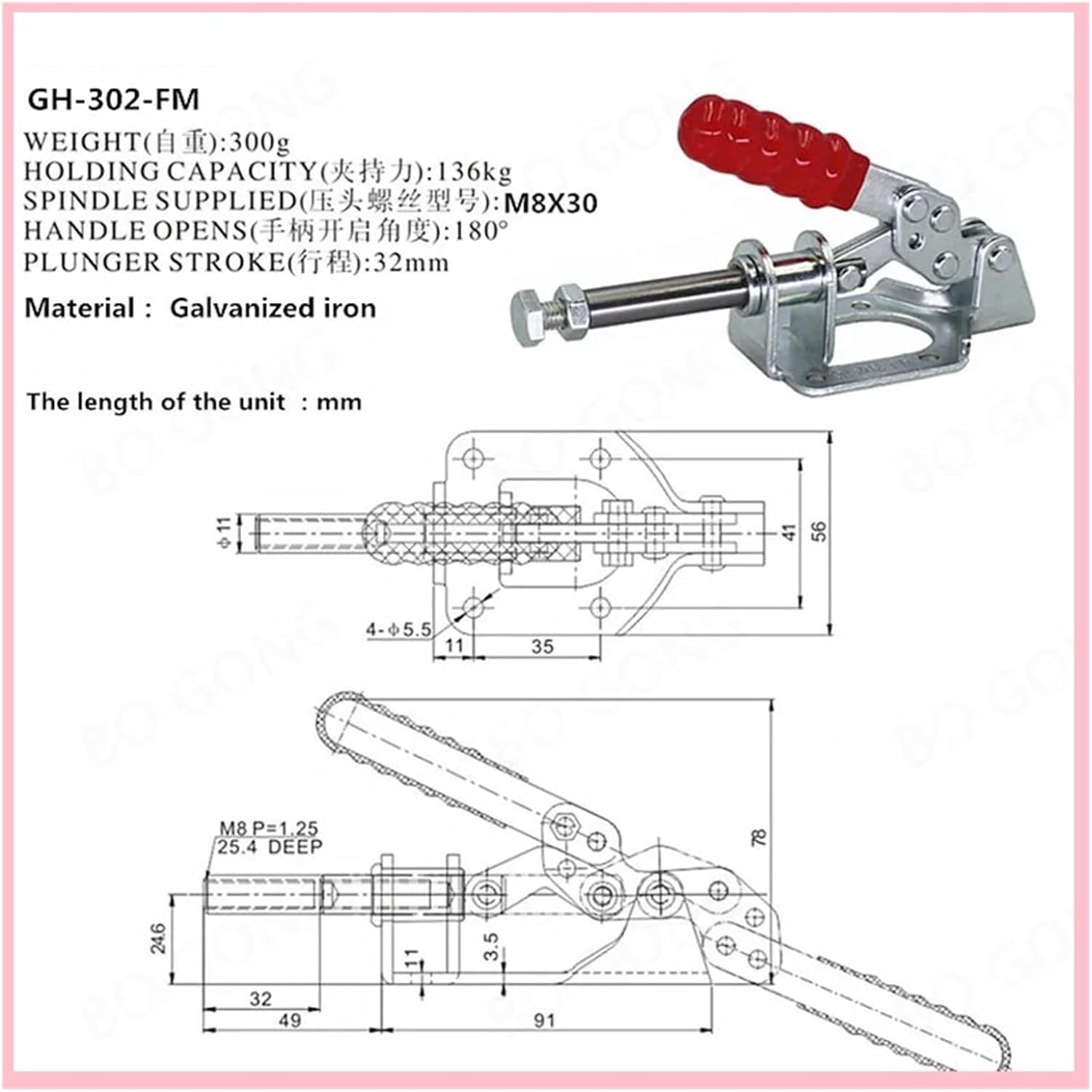
Figure 3.1: General view of the Flozari GH-302-FM Toggle Clamp. This image displays the clamp's overall design, including the red handle and galvanized steel components.
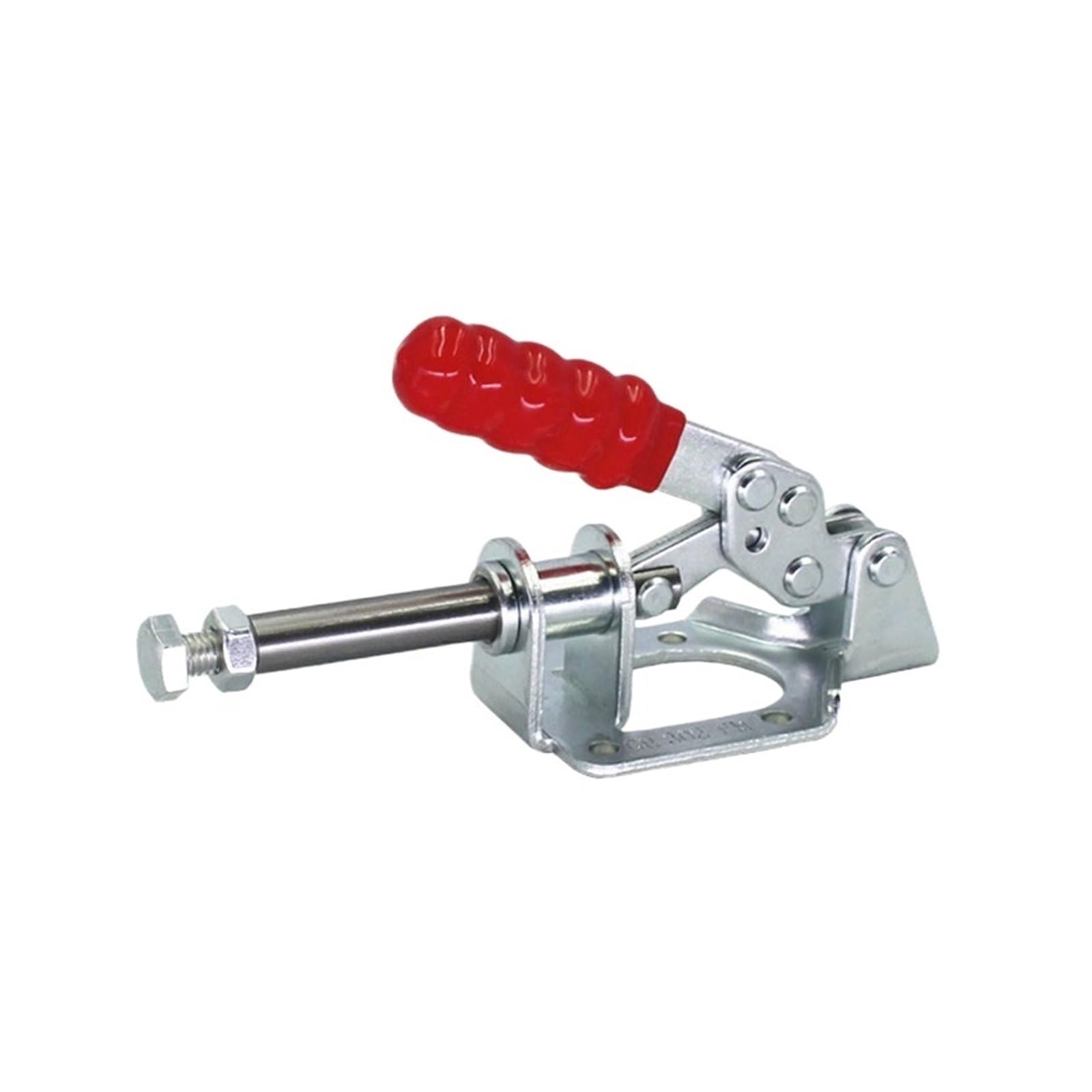
Figure 3.2: Detailed diagram showing the dimensions and key specifications of the GH-302-FM Toggle Clamp. This includes measurements in millimeters, weight, holding capacity, spindle type, handle open angle, and plunger stroke.
4. Setup and Installation
The GH-302-FM toggle clamp is designed for simple installation. Follow these steps to mount the clamp securely:
- Select Mounting Location: Choose a stable and appropriate surface (e.g., workbench, jig, fixture) where the clamp will be used. Ensure the surface can withstand the clamping forces.
- Position the Clamp: Place the clamp base in the desired position. The base has pre-drilled holes for mounting.
- Mark Drilling Points: Use a pencil or marker to mark the locations for drilling through the mounting holes on the clamp base.
- Drill Pilot Holes: Drill pilot holes into the mounting surface according to the size of your chosen screws.
- Secure the Clamp: Align the clamp with the pilot holes and secure it firmly using appropriate screws and nuts (not included). Ensure all fasteners are tightened to prevent movement during operation.
- Adjust Pressure Adaptor: The clamp features a pressure adaptor on the spindle. Adjust its position to achieve the desired clamping depth and pressure on your workpiece.

Figure 4.1: The GH-302-FM Toggle Clamp shown with a separate bolt and nut, illustrating the type of hardware typically used for mounting the clamp to a surface.
5. Operating Instructions
To operate the Flozari GH-302-FM Toggle Clamp:
- Position Workpiece: Place the workpiece securely under the clamping arm.
- Engage Clamp: Push the handle forward to extend the plunger and engage the workpiece. The over-center locking mechanism will hold the clamp in place.
- Adjust Clamping Force: If necessary, fine-tune the clamping force by adjusting the pressure adaptor on the spindle. Turn clockwise to increase pressure, counter-clockwise to decrease.
- Release Clamp: Pull the handle back to retract the plunger and release the workpiece. The handle opens to an angle of 180 degrees for maximum clearance.
6. Maintenance
Regular maintenance ensures the longevity and optimal performance of your toggle clamp:
- Cleaning: Wipe down the clamp regularly with a clean, dry cloth to remove dust, debris, and metal shavings.
- Lubrication: Periodically apply a small amount of light machine oil to the pivot points and moving parts to ensure smooth operation and prevent rust.
- Inspection: Regularly check for loose fasteners, bent components, or excessive wear on the handle, links, or spindle. Tighten any loose screws or nuts.
- Storage: Store the clamp in a dry environment to prevent corrosion, especially if it will not be used for an extended period.
7. Troubleshooting
If you encounter issues with your GH-302-FM Toggle Clamp, consider the following:
- Clamp not holding securely:
- Ensure the clamp is properly mounted and all fasteners are tight.
- Adjust the pressure adaptor on the spindle to increase clamping force.
- Verify the workpiece is positioned correctly and not exceeding the clamp's capacity.
- Difficulty engaging/disengaging:
- Check for any obstructions preventing full movement of the handle or plunger.
- Apply lubrication to pivot points if movement feels stiff.
- Ensure the clamp is not over-tightened or attempting to clamp an oversized workpiece.
- Visible wear or damage:
- Discontinue use immediately.
- Contact the manufacturer or seller for replacement parts or advice.
8. Specifications
| Feature | Specification |
|---|---|
| Model Number | GH-302-FM |
| Weight | 300g (approximately 10.6 ounces) |
| Holding Capacity | 136 kg (300 lbs) |
| Spindle Supplied | M8X30 |
| Handle Open Angle | 180° |
| Plunger Stroke | 32 mm |
| Material | Cold-rolled carbon steel with zinc plating |
| Structure | Push-Pull Action Type |
9. Warranty and Support
For warranty information, technical support, or inquiries regarding replacement parts, please contact the seller or manufacturer directly. Keep your purchase receipt as proof of purchase.


