
1. Important Safety Information
Please read and understand this entire owner's manual, including all safety information, before plugging in or using this product. Failure to do so could result in fire, electric shock, or serious personal injury.
- Always disconnect the fireplace from the power supply before cleaning, performing maintenance, or relocating the unit.
- Do not use this fireplace outdoors.
- This fireplace is hot when in use. To avoid burns, do not let bare skin touch hot surfaces.
- Keep combustible materials, such as furniture, pillows, bedding, papers, clothes, and curtains at least 3 feet (0.9 m) from the front of the fireplace.
- Extreme caution is necessary when any fireplace is used by or near children or invalids and whenever the fireplace is left operating and unattended.
- Do not run cord under carpeting. Do not cover cord with throw rugs, runners, or similar coverings. Arrange cord away from traffic area and where it will not be tripped over.
- Built-in overheat protection ensures safe operation.
2. Setup and Installation
The R.W.FLAME 50-inch Smart Electric Fireplace can be installed as either a recessed unit or a wall-mounted unit. Ensure proper clearances as specified in the diagram below.
2.1 Locating Your Appliance
Refer to the diagram for recommended clearances from the ceiling and combustible materials.
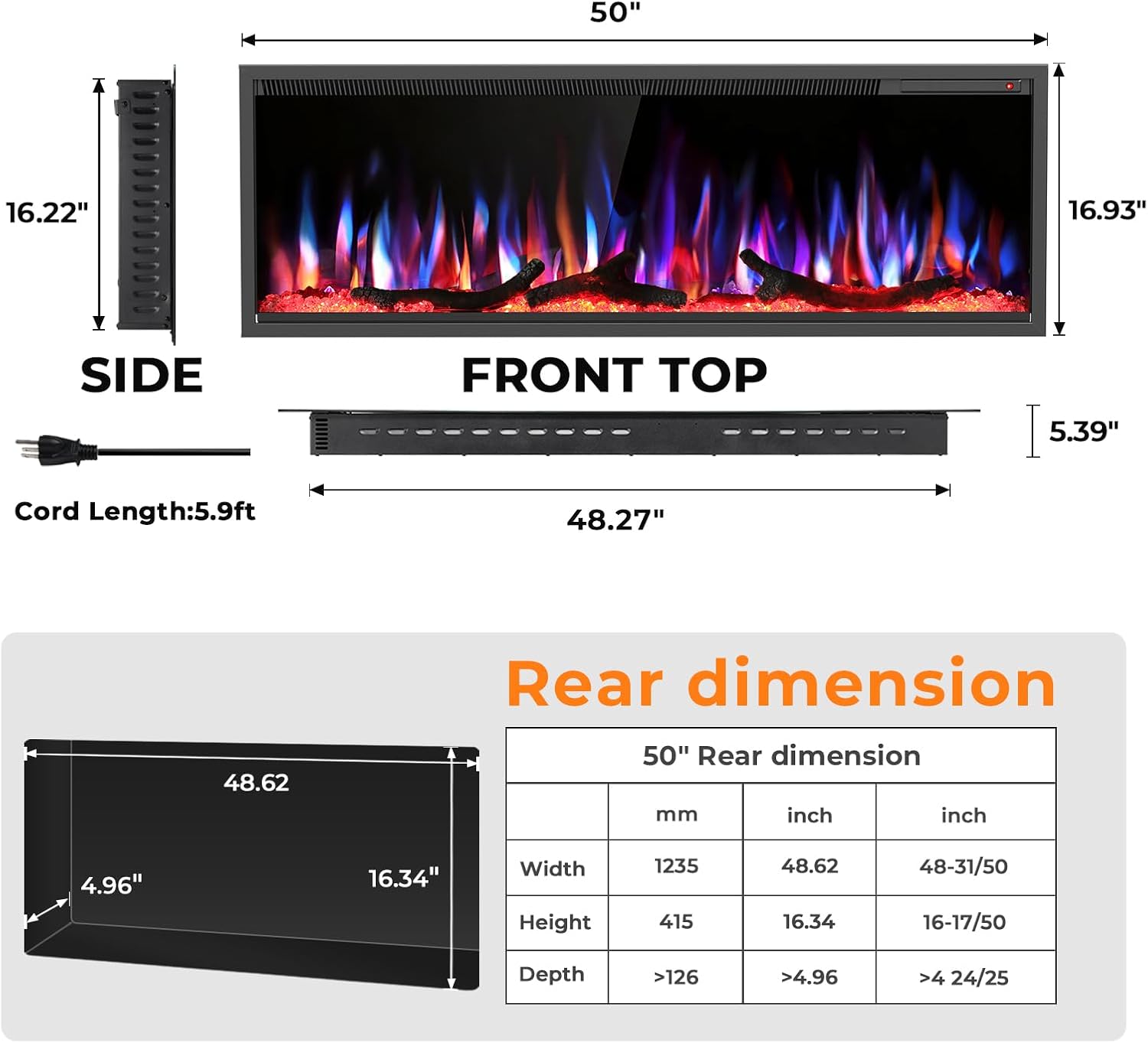
Image: Fireplace dimensions and recommended clearances. Ceiling clearance: 8 inches (203mm). Clearance from combustibles: 36 inches (914mm).
2.2 Installation Methods
This fireplace supports both wall-mounted and recessed installation. The following video provides detailed instructions for both methods.
Video: Detailed installation guide for the R.W.FLAME Smart Electric Fireplace, covering both embedded (recessed) and wall-mounted installation steps. This video demonstrates how to remove the mounting bracket, grip the glass frame with a suction cup, reserve a wall opening, pass the power cord, tuck the fireplace into the pit, drive screws, place decorative pieces (logs and crystals), and reinstall the glass panel for embedded installation. For wall-mounted installation, it shows fixing the bracket to the wall, using a level ruler, marking positions, drilling holes, inserting expansion screws (for concrete walls), installing the bracket, hanging the fireplace, tightening screws, and placing decorative pieces.
2.2.1 Recessed Installation
For recessed installation, it is necessary to reserve a wall opening and drill an inner hole for the power cable. Refer to the provided dimensions for your specific model.

Image: Illustration of two installation methods: Wall-Mounted and Recessed.
2.2.2 Wall-Mounted Installation
For wall-mounted installation, secure the provided bracket to the wall using appropriate hardware for your wall type. Ensure the bracket is level before hanging the fireplace.

Image: Heat vents with air inlet and air outlet, showing the fireplace can be fully or partially recessed in a wall.
2.3 Decorative Media Installation
The fireplace comes with both log and crystal options for the flame bed. Carefully place your chosen decorative media into the fireplace after installation and before reattaching the glass panel.

Image: Product details highlighting crystal and log options for the flame bed.
3. Operating Instructions
Your R.W.FLAME electric fireplace offers multiple control options and customizable settings for a personalized experience.
3.1 Control Options
The fireplace can be controlled via touch-sensitive buttons on the unit, an LCD remote control, or a mobile application with Alexa/Google Assistant voice control integration.

Image: Control options including App Control, Alexa Connecting, Control Panel, and Remote Control.

Image: Control Panel Operation with a digital LED display, showing functions for Sound, Flame Speed, Bed Color, Timer, Heater, Dimmer, Flame Color, and Power ON/OFF.
3.2 Flame and Lighting Adjustment
Customize the visual ambiance with various flame patterns, colors, speeds, and brightness levels.
- 12 Flame Patterns: Choose from a variety of flame styles.
- 12 LED Flame Bed Color Modes: Select the perfect color for the ember bed.
- 5 Flame Speed Settings: Adjust the speed of the flame effect.
- 6 Lighting Brightness Levels: Control the overall brightness of the flame and flame bed.
- Supports pure heating mode with lights off.

Image: 12 Flame Colors and 12 Flame Bed Colors, offering 144 Color Combinations.

Image: 12 Flame Color Adjustable with 5 Flame Speed settings.

Image: 6 Flame Brightness levels, from L0 (dimmer) to L5 (brighter).
3.3 Sound Modes
Enhance the fireplace experience with five simulated sound effects and adjustable volume.
- Sound of burning wood
- Sound of the waves
- The chirping of birds
- Sound of a stream flowing
- Sound of Rain
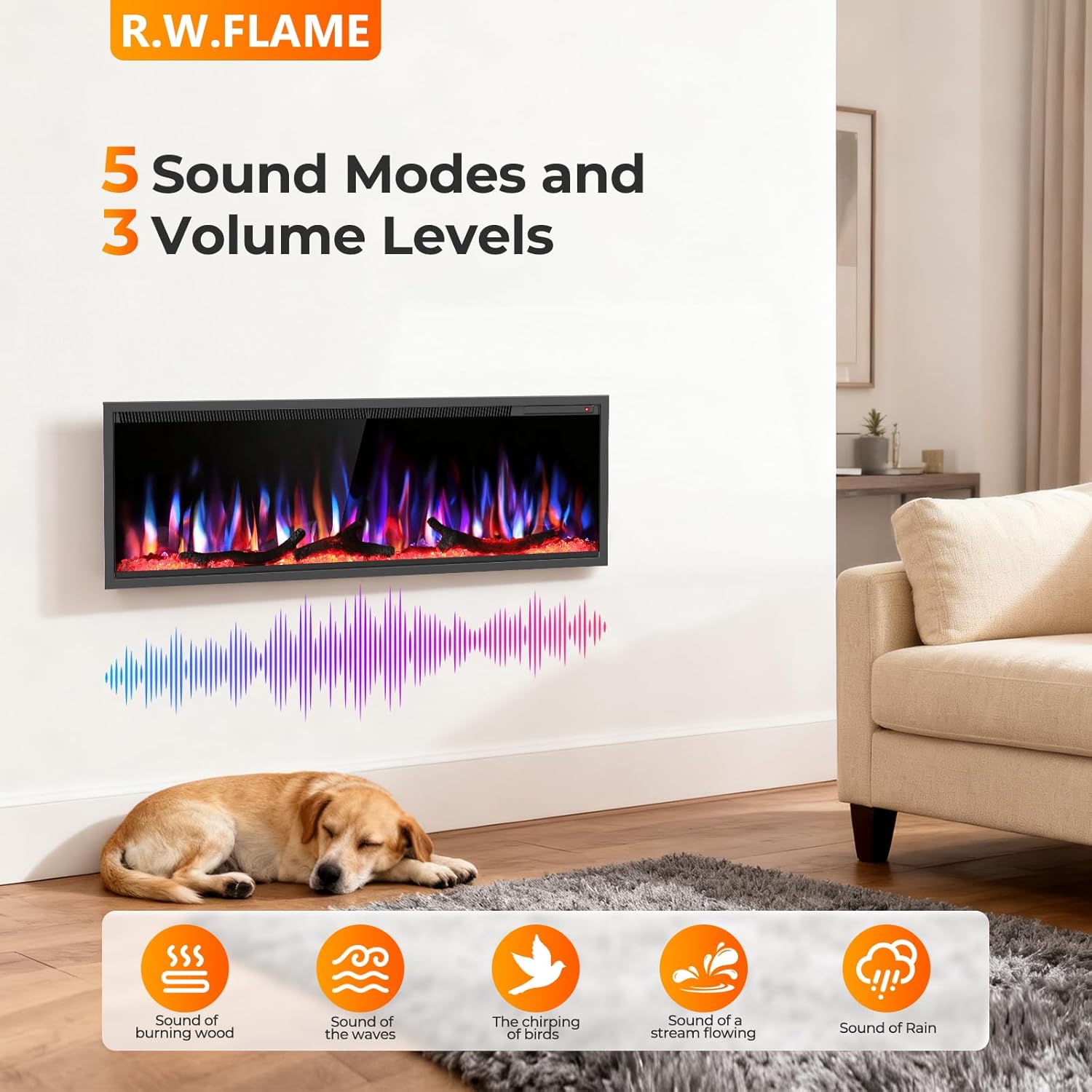
Image: 5 Sound Modes and 3 Volume Levels, with icons for Sound of burning wood, Sound of the waves, The chirping of birds, Sound of a stream flowing, and Sound of Rain.
3.4 Heating and Timer Functions
The fireplace provides efficient heating for up to 400 sq ft and includes a timer function for convenience.
- Heat Output: 1500 Watts.
- Temperature Settings: Adjustable from 59-95°F.
- Timer: Set the operating duration from 1 to 8 hours.

Image: Diversity Function showing Timer (1-8 hours) and Temperature (59-95°F).
3.5 Smart Integration
Connect your fireplace to your home Wi-Fi for advanced control and monitoring.
- Wi-Fi Connectivity: Enables whole-home smart interconnectivity.
- Voice Control: Compatible with Alexa and Google Assistant.
- Mobile App Control: Operate and monitor your fireplace from anywhere using the Smart Life APP.

Image: Control from Anywhere via Smart Life APP and Voice Assistant Devices (Works with Amazon Alexa, Smart Life - Smart Living, Works with Google Home).

Image: Energy Monitoring using the Smart Life APP to monitor and control the Electric Fireplace.
4. Maintenance
Regular maintenance ensures the longevity and optimal performance of your electric fireplace. Always ensure the unit is unplugged and cool before performing any maintenance.
- Cleaning: Use a soft, damp cloth to clean the exterior surfaces. Do not use abrasive cleaners or sprays.
- Glass Panel: Clean the glass panel with a soft cloth and glass cleaner. Avoid scratching the surface.
- Air Vents: Periodically check and clean the air inlet and outlet vents to ensure unobstructed airflow. Dust and debris can accumulate and affect heating efficiency.
- Storage: If storing the fireplace for an extended period, ensure it is clean, dry, and stored in a safe location.
5. Troubleshooting
If you encounter any issues with your R.W.FLAME electric fireplace, refer to the following common troubleshooting steps. If the problem persists, contact customer support.
- No Power: Ensure the power cord is securely plugged into a working outlet. Check your home's circuit breaker.
- No Heat: Verify that the heater function is turned on and the temperature setting is above the ambient room temperature. Check for any obstructions in the air vents.
- Flame Effect Not Working: Ensure the flame effect is turned on. If using the remote, check battery levels.
- Remote Control Not Responding: Replace the AAA batteries in the remote control. Ensure there are no obstructions between the remote and the fireplace sensor.
- App/Voice Control Issues: Verify your Wi-Fi connection and ensure the fireplace is properly paired with the Smart Life app and your Alexa/Google Assistant device.
- Overheat Protection Activated: If the unit shuts off unexpectedly, it may have overheated. Unplug the unit, wait 10-15 minutes for it to cool down, and check for any blocked air vents before plugging it back in.
6. Specifications
| Feature | Detail |
|---|---|
| Brand | R.W.FLAME |
| Model Name | 850C4 |
| Model Number | RFH-5001LCP-C4 |
| Power Source | Corded Electric |
| Product Dimensions (D x W x H) | 5.39"D x 50"W x 16.93"H |
| Material | Metal |
| Finish Type | Painted |
| Installation Type | Wall Mount/Recessed |
| Heat Output | 1500 Watts |
| Special Features | Adjustable Flame, LED Flame, Multicolor Flame, Overheat Protection, Timer |
| Style | Modern |
| Color | Black |
| Room Type | Bedroom, Home Office, Living Room |
| Heating Coverage | 400 sq ft |
| Specific Uses For Product | Indoor |
| Number of Batteries (Remote) | 2 AAA batteries required |
| Item Weight | 50 Pounds |
| Included Components | Crystal, Log, Remote Control, User Manual |
7. Warranty and Support
7.1 Warranty Information
This product comes with a limited warranty. For specific details regarding the warranty period and coverage, please refer to the warranty card included with your product or contact customer support.
7.2 Customer Support
For any questions, assistance, or to report issues, please contact R.W.FLAME customer support. You may also visit the official R.W.FLAME store for more information and resources.
Return Policy: 30-day easy returns for refund or replacement.
R.W.FLAME Store: Visit Store