
Introduction
Thank you for choosing the ZOVIMAX X500 Bone Conduction Headphones. These open-ear headphones are designed for active lifestyles, offering a secure and comfortable fit while maintaining environmental awareness. Featuring Bluetooth 6.0 connectivity, IP68 waterproofing, and a wind-protected microphone, the X500 is ideal for various outdoor activities. Please read this manual carefully to ensure proper use and optimal performance of your device.
What's in the Box
The ZOVIMAX X500 package includes the following items:
- ZOVIMAX X500 Bone Conduction Headphones
- User Manual
- Professional Fast Charging Cable
Product Overview
The ZOVIMAX X500 headphones feature an ergonomic neckband design with open-ear transducers that rest on your cheekbones, delivering sound through bone conduction. This design allows you to hear your audio while remaining aware of your surroundings.
Key Features
- Open Bone Conduction Technology: Ensures situational awareness.
- Bluetooth 6.0: For fast, stable, and low-latency wireless connectivity.
- IP68 Waterproof Rating: Resistant to sweat and water, suitable for various sports.
- Wind-Protected Microphone: Provides clear calls even in windy conditions.
- Tactile Controls: Optimized physical buttons for easy operation and to prevent accidental touches.
- Adjustable LED Safety Light: Enhances visibility during nighttime activities.
- Long Battery Life: Up to 18 hours of playtime on a single charge.
- Multipoint Pairing: Connects to two devices simultaneously.
Components and Controls
Familiarize yourself with the main components and control buttons of your ZOVIMAX X500 headphones.

Image: Overview of ZOVIMAX X500 features including wind-protected microphones, IP67 water resistance, optimized physical buttons, and a waterproof charging connection.

Image: Internal view highlighting the ZOVIMAX Bluetooth 6.0 chip, ensuring stable connectivity.
Setup
Charging the Headphones
Before first use, fully charge your ZOVIMAX X500 headphones. Use the provided professional fast charging cable. The charging port is waterproof.
- Connect the charging cable to the waterproof charging port on your headphones.
- Connect the other end of the cable to a USB power adapter (not included) or a computer's USB port.
- The LED indicator will show the charging status. Once fully charged, the indicator will change (refer to the LED indicator section in the full manual for specific light patterns).
A full charge provides up to 18 hours of playtime.
Bluetooth Pairing
Pair your ZOVIMAX X500 headphones with your mobile device for wireless audio.
- Power On: Press and hold the Power button until the LED indicator flashes, indicating pairing mode.
- Activate Bluetooth: On your mobile device, go to Bluetooth settings and turn Bluetooth on.
- Select Device: Look for "ZOVIMAX X500" in the list of available devices and select it to connect.
- Confirmation: Once connected, the LED indicator will change (refer to the LED indicator section in the full manual), and you will hear an audio prompt.
Multipoint Pairing
The X500 supports multipoint pairing, allowing simultaneous connection to two devices for a flexible and seamless audio experience.

Image: Multipoint pairing feature, showing the headphones connected to both a laptop and a smartphone.
Operating Instructions
Power On/Off
- Power On: Press and hold the Power button for 2 seconds.
- Power Off: Press and hold the Power button for 3 seconds.
Music Playback
- Play/Pause: Press the Multi-function button once.
- Next Track: Double-press the Multi-function button.
- Previous Track: Triple-press the Multi-function button.
- Volume Up: Press the Volume + button.
- Volume Down: Press the Volume - button.

Image: The 'Immersive Sound Bubble' feature provides clear sound, powerful volume, and rich bass.
Call Management
- Answer/End Call: Press the Multi-function button once.
- Reject Call: Press and hold the Multi-function button for 2 seconds.
- Voice Assistant: Press the Multi-function button twice to activate your device's voice assistant.
The wind-protected microphone ensures clear communication during calls, even in challenging environments.
LED Safety Light
The ZOVIMAX X500 features an adjustable LED safety light for enhanced visibility during outdoor activities, especially in low-light conditions.
- Modes: The LED light offers four operating modes: On, Off, Slow Flash, and Fast Flash.
- Control: Refer to the specific button combination in the full manual for controlling the LED light modes.
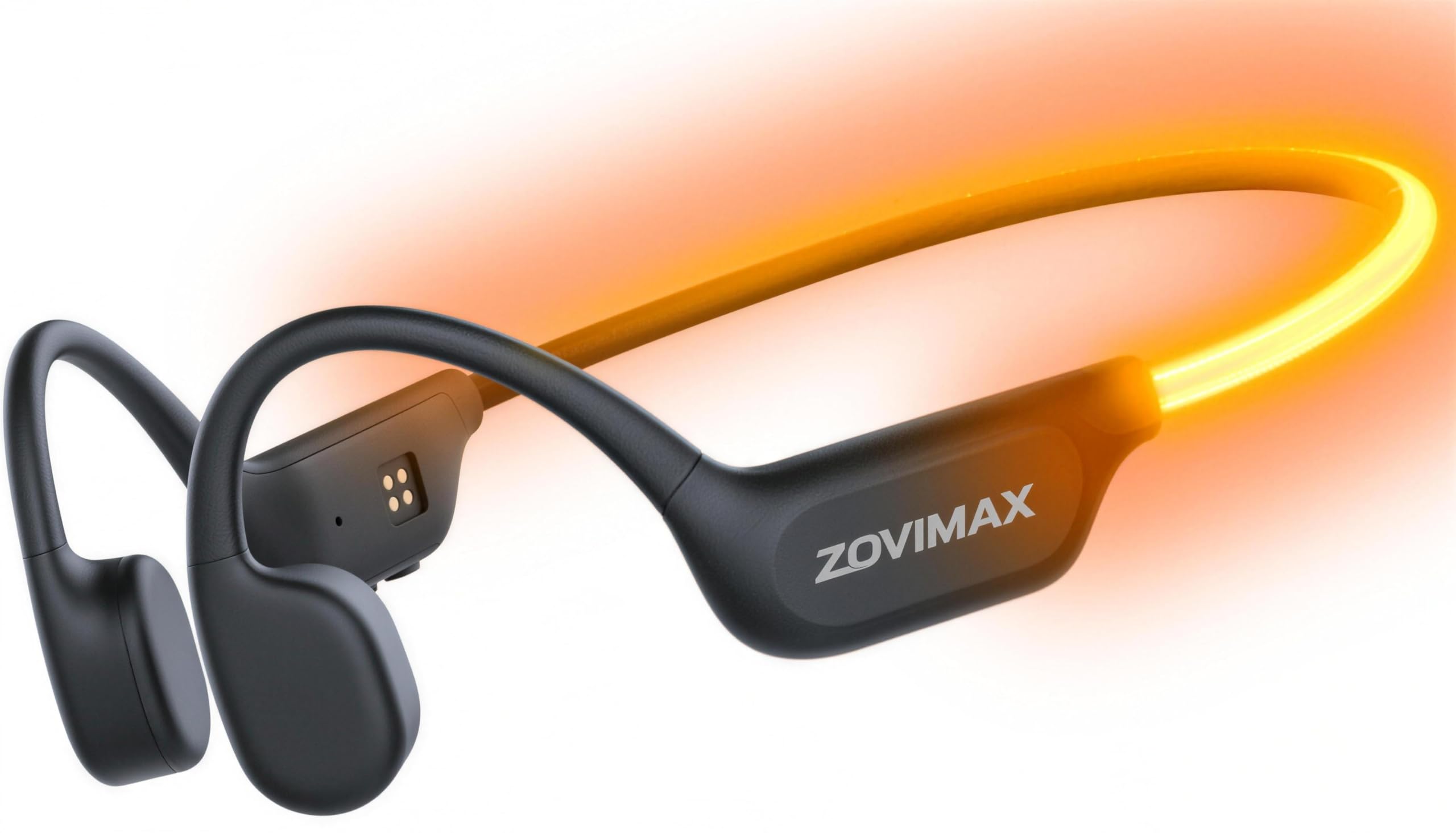
Image: The adjustable LED safety light on the ZOVIMAX X500 headphones, providing visibility during evening runs.

Image: The open-ear design allows users to listen to music while maintaining awareness of their surroundings, crucial for outdoor activities like cycling.
Maintenance
Proper maintenance ensures the longevity and performance of your ZOVIMAX X500 headphones.
- Cleaning: Wipe the headphones with a soft, damp cloth. Do not use harsh chemicals or abrasive materials.
- Water Resistance: The headphones are IP68 waterproof and sweat-resistant. After exposure to water or sweat, ensure they are dry before charging. Do not submerge them for extended periods or use them in hot water.
- Storage: Store the headphones in a cool, dry place away from direct sunlight and extreme temperatures.
- Charging Port: Keep the charging port clean and dry to prevent corrosion.
Troubleshooting
If you encounter issues with your ZOVIMAX X500 headphones, try the following solutions:
| Problem | Possible Solution |
|---|---|
| Cannot power on | Ensure the headphones are fully charged. Press and hold the Power button for 2 seconds. |
| Cannot pair with device | Ensure Bluetooth is enabled on your device. Make sure the headphones are in pairing mode (flashing LED). Move closer to your device. Forget the device in your phone's Bluetooth settings and try pairing again. |
| No sound or low volume | Check the volume levels on both the headphones and your connected device. Ensure the headphones are properly positioned on your cheekbones. Reconnect the Bluetooth. |
| Call quality issues | Ensure the microphone is not obstructed. Move to an area with less wind or background noise. Check your device's network signal. |
| Charging issues | Ensure the charging cable is securely connected. Try a different USB power source or cable. Check the charging port for debris. |
Specifications
| Model Name | X500 |
| Brand | ZOVIMAX |
| Connectivity Technology | Wireless (Bluetooth 6.0) |
| Ear Placement | Open Ear |
| Form Factor | Neckband |
| Water Resistance Level | IP68 (Waterproof) |
| Control Method | Touch |
| Battery Type | Lithium-polymer (Rechargeable) |
| Battery Life | Up to 18 hours (Playtime) |
| Material | Plastic |
| Special Features | Open Bone Conduction Technology, Wind Protection, Adjustable LED Safety Light |
| Compatible Devices | Mobile Phone |
| Specific Uses for Product | Sport |
Warranty and Support
ZOVIMAX is committed to excellence and the quality of our products.

Image: ZOVIMAX 2-Year Warranty Badge.
Your ZOVIMAX X500 headphones come with a 2-year manufacturer's warranty. This warranty covers manufacturing defects and ensures the quality of your product. Should any issues arise during this period, please contact our customer support for prompt resolution.
Our dedicated support team is available to answer any questions you may have regarding your product or warranty. Please refer to the contact information provided with your purchase or visit the official ZOVIMAX website for assistance.