
1. Introduction
The Milavan Smart Health Ring 2.0 is a sophisticated fitness tracker designed to provide comprehensive health insights. This manual will guide you through the setup, operation, and maintenance of your new smart ring to ensure optimal performance and a seamless user experience.

Image: Milavan Smart Health Ring 2.0 in various colors, showcasing its sleek design.
2. Sizing Information
Before purchasing your Milavan Smart Health Ring 2.0, it is recommended to determine your correct finger size for a comfortable and accurate fit. If a sizing kit is not used, please refer to the size chart provided below and measure your finger circumference.

Image: A detailed size chart for the Milavan Smart Health Ring 2.0, including inner diameter and circumference measurements for various ring sizes. Instructions for measuring finger circumference are also shown.
The ring is designed to be worn comfortably on your finger. Ensure the sensors on the inner surface are in contact with your skin for accurate readings.
3. Setup Guide
3.1. App Download and Pairing
The Milavan Smart Health Ring 2.0 is powered by an advanced AB2026B3 chip and integrates with a free, intuitive app. Download the 'H RING' app from the App Store (iOS) or Google Play Store (Android).

Image: The Milavan Smart Health Ring 2.0 app interface displayed on a smartphone, illustrating various health metrics and tracking options.
Once installed, open the app and follow the on-screen instructions to pair your smart ring via Bluetooth. Ensure your phone's Bluetooth is enabled.
3.2. Charging Your Smart Ring
The smart ring charges in 1-2 hours and lasts 3-5 days on a single charge. The charging case, with an upgraded 500mAh battery, can provide multiple charges, extending the total battery life to over 75 days.

Image: The Milavan Smart Health Ring 2.0 charging case, with the ring securely placed inside, indicating the charging process.
Place the ring into its charging case. The magnetic connection will ensure proper alignment. The indicator light on the case will show the charging status.
Video: A demonstration of the Milavan Smart Ring, showcasing its design, charging process, and interaction with the companion app for health tracking.
4. Operating Instructions
4.1. Health Monitoring
The Milavan Smart Health Ring 2.0, equipped with an advanced 5.0 sensor, automatically measures heart rate, HRV, blood oxygen, blood pressure, and stress every 30 minutes. This provides continuous tracking and comprehensive wellness insights throughout the day.
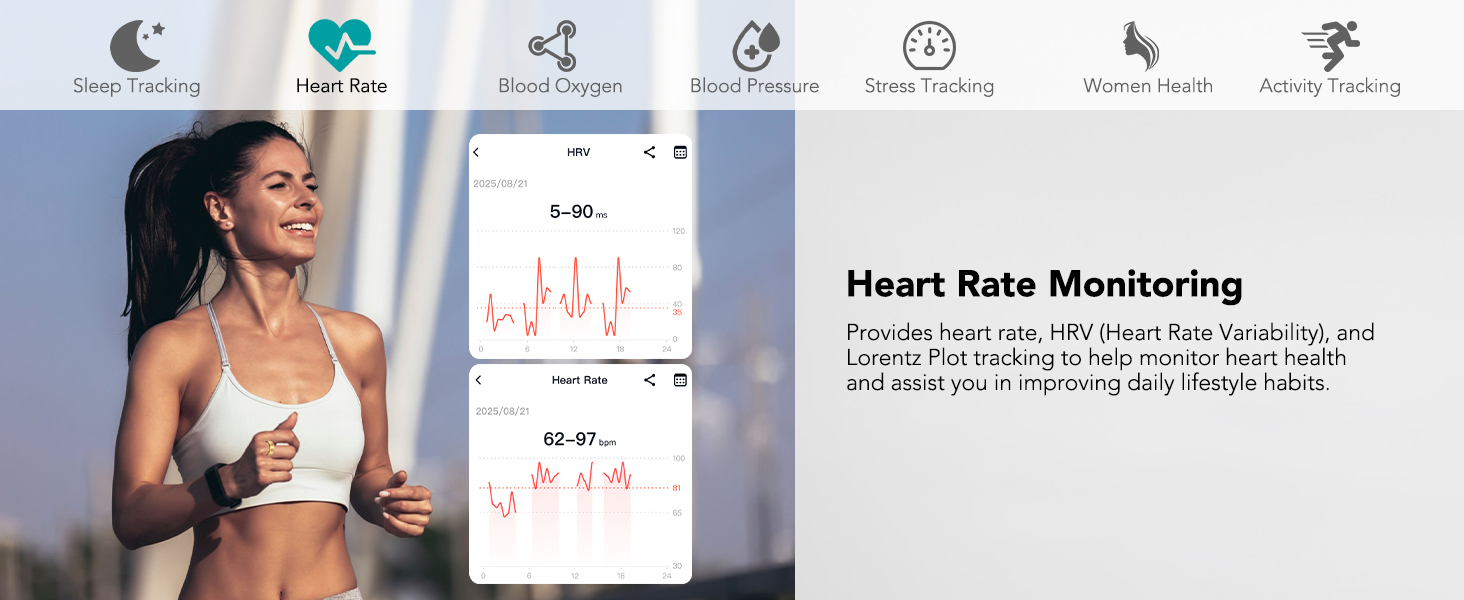
Image: The Milavan Smart Health Ring 2.0 app displaying heart rate data, with a background image of a woman running, emphasizing active health monitoring.

Image: The Milavan Smart Health Ring 2.0 app showing blood oxygen and blood pressure readings, with a man meditating in the background, highlighting comprehensive health insights.

Image: The Milavan Smart Health Ring 2.0 app displaying stress level data, with a man working on a laptop in the background, indicating real-time stress monitoring.
4.2. Intelligent Sleep Tracker
The upgraded smart ring supports 24-hour automatic sleep monitoring. It provides precise tracking of deep sleep, light sleep, rapid eye movement (REM) stages, and wake times, offering detailed insights into your sleep quality.

Image: The Milavan Smart Health Ring 2.0 app showing detailed sleep tracking data, including sleep stages, with a woman sleeping peacefully in the background.
4.3. 187 Sports Modes Tracking
The ring supports 187 sports modes, including running, walking, boxing, ball games, water sports, and ice sports. It automatically records exercise data and syncs it to the app. Activate sport mode in the app for effective workout guidance. Remember to turn off sport mode after use to prevent excessive battery drain.

Image: The Milavan Smart Health Ring 2.0 app displaying activity tracking data, with a man lifting weights, highlighting the ring's sports mode capabilities.
4.4. Remote Shooting & Friends Feature
The app supports remote camera control, allowing you to take photos remotely. It also includes a device-finding function to easily locate your ring. Additionally, you can share health data with friends, couples, and family members, making it a great tool for shared wellness goals.

Image: The Milavan Smart Health Ring 2.0 app interface demonstrating the health data sharing feature, allowing users to share their health insights with family and friends.
5. Key Features
5.1. Upgraded Core Chip & Advanced Sensor
The Milavan Smart Health Ring 2.0 is powered by the advanced AB2026B3 chip with a high-precision 5.0 sensor. This combination offers higher accuracy, faster response, lower power consumption, and enhanced health tracking capabilities.

Image: An exploded view of the Milavan Smart Health Ring 2.0, highlighting its internal chip and advanced sensor technology for precise health tracking.
5.2. Anti-Bump & Scratch-Resistant Design
The ring features an upgraded 7mm width, providing a lightweight and comfortable fit. Its micro-matte finish enhances protection, effectively preventing fingerprints and scratches, ensuring long-lasting elegance.

Image: The Milavan Smart Health Ring 2.0 highlighting its refined craftsmanship, micro-matte finish, and fingerprint/scratch-resistant properties.
5.3. Waterproof Performance
With an IP68 rating and up to 50 meters of water resistance, the Milavan Smart Health Ring 2.0 is built to handle your daily routine effortlessly. Wear it confidently every day while maintaining its outstanding performance.

Image: The Milavan Smart Health Ring 2.0 submerged in water, illustrating its IP68 waterproof performance.
6. Maintenance
To ensure the longevity and accuracy of your Milavan Smart Health Ring 2.0, follow these maintenance guidelines:
- Cleaning: Regularly clean the ring and its sensors with a soft, dry cloth. Avoid abrasive materials or harsh chemicals.
- Charging: Charge the ring using the provided charging case and cable. Avoid using third-party chargers that may not be compatible.
- Storage: When not in use, store the ring in its charging case or a safe, dry place away from extreme temperatures.
7. Troubleshooting
If you encounter any issues with your Milavan Smart Health Ring 2.0, please refer to the following common troubleshooting steps:
- Connectivity Issues: Ensure Bluetooth is enabled on your smartphone and the ring is within range. Try restarting both the ring (by placing it in the charging case) and your phone.
- Inaccurate Readings: Ensure the ring is worn correctly with the sensors in firm contact with your skin. Clean the sensors to remove any dirt or debris.
- App Not Syncing: Check your internet connection and ensure the app is updated to the latest version. Close and reopen the app.
- Battery Not Charging: Verify that the charging cable is securely connected to both the case and a power source. Ensure the ring is correctly placed in the charging case.
For further assistance, please contact Milavan customer support.
8. Specifications
| Feature | Detail |
|---|---|
| Brand | Milavan |
| Model | Smart Health Ring 2.0 |
| Material | Stainless Steel |
| Wireless Communication | Bluetooth |
| Battery Life (Ring) | 3-5 days |
| Charging Case Battery | 500mAh |
| Charging Time | 1-2 hours |
| Water Resistance | IP68 (up to 50 meters) |
| Compatible Devices | Smartphone (Android & iOS) |
| Sensors | Advanced 5.0 Sensor for Heart Rate, HRV, Blood Oxygen, Blood Pressure, Stress |
| Chip | AB2026B3 |
| Item Weight | 3.85 ounces |
| Package Dimensions | 2.99 x 2.95 x 1.73 inches |
9. Warranty and Support
Milavan products are designed for quality and reliability. For information regarding warranty coverage, returns, or technical support, please refer to the product packaging or visit the official Milavan website. Keep your purchase receipt for warranty claims.