
1. Introduction
This manual provides detailed instructions for the installation, operation, and maintenance of your BAFANG BBS01B 36V 15A 250W Mid-Drive Motor Controller. Please read this manual thoroughly before installation and use to ensure proper function and safety. This controller is designed as a replacement part for BAFANG BBS01B 36V 250W Mid Drive Motors and features a UART version with gear sensor and front lamp plugs.

Figure 1: BAFANG BBS01B 36V 15A 250W Mid-Drive Motor Controller
2. Product Overview
The BAFANG BBS01B 36V 15A 250W Mid-Drive Motor Controller is a genuine BAFANG replacement part designed to restore functionality to your eBike's mid-drive motor. This latest model includes enhanced features such as a gear sensor plug and a front lamp plug for improved integration and user experience.
2.1 Key Features
- Genuine BAFANG Part: Ensures compatibility and reliability.
- Rated Voltage: 36V
- Rated Power: 250W
- Max Current: 15A
- Latest Model: Equipped with gear sensor plug and front lamp plug.
- Easy Installation: Designed for quick and straightforward replacement.
2.2 What's Included
- BBS Controller 36V 250W
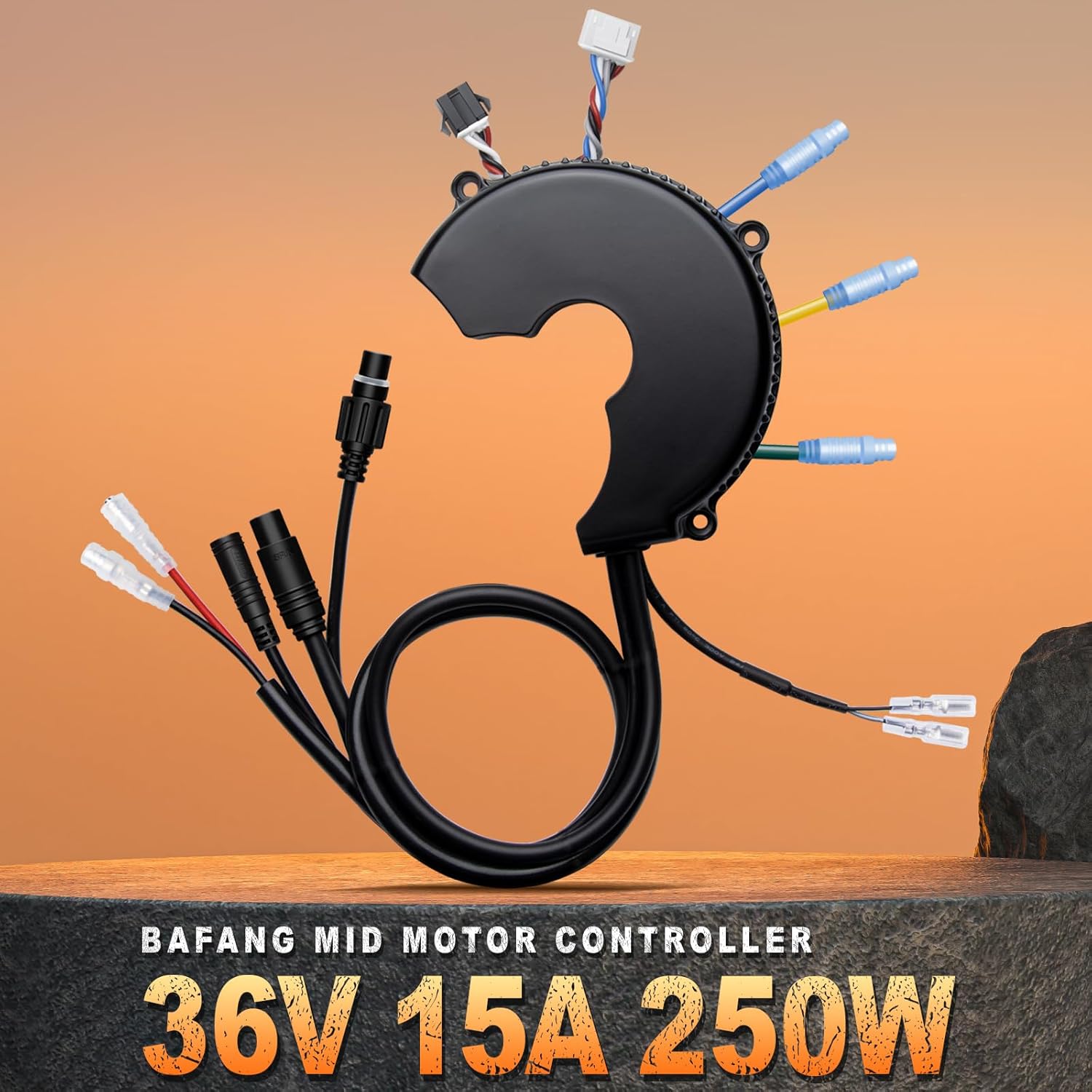
Figure 2: BAFANG Controller showing various connection points.
3. Compatibility
This controller is specifically designed for BAFANG BBS01B 36V 250W Mid Drive Motors. It is crucial to verify your motor's model and year of manufacture for proper compatibility.
3.1 Important Compatibility Note
This controller DOES NOT work with BBS01 motors from 2015 or earlier. If you have an older model, please purchase the corresponding old version controller.

Figure 3: Visual comparison highlighting new features like gear sensor and front lamp connections in the latest controller version.
3.2 Controller Reference Table
Refer to the table below to confirm the correct controller for your BAFANG mid-drive motor.

Figure 4: BAFANG Controller Reference Table for various models.
3.3 Video: Bafang BBS02B/BBS-HD CAN Mid Drive Kit Parameter Compatibility
Video 1: This video provides information on the parameter compatibility of Bafang BBS02B/BBS-HD CAN Mid Drive Kits, which can be useful for understanding general BAFANG controller compatibility.
4. Setup and Installation
The BAFANG controller is designed for relatively easy installation. Follow these steps carefully to replace your existing controller.
4.1 Video: BAFANG BBS Mid Drive Motor for eBike - Installation Video
Video 2: This video demonstrates the installation process for a BAFANG BBS Mid Drive Motor, which includes steps relevant to controller replacement.
4.2 Removing the Crankset
Before installing the new controller, you will need to remove the existing crankset and bottom bracket to access the motor housing.
- Remove the left crank arm using a crank arm puller.
- Remove the chain wheel on the drive side, again using a puller if necessary.
- Remove the bottom bracket.
- Apply a layer of lubricant to the bottom bracket shell to remove any dirt and prepare for the new motor.
4.3 Mid-Drive Motor Installation (Controller Integration)
Once the old components are removed, you can proceed with installing the new controller and motor assembly.
- Attach the chain wheel (e.g., 44-tooth) to the BAFANG motor. Secure it with the M6 bolts.
- Carefully push the motor assembly into the bottom bracket shell of your bike frame.
- Secure the motor using the Y-shaped motor mount bracket on the left-hand side of the bike.
- Install the M6 bolts using a 5mm Allen wrench.
- Install the gray lock nut with the flat side facing the bike. The indicator arrow should go clockwise. Tighten with the provided wrench.
- Install and tighten the outer black lock nut with the same wrench.

Figure 5: Illustration of the controller installation process into the motor.
4.4 Speed Sensor Installation
The speed sensor is crucial for accurate speed readings and motor control.
- Attach the speed sensor to the chainstay using zip ties or other secure methods.
- Position the magnet on a spoke of the rear wheel.
- Adjust the sensor's position so that the small red LED indicator light on the sensor blinks when the magnet passes by. This confirms correct alignment.
4.5 Display Mount
Mount the display unit on your handlebars for easy access and visibility.
- Secure the display mount to your handlebars.
- Attach the display unit to the mount.
4.6 Brake Levers/Sensors
The BAFANG kit includes brake levers with motor inhibitors. If you have hydraulic brakes, separate brake sensors are available.
- Replace your existing brake levers with the provided BAFANG brake levers. These levers will cut off motor power when engaged.
- Alternatively, if using hydraulic brakes, install the provided brake sensors. Attach the sensor to the brake lever housing and the magnet to the lever itself. Adjust the magnet's position until the brake signal is shown on the main display when the lever is pulled.
4.7 Cables
Proper cable management ensures a clean look and prevents damage.
- Connect all necessary cables from the motor, display, speed sensor, and brake levers/sensors to the controller.
- Use the provided zip ties to neatly organize and secure all cables along the bike frame, ensuring they do not interfere with moving parts.

Figure 6: Diagram illustrating the various connectors on the BAFANG controller.
5. Operating Instructions
Once installed, your BAFANG mid-drive system offers several operating modes to enhance your riding experience.
5.1 Pedal-Assist Mode
This mode provides motor assistance as you pedal. The level of assistance can be adjusted via the display.
- Slow Start Function: Ensures a smooth and controlled acceleration when starting from a standstill.
5.2 Walk Assist Mode
Provides low-speed motor assistance for walking the bike, especially useful when pushing it uphill or through crowded areas.
- Typically provides assistance up to 6 KM/H, suitable for climbing slopes up to 15%.
5.3 Throttle Mode
Allows you to engage the motor without pedaling, similar to a motorcycle. The throttle is usually a thumb throttle mounted on the handlebars.
5.4 Display Functions
The display provides essential information and allows for customization of motor settings.
- Real Speed: Current riding speed.
- Battery Power: Remaining battery charge.
- Ride Range: Estimated remaining distance.
- Ride Time: Duration of current ride.
- Error Code: Displays diagnostic codes if issues arise.
- Headlight Indicator: Shows if the front lamp is active.
- Brake Indicator: Shows if the brake is engaged.
Video 3: This video provides an introduction to the controller for BBS01B / BBS02B motors, including basic operation and display functions.
6. Maintenance
Regular maintenance ensures the longevity and optimal performance of your BAFANG controller and mid-drive system.
- Keep Connections Clean: Periodically check all electrical connections for dirt, moisture, or corrosion. Ensure they are securely fastened.
- Cable Management: Regularly inspect cables for any signs of wear, fraying, or damage. Re-secure loose cables to prevent snagging.
- Motor Housing: Keep the motor housing clean and free from debris. Avoid high-pressure washing directly on the motor or electrical components.
- Software Updates: If available, check for and apply any firmware updates for the controller or display to ensure optimal performance and access to new features.
7. Troubleshooting
If you encounter issues with your BAFANG controller, refer to the following common problems and solutions.
| Problem | Possible Cause | Solution |
|---|---|---|
| Motor not providing assistance | Low battery, loose connections, brake lever engaged, speed sensor issue. | Check battery charge. Inspect all cable connections. Ensure brake levers are not engaged. Verify speed sensor alignment. Check display for error codes. |
| Display not turning on | Loose power cable, dead battery. | Check display power cable connection. Ensure battery is charged and properly connected. |
| Inconsistent power delivery | Faulty speed sensor, loose motor connections. | Re-align speed sensor magnet. Check motor phase and Hall sensor connections. |
| Error code displayed | Specific system fault. | Consult the BAFANG display manual for specific error code meanings and troubleshooting steps. |
If problems persist after attempting these solutions, please contact BAFANG customer support or a certified eBike technician.
8. Specifications
| Feature | Specification |
|---|---|
| Brand | BAFANG |
| Model Number | WZKE36V15A250W |
| Rated Voltage | 36V |
| Rated Power | 250W |
| Max Current | 15A |
| Compatibility | BAFANG BBS01B 36V 250W Mid Drive Motor (Latest Model) |
| Special Features | Gear Sensor Plug, Front Lamp Plug |
| Item Weight | 0.46 Kilograms |
9. Warranty
This BAFANG controller comes with a 1-year warranty from the date of purchase. Please retain your proof of purchase for any warranty claims. The warranty covers manufacturing defects but does not cover damage resulting from improper installation, misuse, accidents, or unauthorized modifications.
10. Support
For further assistance, technical support, or warranty inquiries, please contact BAFANG customer service or visit the official BAFANG website. You can also refer to the BAFANG Store on Amazon for additional product information and resources.


