
1. Introduction
The ZIBOO ET1015 Digital Manometer is a precision instrument designed for measuring differential, positive, and negative pressure. It is an essential tool for HVAC technicians, maintenance engineers, and professionals requiring accurate pressure readings in various applications, including ventilation, air conditioning systems, and gas pressure testing. This manual provides detailed instructions for the safe and effective use of your ET1015 manometer.
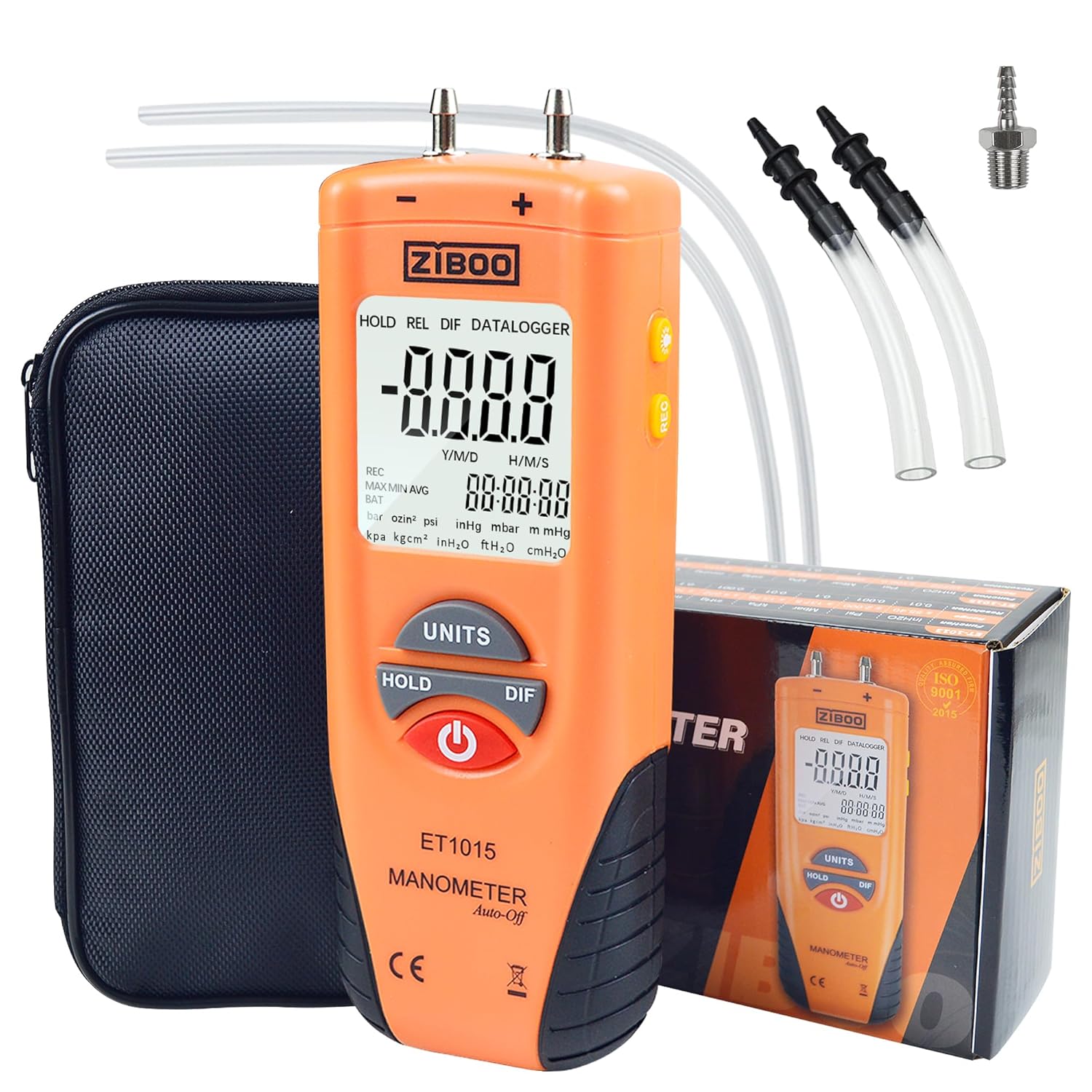
Image 1.1: ZIBOO ET1015 Digital Manometer showing its main display and buttons.
2. Safety Information
Please read and understand all safety instructions before operating the ZIBOO ET1015 Digital Manometer. Failure to follow these instructions may result in injury or damage to the device.
- Do not exceed the maximum pressure rating of 150 PSI.
- Ensure all connections are secure before applying pressure.
- Do not use the device in environments with explosive gases or vapors.
- Keep the device dry and clean. Avoid exposure to extreme temperatures.
- Replace the battery promptly when the low battery indicator appears to ensure accurate readings.
- This device is not intended for medical use.
3. Package Contents
Verify that all items listed below are present in your package:
- 1x ZIBOO ET1015 Digital Manometer
- 1x Protective Carry Pouch
- 2x Soft Connection Tubing
- 1x 9V Battery
- 1x User Manual

Image 3.1: Complete kit contents of the ZIBOO ET1015 Digital Manometer.
4. Product Overview
Familiarize yourself with the components and controls of your ET1015 manometer.
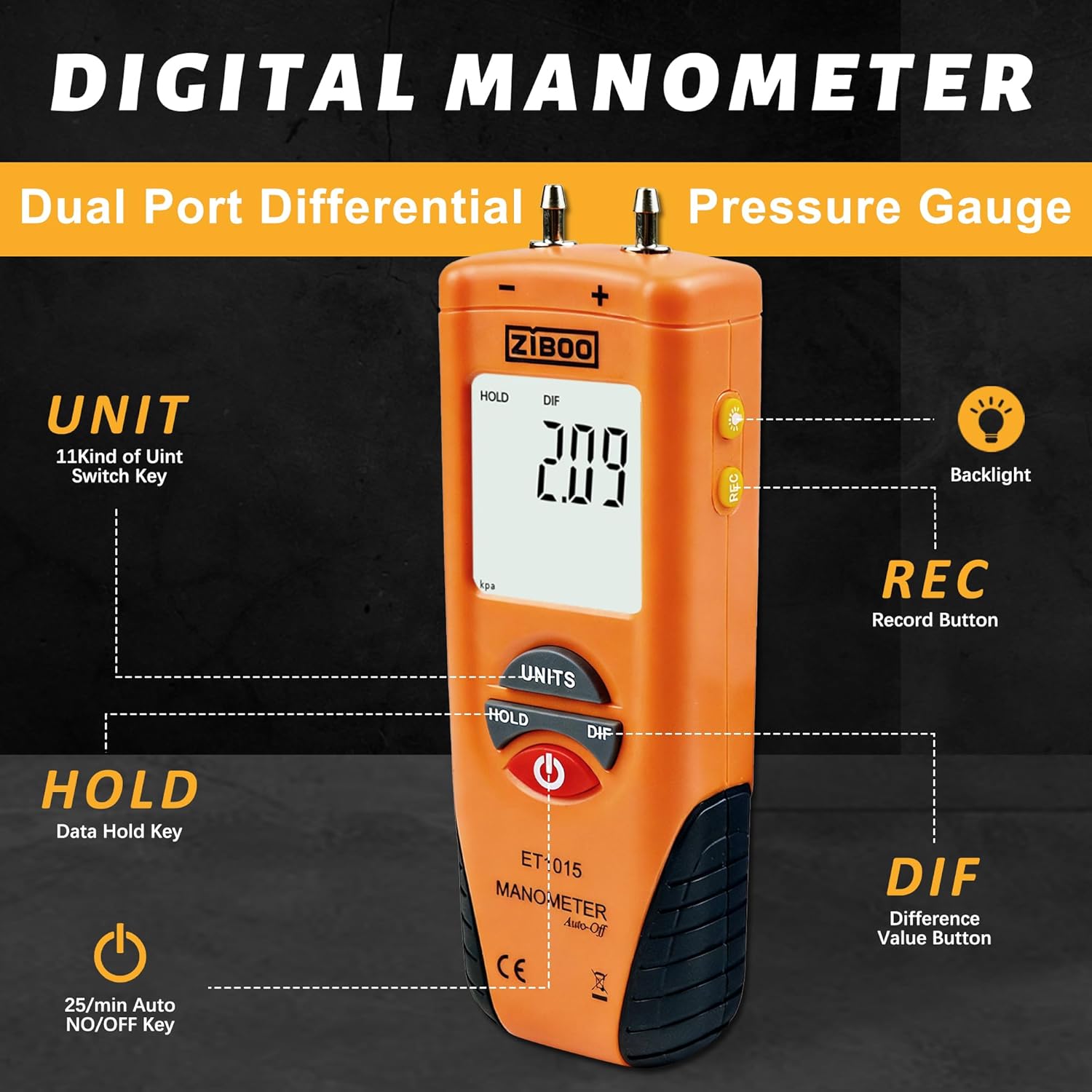
Image 4.1: Front panel and display description of the ZIBOO ET1015.
Key Components:
- Dual Pressure Ports: For connecting tubing to measure differential pressure. Labeled '+' and '-'.
- Large LCD Display: Shows primary data, MAX/MIN/AVG readings, unit indicators, and battery status.
- UNITS Button: Cycles through 11 selectable pressure units.
- HOLD Button: Freezes the current reading on the display.
- DIF Button: Calculates and displays the differential pressure between the two ports.
- REC Button: Activates recording mode to view Maximum (MAX), Minimum (MIN), and Average (AVG) readings.
- Power Button: Turns the device ON/OFF.
- Backlight Button: Toggles the display backlight for improved visibility in dim conditions.
5. Setup
5.1 Battery Installation
The ZIBOO ET1015 requires one 9V battery (included). To install:
- Locate the battery compartment cover on the back of the device.
- Slide or unclip the cover to open.
- Insert the 9V battery, ensuring correct polarity (+/-).
- Replace the battery compartment cover securely.
5.2 Connecting Tubing
Use the provided soft connection tubing to connect the manometer to the pressure source.
- Attach one end of the tubing to the desired pressure port (+ or -) on the top of the manometer.
- Connect the other end of the tubing to the pressure source you wish to measure.
- For differential pressure, connect two tubes to both ports and to the respective pressure points.

Image 5.1: Manometer connected to a system via tubing for pressure measurement.
6. Operating Instructions
6.1 Power On/Off
- Press the Power button to turn the device ON.
- The device features an Auto Power-Off function that activates after 25 minutes of inactivity to conserve battery life.
- To manually turn OFF, press and hold the Power button.
6.2 Zero Adjustment (Clearance)
Before taking measurements, especially for differential pressure, it is recommended to perform a zero adjustment.
- Ensure both pressure ports are open to the atmosphere (not connected to any pressure source).
- Turn on the manometer.
- Press and hold the DIF button for approximately 2 seconds until the display shows '0.00' or 'ZERO'. This calibrates the sensor to zero pressure.
6.3 Unit Selection
Press the UNITS button to cycle through the 11 available measurement units:
- inH2O, psi, bar, mbar, kPa, inHg, mmHg, ozin², ftH2O, cmH2O, kgcm²
6.4 HOLD Function
Press the HOLD button to freeze the current reading on the display. Press it again to release and resume live readings.
6.5 DIF (Differential Pressure) Function
Press the DIF button to instantly calculate and display the differential pressure between the two connected ports. This is useful for measuring pressure drops across filters, coils, or ducts.
6.6 REC (Record) Mode
The REC mode allows you to track pressure fluctuations over time.
- Press the REC button to enter recording mode. The display will show 'REC'.
- While in REC mode, you can press the REC button again to cycle through Maximum (MAX), Minimum (MIN), and Average (AVG) readings. A relative time clock will also be displayed.
- To exit REC mode, press and hold the REC button.
6.7 Backlight
Press the Backlight button (light bulb icon) to turn the display backlight ON or OFF. This improves visibility in dimly lit environments.
6.8 Applications
The ZIBOO ET1015 is suitable for a variety of applications:
- HVAC system diagnostics and balancing.
- Gas furnace calibration and testing.
- Pneumatic control systems.
- Clean room monitoring.
- Spot checks for pressure variations.

Image 6.1: Manometer used to measure pressure in an HVAC system.

Image 6.2: Manometer measuring pressure in a gas line connection.
7. Maintenance
7.1 Cleaning
Wipe the device with a soft, damp cloth. Do not use abrasive cleaners or solvents. Ensure no liquid enters the pressure ports or other openings.
7.2 Battery Replacement
When the low battery indicator (BAT) appears on the display, replace the 9V battery as described in Section 5.1. Prompt battery replacement ensures continued accuracy and functionality.
7.3 Storage
Store the manometer in its protective carry pouch in a cool, dry place, away from direct sunlight and extreme temperatures. If storing for extended periods, remove the battery to prevent leakage.
8. Troubleshooting
If you encounter issues with your ZIBOO ET1015, refer to the following common problems and solutions:
- Device does not power on: Check if the 9V battery is installed correctly and has sufficient charge. Replace if necessary.
- Display shows 'Err.1': This indicates an over-range condition. The measured pressure exceeds the device's maximum capacity (100 PSI). Disconnect from the pressure source immediately to prevent damage.
- Display shows 'Err.2': This indicates an under-range condition. The measured pressure is below the device's minimum detectable range.
- Inaccurate readings: Ensure the zero adjustment has been performed correctly before measurement. Check for any leaks in the tubing connections.
- Low Battery Indicator (BAT): Replace the 9V battery.
If the problem persists after attempting these solutions, please contact customer support.
9. Specifications
Detailed technical specifications for the ZIBOO ET1015 Digital Manometer:
| Parameter | Specification |
|---|---|
| Display | Dual LCD |
| Accuracy | ±0.3% FSO (25°C) |
| Repeatability | ±0.2% (Max +/-0.5% FSO) |
| Linearity/Hysteresis | ±0.29% FSO |
| Maximum Pressure | 100 PSI |
| Response Time | 0.5 seconds typical |
| Low Battery Indicator | Yes |
| Over Range Indicator | Err.1 |
| Under Range Indicator | Err.2 |
| Operating Conditions | 32°F to 122°F (0 to 50°C) |
| Storage Conditions | 14°F to 140°F (-1 to 60°C) |
| Power Supply | 1x 9V Battery (included) or External 9VDC |
| Dimensions (approx.) | 14.5 cm (H) x 5 cm (W) x 3 cm (D) |
| Weight (approx.) | 0.65 Kilograms (with battery) |
| Item Model Number | ZIBOO ET1015 |
| UPC | 707862787321 |

Image 9.1: Parametric indicators for ZIBOO ET1015.
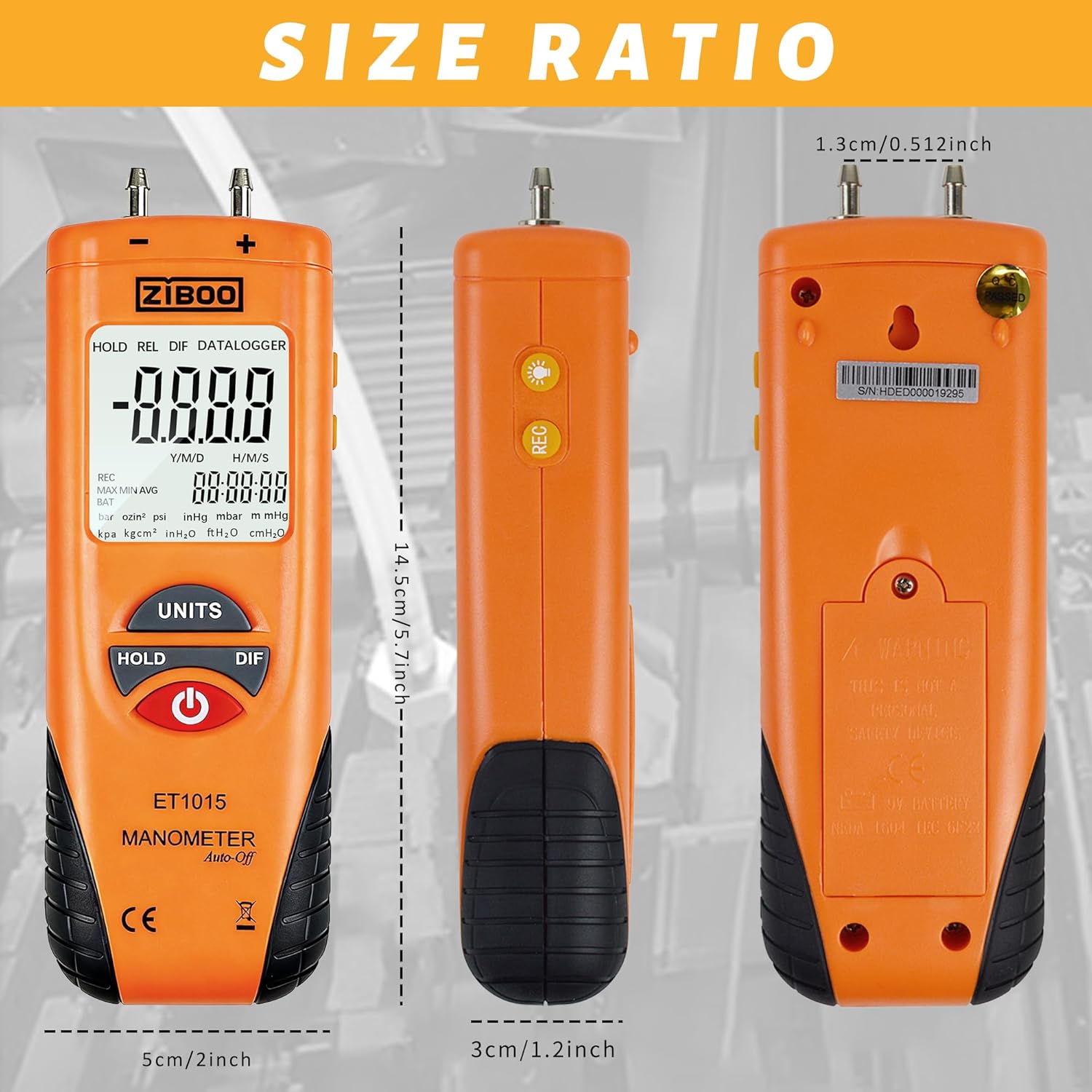
Image 9.2: Size ratio and dimensions of the ZIBOO ET1015.
10. Warranty and Support
ZIBOO products are designed for reliability and performance. This product typically comes with a standard manufacturer's warranty. For specific warranty details, technical support, or service inquiries, please refer to the warranty card included in your package or contact ZIBOO customer service through their official website or the retailer where the product was purchased.
