
Introduction
Thank you for purchasing the Tiksounds S12 Portable Bluetooth Speaker. This manual provides essential information for setting up, operating, and maintaining your speaker. Please read it carefully before use to ensure optimal performance and longevity of your device. Keep this manual for future reference.
Package Contents
Ensure all items are present in the package:
- Tiksounds S12 Portable Bluetooth Speaker
- Charging Cable (Type-C)
- User Manual
Product Overview
Familiarize yourself with the speaker's components:
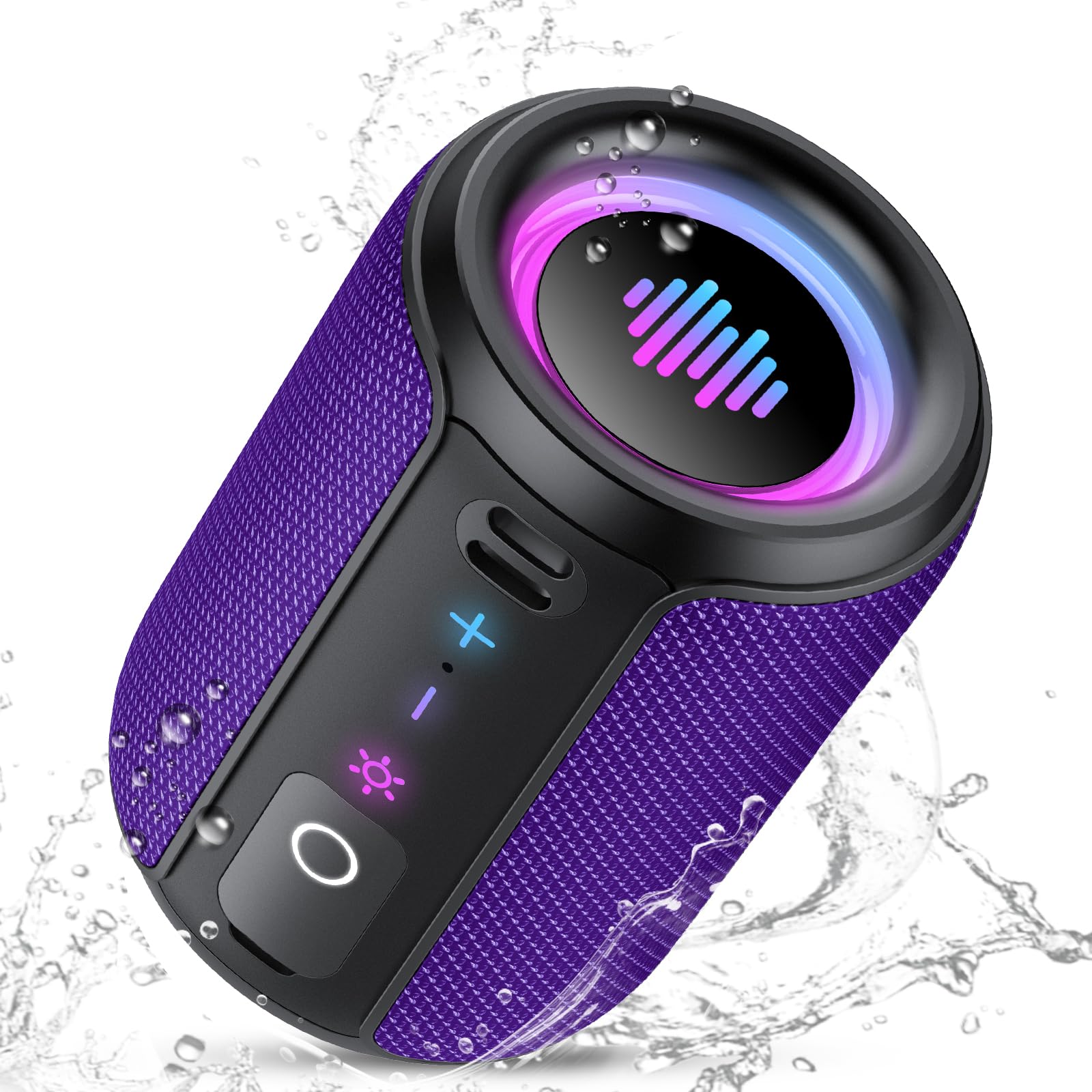
Image: The Tiksounds S12 Portable Bluetooth Speaker, showcasing its compact design and integrated LED lights.
- Power Button: Press and hold to turn on/off. Short press for play/pause.
- Volume Up Button (+): Short press to increase volume. Long press for next track.
- Volume Down Button (-): Short press to decrease volume. Long press for previous track.
- Light Mode Button: Short press to cycle through LED light modes.
- Mode Button (M): Short press to switch between Bluetooth and TF card modes.
- Type-C Charging Port: For charging the speaker.
- TF Card Slot: Insert a TF card for local music playback.
Charging the Speaker
Before first use, fully charge the speaker.
- Connect the provided Type-C charging cable to the speaker's charging port.
- Connect the other end of the cable to a USB power adapter (5V/1A recommended, not included) or a computer's USB port.
- The LED indicator will show charging status (e.g., red light for charging, off when fully charged).
- A full charge takes approximately 3-4 hours.
Setup
Power On/Off
- To Power On: Press and hold the Power Button for 2-3 seconds until you hear an audible prompt and the LED lights activate.
- To Power Off: Press and hold the Power Button for 2-3 seconds until you hear an audible prompt and the LED lights turn off.
Bluetooth Pairing
Pair your speaker with a Bluetooth-enabled device:
- Ensure the speaker is powered on and in Bluetooth mode (indicated by a flashing blue LED). If not, short press the 'M' button to switch modes.
- Enable Bluetooth on your device (smartphone, tablet, etc.).
- Search for available Bluetooth devices and select "Tiksounds S12" from the list.
- Once connected, you will hear a confirmation sound, and the blue LED will stop flashing.
True Wireless Stereo (TWS) Pairing
To achieve 360° stereo sound, you can pair two Tiksounds S12 speakers together:
- Ensure both S12 speakers are powered on and not connected to any other Bluetooth device.
- On one of the speakers (this will be the primary speaker), double-press the Power Button. You will hear a pairing prompt.
- The two speakers will automatically search for and connect to each other. Once connected, you will hear a confirmation sound.
- Now, connect your device to the primary speaker via Bluetooth as described in the "Bluetooth Pairing" section. Both speakers will play audio in stereo.
Operating the Speaker
Basic Controls
- Play/Pause: Short press the Power Button.
- Volume Up: Short press the '+' button.
- Volume Down: Short press the '-' button.
- Next Track: Long press the '+' button.
- Previous Track: Long press the '-' button.
LED Light Modes
The speaker features six dynamic LED light modes. Short press the Light Mode Button to cycle through them and find your preferred ambiance.
TF Card Playback
To play music directly from a TF (MicroSD) card:
- Insert a TF card (with music files in MP3, WAV, etc., format) into the TF card slot.
- The speaker will automatically switch to TF card mode, or you can short press the 'M' button to select it.
- Use the Play/Pause, Volume, and Track Skip buttons to control playback.
Maintenance
- Cleaning: Use a soft, dry cloth to clean the speaker. Do not use abrasive cleaners or solvents.
- Water Resistance: The speaker is IPX7 waterproof, meaning it can be submerged in up to 1 meter of water for 30 minutes. Ensure the charging port cover is securely closed before exposure to water. Do not expose to saltwater or other chemicals.
- Storage: Store the speaker in a cool, dry place away from direct sunlight and extreme temperatures.
- Battery Care: To prolong battery life, charge the speaker at least once every three months if not used regularly.
Troubleshooting
| Problem | Possible Solution |
|---|---|
| Speaker does not turn on | Ensure the speaker is charged. Connect to a power source and try again. |
| Cannot pair via Bluetooth | Make sure the speaker is in Bluetooth pairing mode. Disable and re-enable Bluetooth on your device. Move closer to the speaker. |
| No sound | Check volume levels on both the speaker and your connected device. Ensure the speaker is correctly paired. |
| TWS pairing fails | Ensure both speakers are not connected to any other device. Try resetting both speakers and repeating the TWS pairing steps. |
| Sound distortion | Reduce the volume on both the speaker and your device. Ensure the speaker is within Bluetooth range. |
Specifications
- Model Number: S12
- Output Power: 15W
- Bluetooth Version: 5.4
- Bluetooth Range: Up to 10 meters (33 feet)
- Battery Capacity: 1800 mAh
- Playtime: Up to 12 hours (varies by volume, light usage, and content)
- Charging Time: Approximately 3-4 hours
- Waterproof Rating: IPX7
- Frequency Response: 20 Hz - 20 KHz
- Dimensions: 7.62 x 10.16 x 7.62 cm (3 x 4 x 3 inches)
- Weight: 382.6 g (0.84 lbs)
- Connectivity: Bluetooth, TF Card
Safety Information
- Do not disassemble, repair, or modify the product.
- Do not expose the speaker to extreme temperatures or direct sunlight for extended periods.
- Keep the speaker away from medical devices, as it may interfere with their operation.
- Avoid listening at high volume levels for prolonged periods to prevent hearing damage.
- Ensure the charging port cover is sealed when near water.
Warranty and Support
Tiksounds products are designed for reliability and performance. For any product-related inquiries, technical support, or warranty claims, please refer to the contact information provided with your purchase or visit the official Tiksounds website. Please note that specific warranty details may vary by region and retailer.

