
Introduction
Thank you for choosing the Bearwind Misting Fan S42. This portable device combines a powerful turbo fan with a refreshing cool mist spray, designed to provide instant cooling in various environments. Please read this manual thoroughly before use to ensure proper operation and maintenance.
Product Overview
The Bearwind Misting Fan S42 features a 165° foldable design, a 4000mAh rechargeable battery, 5 adjustable fan speeds, and a continuous mist function. It includes a digital display for easy monitoring of speed, mist mode, and battery level.
What's Included:
- 1 x Bearwind Misting Fan S42
- 1 x 50mL Water Bottle (for refilling)
- 1 x Lanyard
- 1 x USB Type-C Charging Cable
- 1 x User Manual

Image: Contents of the Bearwind Misting Fan S42 package, including the fan, water bottle, lanyard, USB cable, and user manual.
Setup
1. Charging the Fan:
- Connect the provided USB Type-C charging cable to the fan's charging port.
- Connect the other end of the cable to a compatible USB power adapter (not included) or a computer USB port.
- The digital display will show the battery percentage during charging. A full charge (100%) typically takes about 3 hours with 10W fast charging.
- Ensure the fan is fully charged before first use for optimal battery life.
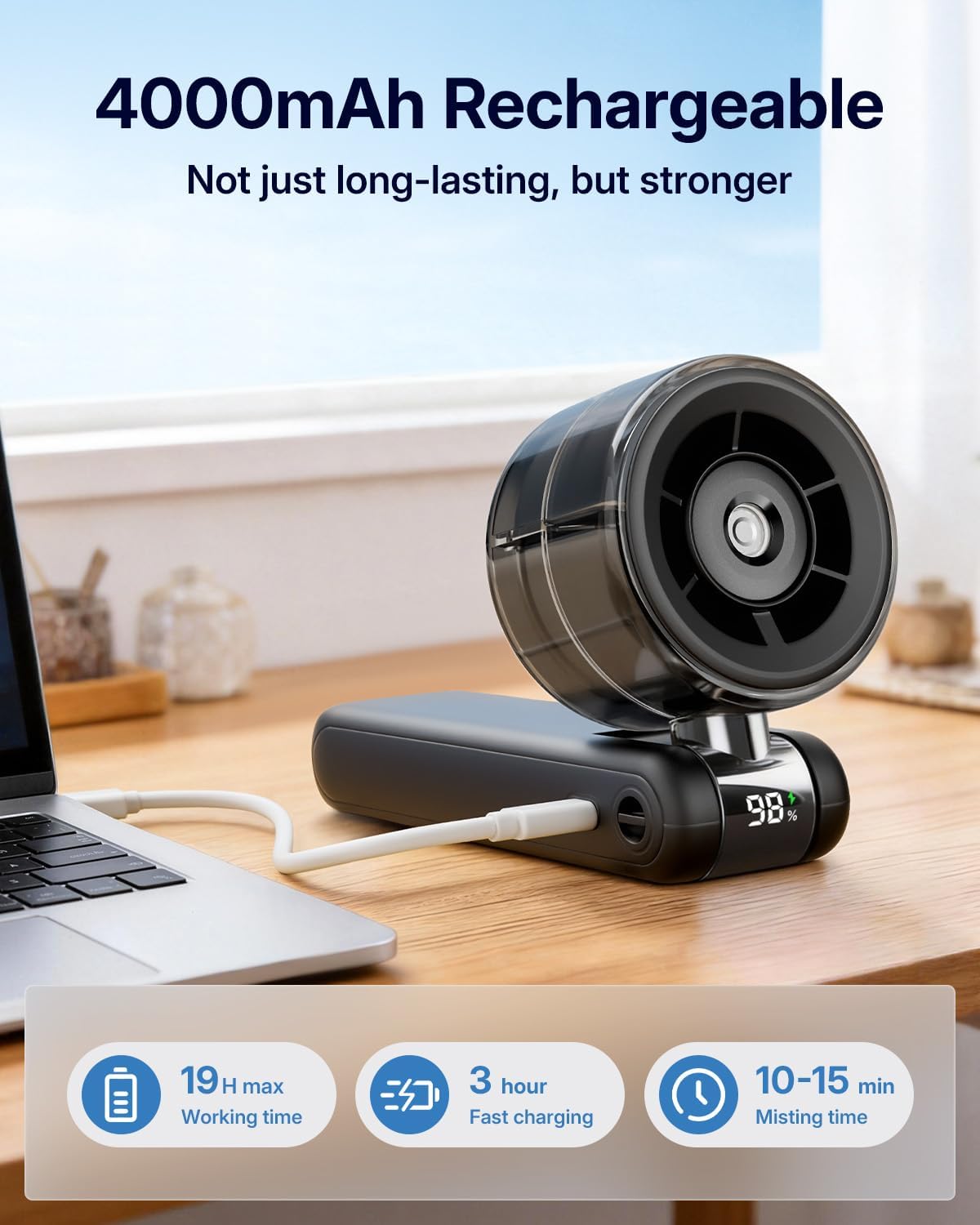
Image: The Bearwind Misting Fan S42 connected to a charging cable, displaying battery percentage on its digital screen.
2. Filling the Water Tank for Mist Function:
- Locate the water tank cap on the fan head.
- Gently open the cap.
- Using the provided 50mL water bottle, carefully fill the tank with clean tap water. Do not use purified water, essential oils, or corrosive liquids, as this may damage the atomizer.
- Close the water tank cap securely to prevent leaks.

Image: A person using the Bearwind Misting Fan S42, demonstrating the misting function for cooling.
Operating Instructions
1. Power On/Off and Fan Speed Adjustment:
- To power on the fan, press and hold the power button (usually located on the handle) for 2 seconds. The digital display will light up.
- To adjust the fan speed (F1-F5), short press the power button. Each press cycles through the 5 speed levels.
- To power off the fan, press and hold the power button for 2 seconds again.
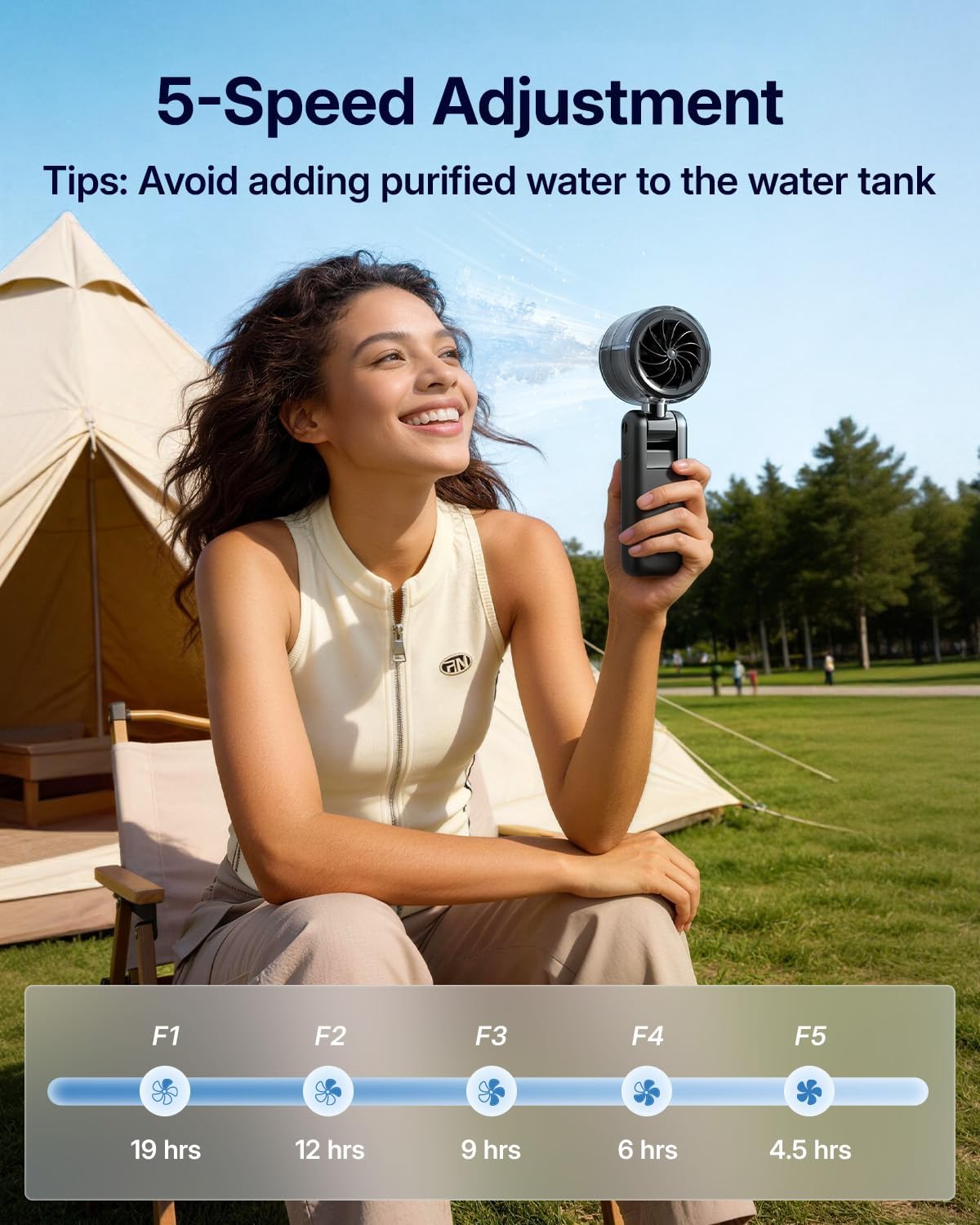
Image: The Bearwind Misting Fan S42 in use, showing the digital display indicating fan speed levels (F1-F5) and estimated battery life.
2. Mist Function Activation:
- With the fan powered on and the water tank filled, short press the mist button (usually located near the power button) to activate the continuous mist.
- The mist function can operate for up to 15 minutes continuously on a full tank.
- To turn off the mist function, short press the mist button again.
3. Using the Foldable Design:
- The fan head can be folded up to 165° relative to the handle. This allows for versatile use as a handheld fan, a desktop fan, or a neck fan.
- To use as a neck fan, attach the included lanyard to the designated slots on the fan handle.

Image: A person wearing the Bearwind Misting Fan S42 around their neck using the included lanyard, demonstrating its hands-free capability.
Maintenance
1. Cleaning:
- Ensure the fan is powered off and unplugged before cleaning.
- Wipe the exterior of the fan with a soft, damp cloth. Do not use abrasive cleaners or solvents.
- For the fan blades, gently wipe with a dry cloth or use a soft brush to remove dust.
- Do not immerse the fan in water or any other liquid.
2. Water Tank and Atomizer Care:
- Regularly empty and rinse the water tank to prevent mineral buildup and bacterial growth.
- If the mist output decreases, gently clean the atomizer opening with a cotton swab dipped in white vinegar to remove mineral deposits, then rinse with clean water.
- Always use clean tap water. Avoid purified water as it can affect mist production due to low mineral content.
3. Storage:
- When not in use for extended periods, ensure the fan is fully charged and the water tank is empty and dry.
- Store the fan in a cool, dry place away from direct sunlight and extreme temperatures.
Troubleshooting
| Problem | Possible Cause | Solution |
|---|---|---|
| Fan does not turn on. | Low battery or no charge. | Charge the fan using the provided USB Type-C cable. |
| Mist function not working. | Water tank empty or atomizer clogged. | Refill the water tank with clean tap water. Clean the atomizer as described in the Maintenance section. |
| Weak airflow. | Fan speed set too low or fan blades are dirty. | Increase the fan speed. Clean the fan blades. |
| Fan makes unusual noise. | Obstruction in fan blades or internal issue. | Power off the fan and check for any obstructions. If the noise persists, contact customer support. |
Specifications
| Feature | Detail |
|---|---|
| Brand | Bearwind |
| Model Name | S42 |
| Color | Black |
| Power Source | Battery Powered (4000mAh Rechargeable) |
| Charging Time | Approx. 3 hours (10W Type-C Fast Charge) |
| Operating Time | Up to 15 hours (fan only, depending on speed) |
| Mist Duration | Up to 15 minutes continuous |
| Number of Speeds | 5 |
| Product Dimensions | 7.6"D x 2.6"W x 2.1"H |
| Item Weight | 8 ounces |
| Noise Level | 30 Decibels |
| Material | Acrylonitrile Butadiene Styrene |
| Special Features | Digital Display, Foldable Design, Misting Function |
Warranty and Support
Your Bearwind Misting Fan S42 comes with a standard manufacturer's warranty. For specific warranty details, please refer to the product packaging or contact Bearwind customer support.
If you encounter any issues or have questions regarding your product, please visit the official Bearwind website or contact their customer service team for assistance. Contact information can typically be found on the product packaging or on the brand's official online store page.