
Introduction
This manual provides detailed instructions for the assembly, operation, and maintenance of your Vipbear 80" Sectional Sleeper Sofa Bed. Please read all instructions carefully before assembly and use to ensure proper function and longevity of your product. This multi-functional furniture piece is designed to serve as a sofa, lounge, and bed, featuring a reclining backrest, reversible storage chaise, and integrated USB charging ports.
Package Contents and Delivery
Your Vipbear Sectional Sleeper Sofa Bed is shipped in two (2) separate packages. It is common for these packages to arrive on different dates. Please allow a few days for all packages to be delivered before beginning assembly. Ensure all components are present before discarding packaging materials.
Included Components: Hardware, Sofa Sections, Cushions.
Setup and Assembly
This sofa bed features a tool-free assembly design, allowing for quick and straightforward setup. Follow these steps for assembly:
- Unpack Components: Carefully remove all parts from the two packages. Lay them out on a clean, soft surface to prevent scratches.
- Connect Main Sections: Align the metal brackets on the sofa sections and slide them together until they lock securely.
- Attach Legs: Screw the sofa legs into the designated holes at the bottom of each section. Ensure they are tightened firmly.
- Place Cushions: Position the seat and back cushions onto the sofa frame.
- Install Chaise: Connect the chaise section to the main sofa body. The chaise is reversible and can be attached to either the left or right side.

Figure 1: Exploded view showing the tool-free assembly components of the sofa.
Operating Instructions
1. Converting to Lounge or Bed Mode
The sofa can be easily converted into a lounge or a full bed. To convert:
- For Lounge Mode: Gently pull the front section of the sofa outwards. The hidden support mechanism will extend, creating an elongated lounging surface.
- For Bed Mode: Continue pulling the front section until it fully extends and locks into a flat position, creating a sleeping surface.

Figure 2: Demonstration of the easy pull-out mechanism to extend the bed.

Figure 3: The sofa configured as a daytime lounge and a nighttime bed.
2. Adjusting the Reclining Backrest
The backrest offers 5 adjustable reclining levels (100°, 120°, 140°, 160°, 180°) to suit various activities such as watching TV, reading, or napping.
- To adjust, gently push the backrest forward until you hear a click, then recline it to your desired angle.
- To return to an upright position, push the backrest fully forward until it clicks into the 100° position, then release.

Figure 4: The 5-level adjustable reclining backrest feature.
3. Reversing the Chaise
The storage chaise is designed to be reversible, allowing you to configure the L-shape to either the left or right side of the sofa to best fit your living space.
- To reverse, detach the chaise from the main sofa body.
- Move the chaise to the opposite side and re-attach it using the connecting brackets.

Figure 5: The reversible chaise allows for left or right configuration.
4. Using USB Charging Ports and Side Pockets
The armrest includes integrated USB and Type-C charging ports for convenient device charging. Two side pockets are also provided for organizing magazines, remote controls, or other small items.
- Connect your device's charging cable to the appropriate USB or Type-C port on the armrest.
- Utilize the side pockets for easy access storage.

Figure 6: Side pockets for convenient storage.
5. Accessing Hidden Storage
The chaise section features hidden storage, ideal for blankets, pillows, or other household items.
- Lift the seat cushion of the chaise section to reveal the storage compartment.
- Close the cushion securely after use.
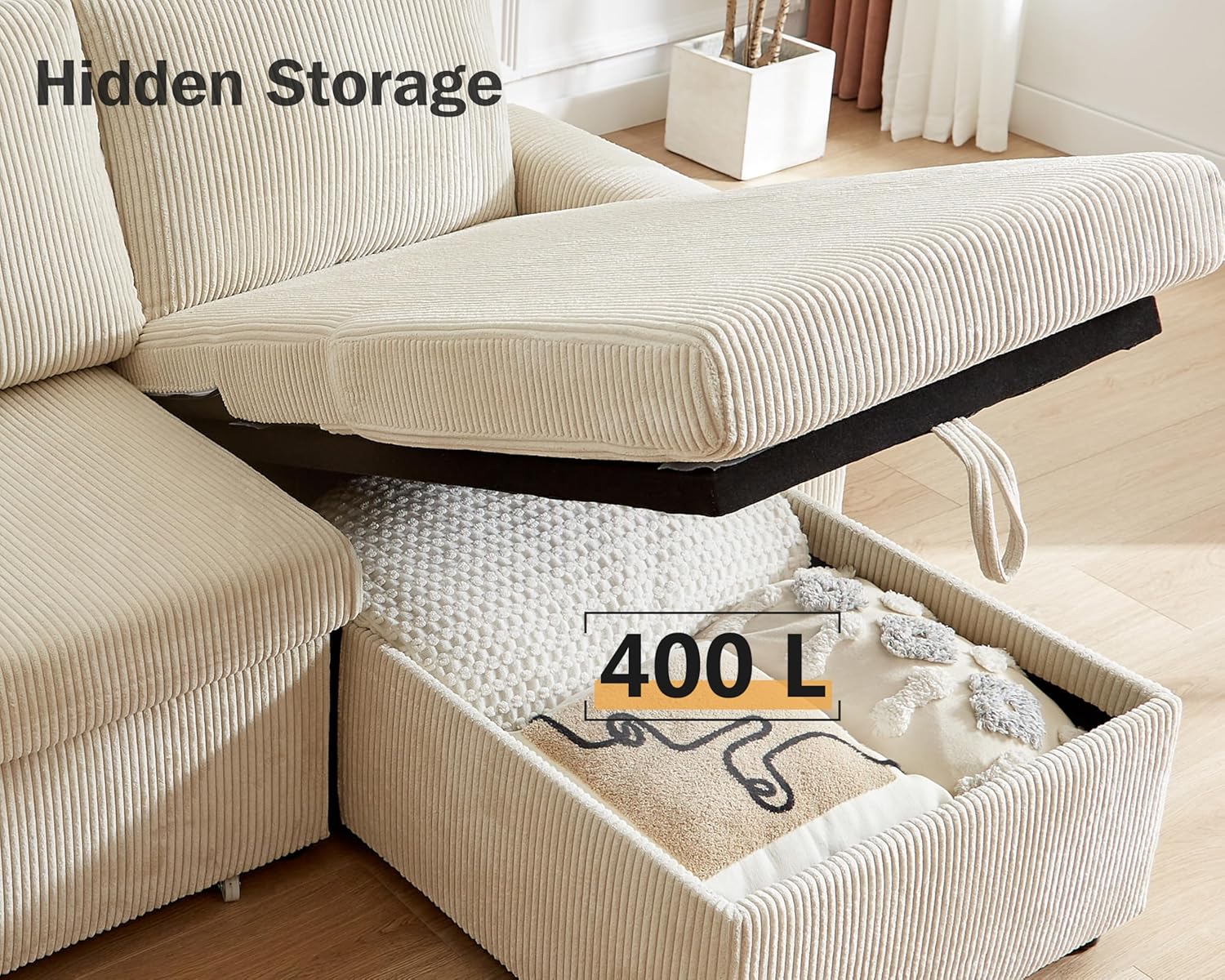
Figure 7: Hidden storage compartment within the chaise.
Maintenance
- Cleaning: For general cleaning, vacuum the corduroy fabric regularly using a soft brush attachment to remove dust and debris.
- Spot Cleaning: For spills, blot immediately with a clean, dry cloth. For stubborn stains, use a mild fabric cleaner specifically designed for corduroy, testing on an inconspicuous area first. Avoid harsh chemicals.
- Frame Care: Periodically check and tighten all screws and connections to ensure stability.
- Sunlight Exposure: Avoid prolonged exposure to direct sunlight to prevent fading of the fabric.
Troubleshooting
| Problem | Possible Cause | Solution |
|---|---|---|
| Missing parts or packages | Packages may arrive separately. | Wait 2-3 days for all packages to arrive. If still missing, contact customer support. |
| Sofa feels unstable after assembly | Legs or connecting brackets not fully tightened. | Ensure all legs are screwed in tightly and connecting brackets between sections are securely locked. |
| Pull-out bed mechanism is stiff | Mechanism may need lubrication or is not aligned. | Ensure no obstructions. Apply a silicone-based lubricant to moving parts if necessary. |
| USB ports not charging | Power source issue or cable problem. | Ensure the sofa is properly connected to a power outlet. Test with a different USB cable or device. |
Specifications
- Brand: Vipbear
- Model: 80" Sectional Sleeper Sofa Bed
- Color: Corduroy Beige
- Material: Wood (frame), Corduroy (fabric)
- Product Dimensions (Sofa Mode): 31.3"D x 81"W x 35.4"H
- Seat Depth: 21.7 inches
- Seat Height: 18.9 inches
- Item Weight: 178 Pounds
- Weight Limit: 1400 Pounds
- Seating Capacity: 4
- Assembly: Tool-Free Assembly Required
- Additional Features: 5-Level Adjustable Backrest, Pull-Out Bed, Reversible Storage Chaise, USB & Type-C Charging Ports, Side Pockets.

Figure 8: Product dimensions in various configurations.
Warranty Information
This product comes with a standard manufacturer's warranty. Please refer to your purchase documentation or contact the retailer for specific warranty terms and conditions. Keep your proof of purchase for any warranty claims.
Customer Support
For further assistance, missing parts, or technical support, please contact Vipbear customer service through the retailer's platform or the contact information provided with your purchase. Please have your model number and purchase date ready when contacting support.