
Introduction
Thank you for choosing the Carlington Velocity Series CT_8125 Analog-Digital Sports Watch. This manual provides detailed instructions for setting up, operating, and maintaining your watch to ensure optimal performance and longevity. Please read this manual carefully before using your watch.
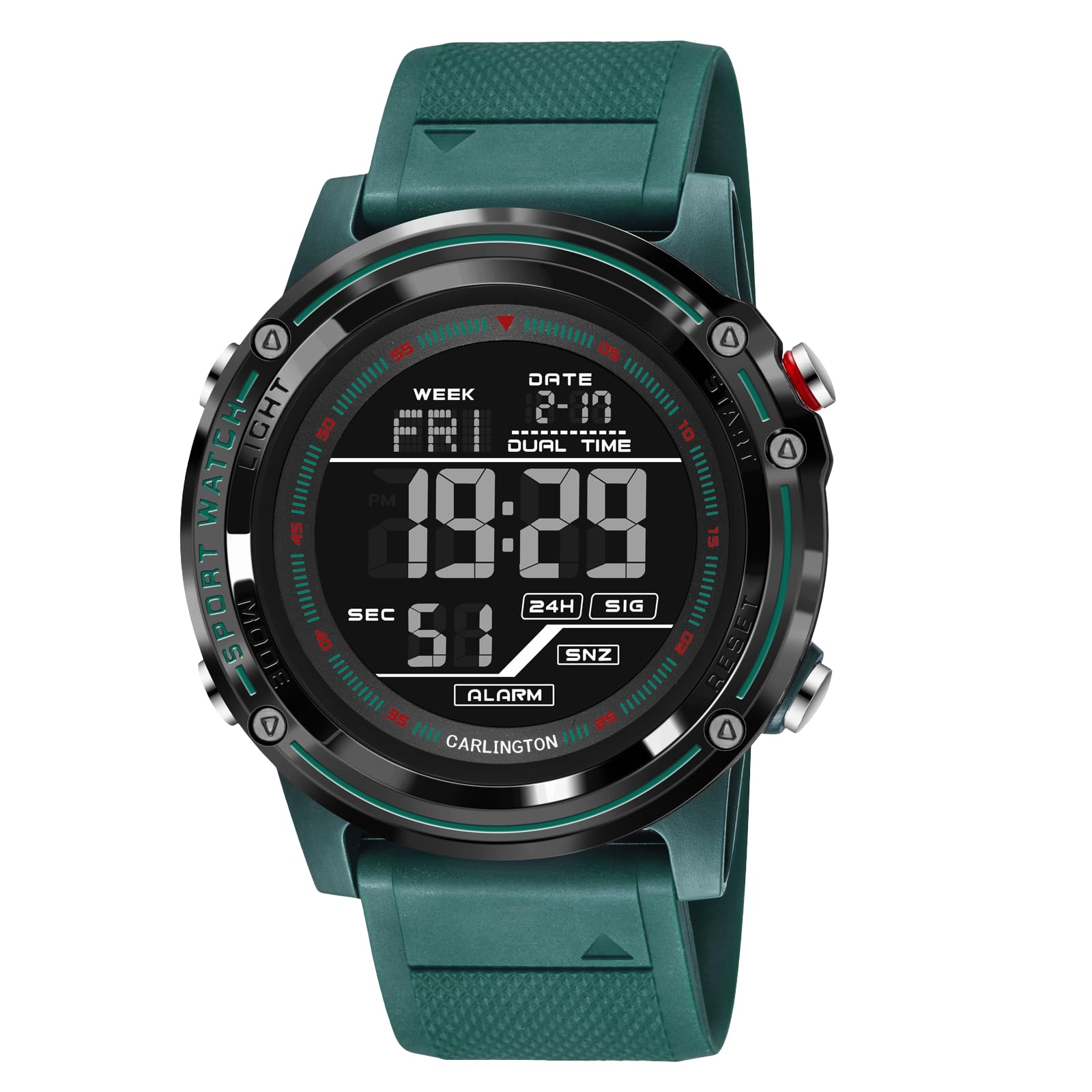
Image: Front view of the Carlington Velocity Series CT_8125 watch, showcasing its analog and digital display.
Watch Features
- Analog-Digital Display: Combines traditional analog hands with a clear digital readout.
- Alarm Function: Set daily alarms to keep you on schedule.
- Stopwatch: Precise timing for sports and activities.
- Backlit Display: Ensures visibility in low-light conditions.
- Dual Time: Track time in two different time zones simultaneously.
- Calendar Display: Shows date, day, and month.
- Water Resistant: Designed to withstand water exposure up to 10 meters.
- Shock Resistant: Built to endure accidental impacts and rough handling.
- Durable Silicone Rubber Strap: Comfortable and robust for active use.
Button Functions
The Carlington Velocity Series CT_8125 watch features four primary buttons for various functions. While specific labels may vary slightly, their general functions are as follows:
- LIGHT Button (Top Left): Activates the backlight for the digital display.
- MODE Button (Bottom Left): Cycles through different modes (Time, Alarm, Stopwatch, Dual Time).
- START/RESET Button (Top Right): Used to start/stop the stopwatch, adjust settings, or confirm selections.
- ADJUST Button (Bottom Right): Used to reset the stopwatch, move through settings options, or change values.

Image: Close-up of the watch face showing the digital display and button labels (LIGHT, MODE, START, ADJUST).
Setup
Setting Time and Date (Digital Display)
- From the Timekeeping Mode, press the MODE button repeatedly until the seconds begin to flash, indicating setting mode.
- Press the ADJUST button to cycle through the settings: Seconds → Hour → Minute → Year → Month → Day.
- Use the START/RESET button to increase the flashing value. Hold to rapidly advance.
- Once all settings are correct, press the MODE button to exit the setting mode.
Setting Analog Time
The analog hands are typically synchronized with the digital time. If they are out of sync, follow these steps:
- In Timekeeping Mode, press and hold the ADJUST button until the digital time starts flashing.
- Press the MODE button to move the analog hands forward. Each press advances the hands slightly. Hold the button to move hands continuously.
- Align the analog hands with the digital time.
- Press the ADJUST button to exit the analog setting mode.
Setting the Alarm
- From Timekeeping Mode, press the MODE button until you reach the Alarm Mode (indicated by "AL" or an alarm icon).
- Press the ADJUST button to select the hour or minute setting.
- Use the START/RESET button to set the desired alarm hour and minute.
- Press the MODE button to confirm and exit.
- To turn the alarm ON/OFF, press the START/RESET button in Alarm Mode. An alarm icon will appear/disappear.
Operating Instructions
Using the Backlight
Press the LIGHT button (top left) to illuminate the digital display. The backlight will remain active for a few seconds.

Image: The watch display illuminated by its backlight, showing clear visibility in low light.
Using the Stopwatch
- Press the MODE button until you reach the Stopwatch Mode (indicated by "STW" or a stopwatch icon).
- Press the START/RESET button to start the stopwatch.
- Press the START/RESET button again to pause the stopwatch.
- To resume, press START/RESET.
- To reset the stopwatch to zero, press the ADJUST button while the stopwatch is paused.
Dual Time Function
The dual time function allows you to view a second time zone.
- Press the MODE button until you reach the Dual Time Mode (indicated by "DT" or a dual time icon).
- Press the ADJUST button to select the hour or minute setting for the second time zone.
- Use the START/RESET button to set the desired hour and minute for the dual time.
- Press the MODE button to confirm and exit.
Maintenance
Cleaning Your Watch
- Wipe the watch case and strap with a soft, damp cloth.
- For stubborn dirt, use a mild soap solution and rinse thoroughly with clean water.
- Ensure the watch is completely dry before wearing.
- Avoid using harsh chemicals, solvents, or abrasive cleaners, as these can damage the watch's finish and seals.
Water Resistance Guidelines
Your watch is water resistant up to 10 meters (1 ATM). This means it is suitable for splashes, rain, and brief immersion in water.
- Do NOT press any buttons while the watch is submerged in water.
- Do NOT use the watch for diving, snorkeling, or high-pressure water activities.
- After exposure to saltwater, rinse the watch with fresh water and dry it thoroughly.
- Avoid exposing the watch to extreme temperature changes, which can affect water resistance seals.

Image: The watch resting on a surface with water, illustrating its water-resistant design.
Battery Replacement
When the display becomes dim or functions become erratic, it may be time to replace the battery. Battery replacement should ideally be performed by a qualified watch technician to ensure proper sealing and maintain water resistance.
Troubleshooting
| Problem | Possible Cause | Solution |
|---|---|---|
| Digital display is blank or dim. | Low battery. | Replace the battery. |
| Analog hands do not match digital time. | Hands are out of sync. | Follow "Setting Analog Time" instructions in the Setup section. |
| Buttons are unresponsive. | Watch may be in a locked mode or internal error. | Try pressing all buttons firmly. If issue persists, contact support. |
| Water inside the watch face. | Water resistance compromised (e.g., buttons pressed underwater, extreme temperature change). | Immediately take the watch to a qualified technician for inspection and repair to prevent further damage. Do not attempt to dry it yourself. |
Specifications
| Feature | Detail |
|---|---|
| Model Number | CT_8125 |
| Display Type | Analog-Digital |
| Movement Type | Quartz |
| Water Resistance Depth | 10 Metres (1 ATM) |
| Band Material | Silicone |
| Case Material | Alloy Steel |
| Crystal Material | Mineral Glass |
| Case Diameter | 5 Centimetres |
| Case Thickness | 1.8 Centimetres |
| Band Width | 2.2 Centimetres |
| Item Weight | 110 Grams |
| Special Features | Backlight, Alarm, Stopwatch, Dual Time, Calendar |
| Power Source | Battery Powered |
| Clasp Type | Tang Buckle |
| Country of Origin | Hong Kong |

Image: Rear view of the watch, highlighting the stainless steel back and strap attachment.
Warranty Information
The Carlington Velocity Series CT_8125 watch comes with a 1-year warranty from the date of purchase. This warranty covers any manufacturing defects. Please retain your proof of purchase for warranty claims. The warranty does not cover damage resulting from improper use, accidents, unauthorized repairs, or normal wear and tear.
Customer Support
For any questions, technical assistance, or warranty claims, please contact Carlington India customer support:
- Phone: 8100323453
- Email: support@carlington.in

Image: The Carlington signature gift box, indicating product packaging.