
1. Introduction
Thank you for choosing the Bellemave Queen Size Loft Bed. This multifunctional bed is designed to maximize space in your room, featuring integrated storage stairs, shelves, a built-in desk, LED lights, and USB charging ports. Constructed from durable metal, it provides a secure and comfortable sleeping and working environment. This manual provides detailed instructions for assembly, operation, maintenance, and troubleshooting to ensure safe and optimal use of your new loft bed.
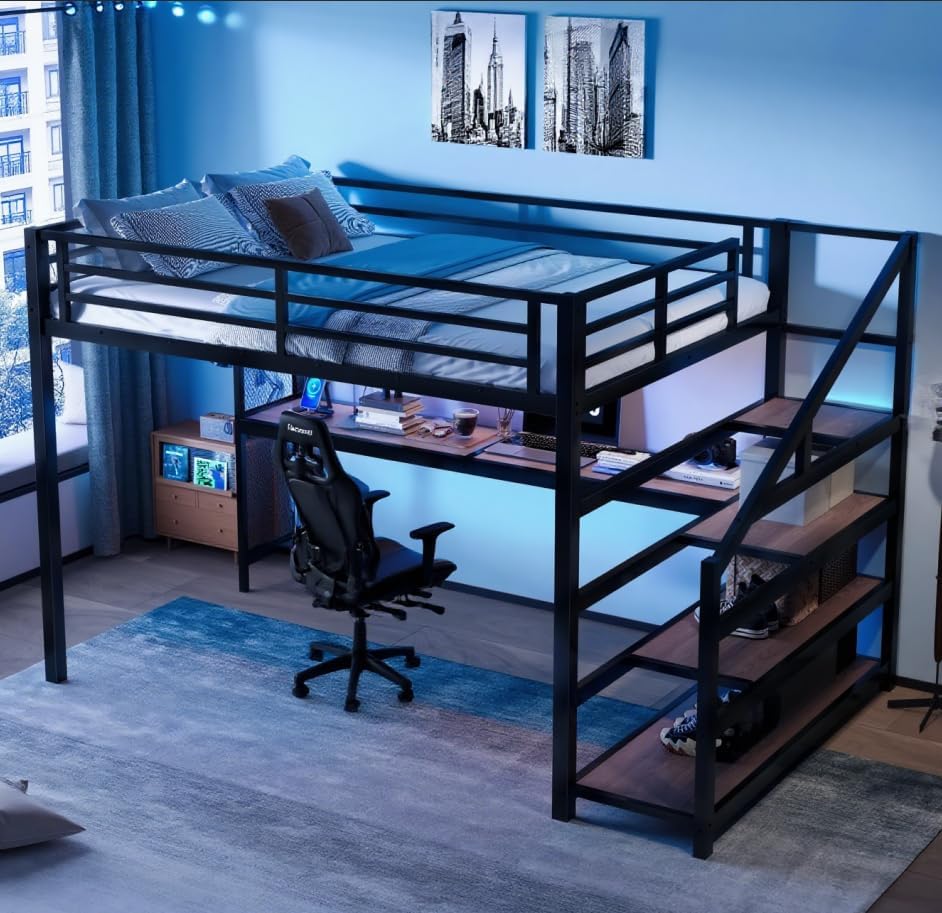
Image 1.1: The Bellemave Queen Size Loft Bed, showcasing its integrated desk and storage stairs.
2. Safety Information
Please read and understand all safety warnings and instructions before assembling and using this product. Failure to follow these instructions can result in serious injury.
- Maximum Weight Capacity: The top bunk is designed to support a maximum weight of 500 pounds. Do not exceed this limit.
- Guardrails: Ensure all guardrails are securely installed and maintained. The top bunk is equipped with full-length guardrails for safety.
- Mattress Requirements: Use only a mattress that is appropriate for a queen-size bed and does not exceed the recommended thickness to ensure guardrail effectiveness.
- Assembly: Assemble the bed on a soft, clean surface to prevent damage. Two or more adults are recommended for assembly.
- Regular Checks: Periodically check all bolts, screws, and connections to ensure they remain tight and secure. Retighten as necessary.
- No Jumping: Do not allow jumping on the bed.
- Children: This loft bed is suitable for older children, teenagers, and adults. Young children should not use the top bunk.
- Ventilation: Ensure adequate ventilation around the bed, especially if using electronic devices on the desk.
3. Package Contents
Before beginning assembly, verify that all parts listed below are present and undamaged. If any parts are missing or damaged, please contact customer support immediately.
| Component | Description | Quantity |
|---|---|---|
| Bed Frame Sections | Metal frame pieces for the loft bed structure | Various |
| Guardrails | Safety rails for the top bunk | Included |
| Slats | Metal support slats for the mattress | Included |
| Stairs with Storage | Staircase unit with integrated shelves | 1 Set |
| Desk Surface | Wooden desk panel | 1 |
| USB/LED Unit | Integrated USB ports and LED light strip | 1 |
| Hardware Kit | Bolts, screws, washers, Allen wrench, etc. | 1 Set |
| Assembly Instructions | Detailed step-by-step guide | 1 |
4. Setup and Assembly
Follow these steps carefully for proper assembly. It is recommended to have at least two people for assembly.
- Prepare the Area: Clear a spacious area for assembly. Lay down a blanket or cardboard to protect your floor and the bed components.
- Unpack and Identify Parts: Carefully unpack all boxes and lay out the components. Refer to the included parts list and diagrams to identify each piece.
- Assemble the Main Frame: Begin by connecting the main vertical and horizontal metal frame sections according to the detailed diagrams in your separate assembly instructions. Do not fully tighten bolts until all sections are loosely connected.
- Attach the Desk: Secure the desk surface to the designated frame supports. Ensure it is level and firmly attached.
- Install Storage Stairs: Assemble the storage stair unit, ensuring the shelves are correctly positioned. Attach the completed stair unit to the main bed frame.
- Install Bed Slats: Place and secure the metal slats onto the bed frame to create the mattress support.
- Attach Guardrails: Securely fasten all guardrails to the top bunk frame.
- Install USB/LED Unit: Integrate the USB charging ports and LED light strip into the designated area, typically under the bed frame above the desk. Connect the power cable.
- Final Tightening: Once all components are in place and aligned, systematically tighten all bolts and screws using the provided tool. Do not overtighten.
- Final Check: Ensure the bed is stable, all connections are secure, and there is no wobbling.

Image 4.1: An angled view of the assembled loft bed frame, showing the desk and storage stairs.

Image 4.2: Another perspective of the loft bed frame, highlighting the integrated desk and storage stairs before mattress placement.
5. Operating Instructions
Your Bellemave Loft Bed includes convenient features for enhanced usability.
5.1. LED Lights
The integrated LED light strip provides ambient lighting for your desk area or room. It is typically controlled by a switch located near the light strip or via a remote control (if included). Refer to the specific instructions provided with the LED unit for detailed operation, including color changes or brightness adjustments.

Image 5.1: The desk area of the loft bed illuminated by the integrated blue LED lighting.
5.2. USB Charging Ports
The bed is equipped with built-in USB charging ports, usually located on the desk or side panel. Simply plug your USB charging cables into these ports to power your electronic devices such as smartphones, tablets, or other USB-powered accessories. Ensure the bed's power cord is connected to a wall outlet for the USB ports to function.
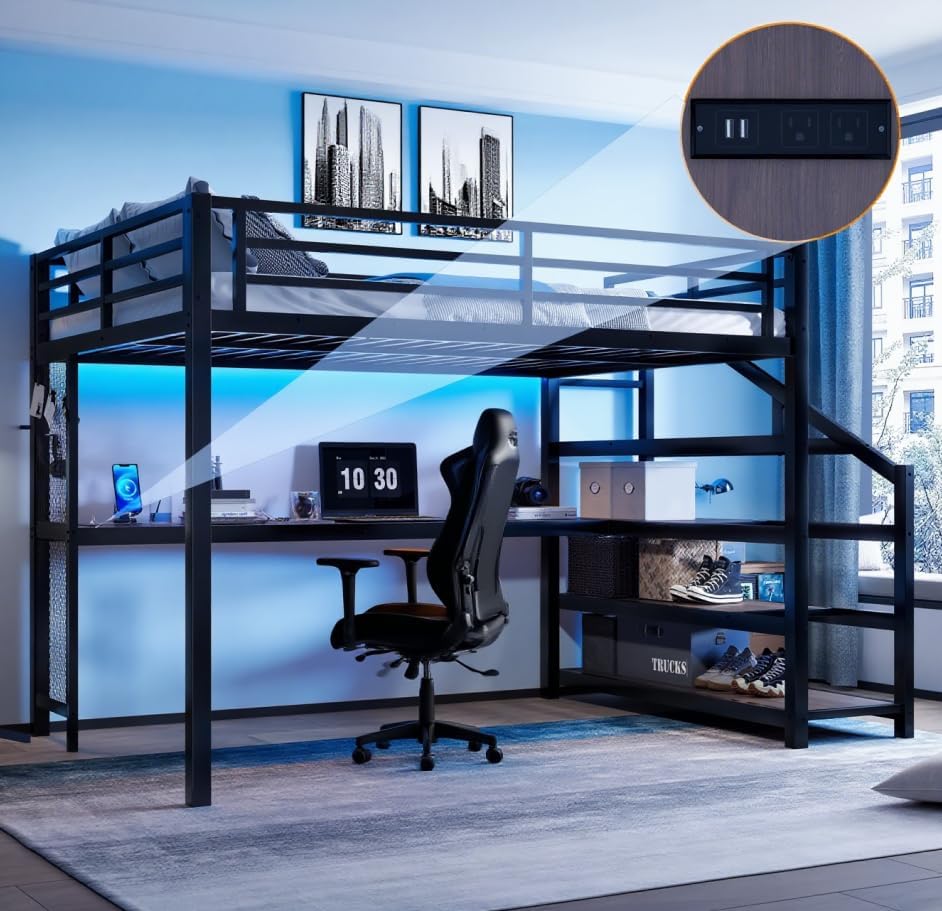
Image 5.2: A close-up view of the integrated USB charging ports and power outlet on the loft bed.
5.3. Storage Stairs and Shelves
The stairs provide safe access to the top bunk and feature integrated shelves for convenient storage of books, decor, or personal items. The desk also offers ample space for study or work essentials.

Image 5.3: A detailed view of the storage stairs, highlighting the integrated shelving units.
6. Maintenance
Proper maintenance will extend the life and appearance of your loft bed.
- Cleaning: Wipe metal surfaces with a soft, damp cloth. For wooden surfaces (desk, shelves), use a mild wood cleaner if necessary, and dry immediately. Avoid harsh chemicals or abrasive cleaners.
- Hardware Check: Periodically (e.g., every 3-6 months) inspect all bolts, screws, and connections. Tighten any that have become loose to maintain stability and prevent squeaking.
- Avoid Overloading: Do not overload the storage shelves or the desk with excessive weight.
- Environmental Conditions: Keep the bed in a dry environment. Avoid prolonged exposure to direct sunlight or extreme temperature changes.
7. Troubleshooting
Refer to this section for solutions to common issues.
- Squeaking Noises: If the bed squeaks, check all bolts and screws. Loose connections are the most common cause of noise. Tighten all hardware. The bed is designed with noise-reducing connectors, but regular checks are still important.
- Unstable Bed: Ensure all frame components are correctly assembled and all hardware is fully tightened. Verify the bed is on a level surface.
- LED Lights Not Working: Check if the power cord for the LED/USB unit is securely plugged into a wall outlet. Ensure the LED light switch is in the 'on' position. If using a remote, check its battery.
- USB Ports Not Charging: Confirm the bed's power cord is plugged into a functional wall outlet. Try a different USB cable or device to rule out issues with your accessories.
- Missing Parts: If you discover missing parts during assembly, do not proceed. Contact customer support immediately for assistance.
8. Specifications
Detailed product specifications for the Bellemave Queen Size Loft Bed.
| Feature | Detail |
|---|---|
| Model Number | FST00232-QB-CB1 |
| UPC | 800067010956 |
| Size | Queen |
| Material | Metal (Frame), Wood (Desk, Shelves) |
| Product Dimensions (L x W x H) | 98.5" x 60.5" x 65" |
| Item Weight | 74 pounds |
| Maximum Weight Recommendation | 500 pounds |
| Color | Black |
| Included Components | Guardrails, Slats, Stairs, Desk, LED Lights, USB Ports |

Image 8.1: Detailed dimensions diagram for the Bellemave Queen Size Loft Bed.
9. Warranty and Support
For any questions, concerns, or to report missing/damaged parts, please contact Bellemave customer support. Refer to your purchase documentation for specific warranty details and contact information. Typically, products are covered by a return policy (e.g., 30-day easy returns) and manufacturer support for defects.
Customer Support: Please refer to the contact information provided at the point of purchase or on the Bellemave official website.