
1. Safety Information
Read all instructions carefully before using this treadmill. Keep this manual for future reference.
- Maximum User Weight: Do not exceed the maximum weight capacity of 400 lbs (181 kg).
- Placement: Place the treadmill on a solid, level surface with adequate clearance around it (at least 2 meters behind and 0.6 meters on each side).
- Children and Pets: Keep children and pets away from the treadmill during operation. Adult supervision is required at all times.
- Attire: Wear appropriate exercise clothing and athletic shoes. Avoid loose clothing that could get caught in moving parts.
- Emergency Stop: Always attach the safety key clip to your clothing before starting a workout. In case of an emergency, pull the safety key to immediately stop the treadmill.
- Power Cord: Ensure the power cord is not pinched or damaged. Do not place the treadmill on the power cord.
- Medical Conditions: Consult a physician before starting any exercise program, especially if you have pre-existing medical conditions.
- Maintenance: Perform regular maintenance as described in this manual to ensure safe operation.
2. Package Contents
Verify that all components are present before assembly:
- FOUSAE X430 Treadmill Main Unit
- Power Cord
- Safety Key
- Assembly Tools (if included)
- User Manual
3. Setup and Assembly
The FOUSAE X430 Treadmill requires some assembly. Follow these steps for proper setup:
- Unpacking: Carefully remove all components from the packaging. Retain packaging materials for future transport or storage.
- Base Placement: Place the treadmill base on a flat, stable surface.
- Upright Assembly: Attach the uprights and console according to the diagrams in the included assembly guide. Ensure all bolts are securely tightened.
- Power Connection: Plug the power cord into a grounded electrical outlet.
- Safety Key: Familiarize yourself with the safety key and its placement on the console.

The treadmill features hydraulic automatic folding for easy storage and mobility wheels for convenient relocation.
4. Operating Instructions
4.1 Control Panel Overview

The oversized LED screen displays key workout data including time, distance, speed, calories, incline, and pulse. Integrated pulse grips monitor heart rate.
The console features an LED display, control buttons for speed and incline, pulse grips, and a device holder.
4.2 Starting a Workout
- Ensure the treadmill is plugged in and the power switch is ON.
- Attach the safety key clip to your clothing and place the magnetic end onto the designated area on the console.
- Step onto the treadmill belt, holding the handrails for stability.
- Press the START button to begin. The belt will start moving at a low speed.
4.3 Speed Adjustment
Adjust the speed using the '+' and '-' buttons on the console. The treadmill offers a speed range from 0.6 MPH to 10 MPH.
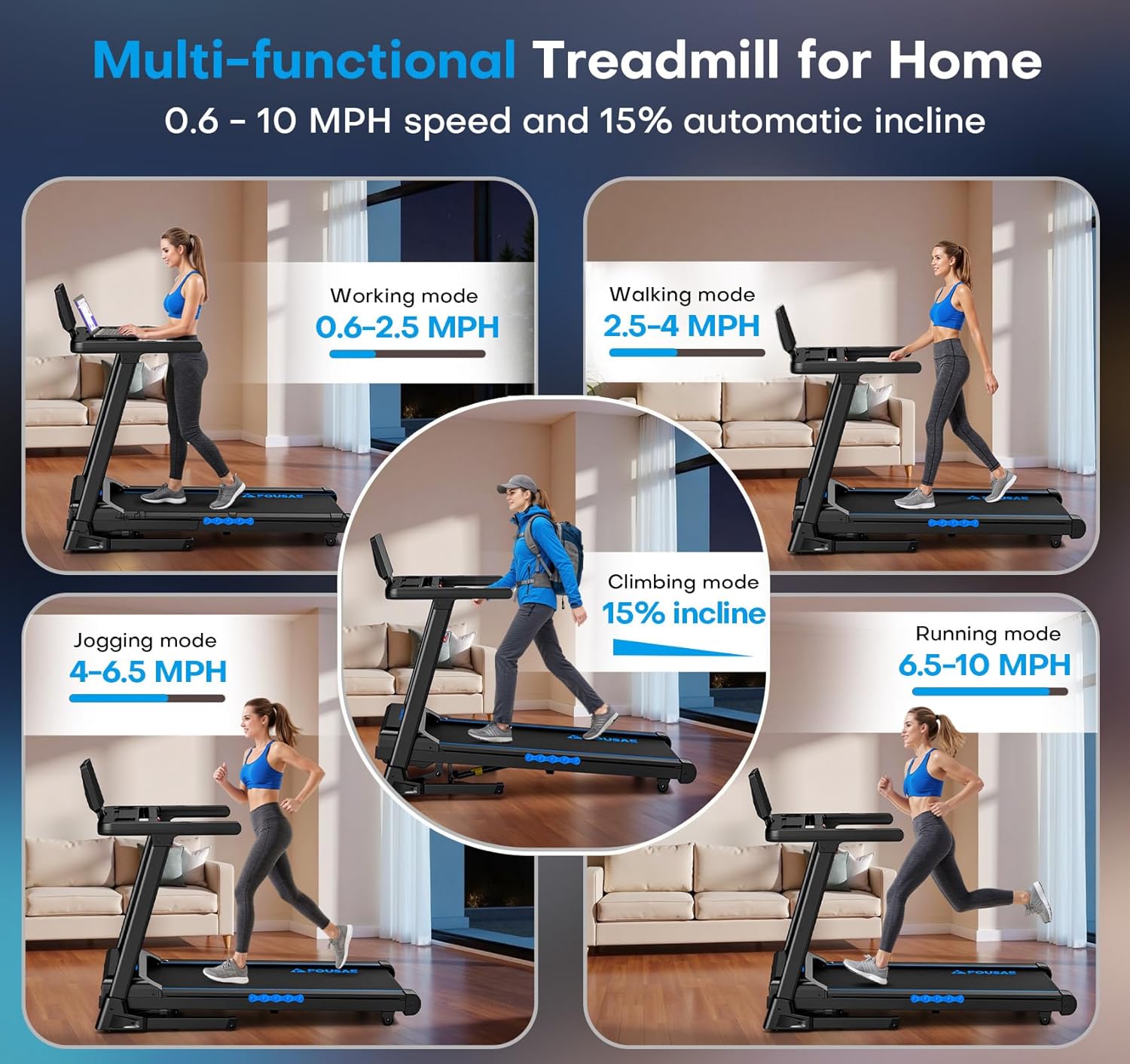
The treadmill supports various exercise modes from walking to running, with speeds up to 10 MPH.
4.4 Incline Adjustment
The treadmill features an automatic incline system, adjustable from 0% to 15%. Use the incline buttons on the console to change the incline level during your workout.

Automatic incline adjustment up to 15% allows for varied workout intensity and increased calorie expenditure.
4.5 Workout Programs and Modes
The treadmill includes 12 pre-set High-Intensity Interval Training (HIIT) programs and 3 countdown modes (distance, time, or calories) to customize your workout goals.

Utilize the 12 HIIT programs or set goals with the 3 countdown modes for diverse training sessions.
4.6 App Connectivity and Speakers
Connect your device via Bluetooth to popular fitness apps such as FITSHOW, KINOMAP, and Zwift for interactive workouts. The treadmill also features built-in speakers for audio playback.

Enjoy music through the built-in speakers and connect to fitness apps for an enhanced workout experience.
4.7 Stopping a Workout
Press the STOP button on the console. The treadmill belt will gradually slow down and stop. Alternatively, pull the safety key for an immediate stop.
5. Maintenance
Regular maintenance ensures the longevity and safe operation of your treadmill.
- Cleaning: Wipe down the treadmill after each use with a damp cloth to remove sweat and dust. Avoid using abrasive cleaners.
- Belt Lubrication: Periodically check the running belt for proper lubrication. Refer to the specific instructions in your assembly guide for lubrication frequency and type of lubricant.
- Belt Tension and Alignment: Inspect the running belt for proper tension and alignment. Adjust as needed following the instructions in your assembly guide. An improperly tensioned or aligned belt can affect performance and safety.
- Power Cord Inspection: Regularly inspect the power cord for any signs of damage. If damaged, contact customer support for replacement.
6. Troubleshooting
If you encounter issues with your FOUSAE X430 Treadmill, refer to the following common problems and solutions:
| Problem | Possible Cause | Solution |
|---|---|---|
| Treadmill does not start | Power cord not plugged in; Safety key not in place; Power switch OFF. | Ensure power cord is securely plugged in. Place safety key on console. Turn power switch ON. |
| Running belt slips or hesitates | Belt tension too loose; Belt requires lubrication. | Adjust belt tension according to manual. Lubricate the running belt. |
| Unusual noise during operation | Loose components; Motor issue; Belt friction. | Check all bolts and tighten if loose. Ensure belt is lubricated. If noise persists, contact customer support. |
| Display not working | Loose cable connection; Console malfunction. | Check console cable connections. If issue persists, contact customer support. |
For issues not listed here or if solutions do not resolve the problem, please contact FOUSAE customer support.
7. Specifications

Powered by a 3.0 HP brushless motor, the treadmill supports up to 400 lbs and operates quietly.

The advanced cushioning system, including a double deck and multiple shock absorbers, reduces impact on joints.
| Model Name | X430 |
| Brand | FOUSAE |
| Product Dimensions (D x W x H) | 134D x 114.5W x 66.5H Centimetres |
| Item Weight | 48 Kilograms |
| Motor | 3.0 HP Brushless Motor |
| Speed Range | 0.6 - 10 Miles per Hour |
| Incline Range | 0 - 15% Automatic Incline |
| Running Belt Dimensions | 106 x 43 cm |
| Maximum Weight Recommendation | 400 Pounds |
| Workout Programs | 12 HIIT Programs, 3 Countdown Modes |
| Connectivity | APP Compatible (FITSHOW, KINOMAP, Zwift), Bluetooth |
| Display | LED Digital Display (12.7 inch) |
| Shock Absorption | Double Deck, 8 Shock-Absorbing Columns |
| Noise Level | < 40 dB |
| Material | Acrylonitrile Butadiene Styrene (ABS), Alloy Steel |
| UPC | 795973002440 |
8. Warranty and Support
Warranty: The FOUSAE X430 Treadmill comes with a 1-year warranty from the date of purchase. This warranty covers manufacturing defects under normal use.
Customer Support: For any questions, technical assistance, or warranty claims, please contact the FOUSAE professional after-sales team. They are committed to responding within 18 hours.
For additional support or to initiate a return/replacement within 30 days of receipt, please refer to your purchase platform's customer service policies.
Manufacturer Contact Information: FOUSAE