
1. Introduction
This manual provides essential information for the safe and efficient operation of your new ANDELI 135A MIG Welder and the accompanying 30Amp 50ft Welder Extension Cord. Please read these instructions thoroughly before initial use to ensure proper setup, operation, and maintenance. Retain this manual for future reference.
2. Safety Information
WARNING: Welding can be dangerous. Always follow safety precautions to prevent serious injury or death.
- Always wear appropriate personal protective equipment (PPE), including a welding helmet with proper shade, welding gloves, protective clothing, and safety shoes.
- Ensure adequate ventilation in the work area to avoid inhaling welding fumes.
- Protect bystanders from arc rays and hot metal.
- Never weld near flammable materials.
- Ensure the welder is properly grounded.
- Inspect all cables and connections for damage before each use. Replace damaged components immediately.
- Do not operate the welder in wet conditions.
- Disconnect power before performing any maintenance or changing accessories.
3. Package Contents
Verify that all items listed below are included in your package:
- ANDELI 135A MIG Welder Unit
- 30Amp 50ft Welder Extension Cord (NEMA 6-50P to 6-50R)
- Gasless Flux Core Wire
- Electrode Holder
- Welding Torch
- Ground Clamp
- Premium Auto-Darkening Welding Helmet (convertible to goggles)
- Professional Leather Welding Gloves
- User Manual

4. Product Overview
The ANDELI 135A MIG Welder is a versatile 3-in-1 machine designed for Flux Core Gasless MIG, Lift TIG, and MMA (Stick) welding. It features dual voltage capability (110V/220V) for adaptability to various power sources and project requirements. The included 30Amp 50ft extension cord provides a safe and reliable power connection for your welding tasks.
4.1 Welder Features
- Multiprocess Capability: Supports Flux Core Gasless MIG, Lift TIG (torch sold separately), and MMA welding.
- Dual Voltage: Operates on both 110V and 220V power supplies.
- Wire Compatibility: Compatible with 0.030", 0.035", and 0.040" flux-core wire.
- Material Thickness: Capable of welding mild steel up to 5.0 mm (0.19") thick.
- Adjustable Controls: Features adjustable Hot Start and Arc Force functions for stick welding.

4.2 Extension Cord Features
- Length: 50 feet for extended reach and safety.
- Gauge: 10 AWG (American Wire Gauge) for heavy-duty applications.
- Amperage: 30 Amp capacity.
- Connectors: NEMA 6-50P plug to NEMA 6-50R receptacle.
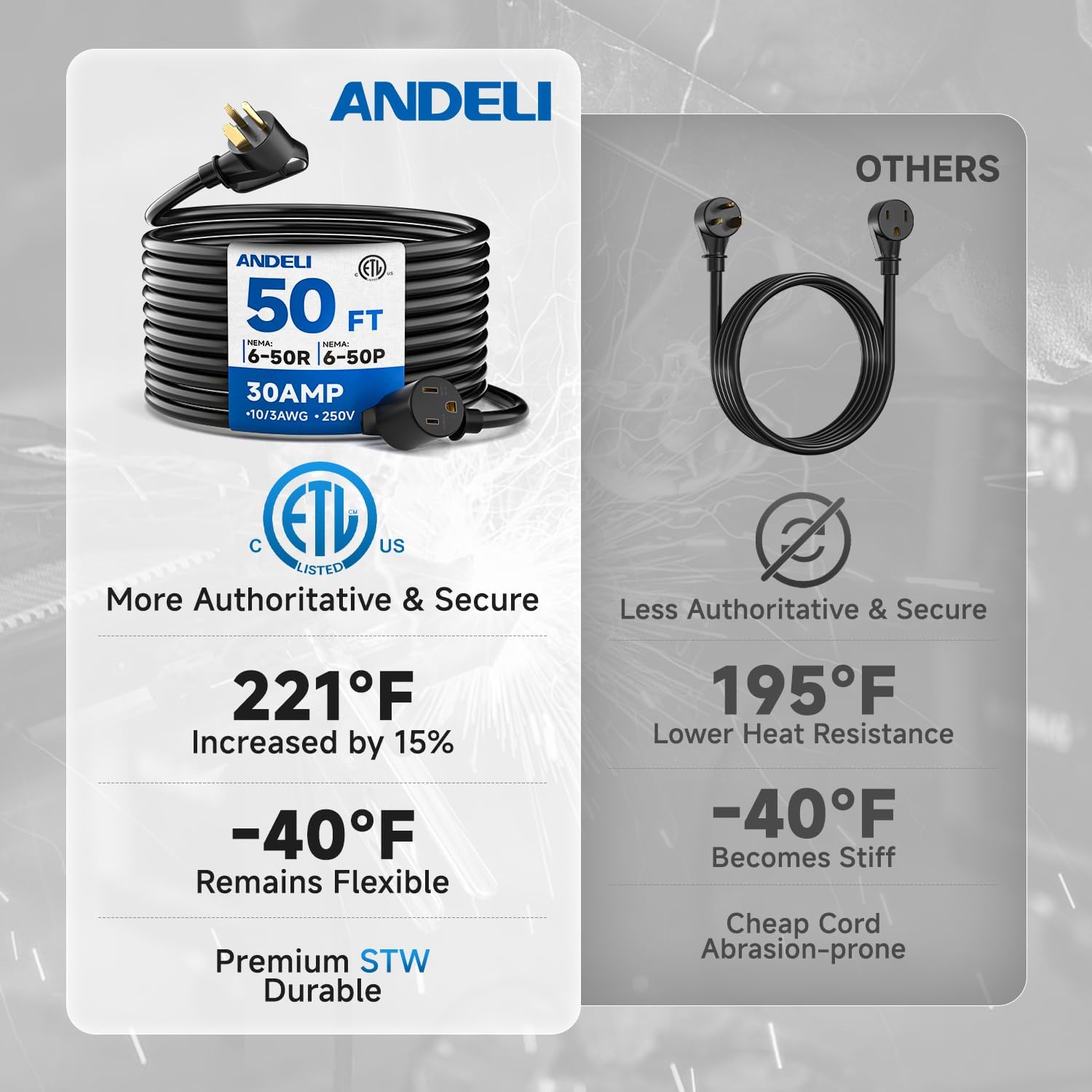
- Construction: 3 conductors with 100% copper and 35% thicker insulation. STW jacket for durability and weather resistance.
- Safety: ETL listed for safe and reliable power supply.

5. Setup
5.1 Welder Setup
- Placement: Position the welder on a stable, level surface in a well-ventilated area, away from flammable materials.
- Ground Clamp Connection: Connect the ground clamp cable to the appropriate terminal on the welder and securely attach the clamp to the workpiece or welding table. Ensure good electrical contact.
- Welding Torch Connection: Connect the welding torch cable to the designated port on the welder.
- Wire Installation (MIG): Open the wire feed compartment. Install the flux core wire spool, ensuring it is properly seated. Thread the wire through the feed rollers and into the torch liner. Adjust the wire tension as needed.
- Electrode Holder Connection (MMA): For MMA welding, connect the electrode holder cable to the appropriate terminal.
- TIG Torch Connection (Lift TIG, optional): If using Lift TIG, connect the TIG torch (sold separately) to its designated port.
5.2 Extension Cord Connection
The 30Amp 50ft Welder Extension Cord is designed to provide a safe and extended power connection for your welder.
- Inspect Cord: Before each use, visually inspect the entire length of the extension cord, including the plug and receptacle, for any signs of damage, cuts, or fraying. Do not use a damaged cord.
- Connect to Power Source: Plug the NEMA 6-50P end of the extension cord into a compatible 250V, 30Amp NEMA 6-50R wall receptacle.
- Connect Welder: Plug the welder's power cord into the NEMA 6-50R receptacle of the extension cord.
- Route Safely: Route the extension cord to avoid tripping hazards, sharp edges, or areas where it could be crushed or damaged.
6. Operating Instructions
The ANDELI 135A Welder supports multiple welding processes. Always refer to the welder's control panel for specific settings and adjustments.

6.1 Powering On and Dual Voltage Selection
- Ensure all connections are secure.
- Turn on the main power switch on the welder.
- The welder automatically detects the input voltage (110V or 220V).
- For 110V operation, the welder is suitable for lighter tasks. For 220V, it provides robust output for thicker metals and industrial power.

6.2 Flux Core Gasless MIG Welding
- Select the MIG mode on the control panel.
- Adjust the wire feed speed and voltage according to the material thickness and wire diameter. The welder may offer synergetic control for simplified settings.
- Ensure the workpiece is clean and properly grounded.
- Begin welding, maintaining a consistent travel speed and arc length.
6.3 MMA (Stick) Welding
- Select the MMA mode.
- Insert the appropriate electrode into the electrode holder.
- Set the amperage based on the electrode type and material thickness.
- Adjust Hot Start and Arc Force functions as needed for optimal arc ignition and stability.
- Strike the arc and maintain a steady hand for a quality weld.
6.4 Lift TIG Welding (Torch Sold Separately)
- Select the TIG mode.
- Ensure a TIG torch with a tungsten electrode is connected.
- Set the amperage.
- Touch the tungsten to the workpiece to initiate the arc (Lift Arc), then lift slightly to establish the arc.
- Feed filler rod manually if required.
7. Maintenance
Regular maintenance ensures the longevity and safe operation of your welding equipment.
- Cleaning: Periodically clean the welder's exterior and internal components (using compressed air) to remove dust and metal particles. Ensure the power is disconnected before cleaning.
- Cable Inspection: Regularly inspect all welding cables, power cords, and connections for wear, cuts, or damage. Replace any damaged parts immediately.
- Torch Maintenance: Clean the welding torch nozzle and contact tip regularly. Replace worn contact tips.
- Wire Feed System: Check the wire feed rollers for wear and ensure they are clean and free of debris. Adjust tension as needed.
- Extension Cord Care: Store the extension cord coiled neatly in a dry place. Avoid kinking or bending the cord sharply.
8. Troubleshooting
Refer to the following table for common issues and their solutions.
| Problem | Possible Cause | Solution |
|---|---|---|
| Welder does not power on | No power supply; Faulty power cord/extension cord; Welder switch off | Check power outlet; Inspect power cords; Turn on welder switch |
| No arc | Poor ground connection; Incorrect settings; Damaged torch/electrode holder | Ensure good ground contact; Verify settings; Inspect and replace damaged components |
| Wire feed issues (MIG) | Incorrect wire tension; Clogged liner; Worn contact tip; Wrong roller size | Adjust wire tension; Clean/replace liner; Replace contact tip; Use correct rollers |
| Poor weld quality | Incorrect settings; Dirty workpiece; Improper technique | Adjust voltage/amperage/wire speed; Clean workpiece; Practice welding technique |
| Extension cord overheating | Overload; Damaged cord; Improper gauge for load | Reduce load; Inspect cord for damage; Ensure cord gauge matches requirements |
9. Specifications
9.1 ANDELI 135A MIG Welder
- Input Voltage: 110V/220V Dual Voltage
- Welding Processes: Flux Core Gasless MIG, Lift TIG, MMA
- Max Material Thickness: 5.0 mm (0.19") mild steel
- Compatible Wire: 0.030", 0.035", 0.040" flux-core wire
9.2 30Amp 50ft Welder Extension Cord
- Length: 50 ft
- Wire Gauge: 10 AWG
- Amperage: 30 Amp
- Voltage: 250V
- Connectors: NEMA 6-50P to NEMA 6-50R
- Conductors: 3 (100% copper)
- Jacket Type: STW (Hard Service, Thermoplastic, Weather Approved)
- Heat Resistance: Up to 221°F (105°C)
- Flexibility: Remains flexible down to -40°F (-40°C)
- Certification: ETL Listed


10. Warranty and Support
For warranty information and customer support, please refer to the documentation included with your purchase or contact ANDELI customer service directly. Keep your purchase receipt as proof of purchase.