
1. Introduction
Thank you for choosing the Bellemave Full Size Corner Bed Frame. This innovative bed frame is designed to maximize space and functionality in your bedroom, living room, or guest room. It features an L-shaped semi-enclosed design, integrated storage drawers, a bookcase, a side desk, LED lighting, and a convenient charging station. This manual provides essential information for safe assembly, operation, maintenance, and troubleshooting to ensure optimal use of your new furniture.

Figure 1: Overview of the Bellemave Full Size Corner Bed Frame.
2. Safety Information
Please read and understand all safety warnings and instructions before assembly and use. Failure to follow these instructions may result in injury or damage to the product.
- Always follow the assembly instructions carefully to prevent instability or collapse.
- Be cautious of sharp edges during assembly and use.
- Keep the charging station dry and do not overload the electrical components.
- Do not exceed the maximum weight capacity of 1000 lbs (453 kg) for the bed frame.
- Ensure all connections are securely tightened before use. Periodically check and re-tighten fasteners as needed.
- Keep small parts away from children during assembly to prevent choking hazards.
3. Package Contents
Verify that all components are present before beginning assembly. This bed frame comes in one box. Refer to the detailed assembly instruction guide included in the package for a complete list of parts and hardware.
Included Components:
- Bed Frame Structure (Metal and Wood)
- Bookcase Unit
- Side Desk
- Storage Drawers (2 units)
- LED Light Strips
- Charging Station (2 AC outlets + 2 USB ports)
- Assembly Hardware (screws, bolts, etc.)
- Assembly Tools (basic tools required for assembly)
- Detailed Assembly Instruction Guide

Figure 2: Main structural components of the bed frame.
4. Assembly Instructions
The Bellemave Full Size Corner Bed Frame requires assembly. A clear and detailed assembly instruction guide is provided with your purchase, along with all necessary tools. Please follow the steps outlined in the guide carefully.
General Assembly Steps:
- Unpack and Identify Parts: Lay out all components and hardware on a clean, soft surface to prevent scratches. Compare them with the parts list in the included manual.
- Assemble the Main Bed Frame: Follow the instructions to connect the metal and wood frame sections. Ensure all bolts are finger-tightened initially.
- Attach Bookcase and Side Desk: Secure the bookcase and side desk units to the main frame as directed.
- Install Storage Drawers: Assemble the two storage drawers and insert them into their designated slots under the bed frame.
- Connect LED Lights and Charging Station: Integrate the LED light strips and charging station according to the electrical connection instructions.
- Final Tightening: Once all components are in place, systematically tighten all bolts and screws using the provided tools. Do not overtighten.
For detailed, step-by-step instructions, refer to the dedicated assembly manual included in your package.
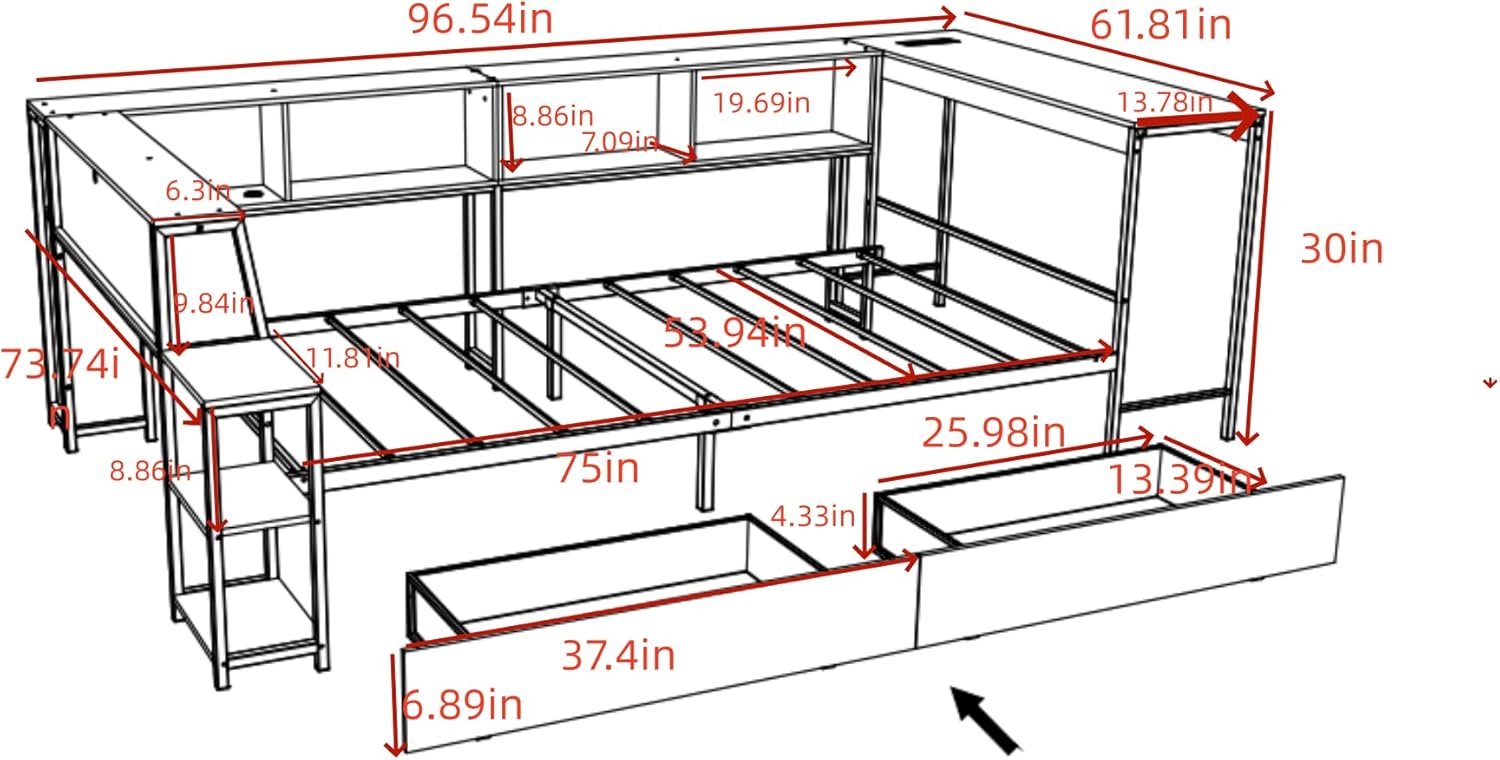
Figure 3: Product dimensions for planning and assembly.
5. Operating Instructions
5.1. LED Lighting System
The bed frame is equipped with RGB LED light strips integrated into the bookcase. These lights offer a variety of colors and patterns to enhance your room's ambiance.
- Power On/Off: Use the included remote control or a compatible mobile application to turn the LED lights on or off.
- Color and Pattern Selection: The remote control and mobile app allow you to cycle through various static colors, adjust brightness, and select dynamic lighting patterns.
- Connectivity: Ensure the LED controller is properly connected to a power source and, if using a mobile app, that your device is paired via Bluetooth or Wi-Fi as per the LED light system's specific instructions.

Figure 4: LED lighting in the bookcase.
5.2. Charging Station
A convenient charging station is built into the bookcase, providing easy access to power for your electronic devices.
- Ports: The charging station includes two (2) standard AC outlets and two (2) USB ports.
- Usage: Plug in your devices directly to charge. Ensure the bed frame's power cord is connected to a functional wall outlet.
- Safety: Do not exceed the rated capacity of the charging station. Avoid spilling liquids near the outlets.

Figure 5: Integrated charging station.
5.3. Storage Drawers
The two large storage drawers located under the bed frame provide ample space for bedding, clothing, or other items.
- Operation: The drawers are equipped with casters for smooth gliding on most floor surfaces. Simply pull them out to access contents and push them back in to store.
- Capacity: Distribute weight evenly within the drawers. Avoid overloading to ensure smooth operation and prevent damage.
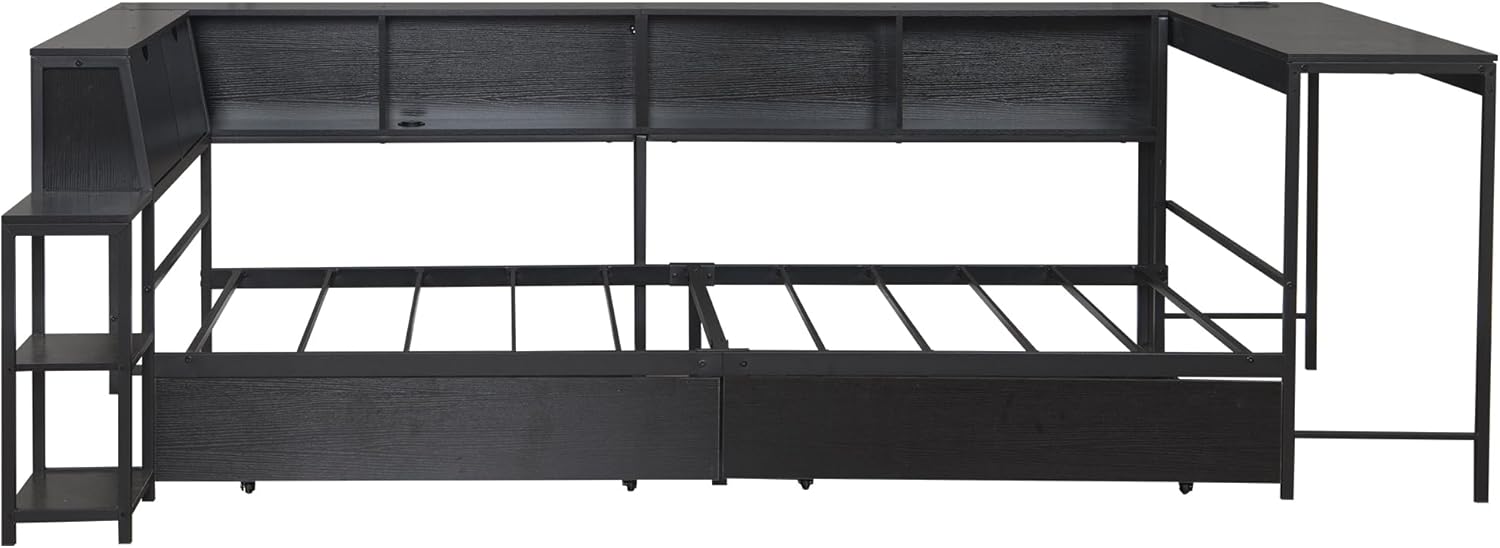
Figure 6: Storage drawers under the bed frame.
6. Maintenance
Regular maintenance will help prolong the life and appearance of your Bellemave bed frame.
- Cleaning: Wipe surfaces with a soft, damp cloth. Avoid harsh chemicals or abrasive cleaners, which can damage the finish.
- Fasteners: Periodically check all bolts, screws, and connections to ensure they remain tight. Re-tighten as necessary to maintain stability.
- Electrical Components: Keep the charging station and LED light connections free from dust and moisture. If any electrical component appears damaged, discontinue use and contact support.
- Drawers: Ensure drawer casters are free of debris for smooth operation.
7. Troubleshooting
If you encounter issues with your bed frame, refer to the following common problems and solutions:
| Problem | Possible Cause | Solution |
|---|---|---|
| Bed frame is wobbly or unstable. | Loose fasteners. Uneven floor. | Check and tighten all bolts and screws. Ensure the bed is on a level surface. |
| LED lights are not working. | Power connection issue. Remote control battery dead. | Verify the LED power cable is securely plugged in. Check remote control battery and replace if needed. Ensure the main power cord is connected. |
| Charging station is not providing power. | Main power cord unplugged. Overloaded circuit. | Ensure the bed frame's main power cord is securely plugged into a working wall outlet. Reduce the number of devices plugged into the charging station. |
| Storage drawers are difficult to open/close. | Debris in casters. Overloaded drawer. | Clean any debris from the drawer casters. Reduce the weight or redistribute contents within the drawer. |
If the problem persists after attempting these solutions, please contact customer support.
8. Specifications
Key specifications for the Bellemave Full Size Corner Bed Frame:
| Feature | Detail |
|---|---|
| Brand | Bellemave |
| Model Number | Corner Bed Frame with Storage Drawer |
| Size | Full |
| Color | Black Light |
| Material | Metal, Wood (MDF Board) |
| Product Dimensions (L x W x H) | 96.54" x 73.74" x 30" (245.2 cm x 187.3 cm x 76.2 cm) |
| Item Weight | 57 Pounds (25.85 kg) |
| Maximum Weight Recommendation | 1000 Pounds (453 kg) |
| Special Features | Bookcase, Charging Station (2 AC, 2 USB), Desk, LED Light, Storage Drawers, No Box Spring Needed, Space Saving |
| Assembly Required | Yes |
| UPC | 810212246369 |
| ASIN | B0GCMDQ16D |
9. Warranty and Customer Support
For any questions, concerns, or issues regarding your Bellemave Full Size Corner Bed Frame, please do not hesitate to contact our customer support team.
Contact Email: US-VC@bellemavehome.com
Please provide your model number (Corner Bed Frame with Storage Drawer) and a detailed description of the issue when contacting support to ensure a prompt resolution.


