
1. Introduction
The CAMWAY RCA to HDMI Converter and ARC Audio Extractor is a versatile device designed to bridge the gap between older analog equipment and modern digital displays and audio systems. It allows you to connect devices with RCA composite outputs (like older game consoles, DVD players, and VCRs) to HDMI-enabled TVs or monitors. Additionally, it functions as an Audio Return Channel (ARC) audio extractor, enabling you to output audio from an ARC-enabled TV to an AV amplifier via optical or coaxial connections.
2. Product Features
- RCA to HDMI Conversion: Converts analog RCA composite input to HDMI 1080P (60Hz) or 720P (60Hz) output.
- Wide Compatibility: Supports PAL/NTSC formats and is compatible with devices such as Wii, PS1, PS2, N64, X-box, VHS, VCR, and Blue-Ray DVD Players.
- Aspect Ratio Switching: Features a toggle switch to select between 4:3 and 16:9 aspect ratios, restoring the original output ratio for game consoles.
- ARC Audio Extraction: Extracts audio from an ARC-enabled HDTV and outputs it to a soundbar, amplifier, speakers, or headphones via optical or coaxial cable.
- High-Quality Audio: Supports PCM/LPCM 2.0CH audio format with sampling rates of 32 kHz, 44.1 kHz, 48 kHz, 96 kHz, and 192 kHz.
- Professional Chipset: Utilizes a professional video conversion chip for advanced signal processing and a built-in audio amplifier chip for clear sound quality.
3. Package Contents
Please verify that all items are present in your package:
- CAMWAY RCA to HDMI Converter + ARC Audio Extractor Unit
- USB Type-C Power Cable
- Optical Cable (3.3ft)
- User Manual
4. Setup Instructions
4.1 RCA to HDMI Converter Setup
- Connect your analog source device (e.g., Wii, PS2, DVD player) to the RCA input ports (yellow for video, white for left audio, red for right audio) on the converter.
- Connect an HDMI cable from the converter's HDMI output port to an HDMI input port on your HDTV or computer monitor.
- Connect the USB Type-C power cable to the converter and plug the other end into a 5V USB power source (e.g., TV USB port, USB wall adapter).
- Power on all connected devices and select the appropriate HDMI input on your display.

Figure 4.1: Connection diagram for RCA to HDMI conversion. Shows Wii, PS2, N64, DVD, and VCR connecting to the converter, which outputs to an HDTV or computer monitor. Also illustrates that RCA to HDMI is supported, but HDMI to RCA is not.

Figure 4.2: Detailed view of the converter's input/output ports and a typical setup with a Wii console. The image highlights the RCA (Video, Audio Left, Audio Right), Type-C power, and HDMI ports.
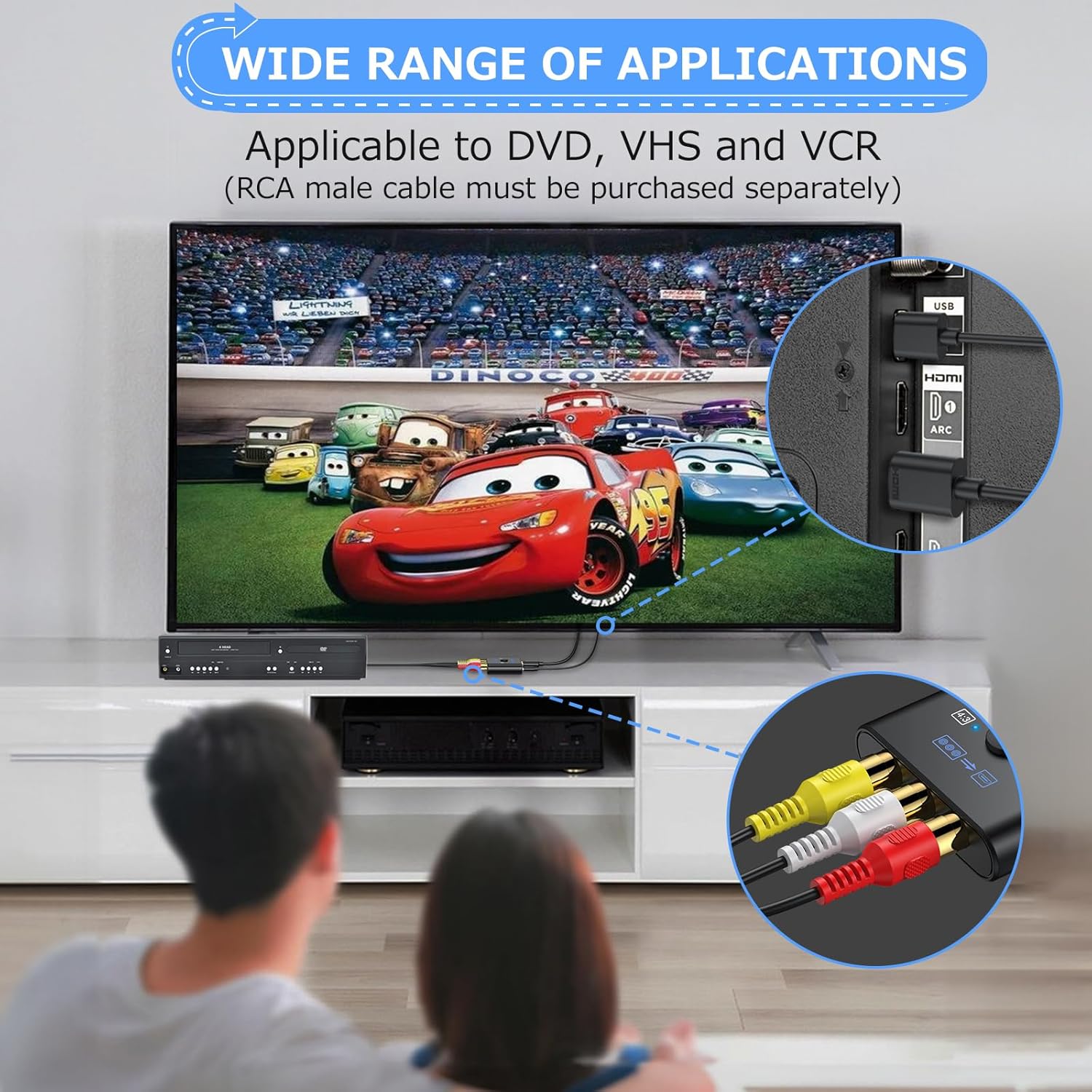
Figure 4.3: Example of the converter's application with DVD and VCR players. Note that an RCA male cable must be purchased separately for these connections.
4.2 ARC Audio Extractor Setup
- Connect an HDMI cable from your TV's HDMI ARC port to the ARC input port on the CAMWAY unit.
- Connect an optical or coaxial cable from the corresponding output port on the CAMWAY unit to the optical or coaxial input on your AV amplifier or sound system.
- Connect the USB Type-C power cable to the CAMWAY unit and plug the other end into a 5V USB power source.
- Ensure your TV's ARC function is enabled in its audio settings and select the correct input on your AV amplifier.
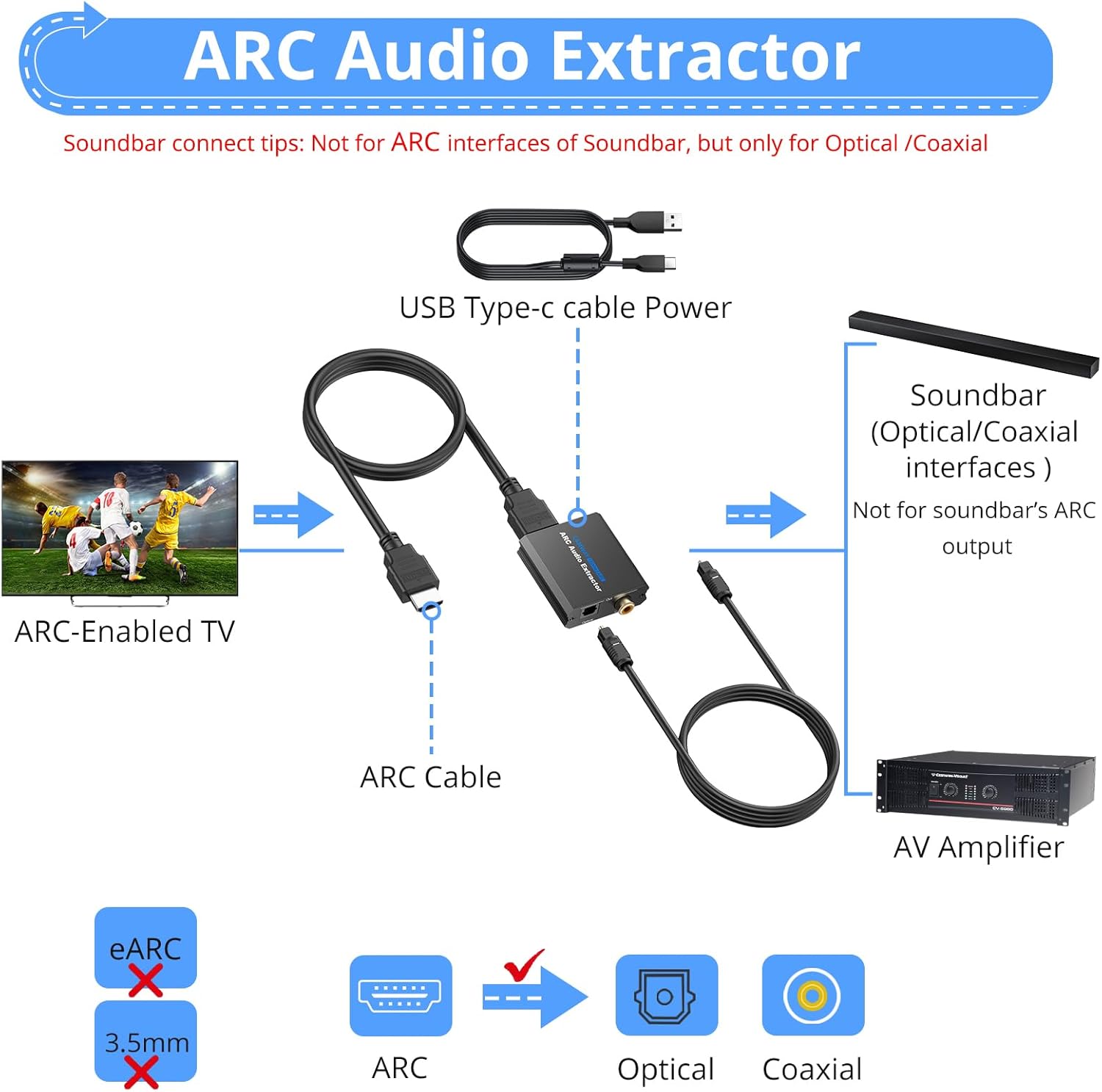
Figure 4.4: Connection diagram for ARC audio extraction. An ARC-enabled TV connects to the CAMWAY unit, which then provides optical or coaxial audio output to an AV amplifier. It clarifies that the unit is not for soundbar's ARC output or eARC/3.5mm interfaces.
5. Operating Instructions
5.1 Aspect Ratio Switching
The RCA to HDMI converter features a physical switch to change the aspect ratio between 4:3 and 16:9. Locate the switch on the device and slide it to your desired aspect ratio. This allows you to restore the original display ratio of older game consoles or content.
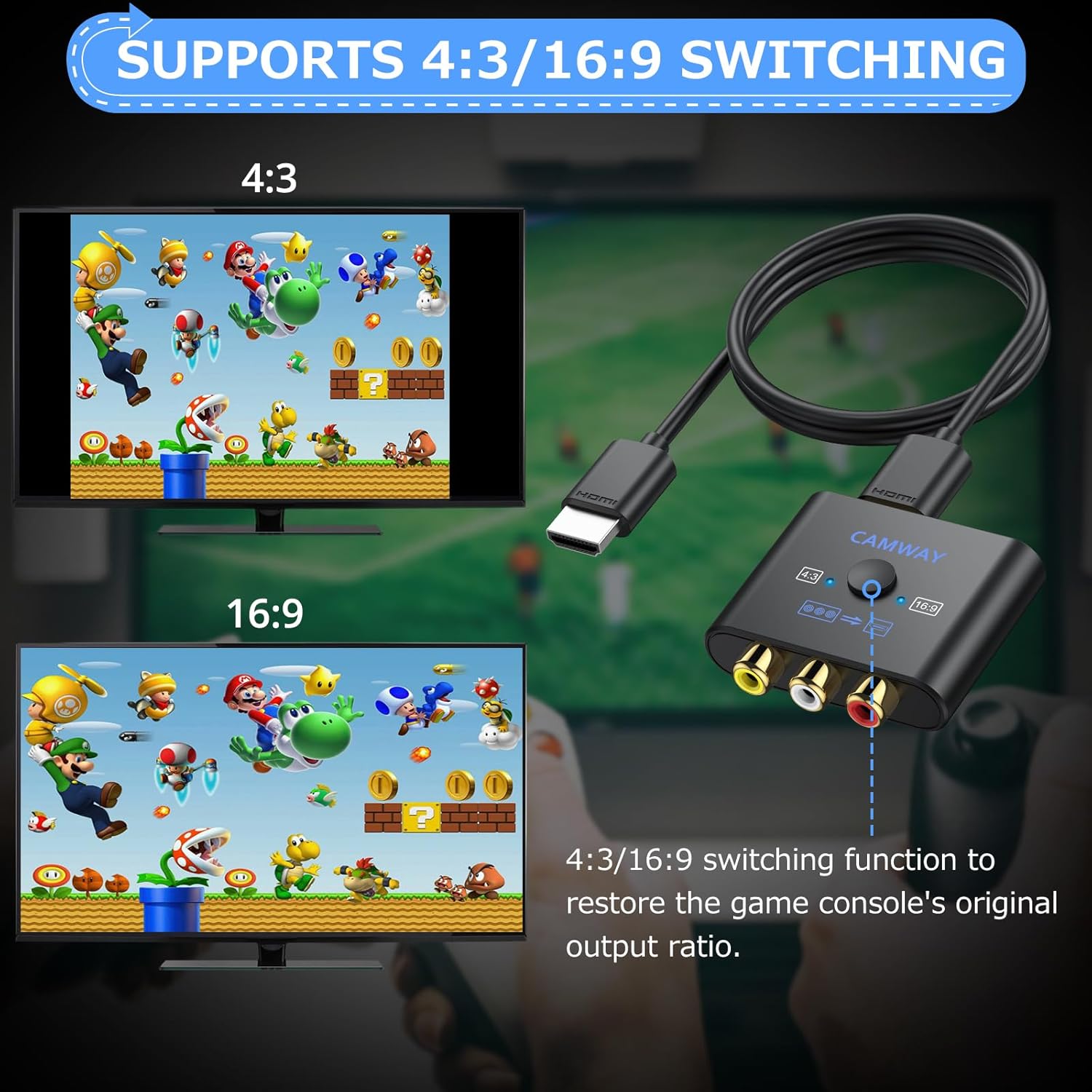
Figure 5.1: Illustration of the 4:3 and 16:9 aspect ratio switching function. The image demonstrates how the switch on the converter restores the game console's original output ratio.
5.2 Audio Output (ARC Mode)
When using the ARC audio extractor function, ensure your TV's audio output is set to 'External Speaker' or 'Audio System' and that the ARC feature is enabled. The CAMWAY unit will automatically extract the audio and send it through the optical or coaxial output. Note that the volume cannot be adjusted using the TV's remote control when audio is output through the extractor; volume control must be done on your connected AV amplifier or sound system.

Figure 5.2: Example of clear sound quality output from the ARC audio extractor to an external speaker system. The image highlights the support for various PCM/LPCM 2.0CH audio formats and sampling rates.
6. Maintenance
To ensure the longevity and optimal performance of your CAMWAY device, please follow these maintenance guidelines:
- Keep the device in a cool, dry place, away from direct sunlight, heat sources, and moisture.
- Avoid exposing the device to extreme temperatures or humidity.
- Clean the device with a soft, dry cloth. Do not use liquid or aerosol cleaners.
- Do not attempt to open or repair the device yourself. Refer to qualified service personnel for any repairs.
- Ensure proper ventilation around the device to prevent overheating.
7. Troubleshooting
If you encounter issues with your CAMWAY RCA to HDMI Converter and ARC Audio Extractor, please refer to the following common solutions:
- No Video Output (RCA to HDMI):
- Ensure all cables (RCA, HDMI, USB power) are securely connected.
- Verify the converter is receiving power (check power indicator light if available).
- Confirm your TV is set to the correct HDMI input source.
- Try a different HDMI cable or input port on your TV.
- Some N64 consoles output 240P resolution, which this converter does not support. It only supports 480P, which may result in a blue screen on some TVs.
- No Audio Output (RCA to HDMI):
- Check RCA audio cable connections (white and red).
- Ensure the source device is outputting audio.
- Verify TV volume is not muted or too low.
- No Audio Output (ARC Extractor):
- Confirm your TV's HDMI port supports ARC and that the ARC function is enabled in your TV's audio settings.
- Ensure the HDMI cable is connected to the ARC input on the CAMWAY unit and the ARC output on your TV.
- Check optical/coaxial cable connections to your AV amplifier.
- Verify your AV amplifier is set to the correct optical/coaxial input.
- Ensure the CAMWAY unit is powered.
- This unit is not compatible with HDMI eARC interfaces or soundbar's ARC output.
- Poor Picture Quality:
- Ensure RCA cables are fully inserted and not damaged.
- Check the aspect ratio switch on the converter.
- The quality of the output is dependent on the quality of the original analog signal.

Figure 7.1: Internal view of the converter's professional video conversion chip. A note clarifies that due to native N64 console resolution (240P), the converter only supports 480P, which may result in a blue screen on some TVs.
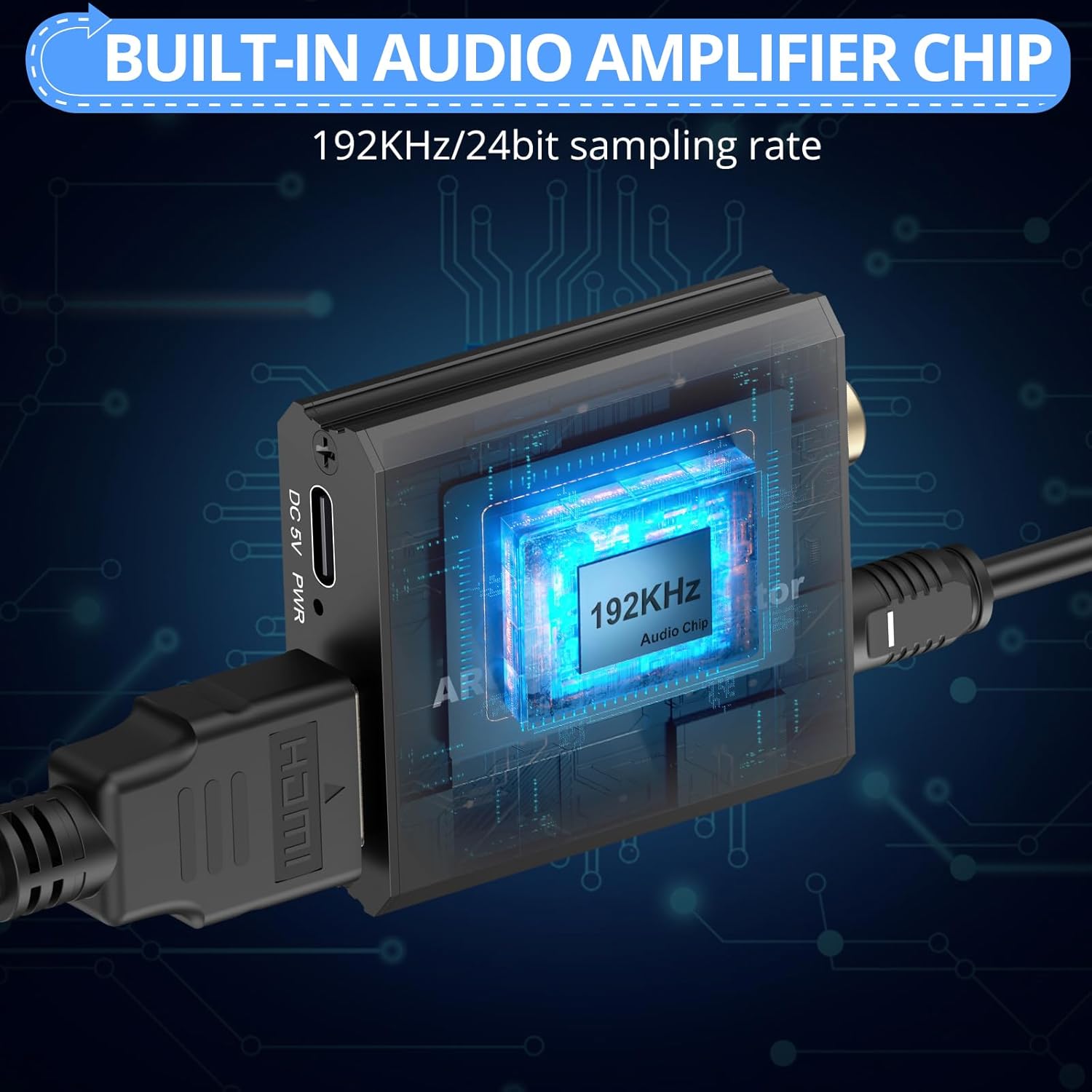
Figure 7.2: Internal view of the built-in audio amplifier chip, emphasizing its 192KHz/24bit sampling rate for high-quality audio processing.
8. Specifications
| Input Ports (RCA to HDMI) | 1 x RCA (Yellow, White, Red) |
| Output Port (RCA to HDMI) | 1 x HDMI |
| Input Port (ARC Extractor) | 1 x HDMI (ARC) |
| Output Ports (ARC Extractor) | 1 x Optical, 1 x Coaxial |
| HDMI Output Resolution | 1080P/60Hz, 720P/60Hz |
| Supported RCA Formats | PAL, NTSC |
| Supported Audio Formats (ARC) | PCM/LPCM 2.0CH |
| Audio Sampling Rates (ARC) | 32 kHz, 44.1 kHz, 48 kHz, 96 kHz, 192 kHz |
| Power Supply | DC 5V (via USB Type-C) |
| ASIN | B0GCMD45W8 |
| Date First Available | November 28, 2024 |
9. Warranty and Support
CAMWAY products are designed for reliability and performance. This product comes with a standard manufacturer's warranty against defects in materials and workmanship. Please refer to the product packaging or contact CAMWAY customer support for specific warranty terms and conditions.
For technical assistance, troubleshooting, or warranty claims, please contact CAMWAY customer support through the retailer's platform or the official CAMWAY website. Please have your product model number (B0GCMD45W8) and purchase date ready when contacting support.
