
Introduction
Thank you for choosing the Lamicall STTP08 Automatic Opening 3-in-1 Smartphone Tripod and Selfie Stick. This versatile device combines a tripod, a selfie stick, and a phone holder, designed for stable and convenient mobile photography and videography. Please read this manual carefully to ensure proper use and optimal performance.
Product Features
- Unique Automatic Opening Design: The tripod legs automatically deploy when placed on a flat surface and retract with a quick pull, allowing for single-handed setup in seconds.
- 8-Section Extendable Pole: The aluminum alloy telescopic pole extends up to 165 cm (65 inches) for wide-angle and panoramic shots.
- Multi-Angle Adjustment: Supports 180° vertical flip, 180° horizontal rotation, and 360° panoramic adjustment for flexible positioning.
- Ultra-Stable Structure: Features a robust triangular structure with anti-slip silicone pads and high-quality aluminum alloy support bars for enhanced stability.
- Detachable Wireless Remote Control: Compatible with iOS and Android devices, allowing hands-free shooting up to 10 meters (33 feet) away. The remote has a dedicated storage slot to prevent loss.
- Lightweight and Portable: Folds down to a compact 36 cm (14.17 inches) and weighs only 0.35 kg (0.77 lbs), making it easy to carry.
- Wide Compatibility and Cold Shoe Mount: The phone holder accommodates most smartphones from 4 to 7 inches (4.06 to 8.64 cm width). Integrated cold shoe mount for external fill lights or microphones.
Package Contents
- Lamicall STTP08 Smartphone Tripod and Selfie Stick
- Detachable Wireless Remote Control
- User Manual
Setup Guide
- Unpack the Device: Carefully remove the tripod/selfie stick and its accessories from the packaging.
- Attach Your Smartphone:
- Gently pull open the phone holder clamps.
- Insert your smartphone into the holder, ensuring it is securely gripped by the anti-slip silicone pads.
- Adjust the phone's position for optimal balance.
- Pair the Wireless Remote Control:
- Press and hold the button on the remote control until the indicator light starts flashing.
- On your smartphone, go to Bluetooth settings and search for available devices.
- Select "Lamicall Remote" (or similar name) from the list to pair. The indicator light will stop flashing once paired.
- The remote is now ready to use for capturing photos or starting/stopping videos.
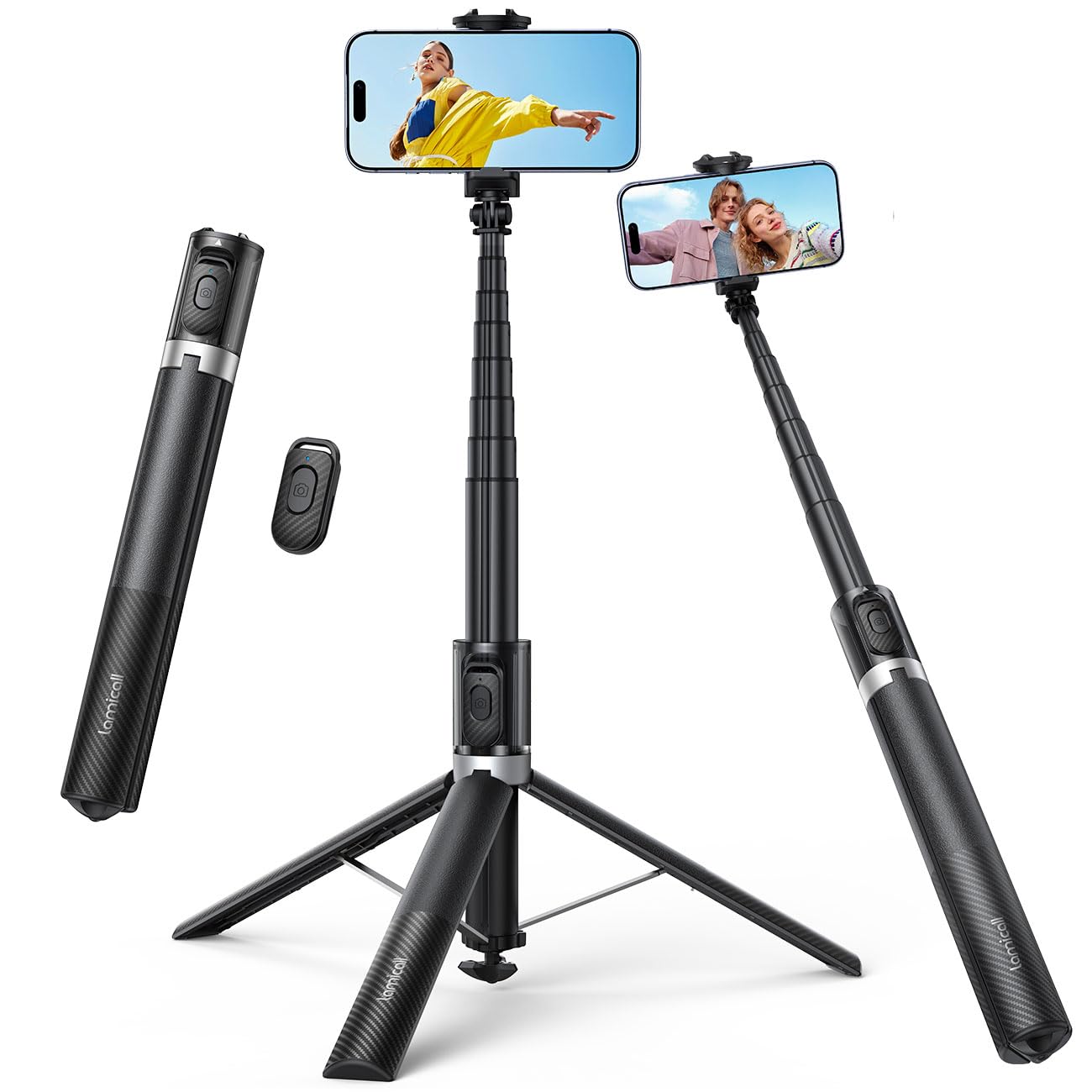
Image: The Lamicall STTP08 3-in-1 Smartphone Tripod and Selfie Stick in its compact and extended forms.
Operating Instructions
Using as a Tripod:
- Automatic Leg Deployment: Hold the device vertically and gently place it onto a flat, stable surface. The three legs will automatically open and lock into a stable triangular position.
- Adjust Height: Pull the telescopic pole upwards to extend it to your desired height (up to 165 cm). Ensure all sections are securely locked.
- Adjust Phone Angle: Use the ball head to tilt and rotate your smartphone for the perfect shooting angle. The phone holder also allows 180° vertical flip and 180° horizontal rotation.
- Retract Legs: To retract the tripod legs, simply pull the main body upwards. The legs will fold back automatically.
Using as a Selfie Stick:
- Hold the Handle: Ensure the tripod legs are fully retracted and the device is in its compact form.
- Extend the Pole: Pull the telescopic pole upwards to extend it to your desired length.
- Adjust Angle: Adjust the phone holder's angle as needed for your selfie or group shot.
- Use Remote: Press the button on the wireless remote control to capture photos or start/stop video recording.
Using the Cold Shoe Mount:
The integrated cold shoe mount on the phone holder allows you to attach external accessories such as LED fill lights or microphones (sold separately) to enhance your content creation.
Maintenance
- Cleaning: Wipe the device with a soft, dry cloth. Do not use harsh chemicals or abrasive cleaners.
- Storage: Store the tripod/selfie stick in a cool, dry place away from direct sunlight and extreme temperatures.
- Avoid Overloading: Do not exceed the recommended weight capacity of the phone holder.
- Battery Care (Remote): If the remote control is not used for an extended period, remove its battery to prevent leakage.
Troubleshooting
- Remote Control Not Pairing:
- Ensure the remote control has sufficient battery power.
- Make sure Bluetooth is enabled on your smartphone.
- Try unpairing and re-pairing the remote control in your phone's Bluetooth settings.
- Ensure the remote is within the 10-meter operating range.
- Tripod Legs Not Opening/Closing Automatically:
- Ensure the device is placed on a completely flat surface for automatic opening.
- Check for any obstructions or debris in the leg mechanism.
- For closing, ensure a firm, upward pull on the main body.
- Device Instability:
- Ensure the tripod legs are fully extended and locked on a stable, level surface.
- Verify that your smartphone is securely seated in the phone holder.
- Avoid extending the pole to its maximum height in windy conditions or on uneven terrain.
Specifications
| Model Number: | STTP08 |
| Material: | Aluminum Alloy |
| Folded Length: | 36 cm (14.17 inches) |
| Maximum Extension Length: | 165 cm (65 inches) |
| Tripod Leg Diameter: | 45 cm (17.7 inches) when fully deployed |
| Weight: | 0.35 kg (0.77 lbs) |
| Phone Holder Width: | 4.06 - 8.64 cm (1.6 - 3.4 inches) |
| Remote Control Range: | Up to 10 meters (33 feet) |
| Compatible Devices: | Smartphones (4-7 inches, iOS & Android) |
| Head Type: | Ball Head |
Warranty and Support
Lamicall products are designed for durability and performance. For warranty information, technical support, or any inquiries regarding your STTP08 tripod and selfie stick, please visit the official Lamicall website or contact their customer service directly.
Official Lamicall Website: Lamicall Store on Amazon