Introduction
Thank you for choosing the jonpony 6-Point Massage Office Chair. This ergonomic chair is designed to provide comfort and support for extended periods of use, featuring integrated massage and heating functions, a reclining backrest, and a retractable footrest. This manual provides detailed instructions for assembly, operation, maintenance, and troubleshooting to ensure optimal performance and longevity of your chair.

The jonpony 6-Point Massage Office Chair, featuring its ergonomic design and plush cushioning.
Setup and Assembly
Assembly of your jonpony office chair is straightforward and typically takes about 20 minutes. Please follow the steps below carefully. All necessary tools and hardware are included.
Assembly Steps:
- Assemble the Chair Base: Attach the five base feet to the central hub using the provided K screws. Ensure all screws are tightened securely. Install the casters into the ends of each base foot. Place the base cover over the central hub and insert the gas lift into the base.
- Attach the Footrest: Use the L screws to install the footrest mechanism to the underside of the seat cushion. Tighten all L screws firmly.
- Install the Seat Pallet: Secure the seat pallet to the underside of the seat cushion using the M screws. Ensure these screws are also tightened.
- Connect Seat to Gas Lift: Carefully place the assembled seat cushion onto the gas lift, ensuring it is firmly seated.
- Attach Connecting Plate: Use the N screws to install the connecting plate to the seat. Tighten them securely and then stick the cover over the plate.
- Connect Seatback: Attach the seatback to the connecting plate using the O screws. Tighten these screws and then secure the covers over the connection points.
- Install Armrests: Attach the left and right armrests to the chair using the P screws. Insert the screw covers (Q) to both sides of the armrests.
- Connect Wiring: Locate the controller bag and stick it to the side of the chair. Connect all the power cords for the massage and heating functions.

Product dimensions and key features for assembly reference.
Assembly Video Tutorial:
Detailed installation instructions for the 9399 Massage Office Chair by Jonpony US.
Operating Instructions
Your jonpony office chair offers multiple adjustable features for personalized comfort. Familiarize yourself with the controls to enhance your sitting experience.
Massage and Heating Functions:
- 6-Point Vibration Massage: The chair features 6 vibrating massage points located in the back, lumbar, and hip areas. Use the remote control to select from 8 different vibration modes and 3 intensity strengths.
- Lumbar Heating: Activate the heating function via the remote control to provide warmth to your lower back, promoting blood circulation and relieving muscle stiffness.

Visual guide to the 6-point vibration massage and remote control settings.
Adjusting Chair Position:
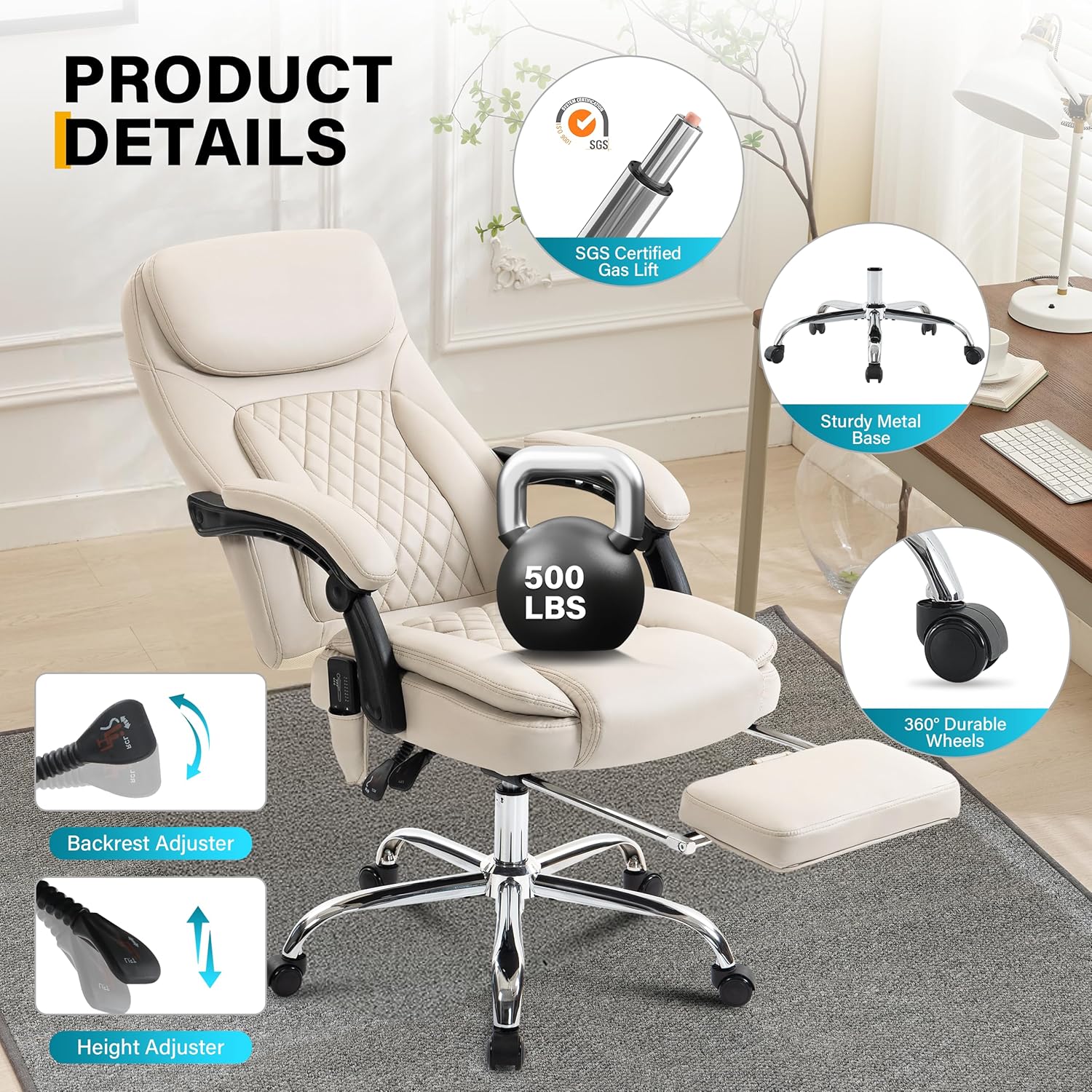
- Height Adjustment: Use the lever located under the seat to adjust the chair's height by up to 4 inches, accommodating various desk heights and user preferences.
- Reclining Backrest: The backrest can be reclined and locked at angles between 90 and 135 degrees. Use the recline lever to find your desired working, reading, or napping position.
- Retractable Footrest: Pull out the footrest from under the seat to support your legs and enhance relaxation. Push it back in when not in use.
The chair supports multiple relaxing postures, including working, reading, and napping, with its adjustable features.
Feature Demonstration Video:
Demonstration of the 9399 6-Point Massage Office Chair's features by Jonpony US.
Maintenance
Proper maintenance ensures the longevity and appearance of your jonpony office chair.
- Cleaning: The chair features easy-to-clean PU leather fabric. Wipe clean with a damp cloth and mild soap. Avoid harsh chemicals or abrasive cleaners that may damage the material.
- Regular Checks: Periodically check all screws and bolts to ensure they remain tight. Re-tighten if necessary to maintain stability and safety.
- Caster Care: Keep the casters free of debris such as hair or dust to ensure smooth movement.
Troubleshooting
If you encounter any issues with your jonpony office chair, please refer to the following common solutions:
- Chair feels wobbly or loose: Ensure all assembly screws (K, L, M, N, O, P) are fully tightened. Over time, screws may loosen with use.
- Massage function not working or weak: Verify that all power cords are securely connected to the chair and the power adapter. Ensure the remote control is functioning and batteries (if applicable) are correctly installed. The massage function provides vibration, not deep tissue kneading.
- Heating function not working: Check all power connections. Ensure the heating function is activated via the remote control. Allow a few minutes for the heat to become noticeable.
- Gas lift not adjusting height: Ensure the height adjustment lever is fully engaged. If the issue persists, the gas lift may need replacement.
- Casters not rolling smoothly: Check for any hair or debris wrapped around the caster wheels and remove them. Lubricate if necessary.
Specifications
| Feature | Detail |
|---|---|
| Brand | jonpony |
| Model | B0GCKSDML5 |
| Color | Beige Pu |
| Product Dimensions | 29.13"D x 25.79"W x 49.21"H |
| Seat Depth | 21.65 inches |
| Item Weight | 55.1 pounds |
| Weight Capacity | Up to 500 lbs |
| Material | Metal frame, PU Leather fabric |
| Fill Material | Spring Pack, Memory Foam |
| Special Features | Adjustable Backrest (90-135°), Adjustable Height (4"), Foot Rest, Heated, 6-Point Vibration Massage |
| Recommended Uses | Office, Reading, Relaxing |
Warranty
This product is covered by a 30-day easy return policy. For specific warranty details beyond this period, please contact customer support.
Customer Support
Your satisfaction is very important to us. If you have any questions, concerns, or require assistance with your jonpony office chair, please do not hesitate to contact our customer support team. We are committed to serving you within 24 hours.
Contact information can typically be found on the product packaging or through your purchase platform.