
Introduction
This manual provides essential instructions for the safe and efficient operation, maintenance, and troubleshooting of your STARRYBOT Portable Carpet & Upholstery Cleaner Machine C-AC2501. Please read this manual thoroughly before first use and retain it for future reference.
Setup
1. Unpacking and Component Identification
Carefully remove all components from the packaging. Ensure all parts are present before proceeding with assembly.
- Carpet Cleaner Machine
- Clean Water Tank (60oz capacity)
- Dirty Water Tank (40oz capacity)
- 3" Hand Tool
- 5" Wide Tool
- Integrated CreviceCollector Tool
- Hose (6.5ft length)
2. Filling the Clean Water Tank
Remove the clean water tank from the unit. Unscrew the cap and fill the tank with clean water, optionally adding a suitable cleaning solution as per the solution manufacturer's instructions. Do not overfill. Securely replace the cap and reinsert the tank into the machine.

Figure 1: Clean and Dirty Water Tanks. The clean water tank has a 60oz capacity, and the dirty water tank has a 40oz capacity.

Figure 2: Independent Dual Water Tanks. The clean water tank (blue liquid) and dirty water tank (brown liquid) are easily accessible for filling and emptying.
3. Attaching the Cleaning Tool
Connect the desired cleaning tool (e.g., 3" hand tool, 5" wide tool, or CreviceCollector Tool) to the end of the hose. Ensure it clicks securely into place.

Figure 3: Professional Multi-Brush Heads. The cleaner comes with various brush heads for different cleaning needs, such as a pet brush and a high-density brush.

Figure 4: The Complete Carpet Care Solution. This image displays the 3" Hand Tool, 6.5" Wide Hand Tool, Integrated Crevice Collector Tool, Steam Brush Tool, Self-Cleaning Tool, and Pet Hand Tool.
4. Initial Setup Video Guide
Video 1: Overview of the STARRYBOT Cleaner. This video demonstrates the initial setup, including tank removal and hose attachment, and provides an overview of the unit's features.
Operating Instructions
1. Powering On and Mode Selection
Plug the machine into a power outlet. Press the power button located on the back of the unit. Use the touch controls on the front panel to select your desired cleaning mode: Cold, Warm, Steam, or Steam Only. The unit will verbally confirm the selected mode.
- Cold/Low Temperature Cleaning Mode: For general cleaning without heat.
- Warm Temperature Cleaning Mode: Utilizes warm water for enhanced cleaning.
- Steam Cleaning Mode: Combines steam and vacuum for deep cleaning.
- Steam Only Mode: Provides steam without vacuum suction.
Allow the unit to preheat when selecting Steam or Warm modes. The unit will indicate when preheating is complete.
2. Cleaning Process
For optimal stain removal, follow these steps:
- Apply the Solution: Aim the nozzle at the stain and spray the cleaning solution by pressing the trigger on the hand tool.
- Let It Sit: Allow the solution to sit for a few minutes to dissolve the stain.
- Extract the Stain: Use the brush head to scrub the stain and then pull the tool across the surface to suction out the stain and any remaining liquid.

Figure 5: Three-Step Stain Extraction Process. This visual guide demonstrates applying the solution, allowing it to penetrate, and then extracting the stain with the cleaning tool.

Figure 6: Integrated Mud & Dirt Removal. The cleaner effectively tackles various stains such as mud, dirt, food, liquid accidents, and pet marks from carpets.
3. Versatile Cleaning Applications
The STARRYBOT C-AC2501 is designed for use on a variety of surfaces, including:
- Carpets and Rugs
- Upholstery (Couches, Chairs)
- Car Interiors (Seats, Floor Mats)
- Mattresses
- Tight Gaps and Crevices

Figure 7: Easily Clean Stains From Multiple Surfaces. The cleaner is effective on carpets, car interiors, furniture, mattresses, and seat gaps.

Figure 8: Pet-Friendly Cleaning. Easily wipe away pet messes without residue using the specialized pet brush.
Maintenance
1. Emptying and Cleaning Tanks
After each use, remove and empty the dirty water tank. Rinse both the clean and dirty water tanks thoroughly with clean water. Allow them to air dry before reassembling.
2. Self-Cleaning Function
The unit features a self-cleaning design to effectively clean residual stains inside the hose and tools. Refer to the specific instructions in the quick start guide for activating this function.
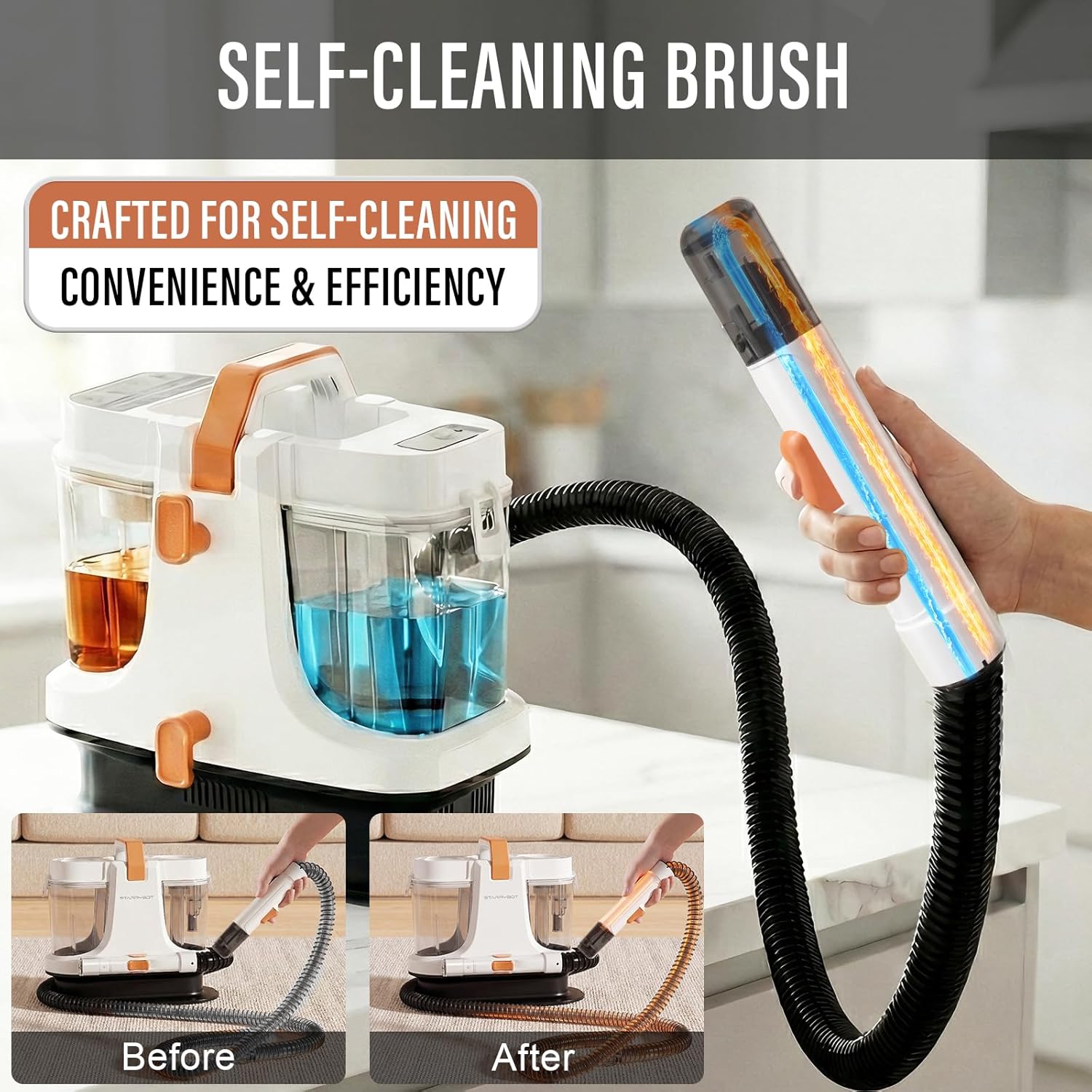
Figure 9: Self-Cleaning Brush. This feature ensures convenience and efficiency by cleaning residual stains inside the pipes.

Figure 10: Self-Cleaning Design. This feature effectively cleans residual stains from within the internal hoses and components, maintaining hygiene and performance.
3. Storage
The compact design and detachable handle make the unit easy to store and transport. Wrap the hose and power cord neatly around the designated storage areas on the machine.

Figure 11: Convenient Storage and Easy to Carry. The lightweight and compact design allows for simple storage and transport.

Figure 12: Portable and Easy to Store. The compact build and detachable handle facilitate easy storage and transport.
Troubleshooting
If you encounter any issues with your STARRYBOT Portable Carpet & Upholstery Cleaner, please refer to the following common solutions. For problems not listed here, or if issues persist, contact customer support.
- No Power: Ensure the unit is securely plugged into a working electrical outlet. Check the power button on the back of the unit.
- No Spray: Verify the clean water tank is filled and correctly seated. Check if the spray nozzle is clogged.
- Low Suction: Ensure the dirty water tank is not full. Check for blockages in the hose or cleaning tool. Ensure all connections are secure.
- Steam Not Heating: Allow sufficient time for the unit to preheat after selecting a steam mode. Ensure the clean water tank has enough water.
Specifications
| Brand | STARRYBOT |
| Model Number | C-AC2501 |
| Color | White |
| Style | Modern |
| Suction Power | 18,000 PA |
| Clean Water Tank Capacity | 60 oz |
| Dirty Water Tank Capacity | 40 oz |
| Hose Length | 6.5 ft |
| Weight | 10.4 lbs |
| Included Components | Carpet Cleaner Machine, Cleaner Water Tank, Dirty Water Tank |
Warranty and Support
Warranty Information
For detailed warranty information regarding your STARRYBOT Portable Carpet & Upholstery Cleaner Machine C-AC2501, please refer to the warranty card included with your product or visit the official STARRYBOT website. Keep your purchase receipt as proof of purchase for warranty claims.
Customer Support
Should you require assistance with setup, operation, maintenance, or troubleshooting, please contact STARRYBOT customer support. Contact details can typically be found on the product packaging, the official STARRYBOT website, or your purchase documentation.


