
1. Product Overview
This manual provides essential information for the safe and efficient operation, installation, and maintenance of your TMWINGS 12000 BTU Mini Split AC/Heating System. Please read this manual thoroughly before using the appliance and retain it for future reference.
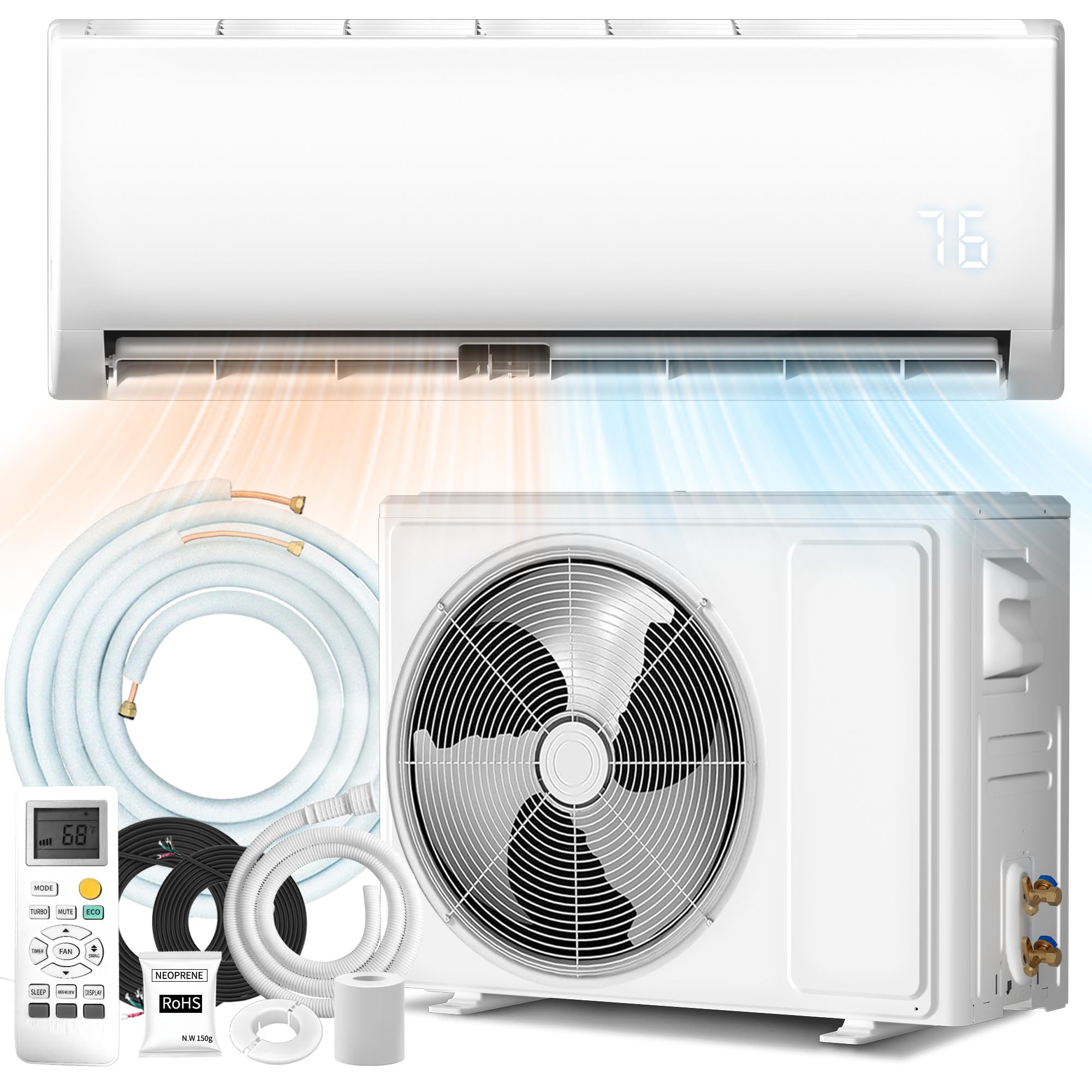
Figure 1.1: TMWINGS 12000 BTU Mini Split AC/Heating System indoor unit.
Key Features:
- 4 Operating Modes: Cool, Heat, Dry, and Fan for year-round climate control.
- Multiple Fan Speeds: 4 fan speeds (Low, Mid, High, Turbo) for customized airflow.
- Quiet Operation: Sleep Mode operates at a whisper-quiet 42dB.
- Energy Efficiency: ECO Mode for energy savings and 19 SEER2 rating.
- Smart Remote Control: Intuitive remote for temperature, timer, and fan speed adjustments.
- Self-Cleaning & Auto-Defrost: Functions to maintain internal cleanliness and stable heating.
- R32 Refrigerant: Environmentally friendly refrigerant with a smaller carbon footprint.

Figure 1.2: Fast cooling and heating capabilities of the unit.

Figure 1.3: Total control at your fingertips with the remote.
2. Safety Information
Please observe the following safety precautions to reduce the risk of electric shock, fire, or injury.
- Read all instructions before using the appliance.
- Installation must be performed by qualified personnel in accordance with national wiring standards.
- Ensure the power supply matches the voltage specified on the unit's nameplate.
- Do not operate the unit with wet hands or in wet conditions.
- Keep children away from the unit and remote control.
- Do not insert objects into the air outlet.
- Turn off the power supply before cleaning or maintenance.
- Do not attempt to repair the unit yourself. Contact qualified service personnel.
3. Setup and Installation
The TMWINGS Mini Split AC/Heating System requires professional installation, especially concerning refrigerant line connections. This section provides an overview of the components and general setup considerations.
3.1 Unpacking and Component Check
Upon receiving your unit, carefully unpack all components and check against the packing list. The system typically arrives in two boxes.

Figure 3.1: Components included in the two shipping boxes.
3.2 Installation Overview
Installation involves mounting the indoor unit, securing the outdoor unit, connecting refrigerant lines, electrical wiring, and drainage. Due to the complexity and handling of refrigerants, professional installation is strongly recommended to ensure proper function and safety.
- Indoor Unit Placement: Choose a location that allows for optimal airflow distribution and is away from direct sunlight or heat sources.
- Outdoor Unit Placement: Ensure adequate clearance for airflow around the outdoor unit and a stable, level surface.
- Refrigerant Lines: Connect the pre-charged refrigerant lines between the indoor and outdoor units. Proper vacuuming and leak checks are crucial.
- Electrical Connections: Connect the power supply and communication wiring according to the wiring diagram in the full owner's manual. Ensure correct voltage (115V for this model).
- Drainage: Install the drain pipe to ensure proper condensation removal from the indoor unit.
Video 3.1: Overview of a Mini Split System Air Conditioner & Heater with Inverter. This video provides a general visual guide to the components and concept of a mini split system.
4. Operating Instructions
Your TMWINGS Mini Split system is designed for user-friendly operation via the included remote control.
4.1 Remote Control Functions
The remote control allows you to adjust all settings from a distance. Point the remote control directly at the indoor unit when making adjustments.
- Power Button: Turns the unit ON or OFF.
- Mode Button: Cycles through Cool, Heat, Dry, and Fan modes.
- Temperature Adjustment: Use the Up/Down arrows to set your desired temperature.
- Fan Speed Button: Selects fan speed (Low, Mid, High, Turbo).
- Sleep Mode: Activates quiet operation for nighttime comfort.
- ECO Mode: Optimizes settings for energy efficiency.
- Timer Function: Set the unit to turn ON or OFF automatically after a specified period.
- Swing Button: Adjusts the vertical airflow direction.
4.2 Operating Modes
- Cool Mode: Provides cooling to lower room temperature.
- Heat Mode: Provides heating to raise room temperature.
- Dry Mode: Reduces humidity in the room.
- Fan Mode: Circulates air without heating or cooling.

Figure 4.1: Dual airflow and four speed settings for comprehensive comfort.

Figure 4.2: Ultra-quiet operation for a comfortable night's sleep.
Video 4.1: Demonstrates how to maintain home temperature using a mini split system, showcasing operational aspects.
5. Maintenance
Regular maintenance ensures optimal performance and extends the lifespan of your TMWINGS Mini Split system.
5.1 Air Filter Cleaning
The air filters should be cleaned every two weeks or more frequently depending on usage and air quality.
- Turn off the unit and disconnect power.
- Open the front panel of the indoor unit.
- Remove the air filters.
- Clean the filters with a vacuum cleaner or wash them with lukewarm water (below 40°C).
- Allow filters to dry completely in a shaded area before reinstalling.
- Close the front panel and restore power.
5.2 Self-Cleaning Function
The unit features a high-temperature self-cleaning cycle to help maintain internal cleanliness and promote fresher airflow. Refer to your remote control instructions for activating this function.
5.3 Auto-Defrost Function
The outdoor unit is equipped with an auto-defrost feature that ensures stable heating performance even in low ambient temperatures by automatically removing ice buildup on the outdoor coil.

Figure 5.1: R32 refrigerant and inverter technology for stable performance and environmental benefits.
6. Troubleshooting
Before contacting service, please check the following common issues and solutions:
| Problem | Possible Cause | Solution |
|---|---|---|
| Unit does not start | No power; Remote control batteries low; Timer function active | Check power supply; Replace batteries; Cancel timer setting |
| Insufficient cooling/heating | Air filter dirty; Temperature setting incorrect; Doors/windows open; Obstruction to airflow | Clean air filter; Adjust temperature; Close openings; Remove obstructions |
| Unusual noise | Loose parts; Unit not level; Fan obstruction | Check for loose components; Ensure unit is level; Clear fan area |
| Water leakage from indoor unit | Drain pipe clogged or bent; Unit not level | Clear drain pipe; Adjust unit level |
| Remote control not working | Batteries dead; Obstruction between remote and unit | Replace batteries; Remove obstruction |
If the problem persists after checking these points, please contact customer support.
7. Specifications
| Feature | Detail |
|---|---|
| Brand | TMWINGS |
| Model Number | KAC-12GWH(E1/6)DBp-M100 |
| Capacity | 12000 BTU (1 Ton) |
| Cooling Power | 12000 British Thermal Units |
| Seasonal Energy Efficiency Ratio (SEER) | 19 SEER2 |
| Voltage | 115 Volts |
| Noise Level | 42 Decibels (Sleep Mode) |
| Refrigerant | R-32 |
| Installation Type | Split System |
| Product Dimensions (D x W x H) | 12.96"D x 30.73"W x 23.72"H |
| Item Weight | 64 Pounds |
| Control Method | Remote Control |
| Floor Area Coverage | Up to 750 Square Feet |
| Included Components | Hose, Installation Kit |

Figure 7.1: Energy efficiency and refrigerant type details.
8. Warranty and Support
8.1 Manufacturer's Warranty
This TMWINGS Mini Split AC/Heating System comes with a 3-Year Manufacturer's Warranty. This warranty covers defects in materials and workmanship under normal use. Please retain your proof of purchase for warranty claims.
8.2 Customer Support
For technical assistance, troubleshooting beyond this manual, or warranty inquiries, please contact TMWINGS customer support. Refer to the contact information provided in your product packaging or on the official TMWINGS website.


