
Introduction
Thank you for choosing the STARRYBOT C-AC2501 Portable Carpet & Upholstery Cleaner Machine. This device is designed for effective spot and stain removal on carpets, upholstery, and car interiors. With its powerful 15Kpa suction and versatile cleaning modes, it provides a convenient solution for maintaining a clean environment. Please read this manual thoroughly before operation to ensure safe and optimal use of your cleaner.
Product Overview
The STARRYBOT C-AC2501 features a compact design with clearly labeled components for ease of use.
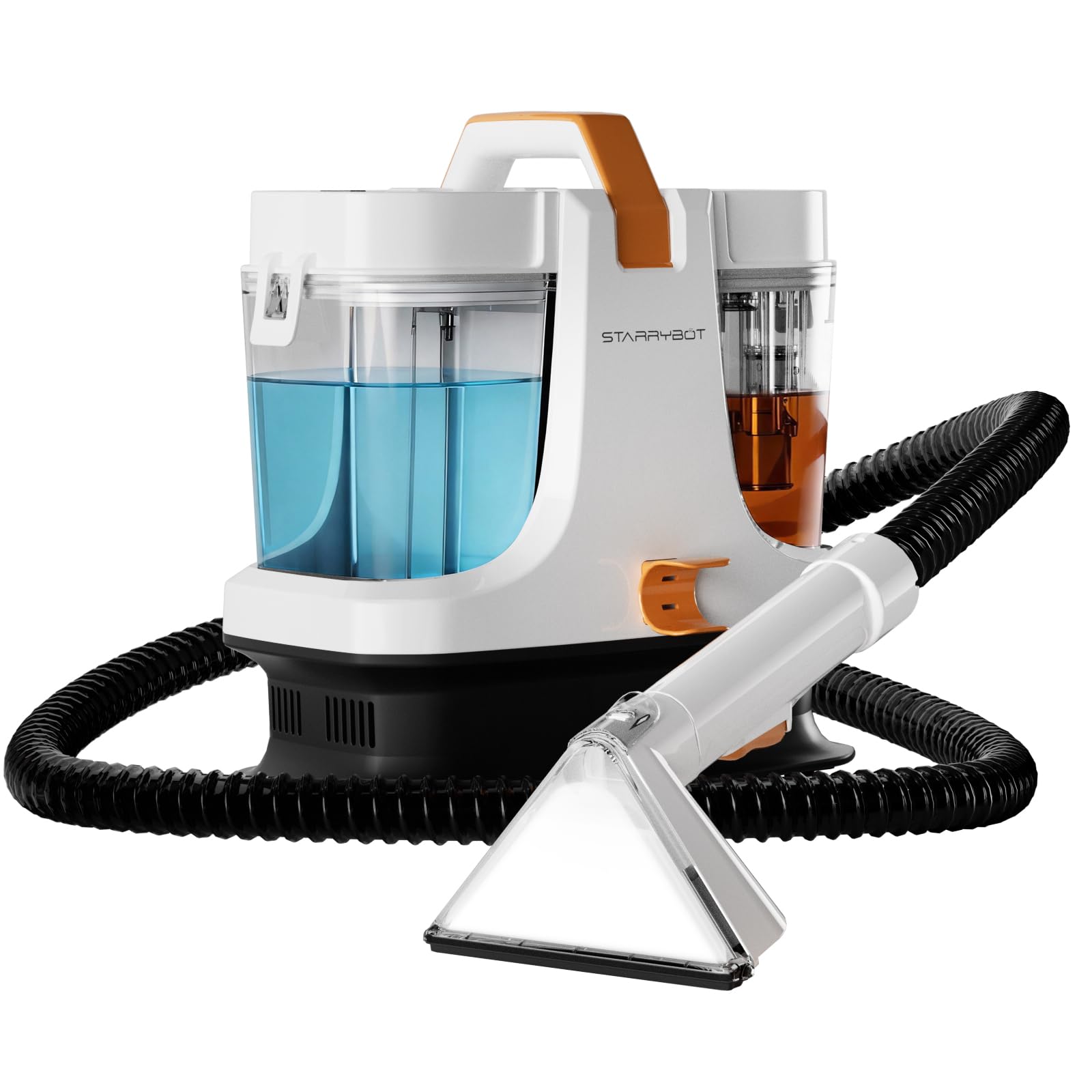
Figure 1: STARRYBOT C-AC2501 Portable Carpet & Upholstery Cleaner Machine.
Key Components:
- Clean Water Tank: Located on the left side of the unit, this tank holds clean water and cleaning solution. It features a simple screw-on cap for easy filling.
- Dirty Water Tank: Positioned on the right side, this tank collects the dirty water and extracted debris during cleaning.
- Flexible Hose with Cleaning Wand: A durable, flexible hose with an attached cleaning wand provides extended reach for various cleaning tasks. The wand includes a transparent nozzle to observe the cleaning process.
- Control Panel: An intuitive touch-sensitive control panel on the top of the unit allows selection of different cleaning modes.
- Power Cord & Reel: The power cord is neatly stored on a cord reel at the front of the unit for convenient storage and access.
Setup and Preparation
- Fill the Clean Water Tank: Remove the clean water tank from the left side of the unit. Unscrew the cap on top and fill the tank with clean water. You may add a suitable carpet or upholstery cleaning solution as per the solution's instructions. Securely replace the cap and reinsert the tank into the unit.
- Position the Unit: Place the cleaner on a stable, flat surface near the area to be cleaned.
- Connect Power: Unwind the power cord from the reel and plug it into a grounded electrical outlet.
- Prepare the Cleaning Wand: Ensure the cleaning wand is securely attached to the hose.
Operating Modes
The STARRYBOT C-AC2501 offers multiple cleaning modes accessible via the touch control panel. The unit provides voice prompts to indicate the selected mode.
- Cold Water Cleaning Mode: For general cleaning tasks where heated water is not required.
- Warm Water Cleaning Mode: Utilizes warm water for enhanced cleaning of common stains.
- Steam Cleaning Mode: Generates steam for deep cleaning and sanitization. This mode requires a preheating period before steam is ready for use. The unit will announce "Steam preheating" and then "Steam ready" when complete.
- Steam & Vacuum Mode: Combines steam application with powerful vacuum suction for comprehensive stain removal and quick drying. This mode also requires preheating for steam generation.
Activating Modes:
Press the power button on the back of the unit to turn it on. Use the touch buttons on the control panel to cycle through the desired cleaning modes. Note that the touch panel may require a firm press to register input.
Usage Demonstration: Cleaning a Stain
To effectively remove a stain using the Steam & Vacuum mode:
- Select Mode: Turn on the unit and select the "Steam & Vacuum" cleaning mode from the control panel. Allow time for the steam to preheat.
- Apply Steam: Once the unit indicates "Steam ready," position the cleaning wand over the stain. Press the trigger on the wand to release steam onto the stained area.
- Vacuum the Area: While applying steam, slowly pull the wand across the stained area. The powerful suction will simultaneously extract the steam, dirt, and moisture into the dirty water tank. Observe the liquid traveling up the transparent wand to confirm suction.
- Repeat if Necessary: For stubborn stains, repeat the steam application and vacuuming process until the stain is removed.
- Dry the Area: After the stain is removed, you can turn off the steam function on the wand and continue to use only the vacuum suction to remove excess moisture, aiding in faster drying.
Maintenance
Regular maintenance ensures the longevity and optimal performance of your STARRYBOT cleaner.
- Empty and Clean Dirty Water Tank: After each use, remove and empty the dirty water tank. Rinse it thoroughly with clean water and allow it to air dry before reattaching.
- Rinse Clean Water Tank: If cleaning solutions were used, rinse the clean water tank to prevent residue buildup.
- Clean Cleaning Wand and Hose: Rinse the cleaning wand and hose with clean water to remove any debris or solution residue.
- Store Properly: Store the unit in a cool, dry place. Ensure the power cord is neatly wrapped around the cord reel.
Troubleshooting
- No Power: Ensure the power cord is securely plugged into a working electrical outlet. Check the power button on the back of the unit.
- No Steam: Verify that the clean water tank is filled and the unit is in a steam-enabled mode. Allow sufficient time for preheating.
- Weak Suction: Check if the dirty water tank is full and needs emptying. Ensure the cleaning wand and hose are free from blockages. Verify all connections are secure.
- Water Leakage: Ensure all tanks and caps are securely fastened and properly seated in the unit.
Specifications
| Brand | STARRYBOT |
| Model Name | C-AC2501 |
| Model Number | C-AC2501 |
| Color | Light brown |
| Style | Modern |
| Included Components | Carpet Cleaner Machine Body |
Warranty and Support
For warranty information, technical support, or to purchase replacement parts, please refer to the official STARRYBOT website or contact customer service through your retailer. Keep your purchase receipt for warranty claims.


