
1. Introduction
This manual provides essential information for the safe and effective operation, maintenance, and care of your JUSTHERO Foldable Electric Wheelchair. Please read this manual thoroughly before using the wheelchair to ensure proper understanding and to prevent injury or damage.
For any questions or assistance, please contact JUSTHERO customer support.
2. Safety Information
WARNING: Failure to follow these safety instructions may result in serious injury or damage to the wheelchair.
- Always ensure the wheelchair is fully unfolded and locked before use.
- Do not exceed the maximum weight capacity of 350 lbs (158 kg).
- Always wear the safety belt when operating the wheelchair.
- Operate the wheelchair at a safe speed, especially in crowded areas or on uneven terrain.
- Be aware of your surroundings and avoid obstacles.
- Do not operate the wheelchair under the influence of alcohol or medication that impairs judgment.
- Avoid steep inclines exceeding the specified climbing angle (12°).
- Ensure batteries are properly installed and charged before each use.
- Keep hands and clothing clear of moving parts.
- Use caution when switching between manual and electric modes.

Image: This image illustrates the intelligent electronic brake system and safety features, including dual anti-tip wheels and a safety belt, highlighting the wheelchair's 12° climbing ability.
3. Product Overview
The JUSTHERO Foldable Electric Wheelchair is designed for adults and seniors, offering mobility with comfort and convenience. Key features include:
- Widened Seat: 20.3-inch wide seat with ergonomic cushion for comfort.
- High Capacity: Supports up to 350 lbs (158 kg).
- Lightweight Design: Frame weighs approximately 40 lbs (without battery).
- Dual Battery Slots: Allows for extended range; each battery provides 12 miles, totaling up to 24 miles with two batteries.
- Powerful Motors: Dual 500W motors for a maximum climbing angle of 12°.
- Durable Tires: 7.6-inch solid rubber front wheels and 13-inch pneumatic rear wheels for various terrains.
- Intelligent Brake System: Automatic braking upon joystick release.
- Dual Operation Modes: Easy switch between electric and manual push modes.
- 360-degree Joystick: Highly sensitive control with 5-speed settings.
- Integrated LED Light: For improved visibility.
- USB/Type-C Charging Ports: Convenient for charging mobile devices.
- Foldable Design: One-step folding for easy transport and storage.
- Adjustable Controller: Can be mounted on the right or left side.
- Flip-up Armrests: For easy access.
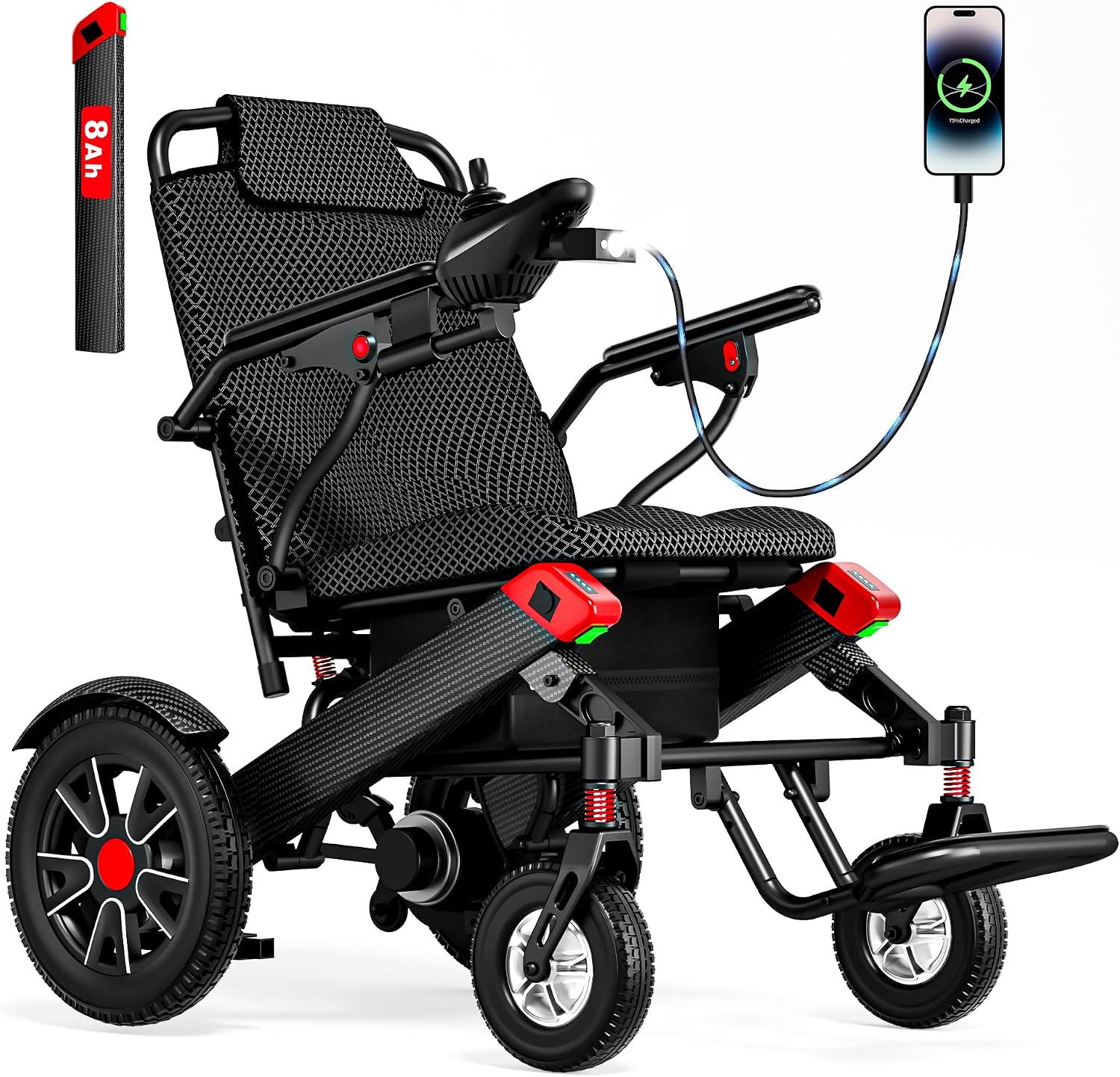
Image: This image displays the JUSTHERO Electric Wheelchair, highlighting its 20.3-inch wide seat and ergonomic cushion for user comfort.

Image: This image provides a detailed view of the wheelchair's dimensions, including the 13-inch rear pneumatic tires, 7.6-inch solid rubber front tires, and the 40 lbs weight without battery, along with overall measurements.
4. Setup and First Use
4.1 Unfolding the Wheelchair
- Place the folded wheelchair on a flat, stable surface.
- Gently pull the armrests outwards until the frame fully expands.
- Push down on the seat frame until it locks into place. Ensure all locking mechanisms are engaged.
- Adjust the footrest to the desired position.
4.2 Battery Installation and Charging
The wheelchair is equipped with dual battery slots. Each battery has a dedicated switch.
- Locate the battery compartments, typically under the seat.
- Insert the battery(ies) into the slots, ensuring a secure connection.
- Connect the charger to the charging port on the joystick or directly to the battery if removable.
- Plug the charger into a standard electrical outlet. The indicator light on the charger will show charging status.
- Charge the battery fully before first use (approximately 6-8 hours).
- Always turn off the battery switch when not in use or during charging.

Image: This image illustrates the dual battery compartment design, showing how batteries are inserted and highlighting the 12-mile range per single battery and the lightweight nature of each battery (3.4 lbs).
4.3 Attaching the Joystick Controller
The joystick controller can be mounted on either the right or left armrest.
- Select the preferred side for the joystick.
- Securely attach the joystick bracket to the armrest.
- Connect the joystick cable to the designated port on the wheelchair. Ensure a firm connection.
4.4 Folding for Storage or Transport
- Ensure the wheelchair is powered off and the battery switches are in the "OFF" position.
- Lift the seat upwards from the center.
- Push the armrests inwards until the frame collapses.
- Secure any locking mechanisms to keep the wheelchair in its folded state.

Image: This image demonstrates the one-step folding design of the electric wheelchair, showing its compact form for easy storage and transport.
5. Operating Instructions
5.1 Powering On/Off
- Ensure the battery switch(es) are in the "ON" position.
- Press the power button on the joystick controller to turn the wheelchair on. The battery display will illuminate.
- To turn off, press the power button again.
5.2 Using the 360-degree Joystick
The joystick provides precise control over the wheelchair's movement.
- Forward: Gently push the joystick forward.
- Backward: Gently pull the joystick backward.
- Turn Left/Right: Push the joystick left or right.
- Stop: Release the joystick, and the intelligent electronic brake system will automatically engage.

Image: This image details the 360-degree joystick controller, pointing out features like the alarm horn, power switch, battery display, speed settings (+/-), speed display, LED light, and USB/Type-C charging ports.
5.3 Speed Settings
The joystick controller features 5-speed settings.
- Press the "Speed +" button to increase speed.
- Press the "Speed -" button to decrease speed.
- The current speed level is indicated on the speed display.
5.4 Switching Between Manual and Electric Modes
The wheelchair can be operated in electric mode or pushed manually.
- Electric Mode: Ensure the levers on the rear motors are pushed up. The joystick will control movement.
- Manual Mode: Push the levers on the rear motors down to disengage the motors. The wheelchair can now be pushed manually.

Image: This image demonstrates how to switch between electric and manual modes. Pushing the lever up engages electric mode, while pushing it down enables manual pushing.
5.5 Using the LED Light and USB Ports
- The LED light can be activated via a button on the joystick controller to illuminate the path.
- Use the integrated USB/Type-C ports on the joystick to charge compatible mobile devices.
6. Maintenance
6.1 Battery Care
- Charge batteries regularly, even if the wheelchair is not in frequent use, to prolong battery life.
- Avoid completely draining the battery.
- Store batteries in a cool, dry place.
- If storing for an extended period, charge batteries to 50-70% and recharge every 1-2 months.
6.2 Cleaning
- Wipe down the frame and seat with a damp cloth and mild detergent.
- Do not use abrasive cleaners or solvents.
- Avoid spraying water directly onto electrical components.
6.3 Tire Maintenance
- Regularly inspect tires for wear and tear.
- For pneumatic rear tires, check tire pressure periodically and inflate to the recommended PSI (refer to tire sidewall for details).
- Remove any debris or foreign objects from the tire treads.
6.4 General Inspection
- Periodically check all bolts, screws, and connections to ensure they are tight.
- Inspect cables and wiring for any signs of damage.
- Ensure the folding mechanism operates smoothly and locks securely.
7. Troubleshooting
| Problem | Possible Cause | Solution |
|---|---|---|
| Wheelchair does not power on. | Battery switch off, low battery, loose connection. | Ensure battery switch is ON. Charge battery. Check all cable connections. |
| Wheelchair moves slowly or not at all. | Low battery, motor levers in manual mode, speed setting too low. | Charge battery. Push motor levers UP for electric mode. Increase speed setting on joystick. |
| Brakes do not engage properly. | Joystick not fully released, electronic brake malfunction. | Ensure joystick is fully centered. If issue persists, contact customer support. |
| Unusual noises during operation. | Loose components, debris in wheels/motors. | Inspect for loose parts and tighten. Clear any debris. If noise continues, contact customer support. |
8. Specifications
| Feature | Detail |
|---|---|
| Model | B0H82RJF69 |
| Brand | JUSTHERO |
| Seat Width | 20.3 inches |
| Weight Capacity | 350 lbs (158 kg) |
| Wheelchair Weight (without battery) | Approx. 40 lbs (18 kg) |
| Motors | Dual 500W |
| Max Climbing Angle | 12° |
| Front Wheels | 7.6 inches, Solid Rubber |
| Rear Wheels | 13 inches, Pneumatic |
| Battery Type | Nonstandard Battery (1 required per slot) |
| Range (Single Battery) | Up to 12 miles (19 km) |
| Range (Dual Batteries) | Up to 24 miles (38 km) |
| Battery Weight (Single) | Approx. 3.7 lbs (1.7 kg) |
| Controller | 360-degree Joystick with 5-speed settings |
| Charging Ports | USB, Type-C (on joystick) |
| Airline Approval | Yes (1-Battery Model) |

Image: This image highlights the powerful dual 500W motors (2x250W) of the electric wheelchair, emphasizing their ability to handle slopes and uneven terrain, and noting features like lightweight design, compact size, zero maintenance, and smooth power delivery.
9. Warranty and Support
JUSTHERO provides customer support for its products. For warranty information, technical assistance, or service requests, please refer to the warranty card included with your purchase or contact JUSTHERO customer service directly.
Please have your model number (B0H82RJF69) and purchase date available when contacting support.
Legal Disclaimer: Statements regarding dietary supplements have not been evaluated by the FDA and are not intended to diagnose, treat, cure, or prevent any disease or health condition. This product is a mobility aid.