1. Important Safety Information
Before operating your Misodo GT12 Electric Scooter, please read and understand all safety instructions. Failure to follow these instructions may result in serious injury or property damage.
- Always wear a helmet and appropriate safety gear (knee pads, elbow pads) when riding.
- Familiarize yourself with local laws and regulations regarding electric scooter use.
- Do not exceed the maximum weight limit of 300 pounds (136 kg).
- Avoid riding in wet conditions, heavy rain, or on slippery surfaces.
- Maintain a safe speed and always be aware of your surroundings, pedestrians, and other vehicles.
- Perform a pre-ride inspection before each use, checking brakes, tires, and all fasteners.
- Do not allow children under the age of 16 to operate the scooter.
2. Product Overview
The Misodo GT12 is a high-performance electric scooter designed for adult commuting and leisure. It features a powerful 1000W peak motor, offering speeds up to 25 MPH and a long range of 25-35 miles on a single charge. Equipped with 14-inch pneumatic tires and a dual suspension system, it provides a smooth and stable ride. The scooter includes a comfortable seat, a removable rear basket for storage, and a convenient foldable design for portability.
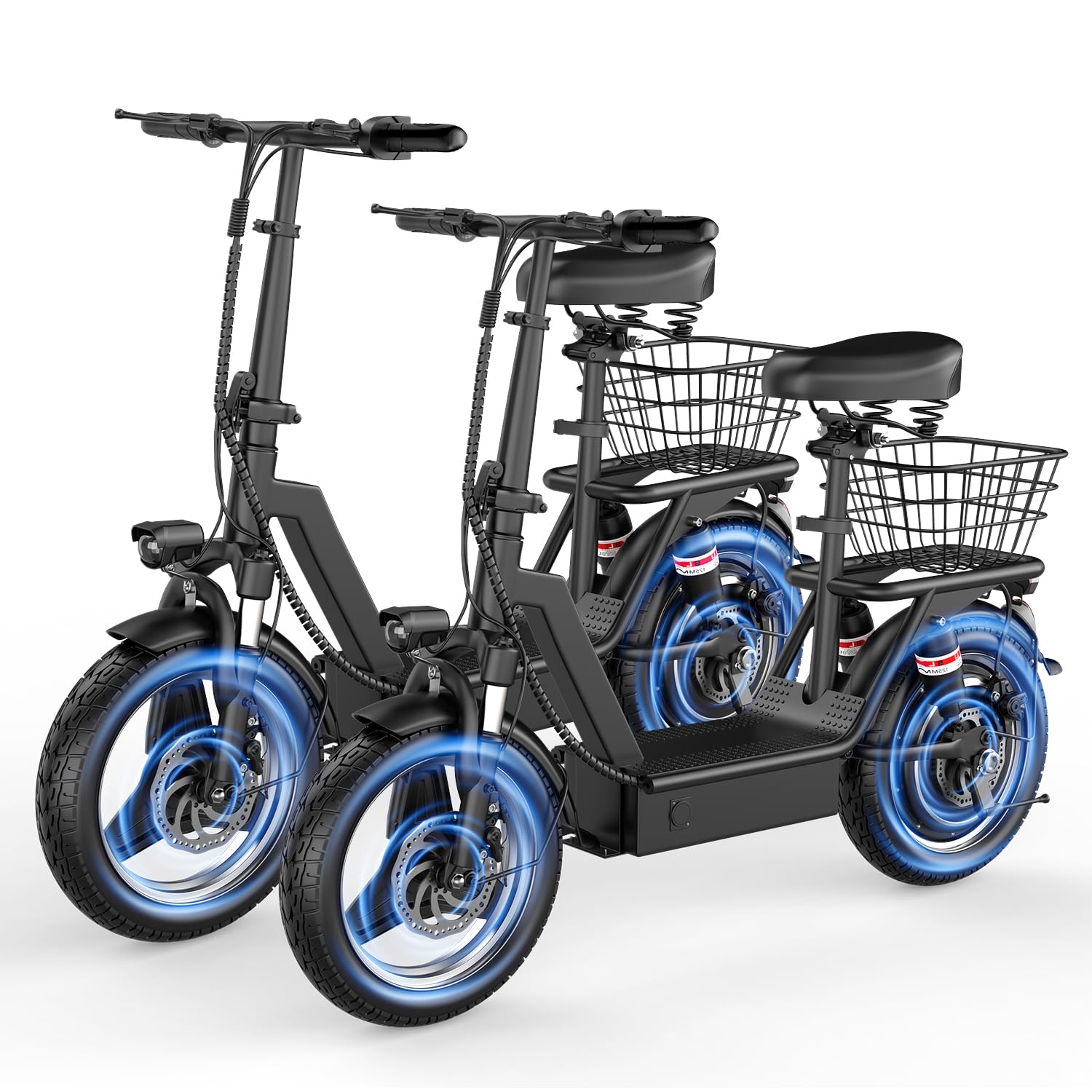
Figure 2.1: The Misodo GT12 Electric Scooter, showcasing its design with a seat and rear basket.
3. Package Contents
Please check the box for the following items:
- Electric Scooter (x1)
- Battery Charger (x1)
- Tool Kit (x1)
- User Manual (this document)
4. Assembly Instructions
The Misodo GT12 Electric Scooter comes partially assembled. Follow these steps to complete the setup:
- Unfolding the Scooter: Carefully remove the scooter from its packaging. Locate the folding mechanism on the main frame. Release the latch and unfold the stem until it locks securely into place. Ensure the locking mechanism is fully engaged before proceeding.
- Attaching the Handlebars: Insert the handlebar assembly into the top of the stem. Align the handlebars and tighten any securing bolts using the provided tool kit. Ensure the handlebars are firm and do not wobble.
- Installing the Seat: Insert the seat post into the designated tube on the scooter frame. Adjust the seat height to a comfortable position and tighten the quick-release lever or bolt to secure it.
- Attaching the Rear Basket: Mount the rear basket onto the rack located above the rear wheel. Secure it using the provided hardware and tools. Ensure the basket is stable and can hold cargo safely.

Figure 4.1: Illustration of the scooter's folding mechanism, demonstrating how to fold or unfold the main frame.
5. Initial Charging and Battery Activation
Before your first ride, fully charge the scooter's battery.
- Locate the Charging Port: The charging port is typically located on the side of the battery compartment.
- Connect the Charger: Plug the charger into a standard wall outlet, then connect the charging cable to the scooter's charging port. The indicator light on the charger will change (e.g., from red to green) when charging is complete.
- Battery Activation: After charging, locate the silver battery switch button near the charging port. Press this button once to activate the battery and disable the kill switch, allowing the scooter to power on.
- Charging Time: A full charge typically takes 4-6 hours. Do not overcharge the battery.

Figure 5.1: A visual representation of the scooter's 48V 13AH battery, highlighting its location and capacity.

Figure 5.2: An exploded view illustrating the 1000W peak motor and its components, emphasizing power delivery.
6. Operating the Scooter
Follow these steps for safe and efficient operation:
- Power On: Press and hold the power button on the intelligent LCD display until the screen illuminates.
- LCD Display: The display shows essential information such as battery level, current speed, and selected gear mode. Familiarize yourself with these indicators before riding.
- Speed Modes: The scooter features multiple speed modes (e.g., Eco, Drive, Sport). Use the mode button on the display to switch between them. Start in a lower speed mode until you are comfortable with the scooter's handling.
- Acceleration: Gently press the throttle lever to accelerate. Apply throttle smoothly to avoid sudden jerks.
- Braking: Use the brake levers on the handlebars to slow down or stop. The scooter is equipped with rear braking for effective stopping power. Apply brakes gradually.
- Adjusting Seat Height: The seat post can be adjusted for rider comfort. Loosen the quick-release lever, adjust the seat to the desired height, and then firmly secure the lever.
- Folding for Storage/Transport: To fold the scooter, ensure it is powered off. Engage the folding mechanism latch and carefully fold the stem down until it clicks into its locked position.

Figure 6.1: Close-up of the intelligent LCD display on the handlebars, showing battery level, speed, and gear shift indicators.

Figure 6.2: A rider on the Misodo GT12 Electric Scooter, demonstrating the adjustable seat post and the large capacity rear basket.
7. Maintenance and Care
Regular maintenance ensures the longevity and optimal performance of your scooter.
- Cleaning: Wipe down the scooter with a damp cloth. Avoid using high-pressure water jets or harsh chemicals, which can damage electronic components.
- Tire Pressure: Check tire pressure regularly. Proper inflation (refer to tire sidewall for recommended PSI) is crucial for ride quality, range, and tire lifespan.
- Brake Inspection: Periodically check the brake levers and cables for proper tension and responsiveness. Ensure brake pads are not excessively worn.
- Battery Care: Store the scooter in a cool, dry place. If storing for extended periods, charge the battery to about 50-70% and recharge every 1-2 months to prevent deep discharge.
- Fasteners: Regularly inspect all bolts, screws, and quick-release levers to ensure they are tight and secure.
8. Troubleshooting
This section addresses common issues you might encounter.
- Scooter Does Not Power On:
- Ensure the battery is charged.
- Verify the silver battery switch button (kill switch) near the charging port has been pressed to activate the battery.
- Check all cable connections for looseness.
- Reduced Range or Speed:
- Check tire pressure; underinflated tires can significantly reduce performance.
- Ensure the battery is fully charged. Battery performance can degrade over time.
- Riding conditions (hills, headwind, rider weight) affect range and speed.
- Loose Handlebars or Seat:
- Tighten all bolts and quick-release levers associated with the handlebars and seat post. Refer to assembly instructions.
- Brake Issues:
- If brakes feel weak, check brake cable tension and adjust if necessary.
- Inspect brake pads for wear and replace if needed.
- Tire Punctures:
- Pneumatic tires are susceptible to punctures. Inspect tires regularly for damage.
- If a puncture occurs, the inner tube will need to be repaired or replaced by a qualified technician.
9. Specifications
| Feature | Specification |
|---|---|
| Brand | Misodo |
| Model Name | GT12 |
| Motor | 1000W Peak |
| Battery | 48V 13AH |
| Max Speed | Up to 25 MPH |
| Max Range | Up to 35 Miles |
| Weight Limit | 300 Pounds |
| Wheel Size | 14 Inches |
| Wheel Type | Pneumatic |
| Suspension Type | Dual Suspension |
| Brake Style | Rear Braking |
| Frame Material | Alloy Steel |
| Special Features | Adult Scooter With Basket, Digital Display, Electric Scooter With Seat, Foldable Scooter, Wide Platform |
10. Warranty Information
The Misodo GT12 Electric Scooter comes with a 1-year warranty from the date of purchase. This warranty covers manufacturing defects under normal use. It does not cover damage caused by misuse, accidents, unauthorized modifications, or normal wear and tear. Please retain your proof of purchase for warranty claims.
11. Customer Support
If you have any questions, require assistance with assembly, operation, or troubleshooting, or need to make a warranty claim, please contact Misodo customer support. Refer to the contact information provided with your purchase documentation or visit the official Misodo website for support options.