1. Introduction
Thank you for choosing the aosu 4K T2 Ultra Wireless Outdoor Solar Security Camera System. This manual provides essential information for setting up, operating, and maintaining your security system to ensure optimal performance and protection for your property. This system features 4K UHD resolution, TrueColor Night Vision, 360° pan-tilt coverage with auto-tracking, advanced AI detection, and secure local storage via the aosuBase 2.0.
2. Package Contents
Your aosu 4K T2 Ultra system (4-Camera Kit) includes the following components:
- 4 x aosu 4K T2 Ultra Wireless Outdoor Solar Cameras
- 1 x aosuBase 2.0
- Mounting Kits (screws, wall anchors)
- Power Adapter for aosuBase
- Ethernet Cable
- Quick Start Guide
3. Setup
3.1 Initial Setup & aosuBase Connection
- Power On aosuBase: Connect the aosuBase 2.0 to a power outlet using the provided power adapter.
- Network Connection: Connect the aosuBase 2.0 to your router using the Ethernet cable. Ensure your router provides 2.4GHz or 5GHz Wi-Fi.
- Download App: Download the aosu app from your smartphone's app store (iOS or Android).
- Pair Devices: Follow the in-app instructions to pair the aosuBase 2.0 and then each of your aosu 4K T2 Ultra cameras. The cameras are pre-linked to the base for easy setup.
The system offers quick and easy configuration, allowing for a simple DIY setup without the need for professional installers.

Figure 3.1: Quick and easy setup of the aosu camera. The image illustrates a user effortlessly mounting a camera, highlighting the wireless and simple installation process.
3.2 Camera Placement & Mounting
Strategically place your cameras to cover all desired areas. The solar panel design allows for continuous power, and flexible mounting options ensure optimal solar exposure.
- Optimal Solar Charging: Position cameras where the integrated solar panels receive maximum direct sunlight throughout the day. The detachable solar panel can be installed separately for optimal light exposure, allowing flexible camera placement.
- Coverage: Utilize the 360-degree pan-tilt capability to cover wide areas and eliminate blind spots.
- Mounting: Use the provided mounting kits to securely attach cameras to walls or eaves. Ensure the mounting surface is stable.

Figure 3.2: Illustration of a house with four aosu cameras providing full perimeter coverage, ensuring every corner is protected.

Figure 3.3: Flexible solar mounting options. The solar panel can be positioned independently from the camera to capture maximum sunlight.
4. Operating Instructions
4.1 Live View and Recording
- Access Live Feed: Open the aosu app to view live feeds from all connected cameras in HD. The system supports simultaneous monitoring of up to 4 cameras without latency.
- Recording: The system automatically records events triggered by detection. Recordings are stored locally on the aosuBase 2.0.

Figure 4.1: All-at-once monitoring. View multiple cameras live in HD without limits or lag.
4.2 Advanced Detection Features
- Intelligent Detection: Equipped with radar, PIR (Passive Infrared), and AI analysis, the cameras intelligently identify people, vehicles, and activities, significantly reducing false alarms.
- 360° Auto-Tracking: The pan-tilt design provides full 360° coverage with real-time automatic tracking of detected subjects, ensuring no blind spots. Cameras work together to follow movement across your property.
- Person Recognition: The AI can recognize individuals by analyzing their unique walk, posture, clothing, and behavioral traits, offering identification beyond just facial features.
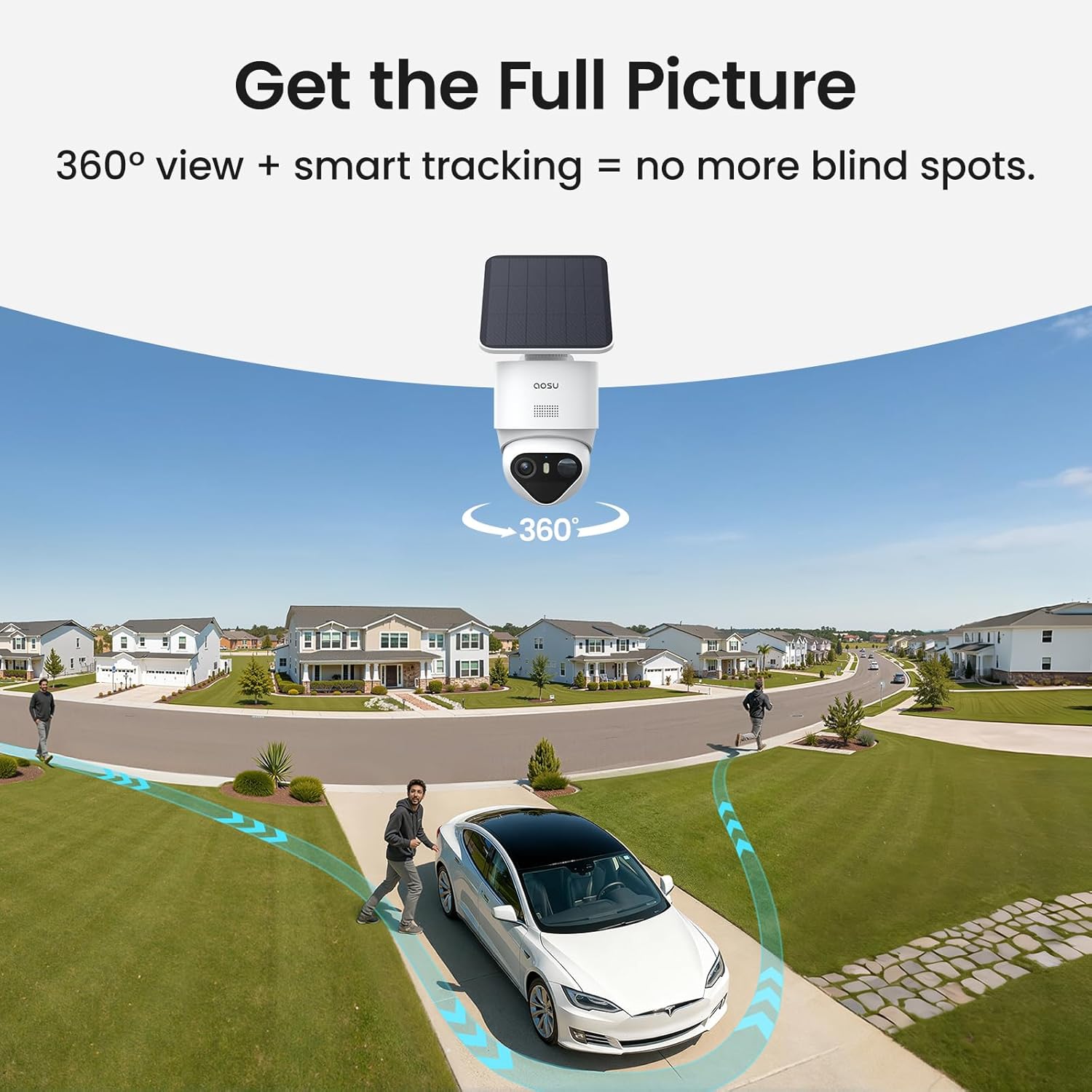
Figure 4.2: Get the full picture with 360° view and smart tracking, eliminating blind spots.

Figure 4.3: Triple detection for precise alerts. Radar, PIR, and AI analysis work together to accurately detect movement and reduce false alarms.

Figure 4.4: See the person, not just the face. The system recognizes individuals by analyzing unique traits beyond facial features.
4.3 Night Vision
The aosu 4K T2 Ultra cameras feature 4K TrueColor Night Vision, providing exceptional color video even in total darkness, without the need for spotlights. A high-sensitivity starlight sensor and F/1.0 ultra-wide aperture ensure clear details day and night.
- TrueColor Night Vision: Captures vivid, natural colors in low-light conditions.
- Night Vision Modes: Experience full control over night viewing by switching between natural color, infrared, or automatic mode based on changing conditions.

Figure 4.5: 4K TrueColor Night Vision. See through the dark in vivid, natural color and ultra-clear detail without a spotlight.
4.4 Two-Way Audio
Engage in real-time conversations through the camera using the two-way audio feature. This allows you to communicate with visitors or deter intruders. The system also includes a voice change function for added security.

Figure 4.6: Two-way audio in action. Communicate in real-time through the camera.
4.5 Local Storage & Data Security
The aosuBase 2.0 handles all video storage locally, enhancing camera performance and strengthening connectivity. It comes with 32GB of built-in storage and is expandable up to 1TB via a MicroSD card (not included). All data is encrypted, ensuring your privacy and control without hidden fees or monthly subscriptions.
- Reliable Recording: Recordings are saved directly to the aosuBase, even during Wi-Fi outages, ensuring no footage is lost.
- Camera-to-Camera Tracking: The system supports camera-to-camera tracking, consolidating clips from different cameras into a single, complete video for a comprehensive event overview.
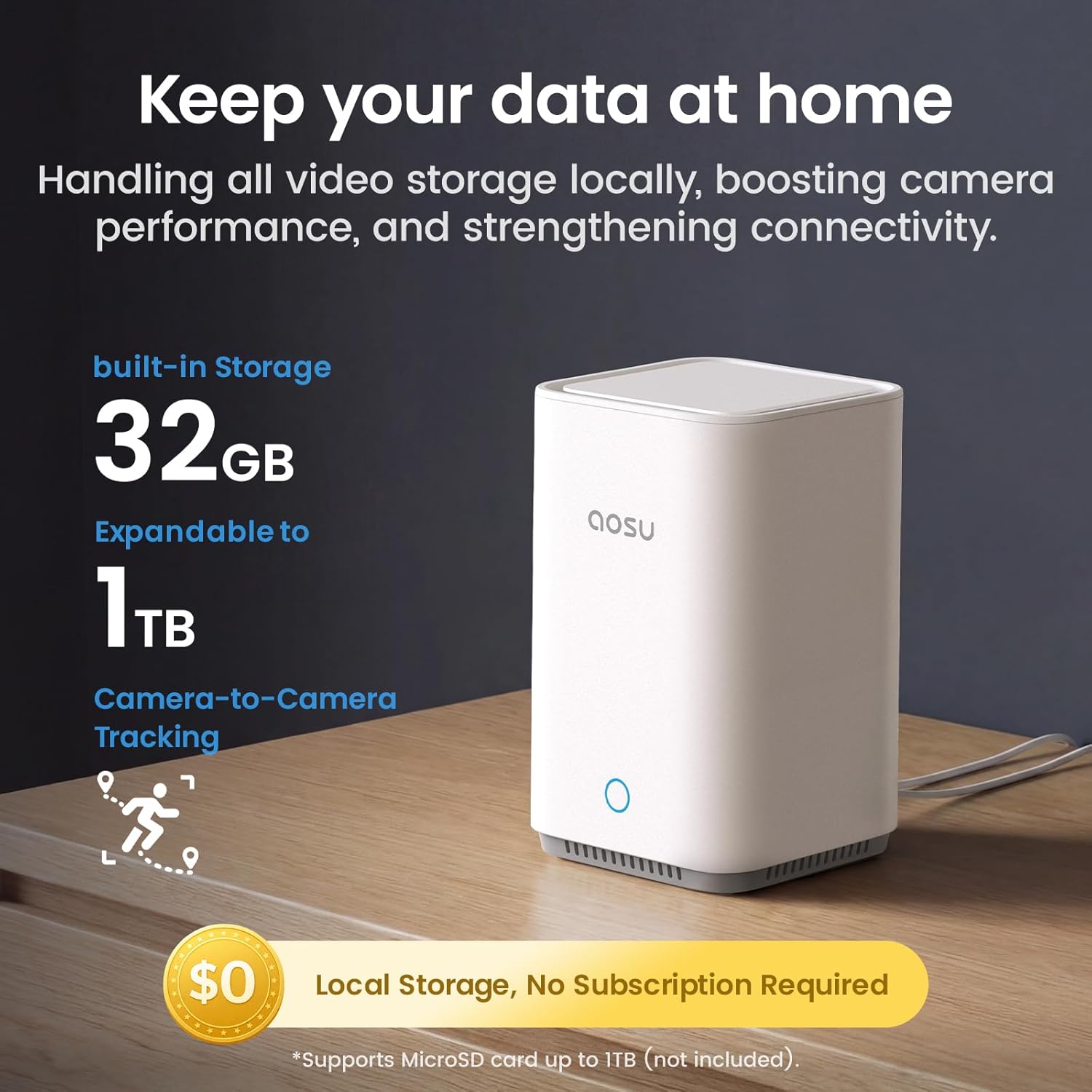
Figure 4.7: Keep your data at home. Local storage on aosuBase 2.0, expandable up to 1TB, with no monthly fees.

Figure 4.8: Uncompromised security. Recordings are saved directly to aosuBase during Wi-Fi drops, ensuring no loss of footage.
4.6 Optional AI Features (aosuProtect+)
Discover advanced AI-powered security features with aosuProtect+. These optional AI functions are available via a subscription through the aosu app and can be canceled at any time. Features may include enhanced notifications, daily security reports, advanced person identification, package delivery detection, and wild animal detection.

Figure 4.9: More features, more storage. Explore advanced AI security with aosuProtect+ (optional subscription).
5. Maintenance
5.1 Power Management
- Solar Power: Each camera operates continuously thanks to solar energy. Ensure solar panels are clean and free from obstructions for optimal charging.
- Energy Optimization: Integration with aosuBase reduces the system's energy consumption by up to 30%, leading to longer battery life and more reliable performance.

Figure 5.1: Reliable solar charging. Designed to function in any lighting condition.

Figure 5.2: Intelligent energy optimization. The system reduces energy consumption by up to 30%.
5.2 Cleaning
- Regularly wipe the camera lens and solar panel with a soft, damp cloth to remove dust and dirt. Avoid abrasive cleaners.
5.3 Firmware Updates
- Ensure your aosu app and camera firmware are always up-to-date for the best performance and latest features. Updates are typically managed through the aosu app.
6. Troubleshooting
6.1 Connectivity Issues
- No Connection: Ensure the aosuBase is powered on and connected to your router via Ethernet. Check your router's internet connection.
- Camera Offline: Verify the camera is charged (check solar panel exposure) and within range of the aosuBase. Restart the camera if necessary.
- Wi-Fi Interference: If experiencing intermittent connection, try repositioning the aosuBase or cameras to minimize interference from other devices.
6.2 False Alarms
- Adjust Sensitivity: In the aosu app, adjust the detection sensitivity settings for PIR and radar.
- Define Activity Zones: Set specific activity zones to monitor only relevant areas and ignore common triggers like passing traffic or swaying trees.
6.3 Poor Image Quality
- Clean Lens: Ensure the camera lens is clean and free from smudges or dirt.
- Network Speed: A stable and fast internet connection is crucial for 4K streaming. Check your network speed.
- Lighting: While TrueColor Night Vision is excellent, extreme low light or direct bright lights can affect image clarity.
7. Specifications
| Feature | Detail |
|---|---|
| Brand | aosu |
| Model Name | C9X 4K T2 |
| Connectivity Technology | Wireless (Wi-Fi 2.4/5GHz) |
| Video Capture Resolution | 8MP (4K UHD) |
| Viewing Angle | 360 Degrees (Pan-Tilt) |
| Night Vision Range | Up to 10 meters (approx. 33 feet) |
| Special Features | Two-Way Audio, AI Detection (Person/Vehicle), Auto-Tracking, Solar Powered |
| Indoor/Outdoor Use | Outdoor |
| Power Source | Battery & Solar Power (1 Lithium Polymer battery included per camera) |
| Local Storage | aosuBase 2.0 with 32GB built-in, expandable up to 1TB (MicroSD card not included) |
| Number of Cameras | 4 |
| Package Dimensions | 40.29 x 36.6 x 16.7 cm |
| Product Weight | 4.7 kg |
8. Warranty and Support
aosu is committed to providing reliable security solutions. For specific warranty information, please refer to the warranty card included with your product or visit the official aosu website. For technical support, troubleshooting assistance, or any inquiries, please contact aosu customer service through the contact information provided in the aosu app or on their official website.
aosu has been creating reliable security solutions for over 10 years, protecting millions of families worldwide. Over a million homes in more than 20 countries trust aosu products.


