
1. Introduction
Thank you for choosing the COMFEE' RCU83WH3EU 88 Litre Upright Freezer. This manual provides essential information for the safe and efficient operation, installation, and maintenance of your new appliance. Please read these instructions carefully before use and keep them for future reference.

Image 1.1: Front view of the COMFEE' RCU83WH3EU 88 Litre Upright Freezer.
2. Safety Information
To ensure safe operation, please observe the following safety precautions:
- Ensure the appliance is properly grounded before use.
- Do not damage the refrigerant circuit.
- Do not use electrical appliances inside the food storage compartments unless they are of the type recommended by the manufacturer.
- Keep ventilation openings clear of obstruction.
- This appliance is not intended for use by persons (including children) with reduced physical, sensory or mental capabilities, or lack of experience and knowledge, unless they have been given supervision or instruction concerning use of the appliance by a person responsible for their safety.
- Children should be supervised to ensure that they do not play with the appliance.
- If the supply cord is damaged, it must be replaced by the manufacturer, its service agent or similarly qualified persons in order to avoid a hazard.
3. Product Overview
The COMFEE' RCU83WH3EU is an 88-litre independent upright freezer designed for efficient food preservation. Key features include:
- Capacity: 88 Litres, providing ample storage space.
- Storage: Features 3 transparent freezer drawers for easy organization and visibility of contents.
- Temperature Rating: 4-star classification, maintaining a temperature of -18 °C for optimal frozen food preservation.
- Door: Reversible door allows for flexible placement and adaptation to your kitchen layout.
- Stability: Two adjustable front feet ensure stable leveling on various floor types.
- Operation: Operates quietly with a noise level of only 39 dB.
- Control: Equipped with a mechanical adjustable thermostat for easy temperature regulation.

Image 3.1: Interior view highlighting the 88-litre capacity and transparent drawers.

Image 3.2: Inverter Compressor benefits: rapid cooling, energy efficiency, and low noise.
4. Setup
4.1 Unpacking
Carefully remove all packaging materials. Inspect the freezer for any damage. If damage is found, do not plug in the appliance and contact your retailer.
4.2 Placement
Place the freezer on a firm, level surface away from direct sunlight, heat sources (e.g., oven, radiator), and extreme cold. Ensure adequate ventilation around the appliance. Allow at least 10 cm of space at the back and sides for proper air circulation.

Image 4.1: The freezer is suitable for various environments such as homes, offices, dormitories, and garages.
4.3 Reversible Door Installation
The freezer door can be reversed to open from either the left or right side, depending on your preference and kitchen layout. Detailed instructions for reversing the door are typically provided in a separate guide or can be found on the manufacturer's website. It is recommended to have this procedure performed by a qualified technician.
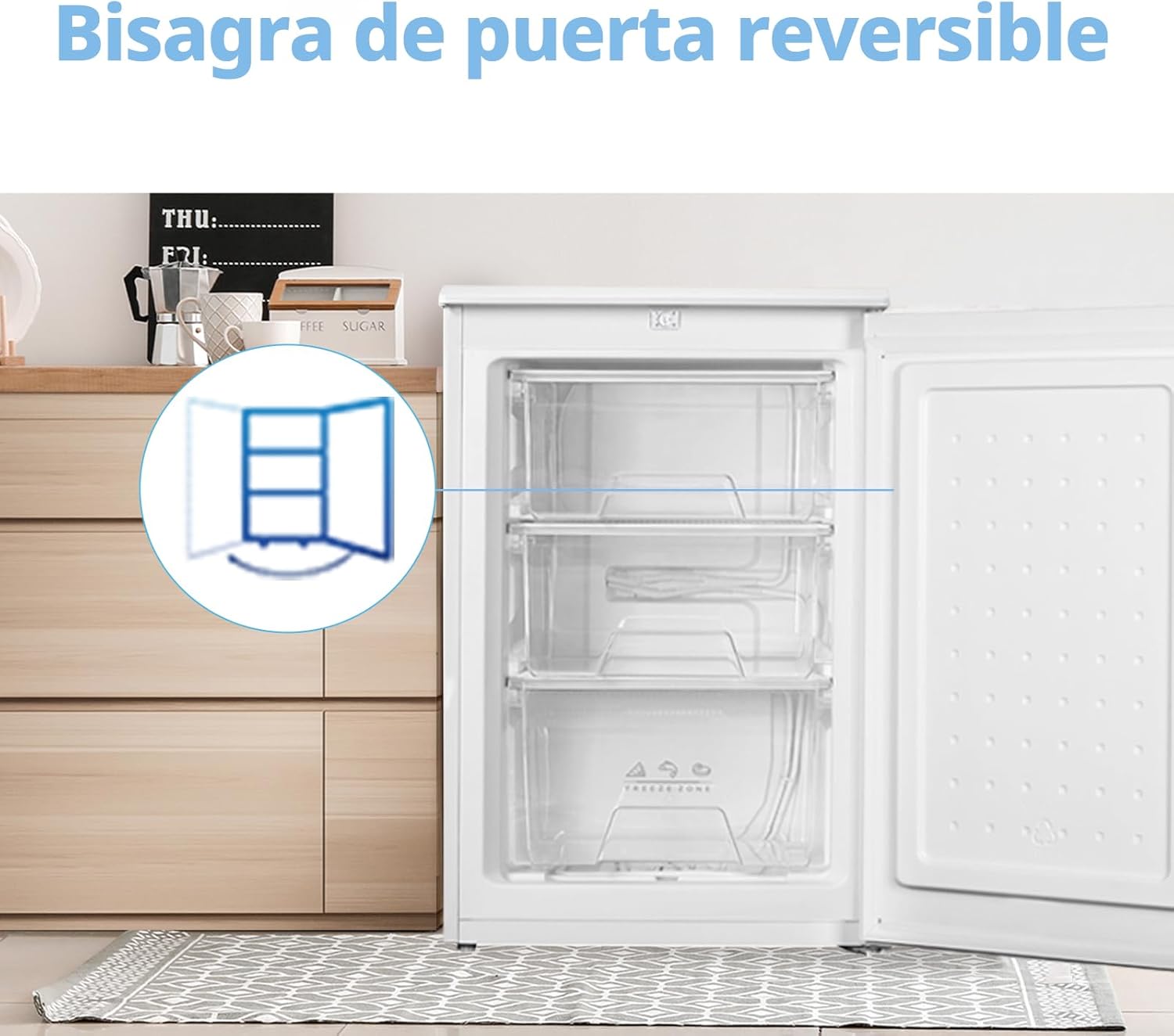
Image 4.2: Illustration of the reversible door feature.
4.4 Leveling
Adjust the two front feet to ensure the freezer is perfectly level. A level appliance operates more efficiently and quietly.

Image 4.3: Freezer dimensions for placement planning.
4.5 First Use
After placing the freezer, wait at least 2-4 hours before plugging it into the power outlet. This allows the refrigerant to settle. Clean the interior with a damp cloth before loading food.
5. Operating Instructions
5.1 Temperature Control
The freezer is equipped with a mechanical thermostat located inside the appliance. Turn the dial to adjust the temperature setting. Higher numbers typically indicate colder temperatures. Start with a medium setting and adjust as needed based on ambient temperature and food load.

Image 5.1: Adjusting the internal thermostat.
5.2 Freezing Fresh Food
To freeze fresh food, place it in the upper compartments first. Ensure food is properly packaged in airtight containers or freezer bags to prevent freezer burn and odor transfer. Avoid placing hot food directly into the freezer.
5.3 Storage Times
Refer to food packaging for recommended storage times. Generally, most frozen foods can be stored for 3-12 months, depending on the type of food.
6. Maintenance
6.1 Cleaning
Regularly clean the interior and exterior of your freezer. Unplug the appliance before cleaning. Use a soft cloth with a mild detergent and warm water. Do not use abrasive cleaners or sharp objects. Dry thoroughly after cleaning.
6.2 Defrosting
This freezer requires manual defrosting. Defrost when the frost layer reaches about 5mm thickness. To defrost:
- Unplug the freezer.
- Remove all food and store it in a cool place or another freezer.
- Leave the door open to allow frost to melt naturally. Place towels at the bottom to absorb water.
- Once defrosted, clean and dry the interior thoroughly.
- Plug the freezer back in and allow it to cool down before returning food.
6.3 Power Outage Guidelines
In case of a power outage, keep the freezer door closed to maintain the internal temperature for as long as possible. Food can remain frozen for several hours depending on the insulation and how full the freezer is.
7. Troubleshooting
If you experience issues with your freezer, consult the following common troubleshooting tips:
| Problem | Possible Cause | Solution |
|---|---|---|
| Freezer not cooling | No power, thermostat set too high, door not closed properly. | Check power supply, adjust thermostat, ensure door is sealed. |
| Excessive noise | Appliance not level, objects vibrating against the freezer. | Adjust leveling feet, remove any objects touching the freezer. |
| Excessive frost buildup | Door left open too long, warm food placed inside, faulty door seal. | Minimize door openings, allow food to cool before freezing, check and clean door seal. |
If the problem persists after checking these points, please contact customer support.
8. Specifications
Detailed technical specifications for the COMFEE' RCU83WH3EU freezer:
- Model Number: RCU83WH3EU(E)
- Brand: Comfee
- Dimensions (D x W x H): 57.4 cm x 55.3 cm x 84.5 cm
- Weight: 24.6 kg
- Capacity: 88 Litres
- Color: White
- Door Material: Metal
- Door Orientation: Reversible
- Voltage: 50 Hz
- Installation Type: Freestanding
- Number of Drawers: 3
- Energy Class: D
- Annual Energy Consumption: 131 kWh/annum
- Noise Level: 39 dB
- Country of Origin: China
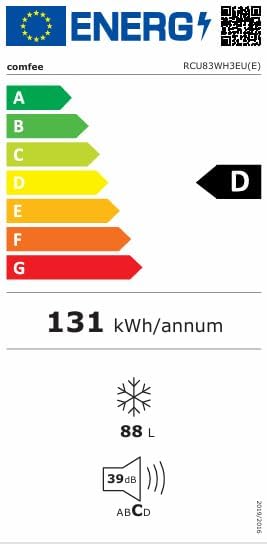
Image 8.1: Energy Label for the RCU83WH3EU.
For more detailed information, please refer to the official product information sheet:
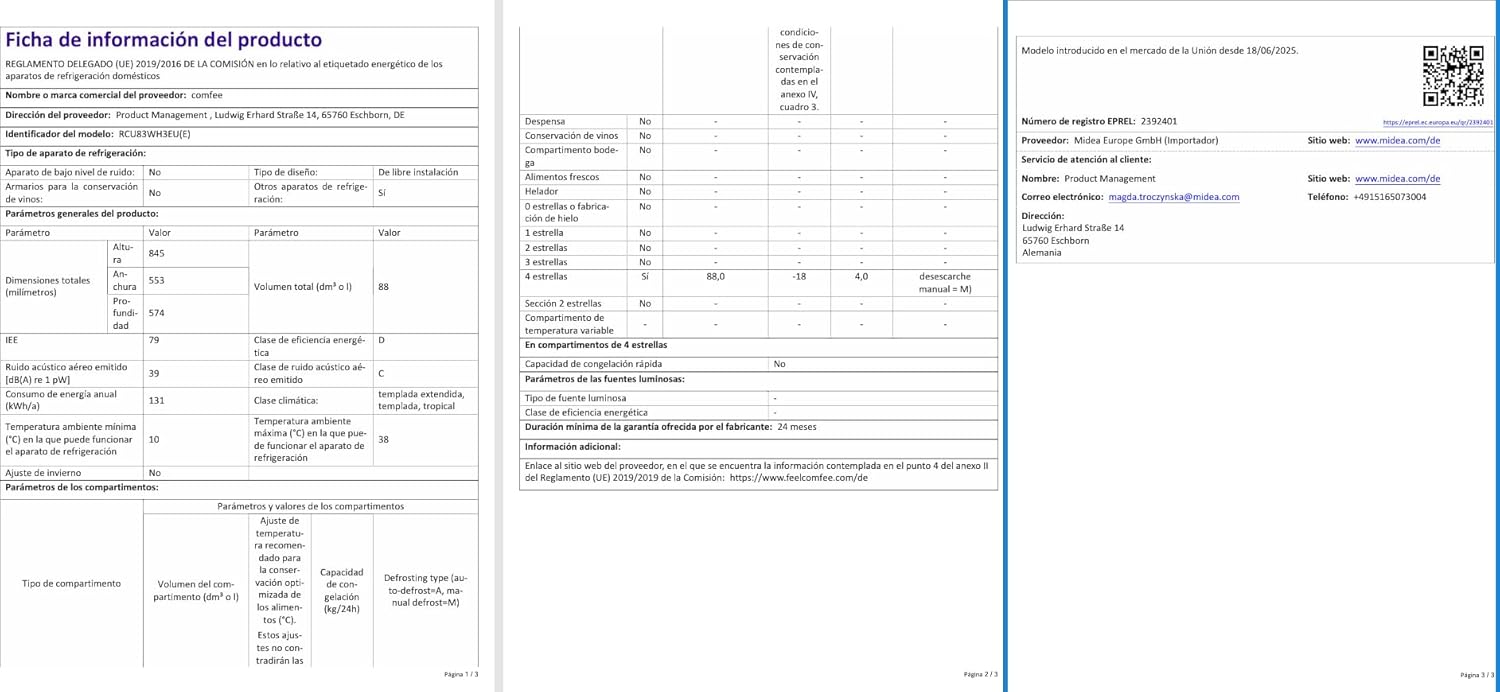
Image 8.2: Product Information Sheet.
You can also find this information on the EPREL database: https://eprel.ec.europa.eu/qr/2392401
9. Warranty and Support
Your COMFEE' RCU83WH3EU freezer comes with a 2-year manufacturer's warranty. Please retain your proof of purchase for warranty claims.
For technical assistance, spare parts, or warranty service, please contact your retailer or the official Comfee customer support in your region. Refer to the product packaging or the manufacturer's website for contact details.


