
1. Getting Started
1.1 Package Contents
Ensure your package contains the following items:
- realme 16 Pro 5G Smartphone
- USB Cable
- Quick Start Guide (this manual)
- SIM Ejector Tool
1.2 Device Layout

Figure 1: Front and Rear View of realme 16 Pro 5G Smartphone.
1.3 SIM Card Installation
- Locate the SIM card tray on the side of the device.
- Insert the SIM ejector tool into the small hole next to the tray and press gently until the tray pops out.
- Place your Nano-SIM card(s) into the tray with the gold contacts facing down.
- Carefully push the tray back into the slot until it is flush with the device.
1.4 Initial Charging and Power On
- Connect the USB cable to the USB-C port at the bottom of the phone and to a power adapter.
- Charge the device until the battery indicator shows a sufficient charge (at least 30%).
- Press and hold the Power button on the side of the device until the realme logo appears.
- Follow the on-screen instructions to complete the initial setup, including language selection, Wi-Fi connection, and Google account setup.
2. Operating Your Smartphone
2.1 Camera Features
The realme 16 Pro 5G is equipped with an advanced camera system for high-quality photography and videography.

Figure 2: The 200MP LumaColor Camera System.
- 200MP LumaColor Camera: Capture ultra-sharp details with 2X lossless zoom. Features an advanced sensor with Optical Image Stabilization (OIS) for bright photos even in low light.
- 50MP Selfie Camera: For high-resolution self-portraits and group selfies.
- 112° Wide-Angle Camera: Ideal for capturing expansive landscapes and large group shots.
- AI Features: Includes AI Instant Clip for quick video creation, AI LightMe for optimized lighting, AI StyleMe for personalized photo styles, and AI Framing Master for intelligent composition.
- 4K HDR Video: Record ultra-defined 4K videos with High Dynamic Range.
- Dynamic 4K Photos: Transform your best video moments into vivid and sharp 4K photos.

Figure 3: AI-Powered Camera Features.
2.2 Display Experience
The device features a vibrant display for an immersive viewing experience.

Figure 4: 144Hz AMOLED Display.
- 6.78" Curved AMOLED Display: Enjoy a superior visual experience with FHD+ resolution.
- 144Hz Refresh Rate: Provides incredibly smooth scrolling and fluid visuals, ideal for gaming and video streaming.
- 1.07 Billion Colors: Delivers brilliant and accurate color reproduction.
- Advanced Eye Protection: Designed to reduce eye strain during prolonged use.
2.3 Performance and Connectivity
Powered by a robust processor, the realme 16 Pro 5G ensures smooth operation.

Figure 5: Dimensity 7300-Max Processor.
- MediaTek Dimensity 7300-MAX 5G Chipset: Enables fluid and fast multitasking, efficient performance, and lag-free gaming.
- 8GB RAM (expandable): Ensures smooth application switching and performance.
- 5G Connectivity: Experience high-speed internet for streaming, gaming, and downloads.
2.4 Battery and Charging
The device is equipped with a large capacity battery and ultra-fast charging.
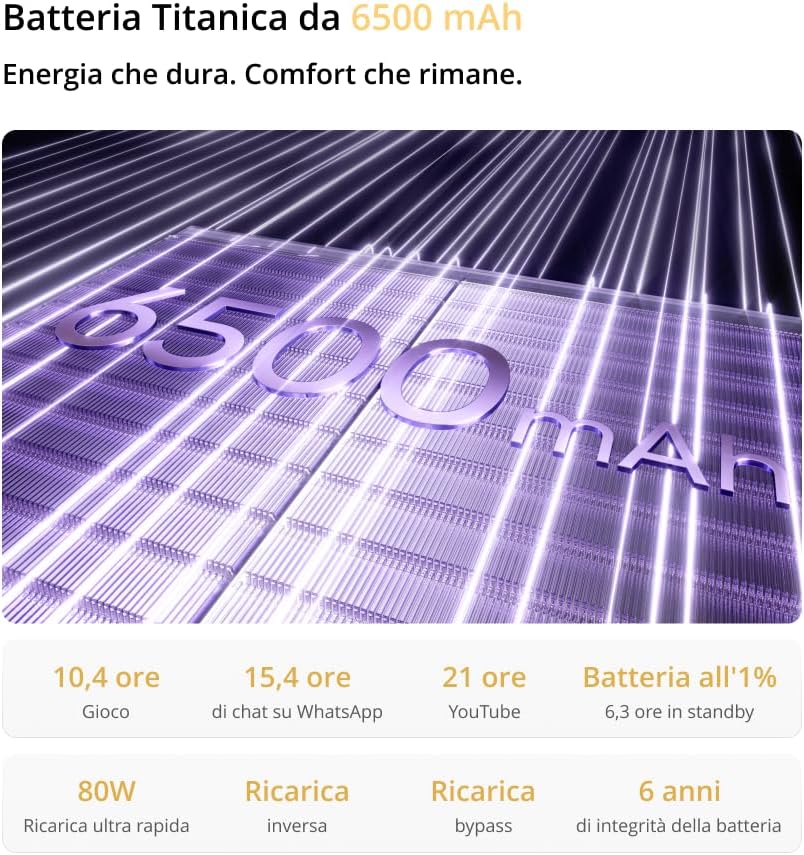
Figure 6: 6500mAh Battery and Charging.
- 6500mAh Battery: Provides extended usage time, lasting over 2 days on a single charge.
- 80W Fast Charging: Quickly recharges your device, minimizing downtime.
- 6 Years Battery Health: Designed for long-term battery integrity.
3. Maintenance and Care
3.1 General Care
- Avoid exposing the device to extreme temperatures, direct sunlight, or excessive moisture.
- Do not drop or subject the device to severe impacts.
- Keep the device away from strong magnetic fields.
3.2 Cleaning
- Use a soft, lint-free cloth to clean the screen and body of the phone.
- For stubborn smudges, slightly dampen the cloth with water or a screen cleaner.
- Avoid using harsh chemicals, abrasive cleaners, or aerosol sprays.
3.3 Software Updates
Regularly check for and install software updates to ensure optimal performance, security, and access to new features. You can usually find this option in Settings > About phone > Software update.
3.4 Water and Dust Resistance (IP69)
The realme 16 Pro 5G is certified IP69 for water and dust resistance, offering enhanced durability.

Figure 7: IP69 Water and Dust Resistance.
- This rating indicates protection against dust ingress and high-pressure, high-temperature water jets.
- While resistant, it is not waterproof. Avoid intentional submersion or exposure to saltwater, chlorinated water, or other liquids.
- Water and dust resistance may decrease over time with normal wear.
4. Troubleshooting
This section addresses common issues you might encounter with your realme 16 Pro 5G Smartphone.
4.1 Device Not Powering On
- Ensure the battery is charged. Connect the device to a charger for at least 30 minutes.
- Press and hold the Power button for 10-15 seconds to force a restart.
4.2 Charging Issues
- Check if the charging cable and adapter are securely connected and undamaged.
- Try using a different charger and cable to rule out accessory malfunction.
- Ensure the charging port is clean and free of debris.
4.3 Network Connectivity Problems
- Verify that your SIM card is correctly inserted and active.
- Check if Airplane Mode is disabled in Quick Settings.
- Restart the device.
- Go to Settings > Network & internet > Mobile network and ensure mobile data is enabled.
4.4 Screen Unresponsive
- Force restart the device by holding the Power button for 10-15 seconds.
- If the issue persists, contact customer support.
5. Specifications
Detailed technical specifications for the realme 16 Pro 5G Smartphone.
| Feature | Specification |
|---|---|
| Brand | realme |
| Model Name | 16 Pro |
| Operating System | Android 14 |
| RAM Size | 8 GB |
| Storage Capacity | 256 GB |
| CPU Model | Mediatek Dimensity 7300 |
| Cellular Technology | 5G |
| Screen Type | AMOLED |
| Refresh Rate | 144 Hz |
| Resolution | 1440 x 2880 |
| Rear Camera Resolution | 200 MP |
| Front Camera Resolution | 50 MP |
| Battery Capacity | 6500 mAh |
| Video Capture Resolution | 3840 x 2160 (4K) |
| Water Resistance Level | IP69 (Water Resistant) |
| SIM Card Format | Nano |
| Biometric Identification | Facial Recognition |
| USB Port Type | USB-C |
| Headphone Jack | 3.5 mm |
6. Warranty and Support
6.1 Product Warranty
This realme 16 Pro 5G Smartphone comes with a 2-year warranty from the date of purchase. Please retain your proof of purchase for warranty claims. The warranty covers manufacturing defects and malfunctions under normal use.
6.2 Customer Support
For technical assistance, troubleshooting, or warranty inquiries, please visit the official realme support website or contact their customer service. Contact details can typically be found on the realme official website or in the warranty card included with your product.