
NEWFAST BE6500 NF-U377
NEWFAST BE6500 WiFi 7 USB Adapter User Manual
Model: NF-U377
1. Introduction
The NEWFAST BE6500 WiFi 7 USB Adapter (Model NF-U377) provides high-speed wireless connectivity for your PC. Featuring tri-band support (2.4 GHz, 5 GHz, and 6 GHz) and the latest WiFi 7 technology, this adapter is designed to deliver fast, stable, and secure network performance. It includes four adjustable antennas and connects via a USB 3.0 Type-C cable, ensuring optimal signal reception and data transfer rates.
2. What's Included
- 1 x NEWFAST BE6500 USB WiFi Adapter
- 1 x User Manual
- 1 x 1.2m Type-C to USB 3.0 Cable
3. Specifications
| Brand | NEWFAST |
| Model | BE6500 NF-U377 |
| Hardware Interface | USB 3.0 Type-C |
| Color | Black |
| Compatible Devices | Computer, Laptop, Router, Smartphone, Tablet |
| Product Dimensions | 10.5L x 10.5W x 3.2H cm |
| Data Link Protocol | IEEE 802.11ac, IEEE 802.11ax, IEEE 802.11be, USB |
| Data Transfer Rate | 6500 Megabits per second (Mbps) |
| Compatible OS Family | Windows |
| Minimum OS Requirement | Windows 10 |
4. Setup and Installation
The NEWFAST BE6500 WiFi 7 USB Adapter features a pre-installed driver for easy setup. Follow these steps to install and connect:
- Connect the Adapter: Insert the USB 3.0 Type-C cable into the adapter and then connect the USB-A end to an available USB 3.0 port on your computer.
Note: Using a USB 3.0 port is crucial for optimal performance. USB 2.0 ports will limit the adapter's speed.

Image: The NEWFAST BE6500 WiFi 7 USB Adapter connected to a PC via its USB 3.0 cable. The image highlights the theoretical speeds of USB 3.0 (5.0 Gbps) compared to USB 2.0 (480 Mbps), emphasizing the importance of using a USB 3.0 port for maximum performance.
- Driver Installation: Upon connecting, your computer should automatically detect the adapter. A virtual drive containing the driver installation program will appear in "This PC" or "My Computer". Double-click on the installer to begin the driver installation process.

Image: The NEWFAST BE6500 WiFi 7 USB Adapter positioned next to a laptop running Windows 11. The image emphasizes easy installation and compatibility with Windows 10 and 11, noting that Windows 11 is required for 6 GHz band connectivity.
- Connect to a Network: Once the driver is installed, navigate to your computer's network settings. Search for available Wi-Fi networks and select your desired network. Enter the password if prompted and connect.
Note: For 6 GHz band connectivity, Windows 11 is required. Windows 10 supports 2.4 GHz and 5 GHz bands.
5. Operating Modes
The NEWFAST BE6500 adapter supports two primary operating modes:
- Receiver Mode: In this mode, the adapter functions as an external Wi-Fi card, allowing desktop computers without built-in wireless capabilities to connect to Wi-Fi networks.
- Transmitter (Soft AP) Mode: This mode transforms a wired internet connection into a secure and powerful Wi-Fi hotspot. It is ideal for sharing an internet connection with other devices or creating a temporary network. To activate, enable the mobile hotspot feature in your operating system's network settings.
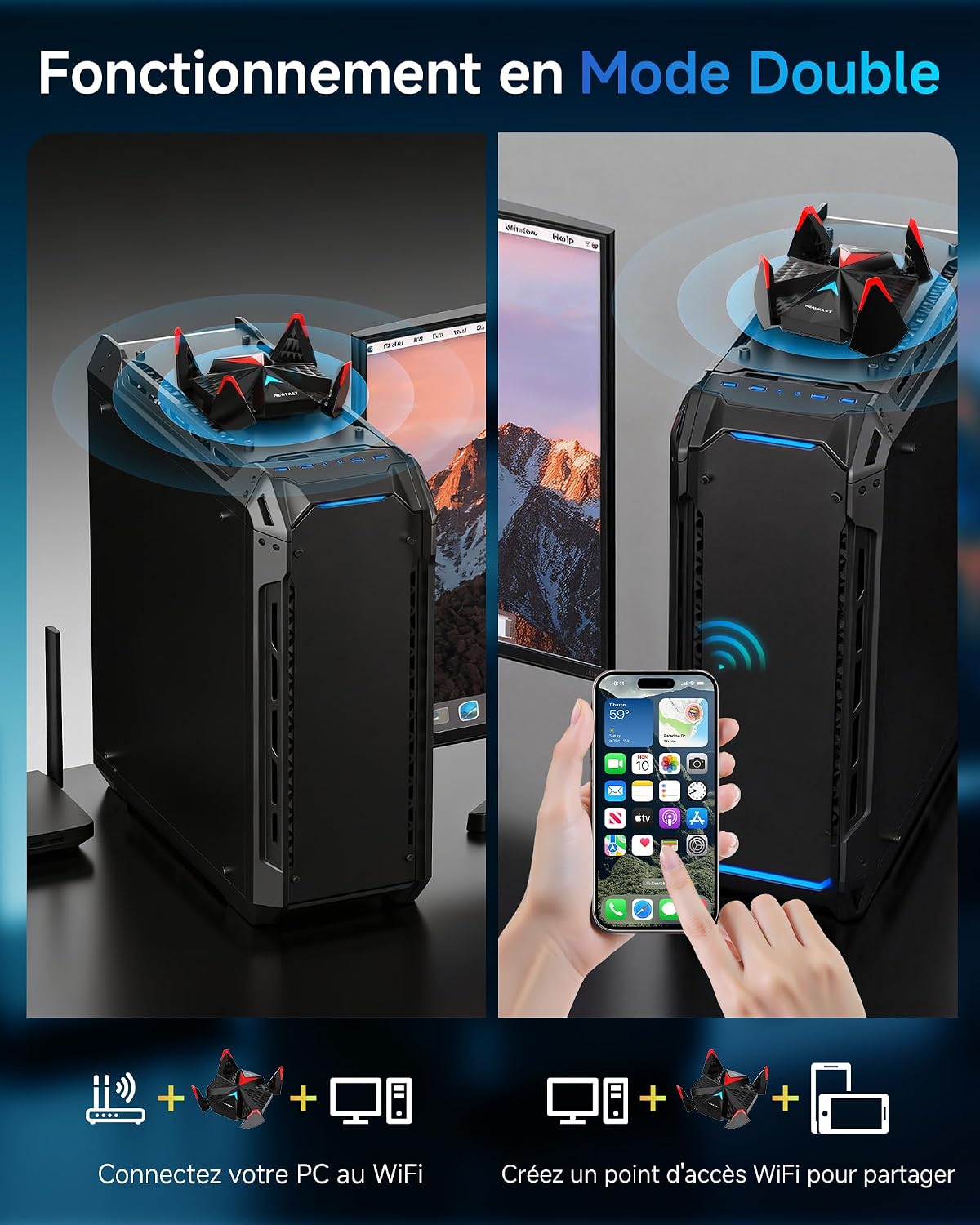
Image: The NEWFAST BE6500 WiFi 7 USB Adapter shown in two scenarios: on the left, connected to a desktop PC to provide Wi-Fi connectivity (Receiver Mode); on the right, connected to a desktop PC and broadcasting a Wi-Fi signal to a smartphone (Transmitter Mode).
6. Key Features
- Tri-Band Ultra-Fast Connectivity: The adapter supports 6 GHz (2882 Mbps), 5 GHz (2882 Mbps), and 2.4 GHz (688 Mbps) bands, offering a total throughput of 6500 Mbps. The 6 GHz band is dedicated to 8K streaming and VR, the 5 GHz band ensures low latency, and the 2.4 GHz band provides broad compatibility. This design helps eliminate network congestion by providing dedicated high-bandwidth channels for each device.

Image: A visual representation of the NEWFAST BE6500 WiFi 7 USB Adapter's tri-band capabilities, showing speeds for 2.4 GHz, 5 GHz, and 6 GHz bands, totaling 6500 Mbps. It also compares these speeds to WiFi 6.
- Four Adjustable High-Gain Antennas: Equipped with four high-gain antennas that can be folded up to 90°, allowing precise signal orientation to improve strength, stability, and range. This helps overcome obstacles like walls and extends coverage, while the foldable design ensures portability.

Image: The NEWFAST BE6500 WiFi 7 USB Adapter on a desk, connected to a PC, with its four antennas shown in an adjustable 90-degree position. The image also mentions the 1.2m USB 3.0 Type-C cable and the compact dimensions.
- USB 3.0 Type-C Cable: Includes a 1.2-meter Type-C to USB 3.0 cable for stable, high-speed connectivity. This ensures universal compatibility and allows for flexible placement of the adapter.
- WPA3 Encryption: Supports the latest WPA3 security protocol, providing enhanced personal and professional network protection. WPA3 offers stronger encryption and better resistance against brute-force attacks compared to WPA2, securing your data transmission.

Image: A graphic illustrating advanced security features, with the NEWFAST BE6500 WiFi 7 USB Adapter at the center, surrounded by a shield icon representing WPA3 encryption and various digital communication symbols.
- WiFi 7 Technology: Benefits from key WiFi 7 advancements including Multi-Link Operation (MLO), 4K QAM modulation, and improved MU-MIMO/OFDMA. These technologies deliver higher throughput, ultra-low latency, and optimized management of connected devices, preparing your network for demanding applications and future smart devices.

Image: A detailed graphic showcasing the advanced intelligent chip within the NEWFAST BE6500 WiFi 7 USB Adapter, emphasizing its capabilities for ultra-fast data transmission, stable WiFi, high speed, easy configuration, USB 3.0, and ultra-low latency.
7. Compatibility
The NEWFAST BE6500 WiFi 7 USB Adapter is compatible with the following operating systems:
- Windows 11 (Full functionality, including 6 GHz band)
- Windows 10 (Supports 2.4 GHz and 5 GHz bands)
It is compatible with various devices including desktop computers, laptops, and can interact with routers, smartphones, and tablets when operating in transmitter mode.
8. Maintenance
- Cleaning: Use a soft, dry cloth to clean the adapter. Avoid liquid cleaners or solvents.
- Storage: When not in use, store the adapter in a cool, dry place. The foldable antennas allow for compact storage.
- Firmware Updates: Periodically check the NEWFAST official website for any available firmware updates to ensure optimal performance and security.
- Avoid Obstructions: For best signal reception, ensure the adapter's antennas are not obstructed by other objects.
9. Troubleshooting
- Q: The adapter is not detected by my computer.
- A: Ensure the adapter is securely plugged into a USB port. Try a different USB port, preferably a USB 3.0 port. Restart your computer. Check Device Manager to see if the device appears, and if there are any driver issues.
- Q: I cannot connect to the 6 GHz Wi-Fi band.
- A: The 6 GHz band requires Windows 11. Ensure your operating system is Windows 11 and that your router supports the 6 GHz band (WiFi 6E or WiFi 7). Also, check that the 6 GHz band is enabled on your router.
- Q: My internet speed is slow.
- A: Ensure the adapter is connected to a USB 3.0 port. Verify that your router supports WiFi 7 (802.11be) or WiFi 6E (802.11ax with 6GHz) and that you are connected to the 5 GHz or 6 GHz band. Position the adapter's antennas for optimal signal reception. Reduce interference from other electronic devices. Check your internet service provider's speed.
- Q: The driver installation failed.
- A: Temporarily disable any antivirus software during installation. Ensure you are running the installer with administrator privileges. If the issue persists, visit the NEWFAST support website for the latest drivers.
10. Warranty and Support
The NEWFAST BE6500 WiFi 7 USB Adapter comes with a 1-year manufacturer's warranty. For warranty claims or technical support, please contact NEWFAST customer service through their official website or the retailer where the product was purchased.
Spare parts availability in the EU is 2 years.
For further assistance, please refer to the contact information provided on the product packaging or the official NEWFAST website.
Ask a question about this manual
Ask about setup, troubleshooting, compatibility, parts, safety, or missing instructions. Manuals+ will review the question and use this page’s manual context to help answer it.