
Memorex MXTAB11
Memorex MXTAB11 11-inch Android 14 Tablet Bundle User Manual
Model: MXTAB11
1. Introduction
The Memorex MXTAB11 11-inch Android 14 Tablet Bundle is designed for versatile use, supporting work, streaming, gaming, and learning. This tablet offers premium performance with an A523 ARM 8-core Cortex processor, optimized graphics, and comes with essential accessories for immediate use.

Image 1: The Memorex MXTAB11 tablet set up with its Bluetooth keyboard and wireless headphones on a wooden table, ready for use.
Key Features:
- Powerful Performance: A523 ARM 8-core Cortex processor (up to 2.0GHz) with optimized graphics for smooth multitasking and responsive app performance.
- Vibrant Display: 11-inch FHD IPS display with 1920 x 1200 pixel resolution for clear visuals.
- Ample Storage: 128GB internal storage for apps, photos, and files.
- Efficient Memory: 4GB RAM for smooth operation.
- Modern OS: Runs on Android 14.
- Durable Design: Features a metal body for enhanced durability.
- Connectivity: Supports 802.11a/b/g/n/ac/ax wireless types.
2. What's in the Box
Your Memorex MXTAB11 Tablet Bundle includes the following items:
- Memorex 11” Tablet
- Bluetooth Keyboard
- Wireless Headphones
- Protective Case with Stand
- AC Adapter Charger & Cable
- Instruction Manual
- Quick Start Guide
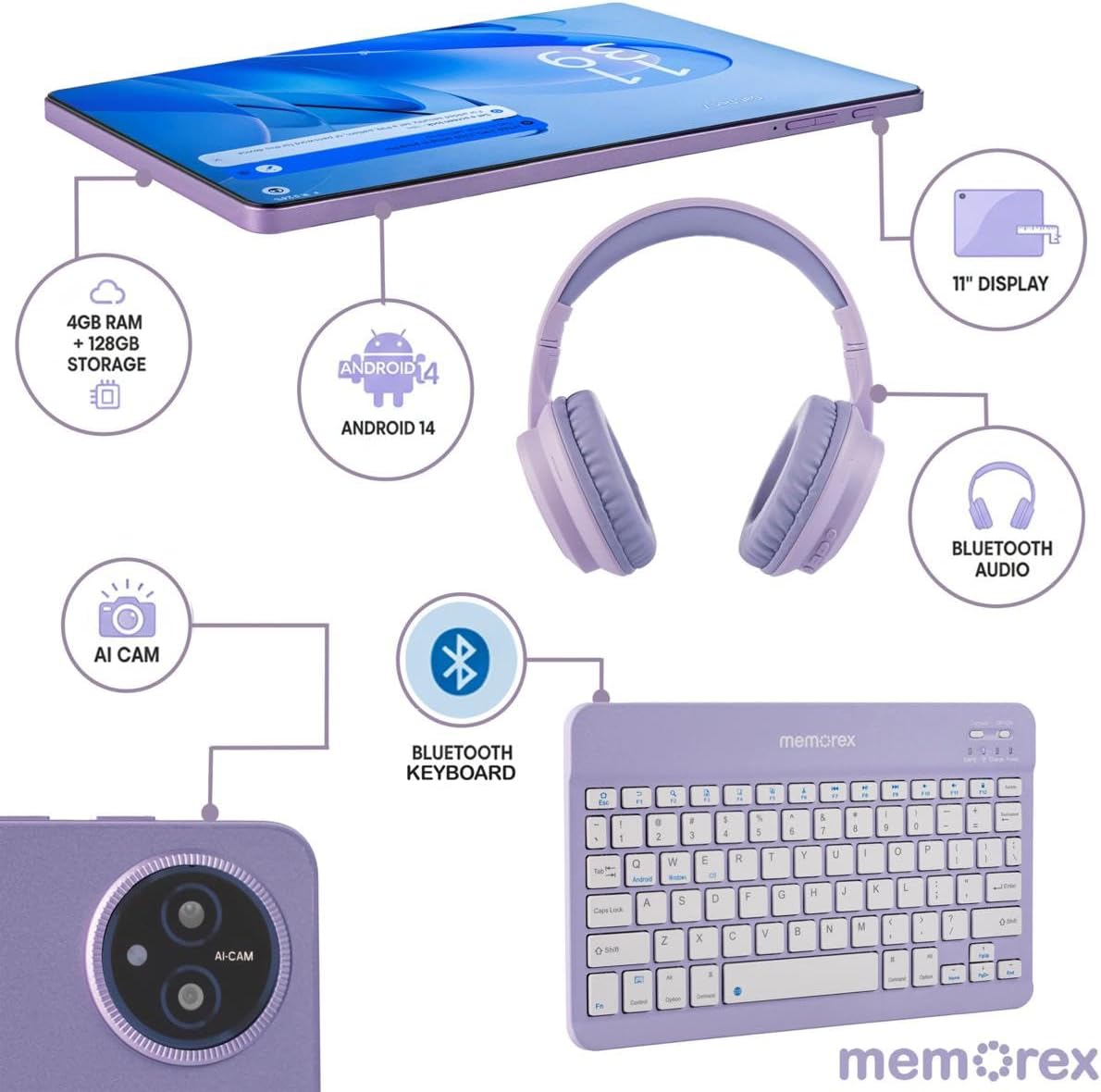
Image 2: A visual breakdown of the Memorex MXTAB11 tablet's features and included accessories, such as 4GB RAM, 128GB storage, Android 14, 11-inch display, AI camera, Bluetooth keyboard, Bluetooth audio, and wireless headphones.
3. Setup
3.1 Initial Power On and Configuration
- Charge the Tablet: Before first use, connect the tablet to the AC adapter charger and cable provided. Allow it to charge fully.
- Power On: Press and hold the power button (usually located on the side or top edge) until the Memorex logo appears on the screen.
- Follow On-Screen Prompts: The tablet will guide you through the initial setup process, including:
- Selecting your language.
- Connecting to a Wi-Fi network.
- Signing in with your Google account (or creating one).
- Setting up screen lock (PIN, pattern, password).
3.2 Connecting Bluetooth Keyboard and Wireless Headphones
- Enable Bluetooth: On your tablet, swipe down from the top of the screen to open the Quick Settings panel. Tap the Bluetooth icon to turn it on. Alternatively, go to Settings > Connected devices > Bluetooth.
- Pair Bluetooth Keyboard:
- Turn on the Bluetooth keyboard (refer to the keyboard's quick start guide for specific instructions).
- On your tablet's Bluetooth settings, tap 'Pair new device'.
- Select the keyboard from the list of available devices. Follow any on-screen prompts to complete pairing.
- Pair Wireless Headphones:
- Put your wireless headphones into pairing mode (refer to the headphones' quick start guide).
- On your tablet's Bluetooth settings, tap 'Pair new device'.
- Select the headphones from the list of available devices. Follow any on-screen prompts to complete pairing.
4. Operating the Tablet
4.1 Basic Navigation
- Home Screen: The central hub for your apps and widgets.
- App Drawer: Swipe up from the bottom of the screen to access all installed applications.
- Quick Settings & Notifications: Swipe down from the top of the screen to access quick settings (Wi-Fi, Bluetooth, brightness) and view notifications.
- Back, Home, Recent Apps: Use the navigation buttons at the bottom of the screen to go back, return to the home screen, or view recently opened applications.
4.2 Using Applications
The tablet comes pre-loaded with essential Google applications and allows you to download more from the Google Play Store.
- Google Play Store: Tap the Play Store icon to browse and download new apps, games, movies, and books.
- Web Browsing: Use the pre-installed Chrome browser to access the internet.
- Camera: Tap the Camera icon to take photos or record videos using the tablet's dual cameras.
- Calendar: Manage your schedule and events.
- Files: Access and organize your documents, images, videos, and other files.

Image 3: A person comfortably using the Memorex MXTAB11 tablet with its Bluetooth keyboard and wireless headphones, demonstrating its suitability for various activities like work or entertainment.
5. Maintenance
- Cleaning: Use a soft, lint-free cloth to clean the screen and body of the tablet. Avoid harsh chemicals or abrasive materials.
- Software Updates: Regularly check for and install system updates to ensure optimal performance and security. Go to Settings > System > System update.
- Battery Care: To prolong battery life, avoid extreme temperatures and do not let the battery completely drain frequently.
- Storage Management: Periodically clear unnecessary files and apps to free up storage space and maintain performance.
6. Troubleshooting
6.1 Common Issues and Solutions
- Tablet Not Turning On: Ensure the tablet is charged. Connect it to the charger and wait a few minutes before attempting to power it on again.
- Slow Performance: Close unused applications, clear cache, or restart the tablet. Check for available system updates.
- Wi-Fi Connectivity Issues: Restart your Wi-Fi router and the tablet. Forget the network in tablet settings and reconnect.
- Bluetooth Pairing Failure: Ensure both devices are in pairing mode and within range. Restart Bluetooth on the tablet and try pairing again.
- Apps Crashing: Clear the app's cache or data via Settings > Apps > [App Name] > Storage > Clear Cache/Data. Reinstall the app if the issue persists.
7. Specifications
| Display Size | 11 Inches |
| Screen Resolution | 1920 x 1200 pixels (FHD IPS) |
| Processor | A523 ARM Cortex-A523 Octa-Core Processor, up to 2.0 GHz |
| RAM | 4 GB |
| Flash Memory Size | 128 GB |
| Operating System | Android 14 |
| Wireless Type | 802.11a, 802.11ac, 802.11ax, 802.11b, 802.11g, 802.11n |
| Item Weight | 5 pounds |
| Product Dimensions | 10 x 4 x 13 inches |
| Color | Blue |
8. Warranty and Support
8.1 Return Policy
The product is eligible for a refund or replacement within 30 days of purchase.
8.2 Protection Plans
Optional protection plans are available for extended coverage:
- 2-Year Protection Plan: One-time payment of $30.99.
- Complete Protect: Monthly payment of $16.99, covering all eligible past and future purchases.
For further support or inquiries, please refer to the contact information provided in your Quick Start Guide or visit the official Memorex support website.
Ask a question about this manual
Ask about setup, troubleshooting, compatibility, parts, safety, or missing instructions. Manuals+ will review the question and use this page’s manual context to help answer it.